roccat kone driver download

iam1simpleguy

New member
Local time
6:54 PM
Messages
5

My Computer My Computer

Computer Manufacturer/Model Number
Assembled
OS
Win7 64bit
CPU
Core2quad
Motherboard
asus
Memory
4gb
Graphics Card(s)
xfx-5870
Sound Card
auxentech forte
Monitor(s) Displays
HP 2309
Hard Drives
seagate
PSU
Coolermaster
Hi iam (and I'm sure you're not) a very warm welcome to seven forums.
I have a Roccat Kone mouse and got it when they first came out. I think they are great in every way apart from the drivers.
I'm at work now so I can't tell you which driver I am using but I doubt it's the most recent.
I always had problems when re-installing the OS. I would download the Roccat driver, put it on a USB stick but it wouldn't install.
I found the only way to install it was a fresh download from the Roccat site.
But you are unable to download it at all?
Perhaps the Roccat site is having problems.
If I were you I'd google "cannot download Roccat Kone driver" and see what comes up.
I'm working all night tonight but when I get home tomorrow I will certainly send you the driver I am using.
As I say I don't know whether it's the latest but it's working perfectly in all 3 x64 OSs I'm using.
But, as I've also said, I never was able to install the driver from a USB or from my documents. It just seemed that it had to be straight from Roccat and installed straight away.
Very odd really.
I'll check this thread tomorrow to see if you've sorted it, if not I'll send you mine and you can try that.
Cheers, John:)
 

My Computer My Computer

Computer Manufacturer/Model Number
The Monolith. 3.1
OS
Windows 7 Home Premium 64 bit
CPU
i7 [email protected]
Motherboard
Gigabyte Z77-D3H
Memory
2x4GB Corsair Vegeance DDR3
Graphics Card(s)
XFX GTX 260 Black Edition
Sound Card
none-through large stereo hi fi
Monitor(s) Displays
Croosover 27MDP LED IPS Dell 2408 WFP
Screen Resolution
2560x1440 1920x1200
Hard Drives
1x Samsung 840Pro 128GB SSD
1x Samsung Spinpoint F1 1TB
PSU
Corsair AX 850 Watt
Case
Cooler Master ACTS 840
Cooling
Be Quiet! Dark Rock Pro
Keyboard
Enermax Aurora
Mouse
Logitech Ballmouse
Internet Speed
20MBPS
Yes roccat support site might be having problems and i am not able to download at all...somehow after posting here i found this link which was uploaded by some guy thx to him
MEGAUPLOAD - The leading online storage and file delivery service
but after that my mouse not work at all.Earlier cursor was moving but config page was not opening not it is stuck.I am on 64bit win7.The drivers those came with cd Driver Version 1.29 Firmware Version 1.32.with these cursor moves though.I have read the forums about windows update and 64bit DPInst and KoneHID.EXE but no success.Even if i try to firmware update it says right away firmware failed:zip:
 

My Computer My Computer

Computer Manufacturer/Model Number
Assembled
OS
Win7 64bit
CPU
Core2quad
Motherboard
asus
Memory
4gb
Graphics Card(s)
xfx-5870
Sound Card
auxentech forte
Monitor(s) Displays
HP 2309
Hard Drives
seagate
PSU
Coolermaster
i have done a fresh install of win7 64bit...installed the megaupload drivers.....it ask to update firmware ...updated and working fine.It is working fine for me.I have only one regret it dont have much profile options ..i wish i could be able to store more profiles..Is there a way to have more profiles?
 

My Computer My Computer

Computer Manufacturer/Model Number
Assembled
OS
Win7 64bit
CPU
Core2quad
Motherboard
asus
Memory
4gb
Graphics Card(s)
xfx-5870
Sound Card
auxentech forte
Monitor(s) Displays
HP 2309
Hard Drives
seagate
PSU
Coolermaster
Hi iam:)
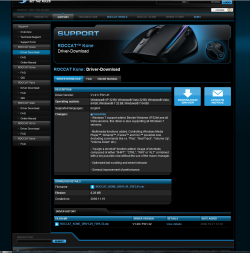
So your mouse is now working? I've just been looking at my driver and it's not the one on Roccat's site. Is it this one you have been trying to download:
 

Attachments

  • roccatbetakonedriver.PNG
    roccatbetakonedriver.PNG
    108.3 KB · Views: 588
Last edited:

My Computer My Computer

Computer Manufacturer/Model Number
The Monolith. 3.1
OS
Windows 7 Home Premium 64 bit
CPU
i7 [email protected]
Motherboard
Gigabyte Z77-D3H
Memory
2x4GB Corsair Vegeance DDR3
Graphics Card(s)
XFX GTX 260 Black Edition
Sound Card
none-through large stereo hi fi
Monitor(s) Displays
Croosover 27MDP LED IPS Dell 2408 WFP
Screen Resolution
2560x1440 1920x1200
Hard Drives
1x Samsung 840Pro 128GB SSD
1x Samsung Spinpoint F1 1TB
PSU
Corsair AX 850 Watt
Case
Cooler Master ACTS 840
Cooling
Be Quiet! Dark Rock Pro
Keyboard
Enermax Aurora
Mouse
Logitech Ballmouse
Internet Speed
20MBPS
If so it is a Beta driver and is more up to date than the one I am using with supposedly more functionality which is maybe why you had issues.. It seems to have more options for profiles, controlling a media player with the side buttons etc. I think I'll download and give it a go. If I find a way to add further profiles I'll let you know. It's a shame you had to do a full reinstall but at least it's working.:)
By the way the Roccat folder lives in c:/programsx86 on my pc.
 

My Computer My Computer

Computer Manufacturer/Model Number
The Monolith. 3.1
OS
Windows 7 Home Premium 64 bit
CPU
i7 [email protected]
Motherboard
Gigabyte Z77-D3H
Memory
2x4GB Corsair Vegeance DDR3
Graphics Card(s)
XFX GTX 260 Black Edition
Sound Card
none-through large stereo hi fi
Monitor(s) Displays
Croosover 27MDP LED IPS Dell 2408 WFP
Screen Resolution
2560x1440 1920x1200
Hard Drives
1x Samsung 840Pro 128GB SSD
1x Samsung Spinpoint F1 1TB
PSU
Corsair AX 850 Watt
Case
Cooler Master ACTS 840
Cooling
Be Quiet! Dark Rock Pro
Keyboard
Enermax Aurora
Mouse
Logitech Ballmouse
Internet Speed
20MBPS

My Computer My Computer

Computer Manufacturer/Model Number
The Monolith. 3.1
OS
Windows 7 Home Premium 64 bit
CPU
i7 [email protected]
Motherboard
Gigabyte Z77-D3H
Memory
2x4GB Corsair Vegeance DDR3
Graphics Card(s)
XFX GTX 260 Black Edition
Sound Card
none-through large stereo hi fi
Monitor(s) Displays
Croosover 27MDP LED IPS Dell 2408 WFP
Screen Resolution
2560x1440 1920x1200
Hard Drives
1x Samsung 840Pro 128GB SSD
1x Samsung Spinpoint F1 1TB
PSU
Corsair AX 850 Watt
Case
Cooler Master ACTS 840
Cooling
Be Quiet! Dark Rock Pro
Keyboard
Enermax Aurora
Mouse
Logitech Ballmouse
Internet Speed
20MBPS
Yes i am not able to download from the pic u have shown me..
Which one is beta version??I am using Driver 1.41 and 1.38 firmware version.what version is yours???Plz do give me link or upload if u are using such version which have more profiles.Btw why u gave me link for manual??

And how come u think i am not simple..h,mmm;)..How dare u question my simplicity :geek:??
 

My Computer My Computer

Computer Manufacturer/Model Number
Assembled
OS
Win7 64bit
CPU
Core2quad
Motherboard
asus
Memory
4gb
Graphics Card(s)
xfx-5870
Sound Card
auxentech forte
Monitor(s) Displays
HP 2309
Hard Drives
seagate
PSU
Coolermaster
I'm using driver 1.41 and 1.38 firmware. Driver 1.41 is a beta. It supposedly has more functions but I can't see how to enable them which is why I was suggesting the manual for us both.
I haven't got round to studying it yet but I've installed the driver and everything seems fine.
How come you want more profiles? Do you play lots of games at the same time?:)

As for your status as a simpleton you're right, I should never have questioned it. I thought I was being polite but I suppose it's difficult enough dealing with societies prejudices against "special" people without having me being condescending.;)
My apologies. You are simple:drool:
 

My Computer My Computer

Computer Manufacturer/Model Number
The Monolith. 3.1
OS
Windows 7 Home Premium 64 bit
CPU
i7 [email protected]
Motherboard
Gigabyte Z77-D3H
Memory
2x4GB Corsair Vegeance DDR3
Graphics Card(s)
XFX GTX 260 Black Edition
Sound Card
none-through large stereo hi fi
Monitor(s) Displays
Croosover 27MDP LED IPS Dell 2408 WFP
Screen Resolution
2560x1440 1920x1200
Hard Drives
1x Samsung 840Pro 128GB SSD
1x Samsung Spinpoint F1 1TB
PSU
Corsair AX 850 Watt
Case
Cooler Master ACTS 840
Cooling
Be Quiet! Dark Rock Pro
Keyboard
Enermax Aurora
Mouse
Logitech Ballmouse
Internet Speed
20MBPS
Oh come on i was just kidding and u know that..though i liked when u said Hi iam (and I'm sure you're not)"Well i dont play many games rather only Bad company 2..but i want more profiles to use with other programmes.Right now like firefox..directory opus zoomplayer etc.Earlier i use to have to 2 mouse Mx revolution for work and DA for gaming.Its amazing mouse but if have more profiles then it is complete mouse for me...otherwise i am afraid i might have to sell it :(
 

My Computer My Computer

Computer Manufacturer/Model Number
Assembled
OS
Win7 64bit
CPU
Core2quad
Motherboard
asus
Memory
4gb
Graphics Card(s)
xfx-5870
Sound Card
auxentech forte
Monitor(s) Displays
HP 2309
Hard Drives
seagate
PSU
Coolermaster
Sorry, I was only having fun. My sense of humour runs away with me sometimes:)
Anyway. I read somewhere-in the notes for this driver probably- that it gives increased functionality and there was mention of browsers and media players being controlled from the mouse buttons.
I haven't figured how to do this though, I haven't really had time to try or read up on it yet.
If we both try and figure it out we might get somewhere. I'll let you know if I manage to find out how to do it:)
 

My Computer My Computer

Computer Manufacturer/Model Number
The Monolith. 3.1
OS
Windows 7 Home Premium 64 bit
CPU
i7 [email protected]
Motherboard
Gigabyte Z77-D3H
Memory
2x4GB Corsair Vegeance DDR3
Graphics Card(s)
XFX GTX 260 Black Edition
Sound Card
none-through large stereo hi fi
Monitor(s) Displays
Croosover 27MDP LED IPS Dell 2408 WFP
Screen Resolution
2560x1440 1920x1200
Hard Drives
1x Samsung 840Pro 128GB SSD
1x Samsung Spinpoint F1 1TB
PSU
Corsair AX 850 Watt
Case
Cooler Master ACTS 840
Cooling
Be Quiet! Dark Rock Pro
Keyboard
Enermax Aurora
Mouse
Logitech Ballmouse
Internet Speed
20MBPS
My mouse Pointer flickers :(

its annoyng, cant hold it still


Can some help
what setting can improve it
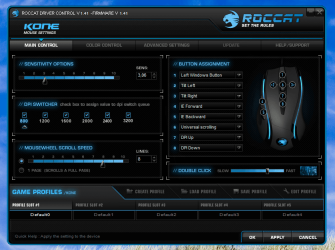
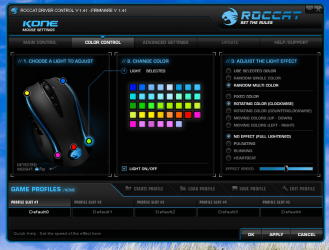
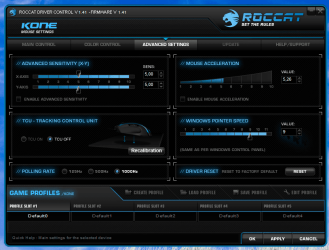
I download new drivers

& have uploaded screen shots

Please Help
 

Attachments

  • Main.png
    Main.png
    91.2 KB · Views: 31
  • Colours.png
    Colours.png
    131.4 KB · Views: 11
  • Advance.png
    Advance.png
    69.1 KB · Views: 18

My Computer My Computer

Computer Manufacturer/Model Number
Alienware m17
OS
Windows 7 Ultimate
CPU
Core 2 Extreme CPU Q9300 @ 2.53GHz
Memory
4 GB
Graphics Card(s)
2x3870 Ati
Hard Drives
2x500 GB Samsung 7200rpm
Hi LordVader. You could try unticking all but three boxes in the DPI. I have mine set at 800, 1200 and 1600. Also enable and recalibrate the TCU.
If that doesn't work you could try uninstalling and reinstaling the driver.
Also there seem to be two drivers for this mouse. See here : ROCCAT STUDIOS V3.0 - SUPPORT » Support - Mice » ROCCAT Kone
I'm presuming you have the Kone rather than the Kone+.
If none of this works then check your connections.
These are great mice but the drivers are mysterious:)

Hope this helps, John
 

My Computer My Computer

Computer Manufacturer/Model Number
The Monolith. 3.1
OS
Windows 7 Home Premium 64 bit
CPU
i7 [email protected]
Motherboard
Gigabyte Z77-D3H
Memory
2x4GB Corsair Vegeance DDR3
Graphics Card(s)
XFX GTX 260 Black Edition
Sound Card
none-through large stereo hi fi
Monitor(s) Displays
Croosover 27MDP LED IPS Dell 2408 WFP
Screen Resolution
2560x1440 1920x1200
Hard Drives
1x Samsung 840Pro 128GB SSD
1x Samsung Spinpoint F1 1TB
PSU
Corsair AX 850 Watt
Case
Cooler Master ACTS 840
Cooling
Be Quiet! Dark Rock Pro
Keyboard
Enermax Aurora
Mouse
Logitech Ballmouse
Internet Speed
20MBPS
Hi LordVader. You could try unticking all but three boxes in the DPI. I have mine set at 800, 1200 and 1600. Also enable and recalibrate the TCU.
If that doesn't work you could try uninstalling and reinstaling the driver.
Also there seem to be two drivers for this mouse. See here : ROCCAT STUDIOS V3.0 - SUPPORT » Support - Mice » ROCCAT Kone
I'm presuming you have the Kone rather than the Kone+.
If none of this works then check your connections.
These are great mice but the drivers are mysterious:)

Hope this helps, John


THANK YOU SO MUCH +1 :)

This did it -
set at 800, 1200 and 1600.


I did not enable and recalibrate the TCU.
cos I take it to work & back home & have different mouse pads
or you think i still should enable and recalibrate the TCU ?

Thanks again :)
 

My Computer My Computer

Computer Manufacturer/Model Number
Alienware m17
OS
Windows 7 Ultimate
CPU
Core 2 Extreme CPU Q9300 @ 2.53GHz
Memory
4 GB
Graphics Card(s)
2x3870 Ati
Hard Drives
2x500 GB Samsung 7200rpm
If it's working as you like it now I'd leave the TCU. Glad yo be of help. Cheers, John:)
 

My Computer My Computer

Computer Manufacturer/Model Number
The Monolith. 3.1
OS
Windows 7 Home Premium 64 bit
CPU
i7 [email protected]
Motherboard
Gigabyte Z77-D3H
Memory
2x4GB Corsair Vegeance DDR3
Graphics Card(s)
XFX GTX 260 Black Edition
Sound Card
none-through large stereo hi fi
Monitor(s) Displays
Croosover 27MDP LED IPS Dell 2408 WFP
Screen Resolution
2560x1440 1920x1200
Hard Drives
1x Samsung 840Pro 128GB SSD
1x Samsung Spinpoint F1 1TB
PSU
Corsair AX 850 Watt
Case
Cooler Master ACTS 840
Cooling
Be Quiet! Dark Rock Pro
Keyboard
Enermax Aurora
Mouse
Logitech Ballmouse
Internet Speed
20MBPS

My Computer My Computer

Computer Manufacturer/Model Number
Alienware m17
OS
Windows 7 Ultimate
CPU
Core 2 Extreme CPU Q9300 @ 2.53GHz
Memory
4 GB
Graphics Card(s)
2x3870 Ati
Hard Drives
2x500 GB Samsung 7200rpm
Back
Top