RocketDock Docklets and 64bit programs (symbolic link)

ZingFreelancer

New member
Hello 7forum.

Right now I am using RocketDock with Stacks Docklet to organize my desktop. Working great taking aside some 64bit applications like Photoshop, Premiere, Maya, ect.

I read online about symbolic links, that people who have same kind of problem create symbolic links to solve them. However, I do not quit understand how to apply their solution to my problem.

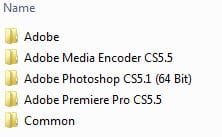
So here is the deal, I got 120gb SSD for windows and all programs running on Win7 Ultimate x64. There I got C:\Program Files\Adobe and in that folder.

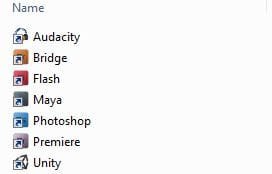
RocketDock stacks work in such way, that you create a folder with many short-cuts and than add it to RocketDock. I have such folder that I keep on another hard drive D:\Windowz\RocketDock\Creative Design\ with all of my short-cuts to desired programs and their custom icons.

Photoshop, Maya, Premiere does not work because they are located in Program Files. But Bridge, Flash og Audacity work fine because they are located in Program Files(x86).

Can anyone give me a comprehensive way to how I can connect my Photoshop short-cut on disk D: to photoshop program on disk C: by means of symbolic link?
 

Attachments
  • adobe stuff.JPG
    adobe stuff.JPG
    13.6 KB · Views: 1,836
  • creative design.JPG
    creative design.JPG
    13 KB · Views: 1,844

My Computer

Computer Manufacturer/Model Number
Selvbuild
OS
Windows 7 Pro 64bit
CPU
Core 2 Duo E3400
Motherboard
Asus P5E-Deluxe
Memory
8GB DDR2
Graphics Card(s)
XFX Radeon 5970 Black Edition
Sound Card
Creative X-FI Soundblaster xTremeGamer
Hard Drives
4 hard drives
1 500gb OS (separeted in 2 partitions, system and personal files)
1 500gb for games
1 500gb for downloads
1 1tb for anime storage
PSU
650W
Case
Antec something
Cooling
Asus SilentKnight 2
2 days have passed and not a single reply... That is rather strange I tell ya O.O
 

My Computer

Computer Manufacturer/Model Number
Selvbuild
OS
Windows 7 Pro 64bit
CPU
Core 2 Duo E3400
Motherboard
Asus P5E-Deluxe
Memory
8GB DDR2
Graphics Card(s)
XFX Radeon 5970 Black Edition
Sound Card
Creative X-FI Soundblaster xTremeGamer
Hard Drives
4 hard drives
1 500gb OS (separeted in 2 partitions, system and personal files)
1 500gb for games
1 500gb for downloads
1 1tb for anime storage
PSU
650W
Case
Antec something
Cooling
Asus SilentKnight 2
create a new folder ( call it adobe shorts or whatever) in your users folder and in program files create shortcuts to each adobe application, it wont allow you to save shortcuts in the prog files so will ask where to put them ,put them in the folder you created.
then drag the folder to your rocket dock and give it a nice adobe icon, this will bypass the need for stacks etc
 

My Computer

Computer Manufacturer/Model Number
Hewlett packard/p6512uk
OS
Microsoft Windows 7 Home Premium 64-bit 7600
CPU
IIx4 amd athelon 635 processor
Motherboard
FOXCONN 2AA9
Memory
2x2gb
Graphics Card(s)
ati radeon HD 5450
Sound Card
(1) Realtek High Definition Audio (2) AMD High Definition
Monitor(s) Displays
samsung lcd tv 32"
Screen Resolution
1360x 768
Hard Drives
(1) WDC WD10 01FAES-60Z2A0 SATA Disk Device (2) Maxtor OneTouch USB Device (3) ST310003 33AS USB Device (4) WD My Book 1111 USB Device
PSU
?
Cooling
air!
Keyboard
wireless hp
Mouse
wireless Hp,optical
Internet Speed
1.10mb/s
Antivirus
MSE
Browser
Firefox
create a new folder ( call it adobe shorts or whatever) in your users folder and in program files create shortcuts to each adobe application, it wont allow you to save shortcuts in the prog files so will ask where to put them ,put them in the folder you created.
then drag the folder to your rocket dock and give it a nice adobe icon, this will bypass the need for stacks etc

Call me stupid, but I dont think I get this.
First you want me to create a folder for short-cuts under my users->username...?
Put all the short-cuts in that folder and pin it to RocketDock...?

That will define the purpose of this thread. I desire to use stacks, what I need is someone who can explain me how to make "symbolic links" between folders?
Adobe folder on disk C and short-cut folder on disk D.
 

My Computer

Computer Manufacturer/Model Number
Selvbuild
OS
Windows 7 Pro 64bit
CPU
Core 2 Duo E3400
Motherboard
Asus P5E-Deluxe
Memory
8GB DDR2
Graphics Card(s)
XFX Radeon 5970 Black Edition
Sound Card
Creative X-FI Soundblaster xTremeGamer
Hard Drives
4 hard drives
1 500gb OS (separeted in 2 partitions, system and personal files)
1 500gb for games
1 500gb for downloads
1 1tb for anime storage
PSU
650W
Case
Antec something
Cooling
Asus SilentKnight 2
In other news Boobah, creator of the famous xwindows dock (which you should try), has become interested in helping matonga out in developing the stacks.lib. Boobah made a post on Sept 6 recently expressing his interest in re-writing the stacks.lib to include a scrollbar and to make it faster. However he deleted his post recently. He still has kept his posts letting matonga know that he is interested in lending a hand wherever possible. With three powerhouses, Matonga, Boobah, and Christian S. tag teaming this thing we could have an incredible replacement for explorer in the future.


not me, unfortunately, im famous for other things. :D
 

My Computer

Computer Manufacturer/Model Number
Hewlett packard/p6512uk
OS
Microsoft Windows 7 Home Premium 64-bit 7600
CPU
IIx4 amd athelon 635 processor
Motherboard
FOXCONN 2AA9
Memory
2x2gb
Graphics Card(s)
ati radeon HD 5450
Sound Card
(1) Realtek High Definition Audio (2) AMD High Definition
Monitor(s) Displays
samsung lcd tv 32"
Screen Resolution
1360x 768
Hard Drives
(1) WDC WD10 01FAES-60Z2A0 SATA Disk Device (2) Maxtor OneTouch USB Device (3) ST310003 33AS USB Device (4) WD My Book 1111 USB Device
PSU
?
Cooling
air!
Keyboard
wireless hp
Mouse
wireless Hp,optical
Internet Speed
1.10mb/s
Antivirus
MSE
Browser
Firefox

My Computer

Computer Manufacturer/Model Number
Selvbuild
OS
Windows 7 Pro 64bit
CPU
Core 2 Duo E3400
Motherboard
Asus P5E-Deluxe
Memory
8GB DDR2
Graphics Card(s)
XFX Radeon 5970 Black Edition
Sound Card
Creative X-FI Soundblaster xTremeGamer
Hard Drives
4 hard drives
1 500gb OS (separeted in 2 partitions, system and personal files)
1 500gb for games
1 500gb for downloads
1 1tb for anime storage
PSU
650W
Case
Antec something
Cooling
Asus SilentKnight 2

My Computer

Computer Manufacturer/Model Number
HP Media Center
OS
Windows 7 32 bit
CPU
AMD 5200+ dual core
Memory
2 GB
Graphics Card(s)
NVidia GeForce 6150SE 128 MB
Monitor(s) Displays
CRT
Screen Resolution
1280x1024
Hard Drives
500 GB Sata internal :

SIIG USB 3.0 docking stations w/WD Caviar Black 6 Gb/s drives
Keyboard
PS/2
Mouse
PS/2 Wheel Mouse
Other Info
SIIG USB 3.0 PCIexpress card.
Back
Top