Router question for mainly wired lan

lucasbuck

New member
Member
Local time
2:21 PM
Messages
57
I need to get a wireless router, although the wireless is just mainly for a couple tablets. Everything else is wired throughout the house. I was looking at a couple different ones: the ASUS RT-AC66U gigabyte router (for $190) and Mediabridge Wireless N 300Mbps ($50)

My question is, since I'm not network savy, is the price and speed difference just for wireless things? If I'm transferring or streaming from one machine to another that are wired, will there be any difference? Sorry if that's a dumb question, but I didn't want to spend the extra money if I didn't have to.
 

My Computer My Computer

At a glance

Windows 7 Professional 64bitIntel Core i7 920 @ 2.67GHz6.00 GB Triple-Channel DDR3 @ 530MHzATI Radeon HD 5800 Series (XFX Pine Group)
Computer Manufacturer/Model Number
Custom desktop
OS
Windows 7 Professional 64bit
CPU
Intel Core i7 920 @ 2.67GHz
Motherboard
EVGA 141-BL-E757 (Socket 423)
Memory
6.00 GB Triple-Channel DDR3 @ 530MHz
Graphics Card(s)
ATI Radeon HD 5800 Series (XFX Pine Group)
Sound Card
AMD High Definition Audio Device
Hard Drives
932GB Western Digital WDC WD1001FALS-00J7B1 ATA Device (SATA)
2795GB Western Digital WDC WD30EZRX-00MMMB0 ATA Device (SATA)
1863GB Western Digital WDC WD2001FASS-00W2B0 ATA Device (SATA)
1863GB Western Digital WDC WD20EADS-00S2B0 ATA Device (SATA)
Internet Speed
Cable
Uhm, don't take it as an offense, but I think "Mediabridge" isn't a brand, but a kind of device.
Media bridges turn wireless connections into Ethernet again for devices that have ethernet ports but not wifi capabilities. They aren't a router, more like an access point working in reverse.
Can you link to the Mediabridge device you are trying to buy?

As for the "ASUS RT-AC66U gigabyte router" it's a fine product, but depending on your actual needs you can shave up to 120$ from it by taking a less-high-end device. For example you can still live fine with a non-dual-band router.

If I'm transferring or streaming from one machine to another that are wired, will there be any difference?
Depends from the transfer speed the network interfaces on the PCs and the router are rated for. Can you provide specs about the network cards on your PCs? This tutorial contains a tool that can help you finding out this detail easily.

The PC in your specs has an integrated 10/100/1000 network chipset, or Gigabit network (looked up the motherboard's specifications), so the max speed of stuff moving to/from it is around 125 MB/s. In general, I would look for a router that has plenty of Gigabit ports too.

But if the other devices aren't rated for Gigabit data transfers the actual transfer speeds are lower as the superior network interfaces adapt to lower speeds for the sake of communicating to such devices. They are likely 100 Mbit/s (unless it's truly prehistoric stuff), so the actual transfer speed to/from such devices is ten times lower, 12.5 MB/s.

Wireless is another beast alltogether, as it has a fixed amount of bandwith per standard g/n/ac, and all devices connected to the same router share the same bandwith pool.
Without even thinking, bulk of tablets can go up to the b/g/n standard, so that's where I would orient you in your wireless requirements as a general advice. It has speeds from 130 (realistic optimistic speed) to 300 (theoretical max) Mb/s depending on router and device power, and distance from router (usually stated on the box of the device, like with that Mediabridge).
Again, this speed is shared by all wireless devices. So if you have Tablet A gobbling up 50 Mb/s for some HD movie in streaming, Tablet B won't get a lot more than 100 MB/s of transfer speed.
This is assuming the stuff is transferred from a PC in your network, if it's from the net, then it's probably irrelevant as I never saw a true 100 MB/s broadband contract. Most I've seen claim 10 Mbit of max speed that would translate to 1.25 MB/s of actual transfer speed. So yeah, that's the main bottleneck.

Admittedly, saturating wireless bandwith is an issue when you have 4-5 devices and there is one user streaming HD from a PC while another is playing a game on the internet and another user is doing whatever else locally that needs bandwith (remote-desktop connection to a PC in your network?), so that the max speed for each drops below the 100 MB/s.

Dual band is the ability to operate in a less-crowded frequency, as not a lot of devices/routers do operate in the newer band. More info here.
 

My Computer My Computer

At a glance

Win 7 Pro 64-bit 7601AMD Phenom 9650 QuadCore, revision DR-B35 GB yes I run 2x 2GB and 1x 1GB, different b...NVIDIA GeForce 9800 GT 512 Mb, unknown manufa...
Computer type
PC/Desktop
Computer Manufacturer/Model Number
custom built
OS
Win 7 Pro 64-bit 7601
CPU
AMD Phenom 9650 QuadCore, revision DR-B3
Motherboard
ASUS M4A78
Memory
5 GB yes I run 2x 2GB and 1x 1GB, different brand, spank me.
Graphics Card(s)
NVIDIA GeForce 9800 GT 512 Mb, unknown manufacturer.
Sound Card
Crappy Realtek Integrated Audio
Monitor(s) Displays
Fujitsu Siemens P19-3P
Screen Resolution
1280 x 1024 x 32 bits @ 60 Hz Oh yeah, 4:3 rocks!
Hard Drives
(1) MAXTOR S TM3320613AS SATA Disk Device (2) STM35004 18AS SATA Disk Device (3) TOSHIBA USB 2.5"-HDD
PSU
whatever, around 450w
Case
Scavenged from old company PC, 10+ years old
Cooling
CPU fan, GPU fan, case fan, nothing fancy
Keyboard
Microsoft, PS/2, white.
Mouse
Optical, logitec.
Internet Speed
effective max speeds: 70-ish kB/s down 30-ish kB/s up
Antivirus
Avira, free edition.
Browser
Firefox with FXChrome to make it look like Google Chrome :P
Other Info
Was discarded by previous owner due to "horrible performance".
Was running Win Xp from a IDE drive. Yeah. Was a pain.
SATA II drive and Win7 and it zips away! Yay!
Thanks for the detail reply! And no offense at all, I wasn't clear. It's a Medialink router, MADE by a company called Mediabridge here. I currently have the 150 mbps version and it doesn't work well in my home, I'm not sure if it's the wall thickness, the fact that it's an internal antenna or what but there's dead spots in my house where my wireless tester shows my neighbors wifi is stronger than mine (in my own house!)

All the machines in the house are gigabit. I do stream to an xbox for an HTPC extender, and the xbox is only 100, so that's a chokepoint. But sometimes I get to moving large files around from one machine to another and my wife and I do a lot of lan gaming. I already have a gigabit switch to connect things.

For my use, do you think a gigabit router is overkill? For the wireless I doubt if we would be streaming video to them and never at the same time. It's mainly for basic web browsing and gaming. The main thing I'm worried about the wireless is range. We have a deck out back and as soon as you step out the door it dies. So I'd really like to find one with good range. Like I mentioned, I think the internal antenna might be the issue.

Open to any suggestions on what might fit my needs and thanks for taking the time.
 

My Computer My Computer

At a glance

Windows 7 Professional 64bitIntel Core i7 920 @ 2.67GHz6.00 GB Triple-Channel DDR3 @ 530MHzATI Radeon HD 5800 Series (XFX Pine Group)
Computer Manufacturer/Model Number
Custom desktop
OS
Windows 7 Professional 64bit
CPU
Intel Core i7 920 @ 2.67GHz
Motherboard
EVGA 141-BL-E757 (Socket 423)
Memory
6.00 GB Triple-Channel DDR3 @ 530MHz
Graphics Card(s)
ATI Radeon HD 5800 Series (XFX Pine Group)
Sound Card
AMD High Definition Audio Device
Hard Drives
932GB Western Digital WDC WD1001FALS-00J7B1 ATA Device (SATA)
2795GB Western Digital WDC WD30EZRX-00MMMB0 ATA Device (SATA)
1863GB Western Digital WDC WD2001FASS-00W2B0 ATA Device (SATA)
1863GB Western Digital WDC WD20EADS-00S2B0 ATA Device (SATA)
Internet Speed
Cable
I would get a Belkin or Linksys and call it a day.
 

My Computer My Computer

At a glance

Windows 7 Ultimate 64i7 3770k OC'd 4.6 @ 1.17v, also FX 8120 & i5 ...32 gb G.Skill Sniper DDR3 10-12-12-31 @ 2133XFX Radeon 7870 2GB DDR5
Computer type
PC/Desktop
Computer Manufacturer/Model Number
A blend of brains, brawn and dumb luck.
OS
Windows 7 Ultimate 64
CPU
i7 3770k OC'd 4.6 @ 1.17v, also FX 8120 & i5 miniITX
Motherboard
MSI P67A-GD80 b3
Memory
32 gb G.Skill Sniper DDR3 10-12-12-31 @ 2133
Graphics Card(s)
XFX Radeon 7870 2GB DDR5
Sound Card
Sound Blaster Z Series Card
Monitor(s) Displays
(2) LG LED 23" 1920 x 1080 2ms Monitors via mini d-port
Screen Resolution
1680 X 1050 p
Hard Drives
Samsung 256 gb 830 SSD sata III
(1) 1 tb WD Black
(2) 1 tb Hitachi deskmates/sata II
(2) 1 tb WD green/sata II
(2) 3 tb Seagate Barracuda
(1) 120 gb OCZ Vertex SS
(1) Drobo 5N w/5 Seagate 3tb
PSU
EVGA modular 1000G2 80% gold rating & APC 1200 RS
Case
CoolerMaster Storm Styker
Cooling
7 case fans 140mm & 120mm, NZXT Kraken X60
Keyboard
(2) Logitech Illuminated Keyboards (1) usb (1) wireless
Mouse
Logitech G700 & T-BC21 - nano nx for the laptop
Internet Speed
Basic 120mbps down
Antivirus
Trend Micro Titanium Max Security & Malwarebytes Premium
Browser
Chrome and IE 10
Other Info
5 Noctua case fans + 3 Noctua in p/p on NZXT cooler
Integrated hot swap drive bays for 2.5" Drives
(2) Lite-on dvd/cd/Blu Ray optical 22X
Integrated fan controller and led on/off
HP Officejet Pro 8630 all-n-one
Hot-swappable 3.5" hard drive bay
Netgear Nighthawk router
Asus USB 3 & sata 6 PCIe card
Vantec IDE to sata adptr./Ultra sata adptr
Lenovo L420 i5 lappy with m sata
Drobo 5N advanced NAS
Thanks for the reply, but I'm still not really sure if I should get a gigabit one or not. I'm also wanting to see if anyone has any suggestions on models with good range.
 

My Computer My Computer

At a glance

Windows 7 Professional 64bitIntel Core i7 920 @ 2.67GHz6.00 GB Triple-Channel DDR3 @ 530MHzATI Radeon HD 5800 Series (XFX Pine Group)
Computer Manufacturer/Model Number
Custom desktop
OS
Windows 7 Professional 64bit
CPU
Intel Core i7 920 @ 2.67GHz
Motherboard
EVGA 141-BL-E757 (Socket 423)
Memory
6.00 GB Triple-Channel DDR3 @ 530MHz
Graphics Card(s)
ATI Radeon HD 5800 Series (XFX Pine Group)
Sound Card
AMD High Definition Audio Device
Hard Drives
932GB Western Digital WDC WD1001FALS-00J7B1 ATA Device (SATA)
2795GB Western Digital WDC WD30EZRX-00MMMB0 ATA Device (SATA)
1863GB Western Digital WDC WD2001FASS-00W2B0 ATA Device (SATA)
1863GB Western Digital WDC WD20EADS-00S2B0 ATA Device (SATA)
Internet Speed
Cable
I currently have the 150 mbps version and it doesn't work well in my home, I'm not sure if it's the wall thickness, the fact that it's an internal antenna or what but there's dead spots in my house where my wireless tester shows my neighbors wifi is stronger than mine (in my own house!)
Did you try changing channel? There are around 14 channels, and if you switch to a less-crowded one you will get much better reception (if you were using a crowded channel before, anyway). This article will guide you to find the best channel, then you need to go in the router settings and change wireless channel. This is the product page with the user guide in case you need it.

Devices don't need to know what channel the router is on. After it reboots they should connect again without fuss.

All the machines in the house are gigabit. I do stream to an xbox for an HTPC extender, and the xbox is only 100, so that's a chokepoint. But sometimes I get to moving large files around from one machine to another and my wife and I do a lot of lan gaming. I already have a gigabit switch to connect things.
Ah ok. The switch changes things for the better then. If the gigabit switch connects all gigabit devices then, all such devices will talk to each other at gigabit speeds, while when talking to the non-gigabit devices (router and whatever connected through wifi or through the router's ethernet ports, and the Xbox or any device with only 100 ports anyway) they will talk at 100.
Given that I really doubt you will ever see more than 2-3 MB/s of raw Internet speed having that part of the network capped at 12.5 isn't a major issue. Although might bottleneck the tablets or other wireless devices.

It's best if you use Cat6 Ethernet cables. Crappy cheap cables can and do bottleneck performance as they allow more interference to get in and support lower transmission frequencies. But take this as general advice, if you are happy with your Ethernet speeds, then you are fine.

Anyway, back to the job at hand:
I would suggest to first try the suggestion above about changing channels, and if your range needs aren't satisfied by that, then you probably need a router with 300N in the name (300 Mbps). In case you were wondering, most 300 have an external antenna, some even more than one. The ones with external antennas are usually better, but the thing that matters most is the power they are putting in the transmissions and the 300N are putting enough power into it for the average 2-floor Italian household (brick walls and/or reinforced concrete). 150N are good in 1-floor apartments or flimsier wooden houses.
And Gigabit Ethernet ports for the sake of it. They don't add much to the price but will be handy for future wireless devices.

As for what router exactly... heh, it's a fast-changing market. As you see even other experts can give very general recommendations.
Still I can give some advice, but you will have to do some homework. :p Don't worry, the leg work is done by Google.

With most electronic stuff, there are reviewers testing and telling their view about all known devices, this is a review of your current router for example. Don't trust too much customer reviews in your favorite shopping site. They usually lack the technical expertise to give a worthwhile opinion, while professional reviewers usually know what they are talking about.

So you need to google a bit about a device with your requirements (say Gigabit, 300N, b/g/n), then choose one that looks cool and has a good price, google some reviews ("product name + review") and read them. If most say it's good and has the features you need, you can assume it's good and you can proceed to buy it.

 

My Computer My Computer

At a glance

Win 7 Pro 64-bit 7601AMD Phenom 9650 QuadCore, revision DR-B35 GB yes I run 2x 2GB and 1x 1GB, different b...NVIDIA GeForce 9800 GT 512 Mb, unknown manufa...
Computer type
PC/Desktop
Computer Manufacturer/Model Number
custom built
OS
Win 7 Pro 64-bit 7601
CPU
AMD Phenom 9650 QuadCore, revision DR-B3
Motherboard
ASUS M4A78
Memory
5 GB yes I run 2x 2GB and 1x 1GB, different brand, spank me.
Graphics Card(s)
NVIDIA GeForce 9800 GT 512 Mb, unknown manufacturer.
Sound Card
Crappy Realtek Integrated Audio
Monitor(s) Displays
Fujitsu Siemens P19-3P
Screen Resolution
1280 x 1024 x 32 bits @ 60 Hz Oh yeah, 4:3 rocks!
Hard Drives
(1) MAXTOR S TM3320613AS SATA Disk Device (2) STM35004 18AS SATA Disk Device (3) TOSHIBA USB 2.5"-HDD
PSU
whatever, around 450w
Case
Scavenged from old company PC, 10+ years old
Cooling
CPU fan, GPU fan, case fan, nothing fancy
Keyboard
Microsoft, PS/2, white.
Mouse
Optical, logitec.
Internet Speed
effective max speeds: 70-ish kB/s down 30-ish kB/s up
Antivirus
Avira, free edition.
Browser
Firefox with FXChrome to make it look like Google Chrome :P
Other Info
Was discarded by previous owner due to "horrible performance".
Was running Win Xp from a IDE drive. Yeah. Was a pain.
SATA II drive and Win7 and it zips away! Yay!
Thanks again for all the help. I did my research and went with the Asus N66U. I really appreciate you taking the time.
 

My Computer My Computer

At a glance

Windows 7 Professional 64bitIntel Core i7 920 @ 2.67GHz6.00 GB Triple-Channel DDR3 @ 530MHzATI Radeon HD 5800 Series (XFX Pine Group)
Computer Manufacturer/Model Number
Custom desktop
OS
Windows 7 Professional 64bit
CPU
Intel Core i7 920 @ 2.67GHz
Motherboard
EVGA 141-BL-E757 (Socket 423)
Memory
6.00 GB Triple-Channel DDR3 @ 530MHz
Graphics Card(s)
ATI Radeon HD 5800 Series (XFX Pine Group)
Sound Card
AMD High Definition Audio Device
Hard Drives
932GB Western Digital WDC WD1001FALS-00J7B1 ATA Device (SATA)
2795GB Western Digital WDC WD30EZRX-00MMMB0 ATA Device (SATA)
1863GB Western Digital WDC WD2001FASS-00W2B0 ATA Device (SATA)
1863GB Western Digital WDC WD20EADS-00S2B0 ATA Device (SATA)
Internet Speed
Cable
lol, that's the same product you started the thread with. :p

last word of advice. Disable WPS feature. It has a flaw that would allow someone to hack your wifi as explained here.
And of course use WPA2 or at worst WPA as encryption.

To clarify, it's not the specific router you are buying that is vulnerable, it's the WPS protocol that sucks.
 
Last edited:

My Computer My Computer

At a glance

Win 7 Pro 64-bit 7601AMD Phenom 9650 QuadCore, revision DR-B35 GB yes I run 2x 2GB and 1x 1GB, different b...NVIDIA GeForce 9800 GT 512 Mb, unknown manufa...
Computer type
PC/Desktop
Computer Manufacturer/Model Number
custom built
OS
Win 7 Pro 64-bit 7601
CPU
AMD Phenom 9650 QuadCore, revision DR-B3
Motherboard
ASUS M4A78
Memory
5 GB yes I run 2x 2GB and 1x 1GB, different brand, spank me.
Graphics Card(s)
NVIDIA GeForce 9800 GT 512 Mb, unknown manufacturer.
Sound Card
Crappy Realtek Integrated Audio
Monitor(s) Displays
Fujitsu Siemens P19-3P
Screen Resolution
1280 x 1024 x 32 bits @ 60 Hz Oh yeah, 4:3 rocks!
Hard Drives
(1) MAXTOR S TM3320613AS SATA Disk Device (2) STM35004 18AS SATA Disk Device (3) TOSHIBA USB 2.5"-HDD
PSU
whatever, around 450w
Case
Scavenged from old company PC, 10+ years old
Cooling
CPU fan, GPU fan, case fan, nothing fancy
Keyboard
Microsoft, PS/2, white.
Mouse
Optical, logitec.
Internet Speed
effective max speeds: 70-ish kB/s down 30-ish kB/s up
Antivirus
Avira, free edition.
Browser
Firefox with FXChrome to make it look like Google Chrome :P
Other Info
Was discarded by previous owner due to "horrible performance".
Was running Win Xp from a IDE drive. Yeah. Was a pain.
SATA II drive and Win7 and it zips away! Yay!
Thanks for the tip! BUT, I actually started out with the Asus AC66, I went with the N66U instead. The more I researched it seems the AC66 had more bugs needing to be worked out, and I don't think I'll ever need the AC66. Not that much bandwidth should be going over the wireless. I just wanted to make sure I was covered with a gigabit system on the wired lan.
 

My Computer My Computer

At a glance

Windows 7 Professional 64bitIntel Core i7 920 @ 2.67GHz6.00 GB Triple-Channel DDR3 @ 530MHzATI Radeon HD 5800 Series (XFX Pine Group)
Computer Manufacturer/Model Number
Custom desktop
OS
Windows 7 Professional 64bit
CPU
Intel Core i7 920 @ 2.67GHz
Motherboard
EVGA 141-BL-E757 (Socket 423)
Memory
6.00 GB Triple-Channel DDR3 @ 530MHz
Graphics Card(s)
ATI Radeon HD 5800 Series (XFX Pine Group)
Sound Card
AMD High Definition Audio Device
Hard Drives
932GB Western Digital WDC WD1001FALS-00J7B1 ATA Device (SATA)
2795GB Western Digital WDC WD30EZRX-00MMMB0 ATA Device (SATA)
1863GB Western Digital WDC WD2001FASS-00W2B0 ATA Device (SATA)
1863GB Western Digital WDC WD20EADS-00S2B0 ATA Device (SATA)
Internet Speed
Cable
Since a few years I use a Netgear that paid $40 at BestBuy and never had any problems. $190 is definitely too much for a router. If you hardwire your PCs, the router works like a switch.
 

My Computer My Computer

At a glance

Vista, Windows7, Mint Mate, Zorin, Windows 8from 1.6GHz Duo to i7
Computer Manufacturer/Model Number
HP, Dell, Gateway, Toshiba - 4 laptops and 2 desktops
OS
Vista, Windows7, Mint Mate, Zorin, Windows 8
CPU
from 1.6GHz Duo to i7
Monitor(s) Displays
2x HP w2207
Hard Drives
5x HDD, 7x SSD, 12x Externals
Keyboard
with trackball - no mices
Mouse
Trackball mice
Internet Speed
DSL 6000
Thanks for the tip! BUT, I actually started out with the Asus AC66, I went with the N66U instead. The more I researched it seems the AC66 had more bugs needing to be worked out, and I don't think I'll ever need the AC66. Not that much bandwidth should be going over the wireless. I just wanted to make sure I was covered with a gigabit system on the wired lan.

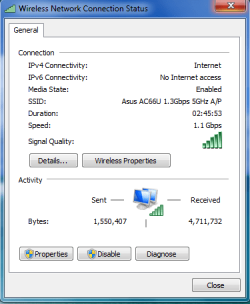
I'm running the AC66U but I'm using it with the PCI AC66 adaptor.

The firmware on this router just keeps getting better and is updated frequently although to get the most out of it you would need to upgrade to the AC PIC-e for PC's or USB NIC's for laptops. It's definitely not the cheap way to go but with 1.1 Gb wireless you get what you pay for.
 

Attachments

  • 1.1Gbps.PNG
    1.1Gbps.PNG
    13.4 KB · Views: 4

My Computer My Computer

At a glance

Windows 7 Ult, Windows 8.1 Pro,Q9650-4.275GHz, E8600 4.5GHz, E6750-3.8GHzG.Skill PC2 9600 1200Mhz 5 5 5 15 2TGTX480
Computer type
PC/Desktop
Computer Manufacturer/Model Number
Home built
OS
Windows 7 Ult, Windows 8.1 Pro,
CPU
Q9650-4.275GHz, E8600 4.5GHz, E6750-3.8GHz
Motherboard
Evga 780i FTW
Memory
G.Skill PC2 9600 1200Mhz 5 5 5 15 2T
Graphics Card(s)
GTX480
Sound Card
Asus Xonar D2
Monitor(s) Displays
HannsG
Screen Resolution
1680X1050
Hard Drives
GSkill Phoenix Pro 120GB SSD
PSU
ThermalTake Toughpower 1000Watt modular
Case
ThermalTake XaserV
Cooling
Xigmatek S1283
Keyboard
Logitech G15
Mouse
Logitech G9
Internet Speed
T1
Another quick question. You mentioned disabling WPS. I still don't have a great signal outside (but it's doable). I had thought about getting one of those little plug in extenders, but they look like they all use WPS. So I assume that's a bad idea. Any other suggestions?
 

My Computer My Computer

At a glance

Windows 7 Professional 64bitIntel Core i7 920 @ 2.67GHz6.00 GB Triple-Channel DDR3 @ 530MHzATI Radeon HD 5800 Series (XFX Pine Group)
Computer Manufacturer/Model Number
Custom desktop
OS
Windows 7 Professional 64bit
CPU
Intel Core i7 920 @ 2.67GHz
Motherboard
EVGA 141-BL-E757 (Socket 423)
Memory
6.00 GB Triple-Channel DDR3 @ 530MHz
Graphics Card(s)
ATI Radeon HD 5800 Series (XFX Pine Group)
Sound Card
AMD High Definition Audio Device
Hard Drives
932GB Western Digital WDC WD1001FALS-00J7B1 ATA Device (SATA)
2795GB Western Digital WDC WD30EZRX-00MMMB0 ATA Device (SATA)
1863GB Western Digital WDC WD2001FASS-00W2B0 ATA Device (SATA)
1863GB Western Digital WDC WD20EADS-00S2B0 ATA Device (SATA)
Internet Speed
Cable
When buying a router, you don't need to buy for what you have right now, you need to buy for what you'll likely have and need support for in the future. Most people keep a router for much longer than any other equipment, so getting a good dual band N router was a great decision. The AC router may be good for some people, but if you are just making the move to dual band and N, you surely won't need AC for years(if ever). I have the retail version of the Asus RT-N66U which is the N66R(exact same thing, just sold in retail stores) and it is absolutely amazing. I've got 450Mbps theoretical bandwidth on EACH channel(2.4/5GHz) so I'm good to go. When I was doing research on routers, AC was still early in Draft and was buggy, and there were no devices AC compatible, so there was no reason to get an AC router.
 

My Computer My Computer

At a glance

Windows 7 Professional 64bit SP1Intel Core i5-3570K @ 4.5GHzCorsair Vengeance 16GB (4x4) @1866MHz CL 9-9-...EVGA GTX 750 Ti FTW
Computer type
PC/Desktop
Computer Manufacturer/Model Number
Custom Built
OS
Windows 7 Professional 64bit SP1
CPU
Intel Core i5-3570K @ 4.5GHz
Motherboard
Asus Sabertooth Z77
Memory
Corsair Vengeance 16GB (4x4) @1866MHz CL 9-9-9-24 1T
Graphics Card(s)
EVGA GTX 750 Ti FTW
Sound Card
Onboard Audio
Monitor(s) Displays
Dell S2309W
Screen Resolution
1920x1080
Hard Drives
Samsung 830 128GB SSD - OS
(4) Seagate 5TB HDD
(1) Seagate 2TB HDD
PSU
Seasonic X750 80+ Gold Full Modular
Case
Antec Eleven Hundred Super Mid Tower
Cooling
Intel Liquid Cooler
Keyboard
Max Nighthawk X8 Mechanical keyboard
Mouse
Mionix Naos 7000
Internet Speed
50 Mbps Down / 10 Mbps Up
Antivirus
Microsoft Security Essentials/Malwarebytes Anti-Malware
Browser
Chrome/Firefox
Other Info
Klipsch ProMedia 2.1's
Asus RT-N66R Wireless Router
Most wifi range extenders (sold as such) are horribly overpriced.

If by plug-in extenders you mean something like this, then it is just a beefy wifi dongle. Will work on computers but not on phones/tablets.

What you can do is getting an access point. That's basically a wifi router without the modem, so it needs an ethernet cable or connection to the wifi of the main router to work.
Most can do repeater, extender, bridge or create their own network.
This for example. Even has a weird "power over ethernet" feature which allows to connect the power brick to the ethernet cable (with a thingy they provide) and power it up with only the ethernet cable.
Yeah, doesn't have gigabit ethernet.

With those devices you can try various configurations, like turning off the wifi of your router and make your wifi from the access point. Which means you can place it wherever you have an ethernet cable, so possibly in a better position than where the modem-router is. Being a wifi router itself, it has the usual security options.
Or setting it as an extender to sense the wifi from the router and re-broadcast it.
Or act as a bridge as explained above when talking of media bridges.

And yeah, they don't usually cost more than 40-60$, but they are the swiss-army knives of wifi networking.
 

My Computer My Computer

At a glance

Win 7 Pro 64-bit 7601AMD Phenom 9650 QuadCore, revision DR-B35 GB yes I run 2x 2GB and 1x 1GB, different b...NVIDIA GeForce 9800 GT 512 Mb, unknown manufa...
Computer type
PC/Desktop
Computer Manufacturer/Model Number
custom built
OS
Win 7 Pro 64-bit 7601
CPU
AMD Phenom 9650 QuadCore, revision DR-B3
Motherboard
ASUS M4A78
Memory
5 GB yes I run 2x 2GB and 1x 1GB, different brand, spank me.
Graphics Card(s)
NVIDIA GeForce 9800 GT 512 Mb, unknown manufacturer.
Sound Card
Crappy Realtek Integrated Audio
Monitor(s) Displays
Fujitsu Siemens P19-3P
Screen Resolution
1280 x 1024 x 32 bits @ 60 Hz Oh yeah, 4:3 rocks!
Hard Drives
(1) MAXTOR S TM3320613AS SATA Disk Device (2) STM35004 18AS SATA Disk Device (3) TOSHIBA USB 2.5"-HDD
PSU
whatever, around 450w
Case
Scavenged from old company PC, 10+ years old
Cooling
CPU fan, GPU fan, case fan, nothing fancy
Keyboard
Microsoft, PS/2, white.
Mouse
Optical, logitec.
Internet Speed
effective max speeds: 70-ish kB/s down 30-ish kB/s up
Antivirus
Avira, free edition.
Browser
Firefox with FXChrome to make it look like Google Chrome :P
Other Info
Was discarded by previous owner due to "horrible performance".
Was running Win Xp from a IDE drive. Yeah. Was a pain.
SATA II drive and Win7 and it zips away! Yay!
Most wifi range extenders (sold as such) are horribly overpriced.

If by plug-in extenders you mean something like this, then it is just a beefy wifi dongle. Will work on computers but not on phones/tablets.I use really good and well working extenders

I guess it depends what you consider as "horribly overpriced". My Belkin extenders are the best I have ever used and work amazingly well, price €70 (£60, $70) and they most certainly are something much more than "just a beefy wifi dongles", as told here: http://www.sevenforums.com/hardware-devices/298848-more-router-questions.html#post2478008
 

My Computer My Computer

At a glance

Windows 10 Pro x64 EN-GB1.6 GHz Intel Core i7-720QM Processor6 GBATI Mobility Radeon HD 5850 Graphics
Computer type
Laptop
Computer Manufacturer/Model Number
HP ENVY 17-1150eg
OS
Windows 10 Pro x64 EN-GB
CPU
1.6 GHz Intel Core i7-720QM Processor
Memory
6 GB
Graphics Card(s)
ATI Mobility Radeon HD 5850 Graphics
Sound Card
Beats sound system with integrated subwoofer
Monitor(s) Displays
17" laptop display, 22" LED and 32" Full HD TV through HDMI
Screen Resolution
1600*900 (1), 1920*1080 (2&3)
Hard Drives
Internal: 2 x 500 GB SATA Hard Disk Drive 7200 rpm
External: 2TB for backups, 3TB USB3 network drive for media
Cooling
As Envy runs a bit warm, I have it on a Cooler Master pad
Keyboard
Logitech diNovo Media Desktop Laser (bluetooth)
Mouse
Logitech Performance Mouse MX
Internet Speed
50/10 Mbps VDSL
Antivirus
Windows Defender 4.3.9431.0
Browser
Maxthon 3.5.2., IE11
I guess it depends what you consider as "horribly overpriced".
Clarification: they offer only range extension and cost as an access point that can do anything.
they most certainly are something much more than "just a beefy wifi dongles"
did you check the link in that sentence? The one in the link is indeed a beefy usb dongle. I'm not certain of what he meant with "little plug in extenders" and the one in the link does qualify as "little" and as "plug-in". It's sold as "extender" or "booster" too.
 

My Computer My Computer

At a glance

Win 7 Pro 64-bit 7601AMD Phenom 9650 QuadCore, revision DR-B35 GB yes I run 2x 2GB and 1x 1GB, different b...NVIDIA GeForce 9800 GT 512 Mb, unknown manufa...
Computer type
PC/Desktop
Computer Manufacturer/Model Number
custom built
OS
Win 7 Pro 64-bit 7601
CPU
AMD Phenom 9650 QuadCore, revision DR-B3
Motherboard
ASUS M4A78
Memory
5 GB yes I run 2x 2GB and 1x 1GB, different brand, spank me.
Graphics Card(s)
NVIDIA GeForce 9800 GT 512 Mb, unknown manufacturer.
Sound Card
Crappy Realtek Integrated Audio
Monitor(s) Displays
Fujitsu Siemens P19-3P
Screen Resolution
1280 x 1024 x 32 bits @ 60 Hz Oh yeah, 4:3 rocks!
Hard Drives
(1) MAXTOR S TM3320613AS SATA Disk Device (2) STM35004 18AS SATA Disk Device (3) TOSHIBA USB 2.5"-HDD
PSU
whatever, around 450w
Case
Scavenged from old company PC, 10+ years old
Cooling
CPU fan, GPU fan, case fan, nothing fancy
Keyboard
Microsoft, PS/2, white.
Mouse
Optical, logitec.
Internet Speed
effective max speeds: 70-ish kB/s down 30-ish kB/s up
Antivirus
Avira, free edition.
Browser
Firefox with FXChrome to make it look like Google Chrome :P
Other Info
Was discarded by previous owner due to "horrible performance".
Was running Win Xp from a IDE drive. Yeah. Was a pain.
SATA II drive and Win7 and it zips away! Yay!
Bob, my only point was to tell that with $70 dollars you can get really good extenders, and if you really need one that is not too expensive.

Everything you said is valid, I just offered a slightly different opinion.

:) Kari
 

My Computer My Computer

At a glance

Windows 10 Pro x64 EN-GB1.6 GHz Intel Core i7-720QM Processor6 GBATI Mobility Radeon HD 5850 Graphics
Computer type
Laptop
Computer Manufacturer/Model Number
HP ENVY 17-1150eg
OS
Windows 10 Pro x64 EN-GB
CPU
1.6 GHz Intel Core i7-720QM Processor
Memory
6 GB
Graphics Card(s)
ATI Mobility Radeon HD 5850 Graphics
Sound Card
Beats sound system with integrated subwoofer
Monitor(s) Displays
17" laptop display, 22" LED and 32" Full HD TV through HDMI
Screen Resolution
1600*900 (1), 1920*1080 (2&3)
Hard Drives
Internal: 2 x 500 GB SATA Hard Disk Drive 7200 rpm
External: 2TB for backups, 3TB USB3 network drive for media
Cooling
As Envy runs a bit warm, I have it on a Cooler Master pad
Keyboard
Logitech diNovo Media Desktop Laser (bluetooth)
Mouse
Logitech Performance Mouse MX
Internet Speed
50/10 Mbps VDSL
Antivirus
Windows Defender 4.3.9431.0
Browser
Maxthon 3.5.2., IE11
yeah, the problem is mine here. I should have been more clear, as "horribly overpriced" didn't convey my opinion in an useful way for the OP.
Thanks for pointing that out. :cool:

For the second thing I'll just blame the language barrier. :p
 

My Computer My Computer

At a glance

Win 7 Pro 64-bit 7601AMD Phenom 9650 QuadCore, revision DR-B35 GB yes I run 2x 2GB and 1x 1GB, different b...NVIDIA GeForce 9800 GT 512 Mb, unknown manufa...
Computer type
PC/Desktop
Computer Manufacturer/Model Number
custom built
OS
Win 7 Pro 64-bit 7601
CPU
AMD Phenom 9650 QuadCore, revision DR-B3
Motherboard
ASUS M4A78
Memory
5 GB yes I run 2x 2GB and 1x 1GB, different brand, spank me.
Graphics Card(s)
NVIDIA GeForce 9800 GT 512 Mb, unknown manufacturer.
Sound Card
Crappy Realtek Integrated Audio
Monitor(s) Displays
Fujitsu Siemens P19-3P
Screen Resolution
1280 x 1024 x 32 bits @ 60 Hz Oh yeah, 4:3 rocks!
Hard Drives
(1) MAXTOR S TM3320613AS SATA Disk Device (2) STM35004 18AS SATA Disk Device (3) TOSHIBA USB 2.5"-HDD
PSU
whatever, around 450w
Case
Scavenged from old company PC, 10+ years old
Cooling
CPU fan, GPU fan, case fan, nothing fancy
Keyboard
Microsoft, PS/2, white.
Mouse
Optical, logitec.
Internet Speed
effective max speeds: 70-ish kB/s down 30-ish kB/s up
Antivirus
Avira, free edition.
Browser
Firefox with FXChrome to make it look like Google Chrome :P
Other Info
Was discarded by previous owner due to "horrible performance".
Was running Win Xp from a IDE drive. Yeah. Was a pain.
SATA II drive and Win7 and it zips away! Yay!
I should have been more clear. I mean power outlet plug in, like this one here or here. So you wouldn't have to hook it into your LAN. I didn't have a LAN plug in the area I was going to put it. I just thought they might be bad since I think they all connect with WPS.
 

My Computer My Computer

At a glance

Windows 7 Professional 64bitIntel Core i7 920 @ 2.67GHz6.00 GB Triple-Channel DDR3 @ 530MHzATI Radeon HD 5800 Series (XFX Pine Group)
Computer Manufacturer/Model Number
Custom desktop
OS
Windows 7 Professional 64bit
CPU
Intel Core i7 920 @ 2.67GHz
Motherboard
EVGA 141-BL-E757 (Socket 423)
Memory
6.00 GB Triple-Channel DDR3 @ 530MHz
Graphics Card(s)
ATI Radeon HD 5800 Series (XFX Pine Group)
Sound Card
AMD High Definition Audio Device
Hard Drives
932GB Western Digital WDC WD1001FALS-00J7B1 ATA Device (SATA)
2795GB Western Digital WDC WD30EZRX-00MMMB0 ATA Device (SATA)
1863GB Western Digital WDC WD2001FASS-00W2B0 ATA Device (SATA)
1863GB Western Digital WDC WD20EADS-00S2B0 ATA Device (SATA)
Internet Speed
Cable
I should have been more clear. I mean power outlet plug in, like this one here or here. So you wouldn't have to hook it into your LAN. I didn't have a LAN plug in the area I was going to put it. I just thought they might be bad since I think they all connect with WPS.

You don't need to use WPS to connect it ;) You can access an extenders configuration settings the same way as your routers via it's IP address.

   Note
You may need to temporarily assign a static IP address in order to set it up correctly however each are different and the user manual should give you sufficient information on how to set it up


Josh :)
 

My Computer My Computer

At a glance

Windows 7 Professional x64 SP1 ; Windows Serv...Intel Core i5 2400 @ 3.10GHz8.0GB DDR3 @ 665MHz (2GBx4)AMD Radeon HD 6870
Computer type
PC/Desktop
Computer Manufacturer/Model Number
Custom Built
OS
Windows 7 Professional x64 SP1 ; Windows Server 2012 R2 Standard
CPU
Intel Core i5 2400 @ 3.10GHz
Motherboard
Foxconn H67MP-S/-V/H67MP
Memory
8.0GB DDR3 @ 665MHz (2GBx4)
Graphics Card(s)
AMD Radeon HD 6870
Sound Card
Realtek High Definition Audio
Monitor(s) Displays
AOC 2243W & SMB1930NW
Screen Resolution
1440x900 & 1920x1080
Hard Drives
977GB Seagate ST31000524AS ATA Drive (SATA)
250GB WD iSCSI attached Drive
PSU
750W Gaming PSU
Case
Novatech Night
Cooling
Fan
Keyboard
Dell Standard PS/2 Keyboard
Mouse
R.A.T 07 Gaming Mouse
Internet Speed
Download: 10 Mbps Ping: 30ms Upload: 0.81 Mbps
Browser
Google Chrome
Other Info
Optiarc DVD RW AD-5260S ATA Device
Back
Top