
Router / subscriber line issue, occasional very slow browsing.

Kari

An Angry Old Man
Guru
VIP
SF Team
Local time
7:50 PM
Messages
17,473
Location
A Finnish ex-pat in Leipzig, Germany
A small irritating issue I seem to be unable to find an explanation and possible solution.

Background:
The issue occurs at seemingly random intervals. When it occurs, it is the same using any of the household computers and / or browsers (Windows 7 & 8 using IE10 & 11 and Maxthon 3.5.2, Macs with 10.8 Mountain Lion and Safari, OpenSUSE Linux with Firefox) both with wired and wireless connection, clearly indicating that the issue has something to do either with the broadband subscription line or the router rather than an individual browser or computer. This is the reason I am posting here and not at Browsers & Mail section.

Problem description:
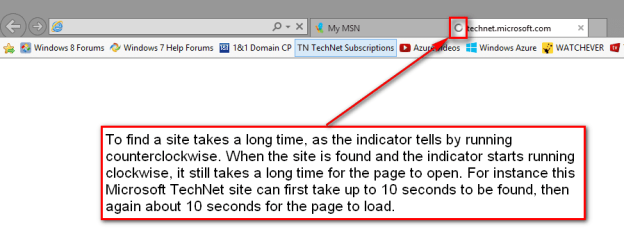
Occasionally all web pages open very slowly. It can take up to 10 even 15 seconds for the page to be found, and then again about 10 seconds for the page to open.
Screenshot_(33).png

Sometimes this can last a day or two, sometimes just an hour. Now since last night everything OK, web and browsers fast. Yesterday when the issue was extremely bad this website took 36 seconds to fully load, now it takes 8 seconds.

VDSL 100 / 20 line, half dedicated to IPTV, computers thus sharing a 50 / 10 line. Router is Belkin AC 1200 DB Wi-Fi Dual-Band AC+ Gigabit.

Notice that when the issue occurs and the opening of various pages takes ages, all speedtests are still showing PINGs under 30 ms, DL over 40 Mbps and UL close to 10 Mbps. Ironically, for instance the Speedtest.net site can take over 40 seconds first to fully load, but then gives totally normal values.

Additional information:
Rebooting / resetting the router and / or computers does not help. When the site is first very slowly found and opened everything works well but again clicking a link to open a subpage, the same happens: to find the page and open it takes ages.

The issue occurs both when obtaining DNS automatically or using for instance Google's 8.8.8.8 and 8.8.4.4 IPv4 and respective IPv6 servers.

As occasionally as this sometimes occurs, it also disappears suddenly and browsing will become fast (normal) again.

Any ideas welcome.

Kari
 
Last edited:

My Computer My Computer

At a glance

Windows 10 Pro x64 EN-GB1.6 GHz Intel Core i7-720QM Processor6 GBATI Mobility Radeon HD 5850 Graphics
Computer type
Laptop
Computer Manufacturer/Model Number
HP ENVY 17-1150eg
OS
Windows 10 Pro x64 EN-GB
CPU
1.6 GHz Intel Core i7-720QM Processor
Memory
6 GB
Graphics Card(s)
ATI Mobility Radeon HD 5850 Graphics
Sound Card
Beats sound system with integrated subwoofer
Monitor(s) Displays
17" laptop display, 22" LED and 32" Full HD TV through HDMI
Screen Resolution
1600*900 (1), 1920*1080 (2&3)
Hard Drives
Internal: 2 x 500 GB SATA Hard Disk Drive 7200 rpm
External: 2TB for backups, 3TB USB3 network drive for media
Cooling
As Envy runs a bit warm, I have it on a Cooler Master pad
Keyboard
Logitech diNovo Media Desktop Laser (bluetooth)
Mouse
Logitech Performance Mouse MX
Internet Speed
50/10 Mbps VDSL
Antivirus
Windows Defender 4.3.9431.0
Browser
Maxthon 3.5.2., IE11
Make sure there isn't a sneaky guy stealing your wireless to torrent japanese tentacle porn or whatever. This article gives various possible ways to check.

Don't feel safe just because you don't see anyone around your home, good directional wireless equipment (or even decently-assembled makeshift one) can easily connect from a km or more from the access point/router/extender/whatever.

Other than that, for me similar stuff is relatively common as I live in a crappy place and my ISP serves a lot of people in my area (being the only one offering DSL), and sometimes there is simply too much traffic for them to handle. Or so they told me when I called them to know why.
 

My Computer My Computer

At a glance

Win 7 Pro 64-bit 7601AMD Phenom 9650 QuadCore, revision DR-B35 GB yes I run 2x 2GB and 1x 1GB, different b...NVIDIA GeForce 9800 GT 512 Mb, unknown manufa...
Computer type
PC/Desktop
Computer Manufacturer/Model Number
custom built
OS
Win 7 Pro 64-bit 7601
CPU
AMD Phenom 9650 QuadCore, revision DR-B3
Motherboard
ASUS M4A78
Memory
5 GB yes I run 2x 2GB and 1x 1GB, different brand, spank me.
Graphics Card(s)
NVIDIA GeForce 9800 GT 512 Mb, unknown manufacturer.
Sound Card
Crappy Realtek Integrated Audio
Monitor(s) Displays
Fujitsu Siemens P19-3P
Screen Resolution
1280 x 1024 x 32 bits @ 60 Hz Oh yeah, 4:3 rocks!
Hard Drives
(1) MAXTOR S TM3320613AS SATA Disk Device (2) STM35004 18AS SATA Disk Device (3) TOSHIBA USB 2.5"-HDD
PSU
whatever, around 450w
Case
Scavenged from old company PC, 10+ years old
Cooling
CPU fan, GPU fan, case fan, nothing fancy
Keyboard
Microsoft, PS/2, white.
Mouse
Optical, logitec.
Internet Speed
effective max speeds: 70-ish kB/s down 30-ish kB/s up
Antivirus
Avira, free edition.
Browser
Firefox with FXChrome to make it look like Google Chrome :P
Other Info
Was discarded by previous owner due to "horrible performance".
Was running Win Xp from a IDE drive. Yeah. Was a pain.
SATA II drive and Win7 and it zips away! Yay!
Thanks for your thoughts, Bob.

I am relatively sure it's not a free rider. Not only have I a very strong WPA2-PSK key, as well as router control panel password, but I am using static internal IPs and have limited the available IP range to exact number of devices, only expanding it to allow occasional overnight guests to use the net.

I guess the only explanation is the "traffic jams" on our exchange?
 
Last edited:

My Computer My Computer

At a glance

Windows 10 Pro x64 EN-GB1.6 GHz Intel Core i7-720QM Processor6 GBATI Mobility Radeon HD 5850 Graphics
Computer type
Laptop
Computer Manufacturer/Model Number
HP ENVY 17-1150eg
OS
Windows 10 Pro x64 EN-GB
CPU
1.6 GHz Intel Core i7-720QM Processor
Memory
6 GB
Graphics Card(s)
ATI Mobility Radeon HD 5850 Graphics
Sound Card
Beats sound system with integrated subwoofer
Monitor(s) Displays
17" laptop display, 22" LED and 32" Full HD TV through HDMI
Screen Resolution
1600*900 (1), 1920*1080 (2&3)
Hard Drives
Internal: 2 x 500 GB SATA Hard Disk Drive 7200 rpm
External: 2TB for backups, 3TB USB3 network drive for media
Cooling
As Envy runs a bit warm, I have it on a Cooler Master pad
Keyboard
Logitech diNovo Media Desktop Laser (bluetooth)
Mouse
Logitech Performance Mouse MX
Internet Speed
50/10 Mbps VDSL
Antivirus
Windows Defender 4.3.9431.0
Browser
Maxthon 3.5.2., IE11
Have you thought about running tracert? It may help narrow down where the problem lies, I would suggest running a base line trace to domains you have had problems with in the past, and then when the lag occurs.

With the Worlds various government agencies doing all this damn snooping my first thought was some type of re-direction to obtain a record of a users internet usage. But, lets not jump to conclusions. :p

  • You can use either the domain name or if you know the numerical address of the domain, you can use that.
  • There are five switches that can be used, one that can force a trace through a specific router, and one that can trace back to your router.
  • You don't have to use an elevated command prompt like I did, its just a habit I developed.

~~~ ~~~~ ~~~

A trace of your link to thelocal.de through my location, and a ping test for comparison.

  • The first hop is the starting point of my router.
  • Hop 2 to, and including 6 are my ISP with 5 and 6 their business servers.
  • Hop 7 Alter.Net is being handed over to tinet.net, an ISP in Ireland.
  • Hop 8 is going through the Isle of Man.
  • Hop 9 is a hand-off to melbourne ISP
  • Hop 10 is melbourne's network infrastructure.
  • Hop 11 arrives at thelocal.de
You can find all this out by using: Domain Name Server records | host.robtex.com Copy/paste all or any part of the domain name into the search box in the upper left corner and either click on Lucky or Search.


   Information
Microsoft Windows [Version 6.1.7601]
Copyright (c) 2009 Microsoft Corporation. All rights reserved.

C:\Windows\system32>tracert thelocal.de

Tracing route to thelocal.de [46.20.229.5]
over a maximum of 30 hops:

1 <1 ms <1 ms <1 ms Wireless_Broadband_Router.home [xxx.xxx.x.x]
2 6 ms 3 ms 4 ms Verizon Global Network Infrastructure - verizon-gni.net [xx.xxx.xxx.x]
3 7 ms 6 ms 8 ms Verizon Global Network Infrastructure - verizon-gni.net [xxx.xx.xxx.xxx]
4 8 ms 7 ms 8 ms Verizon Global Network Infrastructure - verizon-gni.net [xxx.xx.xxx.xx]
5 13 ms 11 ms 12 ms 0.xe-3-0-1.XL3.IAD8.ALTER.NET [xxx.xx.x.xx]
6 12 ms 12 ms 11 ms GigabitEthernet4-0-0.GW8.IAD8.ALTER.NET [xxx.xx.xx.xx]
7 13 ms 13 ms 13 ms tinet-gw.customer.alter.net [xxx.xxx.xx.xx]
8 90 ms 90 ms 89 ms xe-2-2-0.man11.ip4.tinet.net [xx.xxx.xxx.xx]
9 90 ms 90 ms 89 ms melbourne-network-solutions-gw.ip4.tinet.net [xx.xx.xx.xxx]
10 90 ms 90 ms 91 ms custfw3a.tur.melbourne.co.uk [xx.xxx.x.xxx]
11 130 ms 127 ms 123 ms 46-20-229-5.rdns.melbourne.co.uk [46.20.229.5]

Trace complete.

C:\Windows\system32>


C:\Windows\system32>ping 46.20.229.5 (thelocal.de)

Pinging 46.20.229.5 with 32 bytes of data:
Reply from 46.20.229.5: bytes=32 time=91ms TTL=56
Reply from 46.20.229.5: bytes=32 time=92ms TTL=56

Ping statistics for 46.20.229.5:
Packets: Sent = 4, Received = 4, Lost = 0 (0% loss),
Approximate round trip times in milli-seconds:
Minimum = 91ms, Maximum = 92ms, Average = 91ms

C:\Windows\system32>


There are opensource, intensive monitoring tools available like remOcular for traceroute, and Smokeping at this site: Tobi Oetiker - Tobi Oetiker's Toolbox Scroll down a bit until you see Monitoring.

More:
A Practical Guide to (Correctly) Troubleshooting with Traceroute
Richard A Steenbergen <[email protected]> nLayer Communications, Inc. | Powerpoint .pdf

Traceroute Troubleshooting Tutorial

Cable Modem Troubleshooting Tips: Traceroute

traceroute - a very useful troubleshooting tool which reveals the bottlenecks on the Internet. | All about Linux
 

My Computer My Computer

At a glance

Originally Win 7 Hm Prem x64 Ver 6.1.7600 Bui...Intel i3 530 2.93GHz, 2933MHz 2 Cores 4 Logic...6GB of 1,333MHz DDR3 SDRAM32MB Intel Graphics Media Accelerator HD IGChip
Computer type
PC/Desktop
Computer Manufacturer/Model Number
Gateway DX4831-01e (Mid-Tower Desktop)
OS
Originally Win 7 Hm Prem x64 Ver 6.1.7600 Build 7601-SP1 | Upgraded to Windows 10 December 14, 2019
CPU
Intel i3 530 2.93GHz, 2933MHz 2 Cores 4 Logical Processors
Motherboard
Gateway H57M01 133 megahertz
Memory
6GB of 1,333MHz DDR3 SDRAM
Graphics Card(s)
32MB Intel Graphics Media Accelerator HD IGChip
Sound Card
Realtek High Definition Audio
Monitor(s) Displays
Gateway HX2000 20inch TFT active matrix TN
Screen Resolution
1600 x 900 x 59 hertz
Hard Drives
WDC WD10EADS-00M2B0 [HDD] (1000.20 GB) -- drive 0,
HL-DT-ST DVDRAM GH41N [CD-ROM dr]
Four card readers, and Four USB 2.0
PSU
300watts.
Case
Mid-Tower Desktop
Cooling
Stock from Gateway
Keyboard
Natural Ergonomic Keyboard 4000, see Other Info
Mouse
Orig. Gateway wore out now using Insignia USB wired optical
Internet Speed
Vz FIOS 10ms png 57.64Mbps down 65.53Mbps up Speedtest.org
Antivirus
Zamana Anti-logger with Anti-malware, MSE, Windows Firewall,
Browser
IE11.0.9600.19399-Upd ver11.0.135, Firefox 68.0.1 x64
Other Info
System Specs by Belarc.

BIOS: American Megatrends Inc. P01-A0 11/17/2009

Replaced the MS 'Natural' Standard PS/2 Enhanced 101-102 Keyboard with a new Natural Ergonomic Keyboard 4000 on August 1st 2014.

Canon Pixma MG3222 Printer.

Updated to IE11 on 12102015 | Fios Quantum Router g1100

Additional AV: SpywareBlaster, manual Mbam, SAS
Tracing the route is a good idea, one I should have thought myself. Thanks Anak, will do when the issue occurs again.
 

My Computer My Computer

At a glance

Windows 10 Pro x64 EN-GB1.6 GHz Intel Core i7-720QM Processor6 GBATI Mobility Radeon HD 5850 Graphics
Computer type
Laptop
Computer Manufacturer/Model Number
HP ENVY 17-1150eg
OS
Windows 10 Pro x64 EN-GB
CPU
1.6 GHz Intel Core i7-720QM Processor
Memory
6 GB
Graphics Card(s)
ATI Mobility Radeon HD 5850 Graphics
Sound Card
Beats sound system with integrated subwoofer
Monitor(s) Displays
17" laptop display, 22" LED and 32" Full HD TV through HDMI
Screen Resolution
1600*900 (1), 1920*1080 (2&3)
Hard Drives
Internal: 2 x 500 GB SATA Hard Disk Drive 7200 rpm
External: 2TB for backups, 3TB USB3 network drive for media
Cooling
As Envy runs a bit warm, I have it on a Cooler Master pad
Keyboard
Logitech diNovo Media Desktop Laser (bluetooth)
Mouse
Logitech Performance Mouse MX
Internet Speed
50/10 Mbps VDSL
Antivirus
Windows Defender 4.3.9431.0
Browser
Maxthon 3.5.2., IE11
Back
Top