Upgrade causing slow browsing, fine internet speed

drobby3313

New member
Local time
8:10 PM
Messages
12
Hi,
Recently I upgraded from Windows Vista home basic 32 bit to Windows 7 professional 32 bit.

Now however, my browsing speed is very slow and often doesnt work. It seems to especially have trouble with google related stuff (eg Gmail and google maps etc).
However when I finally get a page up, download speed for files are completely normal. Im currently using firefox 4, but I have already tried Chrome and Internet Explorer with no difference between the 3. Ive tried disabling/uninstalling firefox addons, Ive also tried with and with out an active firewall, and turning off my anti virus software. Ive also scanned my computer with my anti virus (Sophos) as well as Spybot Search and Destroy. None of this has helped either.

All other computers in my house hold are all browsing the net fine, including my laptop also using windows 7.

I have really run out of ideas, as my computer was browsing the net fine before upgrading.

Sorry if I have posted this in the wrong place or this has been resolved elsewhere, I am a neewbie to forums, and I couldnt see a similar thread.

Cheers
 

My Computer

Computer Manufacturer/Model Number
Gigabyte Technology Co., Ltd.
OS
Windows 7 Professional 32 Bit
CPU
Intel Core 2 Quad Q9550 2.83GHz
Memory
4GB
Graphics Card(s)
Nvidia GeForce 96000GT 512MB
Sound Card
High Definition Audio Device
Screen Resolution
1920x 1080 x 59Hz
Hard Drives
750GB Samsung HD753LJ
Are you using the latest network drivers? Also, things like java and flash player and any other plugins you use need to be installed with a new install.

Try changing DNS servers to opendns or google.
 

My Computer

Computer Manufacturer/Model Number
Too many to describe...
OS
Windows 7 x64 pro/ Windows 7 x86 Pro/ XP SP3 x86
Yes, I have updated/ checked for updates for drivers. I have also re-installed most programs, I definately know I have installed java and flash player.

Thanks, Ill have a go at changing DNS servers, not that I know what im doing. Ill read up and have a go.
Cheers
 

My Computer

Computer Manufacturer/Model Number
Gigabyte Technology Co., Ltd.
OS
Windows 7 Professional 32 Bit
CPU
Intel Core 2 Quad Q9550 2.83GHz
Memory
4GB
Graphics Card(s)
Nvidia GeForce 96000GT 512MB
Sound Card
High Definition Audio Device
Screen Resolution
1920x 1080 x 59Hz
Hard Drives
750GB Samsung HD753LJ
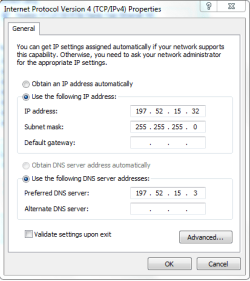
Ok, so Ive had a go at changing DNS, I tried using googles DNS, that didnt help. I went to the website for opendns, I dont really understand what was going on, do I have to subscribe or get the free one? which contains ads?
anyways I then logged into my own router and changed my computer to match it.

This has resolved my issue. Thank you so much for you help, its been bugging me out for days!
 

My Computer

Computer Manufacturer/Model Number
Gigabyte Technology Co., Ltd.
OS
Windows 7 Professional 32 Bit
CPU
Intel Core 2 Quad Q9550 2.83GHz
Memory
4GB
Graphics Card(s)
Nvidia GeForce 96000GT 512MB
Sound Card
High Definition Audio Device
Screen Resolution
1920x 1080 x 59Hz
Hard Drives
750GB Samsung HD753LJ
opendns ip addresses are:

208.67.222.222
208.67.220.220

Just input these numbers in the preferred dns server and alternate dns server fields respectively.

Capture.PNG
 

My Computer

Computer Manufacturer/Model Number
Too many to describe...
OS
Windows 7 x64 pro/ Windows 7 x86 Pro/ XP SP3 x86
i did try those numbers, randomly enough as they were on a tutorial somewhere on this site, however they didnt work either. But not to worry as I said, Ive got it working now anyways!
 

My Computer

Computer Manufacturer/Model Number
Gigabyte Technology Co., Ltd.
OS
Windows 7 Professional 32 Bit
CPU
Intel Core 2 Quad Q9550 2.83GHz
Memory
4GB
Graphics Card(s)
Nvidia GeForce 96000GT 512MB
Sound Card
High Definition Audio Device
Screen Resolution
1920x 1080 x 59Hz
Hard Drives
750GB Samsung HD753LJ
ok, so typing in the DNS made it work for about 30 mins, and hasnt worked since. Since then I have tried Open DNS (including subscribing and also downloading their DNS updater). So once again Im out of ideas....
 

My Computer

Computer Manufacturer/Model Number
Gigabyte Technology Co., Ltd.
OS
Windows 7 Professional 32 Bit
CPU
Intel Core 2 Quad Q9550 2.83GHz
Memory
4GB
Graphics Card(s)
Nvidia GeForce 96000GT 512MB
Sound Card
High Definition Audio Device
Screen Resolution
1920x 1080 x 59Hz
Hard Drives
750GB Samsung HD753LJ
Did the issue happen immediately after the upgrade? How did you install the upgrade?
 

My Computer

Computer Manufacturer/Model Number
Pugh Technologies
OS
W7 Professional x64
CPU
AMD Athlon II X3 445 Rana 3.10 GHz
Motherboard
MSI 870A-G54
Memory
PNY XLR DDR3 1600 4x2GB
Graphics Card(s)
NVIDIA GeForce GTS 450 (fermi) 1GB GDDR5
Sound Card
Realtek ALC892 onboard
Monitor(s) Displays
ASUS VE205t, Viewsonic VX2035WM
Screen Resolution
1600x900, 1600x1050
Hard Drives
977GB Hitachi Hitachi HDS721010CLA332
244GB Western Digital WDC WD2500AAJS-65B4A0
488GB Western Digital WDC WD5000AAJS-00A8B0
488GB Western Digital WDC WD5000AAKS-00UU3A0
PSU
Antec EarthWatts EA650 650W
Case
ThermalTake Armor A90 Mid Tower
Cooling
3x 120mm in, 1x 120mm & 200mm out, self built hydro-cooler
Keyboard
Logitec 55
Mouse
Razer Deathadder
Internet Speed
20 Mbps D/L, 9 Mbps U/L
Yer I havent had the internet working properly since the upgrade.
It was upgraded by downloading the iso file from microsoft. I needed to do a fresh install though, as my vista was only home basic.
 

My Computer

Computer Manufacturer/Model Number
Gigabyte Technology Co., Ltd.
OS
Windows 7 Professional 32 Bit
CPU
Intel Core 2 Quad Q9550 2.83GHz
Memory
4GB
Graphics Card(s)
Nvidia GeForce 96000GT 512MB
Sound Card
High Definition Audio Device
Screen Resolution
1920x 1080 x 59Hz
Hard Drives
750GB Samsung HD753LJ
So you did a clean installation?
 

My Computer

Computer Manufacturer/Model Number
Pugh Technologies
OS
W7 Professional x64
CPU
AMD Athlon II X3 445 Rana 3.10 GHz
Motherboard
MSI 870A-G54
Memory
PNY XLR DDR3 1600 4x2GB
Graphics Card(s)
NVIDIA GeForce GTS 450 (fermi) 1GB GDDR5
Sound Card
Realtek ALC892 onboard
Monitor(s) Displays
ASUS VE205t, Viewsonic VX2035WM
Screen Resolution
1600x900, 1600x1050
Hard Drives
977GB Hitachi Hitachi HDS721010CLA332
244GB Western Digital WDC WD2500AAJS-65B4A0
488GB Western Digital WDC WD5000AAJS-00A8B0
488GB Western Digital WDC WD5000AAKS-00UU3A0
PSU
Antec EarthWatts EA650 650W
Case
ThermalTake Armor A90 Mid Tower
Cooling
3x 120mm in, 1x 120mm & 200mm out, self built hydro-cooler
Keyboard
Logitec 55
Mouse
Razer Deathadder
Internet Speed
20 Mbps D/L, 9 Mbps U/L
yes, sorry to be vague when I said upgrading.
I did use the windows easy transfer program, so I thought alot of my setting and stuff would have came through when I ran that on windows 7
 

My Computer

Computer Manufacturer/Model Number
Gigabyte Technology Co., Ltd.
OS
Windows 7 Professional 32 Bit
CPU
Intel Core 2 Quad Q9550 2.83GHz
Memory
4GB
Graphics Card(s)
Nvidia GeForce 96000GT 512MB
Sound Card
High Definition Audio Device
Screen Resolution
1920x 1080 x 59Hz
Hard Drives
750GB Samsung HD753LJ
yes, sorry for using the term upgrade loosely. Vista home basic doesnt allow you to "upgrade" to 7 professional, meaning I had to do a clean install.
 

My Computer

Computer Manufacturer/Model Number
Gigabyte Technology Co., Ltd.
OS
Windows 7 Professional 32 Bit
CPU
Intel Core 2 Quad Q9550 2.83GHz
Memory
4GB
Graphics Card(s)
Nvidia GeForce 96000GT 512MB
Sound Card
High Definition Audio Device
Screen Resolution
1920x 1080 x 59Hz
Hard Drives
750GB Samsung HD753LJ
You don't want to have DNS server addresses in both Windows and the router. Have both the DNS addresses in the router (I use OpenDNS), and in Windows just have the router's address (192.168.0.1 or whatever) as the 'preferred DNS server' with the Alternate one blank. Let the router do the work, that's what they're good at.

I also prefer to give my network card a fixed address of my choice in Device Manager and let Windows discover that by selecting 'Obtain an IP address automatically' but that shouldn't affect your problem.
 

My Computer

OS
Windows 7
Yer ive been leaving my IP settings as automatic, however when I do what you said (ie make the router address as my DNS server), I get no connectivity at all :(
 

My Computer

Computer Manufacturer/Model Number
Gigabyte Technology Co., Ltd.
OS
Windows 7 Professional 32 Bit
CPU
Intel Core 2 Quad Q9550 2.83GHz
Memory
4GB
Graphics Card(s)
Nvidia GeForce 96000GT 512MB
Sound Card
High Definition Audio Device
Screen Resolution
1920x 1080 x 59Hz
Hard Drives
750GB Samsung HD753LJ
Yer ive been leaving my IP settings as automatic, however when I do what you said (ie make the router address as my DNS server), I get no connectivity at all :(

Now that is strange, that makes it look like a router problem. For now, go back to what worked for a while, then try browsing to Google at Google This will work perfectly and quickly if your ONLY problem is DNS.
 

My Computer

OS
Windows 7
Quick note: when playing with DNS it is always helpful to start from a clean slate. Open a command prompt and type in ipconfig /flushdns. This will clear your DNS cache.

Sent from my Evo 4G. Please to excuse my engrish typing
 

My Computer

Computer Manufacturer/Model Number
Myself
OS
Win7 Ultimate x64, Server 2008 R2
CPU
AMD Phenom II X6 1055T Thuban 2.8GHz
Motherboard
GIGABYTE GA-890FXA-UD5
Memory
8GB G.SKILL Ripjaws Series DDR3 1600 (PC3 12800)
Graphics Card(s)
2x HIS/Sapphire ATI Radeon HD 5830 in CrossfireX
Sound Card
Sound Blaster X-Fi Xtreme
Monitor(s) Displays
Dell 2407WFP 24", Dell 22"
Screen Resolution
1920x1200
Hard Drives
Patriot Torqx 128GB SSD
3TB other HD
PSU
CORSAIR HX Series CMPSU-750HX 750W
Case
Antec Nine Hundred
Cooling
Cooler Master Hyper 212 Plus CPU cooler
Keyboard
SteelSeries MercStealth
Mouse
Razer Lachesis
Internet Speed
HAHA NO MOAR COMCAST. Now, FiOS :D
Other Info
I am a virtualization enthusiast. I like Hyper-V. It's free.
I'm a Windows 7 fangirl. I will teach a class for you or write a custom course for you RIGHT NOW.
I love EVE Online. I'm Sayra Sainer. I play Starcraft II. My gamertag is Tal0nn. I'm trying not to play Minecraft.
I also like coffee. I'll take a basic triple grande extra-hot breve stirred ristretto caramel machiatto.
Yes google is actually working when I go via your link... how does that even work?Why is it different when you go to that ip?

And yes, I have been flushing the dns cache every time i altered DNS
 

My Computer

Computer Manufacturer/Model Number
Gigabyte Technology Co., Ltd.
OS
Windows 7 Professional 32 Bit
CPU
Intel Core 2 Quad Q9550 2.83GHz
Memory
4GB
Graphics Card(s)
Nvidia GeForce 96000GT 512MB
Sound Card
High Definition Audio Device
Screen Resolution
1920x 1080 x 59Hz
Hard Drives
750GB Samsung HD753LJ
A few hrs later, whilst google and most of its related stuff works ok, google maps is still failing, in the sense it loads the initial picture/map straight away, but you then cant do anything (ie zoom, pan, change address etc)
 

My Computer

Computer Manufacturer/Model Number
Gigabyte Technology Co., Ltd.
OS
Windows 7 Professional 32 Bit
CPU
Intel Core 2 Quad Q9550 2.83GHz
Memory
4GB
Graphics Card(s)
Nvidia GeForce 96000GT 512MB
Sound Card
High Definition Audio Device
Screen Resolution
1920x 1080 x 59Hz
Hard Drives
750GB Samsung HD753LJ
Yes google is actually working when I go via your link... how does that even work?Why is it different when you go to that ip?

And yes, I have been flushing the dns cache every time i altered DNS

It works because it bypasses DNS completely.

If you open a command prompt and PING a website like Google with "PING www.google.co.ukhttp://www.google.co.uk" without the quotes, it will answer (unless the site blocks pings) with the real web address which is a bunch of numbers. That's how I got Google's real address. DNS translates the text you type into the address bar of a browser into these very same numbers, so is essential if we are to be able to use normal text instead of having to remember a load of numbers.
 

My Computer

OS
Windows 7
Ok.. That makes sense,
However that's a bit of a pain to do all the time.. Is there anything else dns wise I could do, or is it something like me network card causing problems?
 

My Computer

Computer Manufacturer/Model Number
Gigabyte Technology Co., Ltd.
OS
Windows 7 Professional 32 Bit
CPU
Intel Core 2 Quad Q9550 2.83GHz
Memory
4GB
Graphics Card(s)
Nvidia GeForce 96000GT 512MB
Sound Card
High Definition Audio Device
Screen Resolution
1920x 1080 x 59Hz
Hard Drives
750GB Samsung HD753LJ
Back
Top