Rufus USB Problem Windows 7

iwashere

New member
Local time
11:09 PM
Messages
1
rufus.png
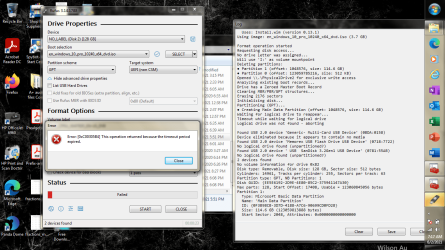
This is the error I receive when formatting my usb with Rufus.

Error 0xc00305b4
The operation returned because the timeout period has expired.
I adjust the timeout value in services to 2000. I still receive the same error.
I attached a screenshot.

Rufus log

Rufus x86 v3.14.1788
Windows version: Windows 7 SP1 64-bit
Syslinux versions: 4.07/2013-07-25, 6.04/pre1
Grub versions: 0.4.6a, 2.04
System locale ID: 0x0409 (en-US)
Will use default UI locale 0x0409
SetLGP: Successfully set NoDriveTypeAutorun policy to 0x0000009E
Localization set to 'en-US'
Found USB 2.0 device 'Generic- Multi-Card USB Device' (0BDA:0158)
Device eliminated because it appears to contain no media
Found USB 2.0 device 'Memorex USB Flash Drive USB Device' (0718:7722)
No logical drive found (unpartitioned?)
Found USB 2.0 device ' USB SanDisk 3.2Gen1 USB Device' (0781:55AB)
No logical drive found (unpartitioned?)
2 devices found
No volume information for drive 0x83
Disk type: Removable, Disk size: 16 GB, Sector size: 512 bytes
Cylinders: 1887, Tracks per cylinder: 255, Sectors per track: 63
Partition type: SFD (Super Floppy Disk) or unpartitioned
2 devices found
No volume information for drive 0x82
Disk type: Removable, Disk size: 128 GB, Sector size: 512 bytes
Cylinders: 14961, Tracks per cylinder: 255, Sectors per track: 63
Partition type: GPT, NB Partitions: 2
Disk GUID: {3D3EF100-04A4-402C-81E1-4CF5B1BB5612}
Max parts: 128, Start Offset: 17408, Usable = 123060845056 bytes
Partition 1:
Type: Microsoft Basic Data Partition
Name: 'Main Data Partition'
ID: {831822D2-32F3-408F-8899-E5CEB8018BCE}
Size: 114.6 GB (123058736640 bytes)
Start Sector: 2048, Attributes: 0x0000000000000000
Partition 2 (UEFI:NTFS):
Type: Microsoft Basic Data Partition
Name: 'UEFI:NTFS'
ID: {3C11BE4B-C533-42B7-9513-20C870B676A5}
Size: 512 KB (524288 bytes)
Start Sector: 240351143, Attributes: 0x0000000000000000
Scanning image...
ISO analysis:
Image is an UDF image
Disk image analysis:
Image does not have a Boot Marker
ISO label: 'JM1_CPRA_X64FRER_EN-US_DV9'
Size: 3.7 GB (Projected)
Uses: EFI
Uses: Bootmgr (BIOS and UEFI)
Uses: Install.wim (version 0.13.1)
Using image: en_windows_10_pro_10240_x64_dvd.iso (3.7 GB)

Format operation started
Requesting disk access...
No drive letter was assigned...
Will use 'I:' as volume mountpoint
Deleting partitions:
● Partition 1 (offset: 1048576, size: 114.6 GB)
● Partition 0 (offset: 123059785216, size: 512 KB)
Opened \\.\PhysicalDrive2 for exclusive write access
Analyzing existing boot records...
Drive has a Zeroed Master Boot Record
Clearing MBR/PBR/GPT structures...
Erasing 2176 sectors
Initializing disk...
Partitioning (GPT)...
● Creating Main Data Partition (offset: 1048576, size: 114.6 GB)
Waiting for logical drive to reappear...
Timeout while waiting for logical drive
Logical drive was not found - aborting

Found USB 2.0 device 'Generic- Multi-Card USB Device' (0BDA:0158)
Device eliminated because it appears to contain no media
Found USB 2.0 device 'Memorex USB Flash Drive USB Device' (0718:7722)
No logical drive found (unpartitioned?)
Found USB 2.0 device ' USB SanDisk 3.2Gen1 USB Device' (0781:55AB)
No logical drive found (unpartitioned?)
2 devices found
No volume information for drive 0x82
Disk type: Removable, Disk size: 128 GB, Sector size: 512 bytes
Cylinders: 14961, Tracks per cylinder: 255, Sectors per track: 63
Partition type: GPT, NB Partitions: 1
Disk GUID: {EE5E6192-2D9E-4E80-85C2-375941147A30}
Max parts: 128, Start Offset: 17408, Usable = 123060845056 bytes
Partition 1:
Type: Microsoft Basic Data Partition
Name: 'Main Data Partition'
ID: {0F3B98CB-3D7D-4188-A7C6-90699CD0FD28}
Size: 114.6 GB (123059813888 bytes)
Start Sector: 2048, Attributes: 0x0000000000000000
 

My Computers

System One System Two

  • OS
    Windows 7
  • Computer type
    PC/Desktop
Welcome to the Forum
Please edit your profile with all your hardware specs. It will help us to help you.
System Info - See Your System Specs


You don't need Rufus.
Don't you have a smaller USB drive? Ideal is a 8G drive

Open a CMD window as administrator and type:
diskpart
list disk (it will list all drives. Identify the USB drive number)
select disk n (replace n by the USB drive number obtained with list disk)
clean
convert mbr
create part primary
select part 1
format fs=fat32 quick
assign
active
exit (to exit diskpart)

Now extract all files and folders to the root of the USB drive.
To extract a iso file on Win 7 is with 7zip
On Win 10, mount the iso, select all files and folders and copy to the root of the USB drive.
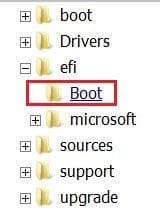
To make it boot able as UEFI (to install as UEFI-GPT) you need to add a small Boot folder.
Extract View attachment boot.zip to /efi folder

Efi boot.JPG

Now it will boot as Legacy or UEFI.
To make it universal (with HB, HP, Pro and Ultimate), on the USB drive, go to folder \sources and rename ei.cfg to ei.cfg.bak.

Now you can install any version of win 7 as Legacy or UEFI
 
Last edited:

My Computers

System One System Two

  • Computer type
    PC/Desktop
    Computer Manufacturer/Model Number
    custom build
    OS
    Windows 7 HP 64
    CPU
    i5 6600K - 800MHz to 4200MHz
    Motherboard
    GA-Z170-HD3P
    Memory
    4+4G GSkill DDR4 3000
    Graphics Card(s)
    IG - Intel 530
    Monitor(s) Displays
    Samsung 226BW
    Screen Resolution
    1680x1050
    Hard Drives
    (1) -1 SM951 – 128GB M.2 AHCI PCIe SSD drive for Windows 7 and Lubuntu
    (2) -1 WD SATA 3 - 1T for Data
    (3) -1 WD SATA 3 - 1T for backup
    PSU
    Thermaltake 450W TR2 gold
    Keyboard
    Old and good Chicony mechanical keyboard
    Mouse
    Logitech mX performance - 9 buttons (had to disable some)
    Internet Speed
    500Mb/s
    Browser
    Firefox 64
    Other Info
    TinyWall firewall
  • Computer type
    Laptop
    System Manufacturer/Model Number
    Asus Q550LF
    OS
    Windows 7 Pro
    CPU
    i7-4500U 800MHz to 3.0GHz
    Motherboard
    Asus Q550LF
    Memory
    (4+4)G DDR3 1600
    Graphics Card(s)
    IG intel 4400 + NVIDIA GeForce GT 745M
    Sound Card
    Realtek
    Monitor(s) Displays
    LG Display LP156WF4-SPH1
    Screen Resolution
    1920 x 1080
    Hard Drives
    BX500 120G SSD for Windows and programs +
    1T HDD for data
    Internet Speed
    500 Mb/s
    Browser
    Firefox
    Other Info
    TinyWall firewall
I have joined this thread. My install will be Legacy rather than UEFI. If no need for Rufus that's fine. I don't see how
FAT32 gets involved in making one of these boot disks.

I usually don't use 7Zip bit rather IZArc. On the extraction whatever I have usually loads to the desktop.
How is the path set to the what is is normally listed as F: drive?

Also all those commands do not indicate what to do with the ISO disk and when to prevent over writes
of the Boot drive by some auto setup starting from Win7. I can see where a lot of this can go awry.

Can you break it down into steps?
 

My Computer

Computer type
PC/Desktop
Computer Manufacturer/Model Number
custom
OS
Windows 7 x64 Ultimate
CPU
AMD Athlon II x3 450
Motherboard
MSI 880GM
Memory
2 GB
Hard Drives
various
Browser
Firefox, Opera
If you want to use the Win 7 installation USB drive only to install as Legacy, you don't need the Fat32 format and the \efi\boot folder.

Open a CMD window as administrator and type:
diskpart
list disk (it will list all drives. Identify the USB drive number)
select disk n (replace n by the USB drive number obtained with list disk)
clean
convert mbr
create part primary
select part 1
format fs=ntfs quick
assign
active
exit (to exit diskpart)

Now extract all files and folders from the Win 7 installation DVD or iso file to the root of the USB drive.
Now it will boot as Legacy only.
To make it universal (with HB, HP, Pro and Ultimate), on the USB drive, go to folder \sources and rename ei.cfg to ei.cfg.bak.

Now you can install any version of win 7 as Legacy
 
Last edited:

My Computers

System One System Two

  • Computer type
    PC/Desktop
    Computer Manufacturer/Model Number
    custom build
    OS
    Windows 7 HP 64
    CPU
    i5 6600K - 800MHz to 4200MHz
    Motherboard
    GA-Z170-HD3P
    Memory
    4+4G GSkill DDR4 3000
    Graphics Card(s)
    IG - Intel 530
    Monitor(s) Displays
    Samsung 226BW
    Screen Resolution
    1680x1050
    Hard Drives
    (1) -1 SM951 – 128GB M.2 AHCI PCIe SSD drive for Windows 7 and Lubuntu
    (2) -1 WD SATA 3 - 1T for Data
    (3) -1 WD SATA 3 - 1T for backup
    PSU
    Thermaltake 450W TR2 gold
    Keyboard
    Old and good Chicony mechanical keyboard
    Mouse
    Logitech mX performance - 9 buttons (had to disable some)
    Internet Speed
    500Mb/s
    Browser
    Firefox 64
    Other Info
    TinyWall firewall
  • Computer type
    Laptop
    System Manufacturer/Model Number
    Asus Q550LF
    OS
    Windows 7 Pro
    CPU
    i7-4500U 800MHz to 3.0GHz
    Motherboard
    Asus Q550LF
    Memory
    (4+4)G DDR3 1600
    Graphics Card(s)
    IG intel 4400 + NVIDIA GeForce GT 745M
    Sound Card
    Realtek
    Monitor(s) Displays
    LG Display LP156WF4-SPH1
    Screen Resolution
    1920 x 1080
    Hard Drives
    BX500 120G SSD for Windows and programs +
    1T HDD for data
    Internet Speed
    500 Mb/s
    Browser
    Firefox
    Other Info
    TinyWall firewall
I have done some things.

I located my Win7 Ultimate ISO and put that on the desktop
I made sure I have 7zip downloaded for use.
My thumb drive currently has NTFS on it.. I'll add a screenshot of what Rufus says for it's
formatting. The CMD instructions say return the USB to FAt32 so there's a confusion.

I will see how many of command instructions I get through before errors in DOS

- - - Updated - - -

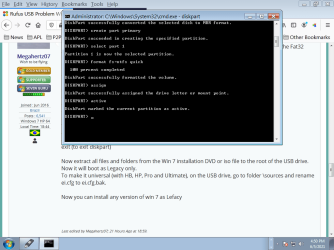
Here I executed the CMD instructions with no errors.

I can retype that at any time since it is not anywhere in an autoexec to load.

What extract procedure is necessarty get my Win7 ISO on the desktop onto the F: SSD drive?
Please be specific.

I was surpised to be able to make all the commands with no DOS errors.

- - - Updated - - -

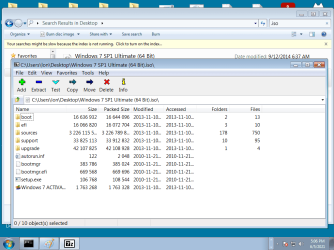
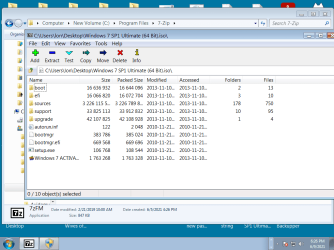
7zip loads ISO from desktop

- - - Updated - - -

To this point, the SSD should not need the commands rerun.

7zip has found the ISO.

How do I work the Extract function?
 

Attachments

  • screen for rufus.png
    screen for rufus.png
    61.6 KB · Views: 0
  • diskpart commands executed.png
    diskpart commands executed.png
    37.1 KB · Views: 1
  • 7ziploads ISO.png
    7ziploads ISO.png
    36.8 KB · Views: 0

My Computer

Computer type
PC/Desktop
Computer Manufacturer/Model Number
custom
OS
Windows 7 x64 Ultimate
CPU
AMD Athlon II x3 450
Motherboard
MSI 880GM
Memory
2 GB
Hard Drives
various
Browser
Firefox, Opera
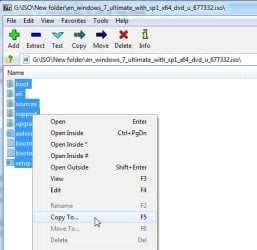
Select, then rt click and copy to

7zip-copyto.jpg
 

My Computers

System One System Two

  • Computer type
    PC/Desktop
    OS
    7 X64
    CPU
    i5 8400
    Motherboard
    gigabyte b365m ds3h
    Memory
    2x8gb 3200mhz
    Hard Drives
    various
    PSU
    pure power 11 400w cm
    Case
    Coolermaster
    Cooling
    cryorig m9i
  • Computer type
    PC/Desktop
    OS
    7x64
    CPU
    g5400
    Motherboard
    ga b365m ds3h
    Memory
    8gb ddr4 2400
    PSU
    xfx pro 450w
Get to last screen (Win 7 iso on 7zip) hit extract on the menu, point to F: - Enter
 

My Computers

System One System Two

  • Computer type
    PC/Desktop
    Computer Manufacturer/Model Number
    custom build
    OS
    Windows 7 HP 64
    CPU
    i5 6600K - 800MHz to 4200MHz
    Motherboard
    GA-Z170-HD3P
    Memory
    4+4G GSkill DDR4 3000
    Graphics Card(s)
    IG - Intel 530
    Monitor(s) Displays
    Samsung 226BW
    Screen Resolution
    1680x1050
    Hard Drives
    (1) -1 SM951 – 128GB M.2 AHCI PCIe SSD drive for Windows 7 and Lubuntu
    (2) -1 WD SATA 3 - 1T for Data
    (3) -1 WD SATA 3 - 1T for backup
    PSU
    Thermaltake 450W TR2 gold
    Keyboard
    Old and good Chicony mechanical keyboard
    Mouse
    Logitech mX performance - 9 buttons (had to disable some)
    Internet Speed
    500Mb/s
    Browser
    Firefox 64
    Other Info
    TinyWall firewall
  • Computer type
    Laptop
    System Manufacturer/Model Number
    Asus Q550LF
    OS
    Windows 7 Pro
    CPU
    i7-4500U 800MHz to 3.0GHz
    Motherboard
    Asus Q550LF
    Memory
    (4+4)G DDR3 1600
    Graphics Card(s)
    IG intel 4400 + NVIDIA GeForce GT 745M
    Sound Card
    Realtek
    Monitor(s) Displays
    LG Display LP156WF4-SPH1
    Screen Resolution
    1920 x 1080
    Hard Drives
    BX500 120G SSD for Windows and programs +
    1T HDD for data
    Internet Speed
    500 Mb/s
    Browser
    Firefox
    Other Info
    TinyWall firewall
Ok thanks.
We are close on this. I will finish it off soon.
May even get a decent new USB drive.
 

My Computer

Computer type
PC/Desktop
Computer Manufacturer/Model Number
custom
OS
Windows 7 x64 Ultimate
CPU
AMD Athlon II x3 450
Motherboard
MSI 880GM
Memory
2 GB
Hard Drives
various
Browser
Firefox, Opera
I am back on this and not done.
I have made a new screen shot with what I've done today with the iso in the 7zip address bar.
From there, I was not able in Win7 to open the location. Clicking on Extract opens a small dialog with a down arrow. Activating that gives a blank window.
I am not able to get to the USB that we configured in all those previous messages.
This is why I give plenty of time in between responses. I don't like things that appear easy only to be stopped by more errors.
 

Attachments

  • extractwin7.png
    extractwin7.png
    38.3 KB · Views: 0

My Computer

Computer type
PC/Desktop
Computer Manufacturer/Model Number
custom
OS
Windows 7 x64 Ultimate
CPU
AMD Athlon II x3 450
Motherboard
MSI 880GM
Memory
2 GB
Hard Drives
various
Browser
Firefox, Opera
It tells you at the bottom of the screen

0/10 objects selected . Obviously, because you have not selected anything, there is nothing to extract.

Look at the pic I posted earlier and you will see the selected objects are highlighted in blue.
 

My Computers

System One System Two

  • Computer type
    PC/Desktop
    OS
    7 X64
    CPU
    i5 8400
    Motherboard
    gigabyte b365m ds3h
    Memory
    2x8gb 3200mhz
    Hard Drives
    various
    PSU
    pure power 11 400w cm
    Case
    Coolermaster
    Cooling
    cryorig m9i
  • Computer type
    PC/Desktop
    OS
    7x64
    CPU
    g5400
    Motherboard
    ga b365m ds3h
    Memory
    8gb ddr4 2400
    PSU
    xfx pro 450w
I think it's going in. What seemed to happen is there's an extra "..." bubble to open to get to the E: drive on the PC where 7zip and the USB are installed. I had repeatedly failed to discover that.
time passes.
Ok it shows completed.
To test I'd have to reset the PC to boot from removable drive?
I'll find some extra HD or SSD to practice with that and confirm this has worked.

- - - Updated - - -

Last thing today.

The USB drive has booted up successfully for a Win7 install with no target device.

The first time I tried this, the USB refused when an SSD was attached.
I don't know what formatting tricks or BIOS settings might be needed.

I'll be able to mark this solved. Apparently there's something on my end not ready
to accept the USB.

I can redo the format on the target device which is an SSD.

- - - Updated - - -

Not my thread so I will not attempt to mark solved. It may be turned off anyway.
Once I refreshed the needed format of the target SSD , the USB recognized the target SSD for Windows install.

- - - Updated - - -

I didn't expect to be back but this should be known for anyone following along.

The USB installer ran the setup exe to a fresh NTFS formated SSD from Crucial. It did all it's count up to 100% and the rest
of it on the setup screen and then saying Windows will restart after a 10 sec countdown.

After that _it did not_ go to the SSD or whatever is supposed to happen but ran the setup.exe again from the USB.
I had to sit through all that. At the new start of setup screen I turned the PC off. I disconnected the USB and restarted the PC with SSD only to see what would happen.

Apparently the rest of the setup routine looking for workgroup connections, and such is going in.

Once that restart was made everything went as one normally sees it. The first thing I do is setup my
workgroup and that appears to be working.

- - - Updated - - -

my replies have shown up as updates when I requested a reply. No idea why.
 

My Computer

Computer type
PC/Desktop
Computer Manufacturer/Model Number
custom
OS
Windows 7 x64 Ultimate
CPU
AMD Athlon II x3 450
Motherboard
MSI 880GM
Memory
2 GB
Hard Drives
various
Browser
Firefox, Opera
Oviously, if you leave the usb plugged in, the machine will boot from it
( assuming there are no other bootable devices before it in the bios boot order).

One way is to unplug the usb stick when it it reboots after the countdown..

on the setup screen and then saying Windows will restart after a 10 sec countdown.
 

My Computers

System One System Two

  • Computer type
    PC/Desktop
    OS
    7 X64
    CPU
    i5 8400
    Motherboard
    gigabyte b365m ds3h
    Memory
    2x8gb 3200mhz
    Hard Drives
    various
    PSU
    pure power 11 400w cm
    Case
    Coolermaster
    Cooling
    cryorig m9i
  • Computer type
    PC/Desktop
    OS
    7x64
    CPU
    g5400
    Motherboard
    ga b365m ds3h
    Memory
    8gb ddr4 2400
    PSU
    xfx pro 450w
Well, not obvious to me but thanks for the clarification. I am glad I got through it finally. What I usually do is make
paper copies of these procedures so I don't have bother anyone on the same topic. Just now and not being fully in
public I have no access to the usual public library printers.
 

My Computer

Computer type
PC/Desktop
Computer Manufacturer/Model Number
custom
OS
Windows 7 x64 Ultimate
CPU
AMD Athlon II x3 450
Motherboard
MSI 880GM
Memory
2 GB
Hard Drives
various
Browser
Firefox, Opera
Rufus works! Because it was MADE for the simple job of putting an ISO on a Flash Drive and making it bootable.
I only read one tutorial on how to use Rufus and it said to use "MBR an BIOS" in the appropriate boxes.
All other boxes must be filled in appropriately too, of course.

I have about a half dozen flash drives with OS's on them, and every one was created with the latest 'Rufus'. It's so simple, even a total Nube can use it. NO other program is required!
Please, don't make something difficult out of something that is really SO Simple!
If you can't use Rufus, it's only because you're trying to use it Improperly! .
:cool:
 

My Computer

Computer type
PC/Desktop
Computer Manufacturer/Model Number
Various
OS
Win 7 Pro, SP1, x86, Win-11/Pro/64
CPU
AMD
Motherboard
Various
Memory
8GB Crucial
Graphics Card(s)
Various
Sound Card
OnBoard
Monitor(s) Displays
Acer 21.5"
Hard Drives
Crucial SSD, 500 GB
PSU
OEM
Case
SFF Slim Line Case
Cooling
OEM
Keyboard
eMachines
Mouse
Logitech Wireless
Internet Speed
varies
Antivirus
Windows Defender/Super Anti-Spyware
Browser
Firefox
Ok, noted.
 

My Computer

Computer type
PC/Desktop
Computer Manufacturer/Model Number
custom
OS
Windows 7 x64 Ultimate
CPU
AMD Athlon II x3 450
Motherboard
MSI 880GM
Memory
2 GB
Hard Drives
various
Browser
Firefox, Opera
Hi, loniapple,
Watch the point.
There are two procedures, separate to get it done. You need not use rufus for these steps.
first, Plug your 4 gb pendrive in to the pc and note down the drive.
go to the cmd as admin.
There you execute the command as shown in post 4 by megathir. Just execute those commands, one by one to make your usb bootable. Ok.
When you issue list disk command, you may be seeing your 4 gb drive and please select that disk for further commands.
After you exit diskpart, your usb is now bootable.
Then go to the folder, where you are all having all the windows files.
If you are having iso, then just use 7 zip for extracting those files in to a separate new folder . All the files will be copied to that folder. Now, Select these files , all files in the folder and then copy to the pendrive , which is ready . Then just take the pendrive and now your pendrive is bootable with windows file.
 

My Computer

Computer type
PC/Desktop
Computer Manufacturer/Model Number
custom build
OS
Microsoft Windows 7 Ultimate 64-bit 7601 Multiprocessor Free Service Pack 1
CPU
Intel(R) Core(TM)2 Duo CPU E7200 @ 2.53GHz
Motherboard
To be filled by O.E.M. To be filled by O.E.M.
Memory
4.00 GB
Graphics Card(s)
NVIDIA GeForce 210
Sound Card
(1) NVIDIA High Definition Audio (2) Realtek High Definiti
Screen Resolution
1920 x 1080 x 32 bits (4294967296 colors) @ 60 Hz
Hard Drives
ST3500312CS ATA Device
Much obliged: successfully installed Windows 7 Pro 32-bit on a Dell Dimension 2350 (which was running Windows XP) using your USB method (including the 'boot' folder).
 

My Computers

System One System Two

  • Computer type
    PC/Desktop
    Computer Manufacturer/Model Number
    Dell Dimension 2350
    OS
    Windows 7 Pro 32-bit
    CPU
    Pentium 4 2.00 GHz
    Motherboard
    Dell Dimension 2350
    Memory
    2x512MB
    Graphics Card(s)
    pending
    Sound Card
    none
    Monitor(s) Displays
    HP V241p
    Screen Resolution
    1920 x 1080
    Hard Drives
    256GB Netac SATA SSD using a SATA to IDE Converter IDE to SATA Adapter Converter
    PSU
    Stock
    Case
    Stock
    Cooling
    Stock
    Other Info
    Ordered 2x1GB RAM sticks and a Pentium 4 2.80 GHz processor
    Purchased this PC via a local Thrift store for $10. Came with Windows XP, but I didn't care for that much.
  • Computer type
    PC/Desktop
    System Manufacturer/Model Number
    HP Pavilion Elite HPE-480t
    OS
    Windows 11 (25H2) Using bypass method
    CPU
    Intel Core i7 Extreme Edition 990X
    Motherboard
    Pegatron 2A86
    Memory
    6x8GB Patriot Viper DDR3 1866MHz (MPV316G186C0K) RAM running at 1066 MHz in Triple Channel/Dual Rank
    Graphics Card(s)
    GTX 970 4GB
    Sound Card
    none
    Monitor(s) Displays
    Acer KG241Q p
    Screen Resolution
    1920 x 1080
    Hard Drives
    512GB IndMEM mSATA
    PSU
    HP 460-watt p/n: 570857-001
    Case
    Stock
    Cooling
    Stock
    Browser
    Mostly MS Edge or Waterfox
    Antivirus
    Webroot Secure
    Other Info
    https://www.userbenchmark.com/UserRun/72537752
For upgrades, ordered 2x1GB RAM (was 2 x 512MB), a Pentium 4 2.80 GHz (was P4 2.00 GHz), and just a moment ago, a Nvidia GeForce 8400 GS 512MB DDR2 (rare vintage PCI edition!) graphics card. Apparently, there is a W7 driver available too: NVidia GeForce 8400 GS | Graphics card NVIDIA GeForce
 

My Computers

System One System Two

  • Computer type
    PC/Desktop
    Computer Manufacturer/Model Number
    Dell Dimension 2350
    OS
    Windows 7 Pro 32-bit
    CPU
    Pentium 4 2.00 GHz
    Motherboard
    Dell Dimension 2350
    Memory
    2x512MB
    Graphics Card(s)
    pending
    Sound Card
    none
    Monitor(s) Displays
    HP V241p
    Screen Resolution
    1920 x 1080
    Hard Drives
    256GB Netac SATA SSD using a SATA to IDE Converter IDE to SATA Adapter Converter
    PSU
    Stock
    Case
    Stock
    Cooling
    Stock
    Other Info
    Ordered 2x1GB RAM sticks and a Pentium 4 2.80 GHz processor
    Purchased this PC via a local Thrift store for $10. Came with Windows XP, but I didn't care for that much.
  • Computer type
    PC/Desktop
    System Manufacturer/Model Number
    HP Pavilion Elite HPE-480t
    OS
    Windows 11 (25H2) Using bypass method
    CPU
    Intel Core i7 Extreme Edition 990X
    Motherboard
    Pegatron 2A86
    Memory
    6x8GB Patriot Viper DDR3 1866MHz (MPV316G186C0K) RAM running at 1066 MHz in Triple Channel/Dual Rank
    Graphics Card(s)
    GTX 970 4GB
    Sound Card
    none
    Monitor(s) Displays
    Acer KG241Q p
    Screen Resolution
    1920 x 1080
    Hard Drives
    512GB IndMEM mSATA
    PSU
    HP 460-watt p/n: 570857-001
    Case
    Stock
    Cooling
    Stock
    Browser
    Mostly MS Edge or Waterfox
    Antivirus
    Webroot Secure
    Other Info
    https://www.userbenchmark.com/UserRun/72537752

My Computers

System One System Two

  • Computer type
    PC/Desktop
    Computer Manufacturer/Model Number
    custom build
    OS
    Windows 7 HP 64
    CPU
    i5 6600K - 800MHz to 4200MHz
    Motherboard
    GA-Z170-HD3P
    Memory
    4+4G GSkill DDR4 3000
    Graphics Card(s)
    IG - Intel 530
    Monitor(s) Displays
    Samsung 226BW
    Screen Resolution
    1680x1050
    Hard Drives
    (1) -1 SM951 – 128GB M.2 AHCI PCIe SSD drive for Windows 7 and Lubuntu
    (2) -1 WD SATA 3 - 1T for Data
    (3) -1 WD SATA 3 - 1T for backup
    PSU
    Thermaltake 450W TR2 gold
    Keyboard
    Old and good Chicony mechanical keyboard
    Mouse
    Logitech mX performance - 9 buttons (had to disable some)
    Internet Speed
    500Mb/s
    Browser
    Firefox 64
    Other Info
    TinyWall firewall
  • Computer type
    Laptop
    System Manufacturer/Model Number
    Asus Q550LF
    OS
    Windows 7 Pro
    CPU
    i7-4500U 800MHz to 3.0GHz
    Motherboard
    Asus Q550LF
    Memory
    (4+4)G DDR3 1600
    Graphics Card(s)
    IG intel 4400 + NVIDIA GeForce GT 745M
    Sound Card
    Realtek
    Monitor(s) Displays
    LG Display LP156WF4-SPH1
    Screen Resolution
    1920 x 1080
    Hard Drives
    BX500 120G SSD for Windows and programs +
    1T HDD for data
    Internet Speed
    500 Mb/s
    Browser
    Firefox
    Other Info
    TinyWall firewall
Back
Top