

When I type "%APPDATA% ... in Run > Enter
I get this result. "Favorites" in navigation pane has nothing to do with "%appdata%"
Why doesn't the navigation pane reflect the path "C:\Users\Owner\AppData\Roaming" ?
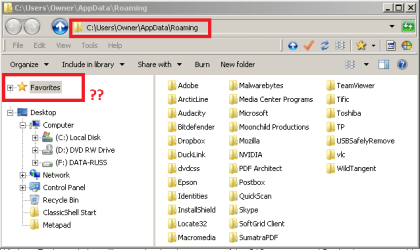
Should I be adding a switch (or something) to the %appdata% string to open the navigation pane as displayed in the address bar ?
File Properties:- (•) Show all files, folders and drives ... as True
Am I doing something wrong or is there a WinExp setting that must be tweaked ?
----------
SPECS:
Toshiba Satellite C665
OS:= Windows 7 Home Premium (32-bit), sp1 (Build 7601) OEM
UI:=Classic Shell Start + Classic Explorer
I get this result. "Favorites" in navigation pane has nothing to do with "%appdata%"
Why doesn't the navigation pane reflect the path "C:\Users\Owner\AppData\Roaming" ?
Should I be adding a switch (or something) to the %appdata% string to open the navigation pane as displayed in the address bar ?
File Properties:- (•) Show all files, folders and drives ... as True
Am I doing something wrong or is there a WinExp setting that must be tweaked ?
----------
SPECS:
Toshiba Satellite C665
OS:= Windows 7 Home Premium (32-bit), sp1 (Build 7601) OEM
UI:=Classic Shell Start + Classic Explorer
Last edited:
My Computer
- Computer type
- PC/Desktop
- Computer Manufacturer/Model Number
- Toshiba, Lenovo (laptops) + 4 rigs
- OS
- XP Pro (x86) | 7 HP (x86) & (x64) | 7 Pro (x64)


