Solved RUN instead of EXPLORER in Task Bar

TheDeerDude

New member
Power User
VIP
Local time
11:48 PM
Messages
204
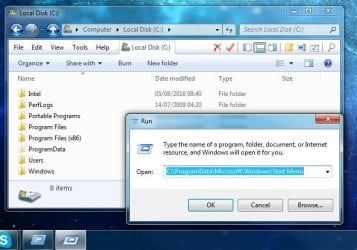
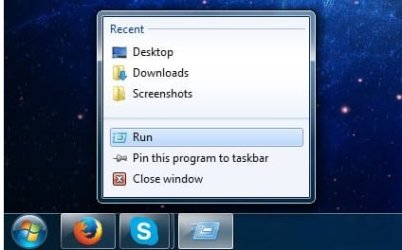
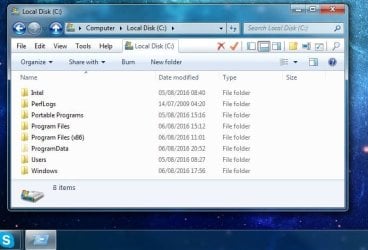
Strange, very strange situation I'm having right here. Whenever I open any explorer window, the icon on the taskbar appears as "Run" command instead of the usual Windows Explorer icon. It's rather annoying to say the least, quite confusing too. Any idea why this is happening and how I can fix it? It acts as if it was a "Run" window, too (when you press Windows+R) but it has a different icon. Please see attached screenshots, it's really strange.
 

Attachments
  • cx.JPG
    cx.JPG
    51.9 KB · Views: 18
  • wtf.JPG
    wtf.JPG
    57 KB · Views: 18
  • tb.jpg
    tb.jpg
    15.7 KB · Views: 18

My Computer My Computer

At a glance

Windows 7 x64
OS
Windows 7 x64
Apparently at some point you have ticked the Run check box in Customise Task Bar. If you do not want it, Right Click on the Task Bar & select Properties, then select the Start Menu tab, then select Customise & scroll down to the Run check box & untick it. Click OK, then be sure to click the Apply button before clicking the the OK button to close it.

The run icon will probably still be on the Task Bar, if so just right click on it & select Close Windows or click on the little X on the RH upper corner & it will disappear from the Task Bar.
 

My Computer My Computer

At a glance

Windows 7 Home Premium 64 bit sp1Intel i5 3570 3.4Ghz Ivy Bridge SKT 1155 quad...G-Skill Rip Jaws 16Gb (8x2) DDR3 -1600 PC3 12...Gigabyte NVIDIA GT610 1Gb DDR3 810/1200 PCI-E...
Computer type
PC/Desktop
Computer Manufacturer/Model Number
Self built using existing case
OS
Windows 7 Home Premium 64 bit sp1
CPU
Intel i5 3570 3.4Ghz Ivy Bridge SKT 1155 quad core
Motherboard
Gigabyte Z77-HD3 SKT 1155 2xSata 3, 4x USB 3.0
Memory
G-Skill Rip Jaws 16Gb (8x2) DDR3 -1600 PC3 12800 CL 10 red
Graphics Card(s)
Gigabyte NVIDIA GT610 1Gb DDR3 810/1200 PCI-E 2.0 Silent
Sound Card
NVIDIA High Definition & Realtech High Definition Audio
Monitor(s) Displays
2 x Philips 226V4L 16:9 aspect ratio
Screen Resolution
1920 x 1080 HD
Hard Drives
Samsung 840 Pro 256gb SSD, SATA 3.
Hitachi Touro Portable 1tb, USB 3.0 HDD used for image b/ups.
PSU
Corsair VS450
Case
Codeng
Cooling
PSU fan & CPU fan
Keyboard
Logitech
Mouse
Logitech Wireless trackball M570
Internet Speed
Wireless 3G. 3mg down & 550kb up.
Antivirus
Bitdefender Internet Security 2020
Browser
Opera (Current Version) & Firefox
Other Info
MS Office 2013 Pro. Davis weather station software. MGE Nova 600 avr UPS.
Hi Ranger4, and thank you for your reply.

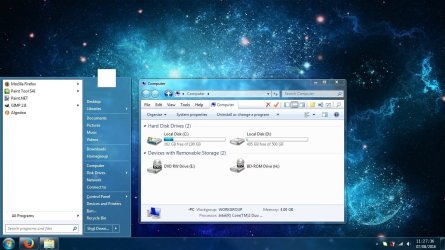
I am not using the default Windows start menu, but ClassicShell. The "Run" is not in the default start menu, and I don't believe it has anything to do with this. This is a fresh install, it was never checked either way.

To clarify, in case if my first post is not clear enough. My issue is the following:
- When I open any Windows Explorer (file browser) window, through anywhere (Win+E, Start>Computer, etc) its icon on the taskbar isn't the usual "Windows Explorer" Libraries icon, but something that looks somewhat like a "Run" prompt icon. When I Shift+Click it (which would normally open another instance of Windows Explorer) a "Run" prompt comes up, with a similar icon.

This is not normal behaviour, and I am trying to figure out what is causing it, and how to fix it.
 

My Computer My Computer

At a glance

Windows 7 x64
OS
Windows 7 x64
If it's only a matter of the icon being wrong but the operations are aok, must find an icon fixer. I think there is a clickbox for re-pairing icons with their respective EXEs and whatever elses within Tweaking.com's Windows Repair (All in One). Download, install, boot Windows into Safe Mode with Networking, click only the repair icons box, and if you want, add items #26 & #27. Restart twice to allow Windows and desktop to settle into place.
 

My Computer My Computer

At a glance

Windows 7 Professional 64-bitDesktop i5; Acers i5 & i7desktop 16GB; 1 Acer 8GB & 1 Acer 16GB
Computer type
PC/Desktop
Computer Manufacturer/Model Number
Antec desktop; Acer Aspire laptops
OS
Windows 7 Professional 64-bit
CPU
Desktop i5; Acers i5 & i7
Memory
desktop 16GB; 1 Acer 8GB & 1 Acer 16GB
Hard Drives
1TB split into 2 equal partitions [OS and data] usable by RJS
Internet Speed
AT&T DSL
Browser
FF, GChrome, msIE
Other Info
Windows 7 Firewall, Emsisoft AM/AV, MSE [scan-only], SpywareBlaster, Ruiware/BillP combine

My Computer My Computer

At a glance

Win7 Pro-64 Biti7-2600-3.4GHz8 GIG DDR3onboard
Computer Manufacturer/Model Number
Put together
OS
Win7 Pro-64 Bit
CPU
i7-2600-3.4GHz
Motherboard
ASRock Z68M
Memory
8 GIG DDR3
Graphics Card(s)
onboard
Sound Card
onboard
Hard Drives
Seagate 1TB 7200RPM
PSU
680 W
Case
black
Cooling
stock fans
Keyboard
Microsoft
Mouse
Microsoft optical
BrightBlessings, you know, I failed to note thread starter was using ClassicShell, thanks for the heads-up. Awhile back, I also used and did like ClassicShell within Windows 8 and Windows 7 [I have 3 computers]. Now, even all three are running Windows 7 Pro, I uninstalled ClassicShell awhile back -- because it was causing a few annoying problems. Pass the pot o' virtual coffee, willya? I need some...
 

My Computer My Computer

At a glance

Windows 7 Professional 64-bitDesktop i5; Acers i5 & i7desktop 16GB; 1 Acer 8GB & 1 Acer 16GB
Computer type
PC/Desktop
Computer Manufacturer/Model Number
Antec desktop; Acer Aspire laptops
OS
Windows 7 Professional 64-bit
CPU
Desktop i5; Acers i5 & i7
Memory
desktop 16GB; 1 Acer 8GB & 1 Acer 16GB
Hard Drives
1TB split into 2 equal partitions [OS and data] usable by RJS
Internet Speed
AT&T DSL
Browser
FF, GChrome, msIE
Other Info
Windows 7 Firewall, Emsisoft AM/AV, MSE [scan-only], SpywareBlaster, Ruiware/BillP combine
I have figured out what the problem is. Thank you both for hinting at ClassicShell and running SFC.

"classic shell" "start menu" "taskbar" "system files"

Those words made me wonder whether it could be related to something I did recently, which was to delete all contents of "Start>All Programs" and create custom folders with categories for programs.

I've put the default folders back to their directory - "C:\Users\USERNAME\AppData\Roaming\Microsoft\Windows\Start Menu\Programs" and surely, after restarting Explorer, the icon is back and works as it should.

Turns out that Windows Explorer NEEDS the "Accessories/Windows Explorer.lnk" shortcut in start menu. If it is removed, it'll cause this strange behaviour.

Another solution to this, if you really want to get rid of the "Accessories" folder is to pin Windows Explorer to taskbar.

Thank you all for help!

I've been using Classic Shell and QTTabBar for quite a while now, and I would never go back to the default start menu and explorer :) (because of the additional functionality and customization)
 

Attachments

  • cs.jpg
    cs.jpg
    144.7 KB · Views: 2

My Computer My Computer

At a glance

Windows 7 x64
OS
Windows 7 x64
Good that you got it sorted and thanks for letting us know what was needed to do so. Cheers.
 

My Computer My Computer

At a glance

Win7 Pro-64 Biti7-2600-3.4GHz8 GIG DDR3onboard
Computer Manufacturer/Model Number
Put together
OS
Win7 Pro-64 Bit
CPU
i7-2600-3.4GHz
Motherboard
ASRock Z68M
Memory
8 GIG DDR3
Graphics Card(s)
onboard
Sound Card
onboard
Hard Drives
Seagate 1TB 7200RPM
PSU
680 W
Case
black
Cooling
stock fans
Keyboard
Microsoft
Mouse
Microsoft optical
Back
Top