run window update from command line?

fluidmotion

New member
Member
VIP
Local time
2:27 PM
Messages
275
can Window Update be ran from command line?
 

My Computer

Computer Manufacturer/Model Number
MP Mini Netbook 110
OS
Win7 Starter 32 bits
yes, you can run it from the command line

%windir%\system32\wuapp.exe startmenu

works but it brings up the gui

Rich
 

My Computer

Computer type
Laptop
Computer Manufacturer/Model Number
Toshiba Laptop Qosimo X870
OS
Windows 7 Pro x64 SP1
CPU
Intel Core I7
Motherboard
Toshiba Qosmio
Memory
16 Gigs
Graphics Card(s)
NVIDIA GeForce GTX 670M
Monitor(s) Displays
17.7" laptop
Screen Resolution
1600 x 900
Hard Drives
256 Gig SanDisk SSD for C
256 Gig Intel SSD for D
Internet Speed
50/25 FIOS
Antivirus
Vipre (all you can eat for 10 machines)
Browser
IE and FF
Other Info
I have dos 6.22, wfwg 3.11, win98, 2000 and xp VHD's available for testing. MS's Virtual PC works great.
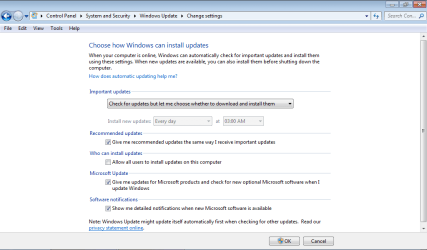
win.update.png

my win 7 update is set up like this.
do you know how my win 7 gets update notice?

yes, you can run it from the command line

%windir%\system32\wuapp.exe startmenu

works but it brings up the gui

Rich
 

My Computer

Computer Manufacturer/Model Number
MP Mini Netbook 110
OS
Win7 Starter 32 bits
"my win 7 update is set up like this.
do you know how my win 7 gets update notice?"

What the update program does is check for updates when you boot your computer. the check for
updaters is most likely in the startup options on your system.

That's why the shield shows on the right side of your status bar when there are updates available.

Rich
 

My Computer

Computer type
Laptop
Computer Manufacturer/Model Number
Toshiba Laptop Qosimo X870
OS
Windows 7 Pro x64 SP1
CPU
Intel Core I7
Motherboard
Toshiba Qosmio
Memory
16 Gigs
Graphics Card(s)
NVIDIA GeForce GTX 670M
Monitor(s) Displays
17.7" laptop
Screen Resolution
1600 x 900
Hard Drives
256 Gig SanDisk SSD for C
256 Gig Intel SSD for D
Internet Speed
50/25 FIOS
Antivirus
Vipre (all you can eat for 10 machines)
Browser
IE and FF
Other Info
I have dos 6.22, wfwg 3.11, win98, 2000 and xp VHD's available for testing. MS's Virtual PC works great.
The screen you posted and RichnRockville described affects automatic updates. You can run Windows Update manually at any time to see if you're up-to-date.
 

My Computer

Computer type
Laptop
Computer Manufacturer/Model Number
HP Pavilion dv6-6c10us
OS
x64 (6.3.9600) Win8.1 Pro & soon dual boot x64 (6.1.7601) Win7_SP1 HomePrem
CPU
AMD A6-3420M APU with Radeon(tm) HD Graphics
Motherboard
Hewlett-Packard 1805
Memory
6.00 GB
Graphics Card(s)
AMD Radeon(TM) HD 6520G
Sound Card
(1) AMD High Definition Audio Device (2) IDT High Definiti
Monitor(s) Displays
HP W2072a 20" LCD (1600 x 900) @ 60 Hz
Screen Resolution
1366 x 768 x 32 bits (4294967296 colors) @ 60 Hz
Hard Drives
ST640LM0 00 HM641JI SATA Disk Device
Keyboard
Logitech k520 wireless KB
Mouse
Logitech m320 wireless mouse (bundled with KB)
Internet Speed
15/5 | 54 MB Wireless 'n'
Antivirus
Realtime: Defender or Avast | On-demand: Malwarebytes, ESET
Browser
IE 11 on Win8, IE 10 on win 7
Other Info
Media: [Gimp, Audacity, VLC] || Comm: [WEmail 2012, Skype] || Productivity: [OpenOffice,| Textpad] || Utils: [Sysinternals, cCleaner, Speccy, Defraggler]
Windows update script

Here is a useful script to download and install Windows updates just from the command line:

Searching, Downloading, and Installing Updates (Windows)

Copy script to notepad and save it to WUA_SearchDownloadInstall.vbs.
Open a command prompt and type CSCRIPT WUA_SearchDownloadInstall.vbs
(dont' forget the CSCript command).
 

My Computer

Computer Manufacturer/Model Number
CCL Online OEM
OS
Windows 7 Home Premium 32bit
CPU
Intel Core 2 2.4GHz
Motherboard
Foxconn 946GZ7MA
Memory
4GB
Graphics Card(s)
ATI Radeon 4850
Sound Card
Realtek HD Audio
Monitor(s) Displays
Prolite E2407HDS
Screen Resolution
1920x1080
Hard Drives
2 x WDC 500 GB
Cooling
Fan
Keyboard
Microsoft Digital Media
Mouse
Optical Wheel Mouse
Internet Speed
14Mb/sec
Other Info
Internet ISP: Plusnet
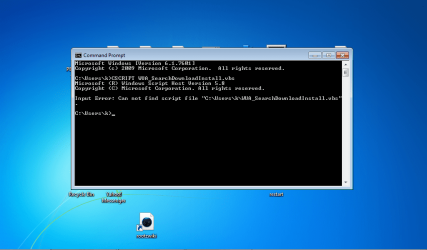
i typed this command in command prompt, but this did not work.

win update command prompt.png

and
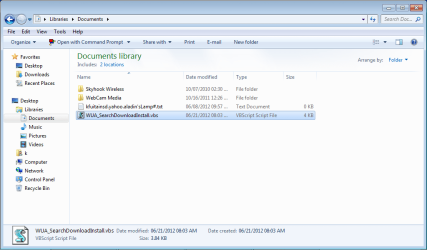
i clicked this file name in doc. lib.,
"searching for update..." showed up in command prompt.

win update.script.png


Here is a useful script to download and install Windows updates just from the command line:

Searching, Downloading, and Installing Updates (Windows)

Copy script to notepad and save it to WUA_SearchDownloadInstall.vbs.
Open a command prompt and type CSCRIPT WUA_SearchDownloadInstall.vbs
(dont' forget the CSCript command).
 
Last edited:

My Computer

Computer Manufacturer/Model Number
MP Mini Netbook 110
OS
Win7 Starter 32 bits
running the script

You did not change directory to where the script was.

cd c:\Users\<your userid>\Documents
dir
cscript WUA_SearchDownloadInstall.vbs


My Computer

Computer Manufacturer/Model Number
CCL Online OEM
OS
Windows 7 Home Premium 32bit
CPU
Intel Core 2 2.4GHz
Motherboard
Foxconn 946GZ7MA
Memory
4GB
Graphics Card(s)
ATI Radeon 4850
Sound Card
Realtek HD Audio
Monitor(s) Displays
Prolite E2407HDS
Screen Resolution
1920x1080
Hard Drives
2 x WDC 500 GB
Cooling
Fan
Keyboard
Microsoft Digital Media
Mouse
Optical Wheel Mouse
Internet Speed
14Mb/sec
Other Info
Internet ISP: Plusnet
how do u change directory?

You did not change directory to where the script was.

cd c:\Users\<your userid>\Documents
dir
cscript WUA_SearchDownloadInstall.vbs


My Computer

Computer Manufacturer/Model Number
MP Mini Netbook 110
OS
Win7 Starter 32 bits
Change dir

You run the CD command to change directory to where the script is saved to. To change drive just type C:, to change directory enter CD and then the path
e.g.
CD c:\Users\<your userid>\Documents
 

My Computer

Computer Manufacturer/Model Number
CCL Online OEM
OS
Windows 7 Home Premium 32bit
CPU
Intel Core 2 2.4GHz
Motherboard
Foxconn 946GZ7MA
Memory
4GB
Graphics Card(s)
ATI Radeon 4850
Sound Card
Realtek HD Audio
Monitor(s) Displays
Prolite E2407HDS
Screen Resolution
1920x1080
Hard Drives
2 x WDC 500 GB
Cooling
Fan
Keyboard
Microsoft Digital Media
Mouse
Optical Wheel Mouse
Internet Speed
14Mb/sec
Other Info
Internet ISP: Plusnet

My Computer

Computer type
PC/Desktop
Computer Manufacturer/Model Number
Gateway SX2110G
OS
Win 7 Home Premium 64 bit
CPU
AMD
Motherboard
Acer micro atx
Memory
8 GB
Graphics Card(s)
ATI onboard
Hard Drives
500 GB
Antivirus
Microsoft
Browser
Chrome
Back
Top