Running an elevated command prompt (from the Recovery DVD)

sviatko

New member
Local time
6:32 PM
Messages
3
Long story short,
I've been trying to dual-boot W7 with Ubuntu. Failed. Now I cannot boot up Windows, and though there are hundreds of forum articles explaining how to fix this (using the Bootrec/bcdedit commands in the Windows RE command prompt), but I can't run either of them (get an error). My guess is that I need to run bcdedit as an admin.
After doing some research, I learned about the "Runas" command, but I can't seem to get it to work. Microsoft and other forums didn't help much...

Please help!
 

My Computer My Computer

At a glance

Windows 7, Home Premium 64bit
OS
Windows 7, Home Premium 64bit
Tried it. Once I do Diskpart> list disk, the status of Disk 0 is "Invalid", as opposed to "Online" as on the screen shot.
 

My Computer My Computer

At a glance

Windows 7, Home Premium 64bit
OS
Windows 7, Home Premium 64bit
Try using free Partition Wizard bootable CD to mark Active, then click on Disk to highlight it, from Disk tab select Rebuild MBR to see if it will start. If not run the three Repairs from DVD/Repair CD.

If this fails post back a camera snap of PW drive map with listings if possible.

Be aware that GRUB can corrupt Win7 beyond repair as we see often here. You may need to wipe your HD then clean reinstall Win7.
 
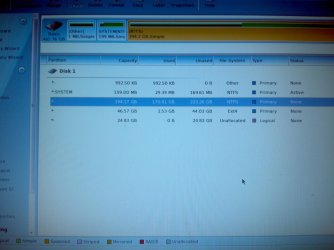
No luck... here's the screen shot of the drive map. And thank you for your quick responses.
 

Attachments

  • IMG_20111228_215837.jpg
    IMG_20111228_215837.jpg
    416.6 KB · Views: 39

My Computer My Computer

At a glance

Windows 7, Home Premium 64bit
OS
Windows 7, Home Premium 64bit
The 200mb System Reserved partition should hold both System and Active flags not just Active. Did you click on Disk 1 to highlight it, then try Rebuild MBR from Disk tab, reboot to see if it starts? If not run three full Startup Repairs with reboots in between.

If that fails, try rightclicking on the Win7 partition to Modify>Set to Active, OK, then click on Disk 1 again, try Rebuild MBR, apply. If OS won't boot then try 3 Startup Repairs.

You can try bootrec.exe /fixboot, bootrec.exe /fixmbr and bootsect.exe /nt60 ALL from DVD/Repair CD Command line in case Startup Repair is missing running them for some reason.

You've now tried everything and may be up against GRUB corruption of WIn7. You can rescue your files by Copy & Paste - in Windows Recovery Console
 
Back
Top