Running chkdsk on external drive affects internet connectivity :/

Admiral Awesome

New member
Member
Local time
2:36 AM
Messages
98
Location
Kistianstad, Sweden
Why does running chkdsk /f /r on external drive(s) affect internet connectivity?
And it's not somewhat, either; it's like being offline.

Thanks
 

My Computer My Computer

At a glance

Windows 7 Pro 64-bitAMD Athlon 64X2 Dual Core 5000+ @ 2611 Mhz4 GB Dual-Channel DDR2 @ 373 MHzNVIDIA GeForce 6150SE nForce 430
Computer type
PC/Desktop
Computer Manufacturer/Model Number
Dell OptiPlex 3040
OS
Windows 7 Pro 64-bit
CPU
AMD Athlon 64X2 Dual Core 5000+ @ 2611 Mhz
Motherboard
ASUS
Memory
4 GB Dual-Channel DDR2 @ 373 MHz
Graphics Card(s)
NVIDIA GeForce 6150SE nForce 430
Sound Card
Proprietary, I suppose
Monitor(s) Displays
19" LG Flatron L1910B
Screen Resolution
1280x1024
Hard Drives
Some 2,5 TB divided among one internal SATA, partitioned into C: and D:, and two USB 2.0-connected external drives, the latter for independent backups
PSU
Super Flower 500W
Case
Sure
Cooling
Yes
Keyboard
A year old Dell. The best so far, excluding the original IBM
Mouse
Logitech
Internet Speed
Wireless modem 2 MB/s and down; typically 0.5 to 1.3 MB/s
Antivirus
AVG free
Browser
Chrome
Does it happen with programs/stuff that's not on the internet as well?
I've never heard of that happening, with the exception of a situation where your computer is old/out of date/doesnt have enough ram, CPU power, or disk space/speed to simultaneously check a disk and connect to the internet. If that's the case, it doesn't have anything to do with the connection and is just your computer is too slow. Try pressing Ctrl+Shift+ESC to bring up the task manager service section and then click on performance. Then run the chkdsk and see if the cpu or ram are skyrocketing or capping out; that would probably mean your system is just too slow to do the internet and the chkdsk at the same time.

Hope that helps.
 

My Computer My Computer

At a glance

Windows 7 professional 64 biti7-4790k64gbnvidia gtx 780
Computer type
PC/Desktop
Computer Manufacturer/Model Number
custom
OS
Windows 7 professional 64 bit
CPU
i7-4790k
Motherboard
asrock z97 extreme4
Memory
64gb
Graphics Card(s)
nvidia gtx 780
Hard Drives
lots
Browser
chrome
Why does running chkdsk /f /r on external drive(s) affect internet connectivity? And it's not somewhat, either; it's like being offline. Thanks
Another possibility, Windows has to keep refreshing its view, its outline, its mapping [pick best wording] of that external drive, internet operations involving stuff on said external drive might be waiting for refreshing to become manageable. I sometimes get the same thing concerning my flash drives, so I'll be watching this thread to learn right alongside you. :)
 

My Computer My Computer

At a glance

Windows 7 Professional 64-bitDesktop i5; Acers i5 & i7desktop 16GB; 1 Acer 8GB & 1 Acer 16GB
Computer type
PC/Desktop
Computer Manufacturer/Model Number
Antec desktop; Acer Aspire laptops
OS
Windows 7 Professional 64-bit
CPU
Desktop i5; Acers i5 & i7
Memory
desktop 16GB; 1 Acer 8GB & 1 Acer 16GB
Hard Drives
1TB split into 2 equal partitions [OS and data] usable by RJS
Internet Speed
AT&T DSL
Browser
FF, GChrome, msIE
Other Info
Windows 7 Firewall, Emsisoft AM/AV, MSE [scan-only], SpywareBlaster, Ruiware/BillP combine
Thank you zooga and RolandJS.

zooga, you said: 'Does it happen with programs/stuff that's not on the internet as well?' yes, but not to that paralyzing extent at all, although even (seemingly to me) non internet-related stuff like, say, playing music using VLC (which obviously resides on C:\) off a USB stick not involved in any chkdsk operations is noticeably affected (delays in response, gaps in the music etc).
- - -
It is interesting that you should mention insufficient memory and slow CPU (I think free disk space is not an issue) as I have been meaning to post about what I perceive to be very unimpressive performance indeed (although this is a recent development w/o my making any more demands on the resources now than e.g. a year ago) - all the while with the same amount of ram, the same CPU as then.

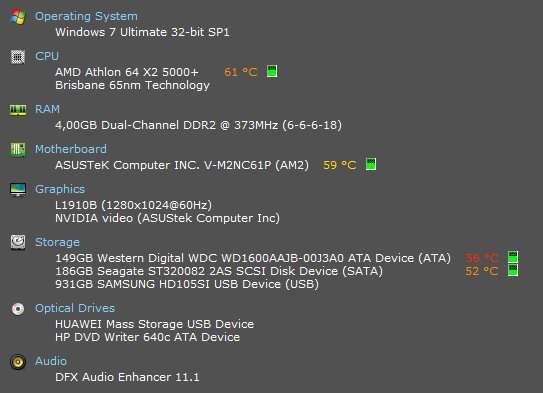
If you get my meaning; I have difficulty explaining this even to myself;) I'll give you my specs as reported by the Piriform utility Speccy, the free disk-space as reported by explorer and then try and explain what I think is less-than-impressive performance from hardware that
a) I thought at least sufficient for the things I try to do and

b) an example of a 'demand' on my part which seems to absolutely stupefy the poor machine and send Task Manager reported performance graphs (memory, CPU) 'through the roof' for extended periods of time.

Speccy:

jiBsGw.jpg


Disk map:

rPdQHd.jpg


Let's just say, as this reply is nearing or has exceeded the tl;dr limit, that literally anything, such as opening another webpage (these are 'normal circumstances' - no chkdsk funny-stuff) sends this indicator

BPC2El.jpg


to 100% for 20-30 seconds and, it appears, completely overwhelms the hardware. It is as if I were expecting a 3 HP engine to pull my '59 Cadillac up a 45 degree incline.

And this is a fairly recent thing. It's like the system resources have been reduced by 70% overnight or else as if my trusty AMD Athlon CPU has had a massive stroke.

Any ideas? 'Cause the situation is untenable..:/
 

My Computer My Computer

At a glance

Windows 7 Pro 64-bitAMD Athlon 64X2 Dual Core 5000+ @ 2611 Mhz4 GB Dual-Channel DDR2 @ 373 MHzNVIDIA GeForce 6150SE nForce 430
Computer type
PC/Desktop
Computer Manufacturer/Model Number
Dell OptiPlex 3040
OS
Windows 7 Pro 64-bit
CPU
AMD Athlon 64X2 Dual Core 5000+ @ 2611 Mhz
Motherboard
ASUS
Memory
4 GB Dual-Channel DDR2 @ 373 MHz
Graphics Card(s)
NVIDIA GeForce 6150SE nForce 430
Sound Card
Proprietary, I suppose
Monitor(s) Displays
19" LG Flatron L1910B
Screen Resolution
1280x1024
Hard Drives
Some 2,5 TB divided among one internal SATA, partitioned into C: and D:, and two USB 2.0-connected external drives, the latter for independent backups
PSU
Super Flower 500W
Case
Sure
Cooling
Yes
Keyboard
A year old Dell. The best so far, excluding the original IBM
Mouse
Logitech
Internet Speed
Wireless modem 2 MB/s and down; typically 0.5 to 1.3 MB/s
Antivirus
AVG free
Browser
Chrome
Did I somehow make a mistake or offend anybody in my latest reply? If so, please let me know because I'm mystified. It's been awful quiet for almost a full day now...:huh:
 

My Computer My Computer

At a glance

Windows 7 Pro 64-bitAMD Athlon 64X2 Dual Core 5000+ @ 2611 Mhz4 GB Dual-Channel DDR2 @ 373 MHzNVIDIA GeForce 6150SE nForce 430
Computer type
PC/Desktop
Computer Manufacturer/Model Number
Dell OptiPlex 3040
OS
Windows 7 Pro 64-bit
CPU
AMD Athlon 64X2 Dual Core 5000+ @ 2611 Mhz
Motherboard
ASUS
Memory
4 GB Dual-Channel DDR2 @ 373 MHz
Graphics Card(s)
NVIDIA GeForce 6150SE nForce 430
Sound Card
Proprietary, I suppose
Monitor(s) Displays
19" LG Flatron L1910B
Screen Resolution
1280x1024
Hard Drives
Some 2,5 TB divided among one internal SATA, partitioned into C: and D:, and two USB 2.0-connected external drives, the latter for independent backups
PSU
Super Flower 500W
Case
Sure
Cooling
Yes
Keyboard
A year old Dell. The best so far, excluding the original IBM
Mouse
Logitech
Internet Speed
Wireless modem 2 MB/s and down; typically 0.5 to 1.3 MB/s
Antivirus
AVG free
Browser
Chrome
Back
Top