
ToukoAozaki
New member
- Local time
- 11:11 PM
- Messages
- 1
After wondering where Microsoft would have stored Game information, I searched registry for Starcraft. Suddenly, I found out this weird feature.
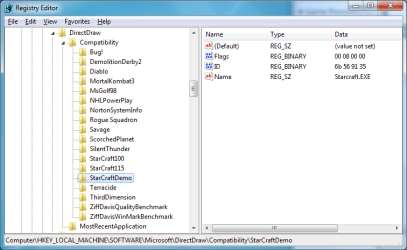
I searched for this registry key, but there wasn't much information available. It seemed like the key to get the colors working.
Basically there were three keys named StarCraft: StarCraft100, StarCraft115, and StarCraftDemo. Since I had already installed SCBW 1.16, I decided to test with demo version of StarCraft. Not surprisingly, it worked like a charm.
So it seemed like I could get SCBW 1.16 working with this registry feature. Name was self-explanatory; the problem was ID and flag.
In case of ID, different versions had different IDs. Modifying the ID made SC demo have incorrect colors. So I searched for ID in SC demo binary, and found a match. It later turned out to be PE header timestamp in little-endian order. That is, 0x3591566B as 6b,56,91,35.
Different games have different flags. I couldn't find any documentation about this feature. If someone could find out what the flags mean, then someone can make a tool for adding DirectDraw games to work.
With above information, I simply added a new registry entry called Starcraft116, with timestamp of SCBW 1.16.1 executable. This fixed the color issue all but initial loading screen. It might be due to the loadscreen being displayed before compatibility measures kick in.
To apply the fix, download and run attached sc116.reg. It basically adds an entry for SCBW 1.16.1. You still need compatibility mode, or run as administrator, when starting the game; otherwise you will get crashes due to write without permission.
Tested on Windows 7 Professional 32-bit.
I searched for this registry key, but there wasn't much information available. It seemed like the key to get the colors working.
Basically there were three keys named StarCraft: StarCraft100, StarCraft115, and StarCraftDemo. Since I had already installed SCBW 1.16, I decided to test with demo version of StarCraft. Not surprisingly, it worked like a charm.
So it seemed like I could get SCBW 1.16 working with this registry feature. Name was self-explanatory; the problem was ID and flag.
In case of ID, different versions had different IDs. Modifying the ID made SC demo have incorrect colors. So I searched for ID in SC demo binary, and found a match. It later turned out to be PE header timestamp in little-endian order. That is, 0x3591566B as 6b,56,91,35.
Different games have different flags. I couldn't find any documentation about this feature. If someone could find out what the flags mean, then someone can make a tool for adding DirectDraw games to work.
With above information, I simply added a new registry entry called Starcraft116, with timestamp of SCBW 1.16.1 executable. This fixed the color issue all but initial loading screen. It might be due to the loadscreen being displayed before compatibility measures kick in.
To apply the fix, download and run attached sc116.reg. It basically adds an entry for SCBW 1.16.1. You still need compatibility mode, or run as administrator, when starting the game; otherwise you will get crashes due to write without permission.
Tested on Windows 7 Professional 32-bit.
Attachments
My Computer
- OS
- Windows 7 Professional 32-bit
- CPU
- Intel Core 2 Duo E8400 @ 3.25GHz
- Motherboard
- ASUS P5B Deluxe
- Memory
- DDR2 1GB PC2-6400 x2
- Graphics Card(s)
- ATI Radeon HD 4850 512MB
- Sound Card
- Onboard
- Hard Drives
- Western Digital HDDs


