
Safe Internet Browsing

   Note
As Shawn once said to me, the best tutorials are those that address a problem which a member has posted. This tutorial was triggered by a problem that a member posted on the eightforums and also by a member on another forum.


1. The Problem

We all know that the internet is not a safe place especially when you operate from a Windows system. There are thousands of new pieces of malware each day and the Firewalls and AV programs can protect us only to a certain point. But despite all those tools there is no 100% guarantee that you may not get a malware infection.

You are especially exposed if you work on an open access point like in an airport, a hotel, at McDonald, Starbucks or alike. In those situations you do not want to expose the system which you use for normal operation and which contains all your data.

I propose two different solutions for the problem which can easily be implemented with few resources.


2. Two possible Solutions

Note: There are other solutions than the ones I suggest such as Sandboxie and alike. But those are not as elegant and flexible as these proposed solutions and are not subject of this discussion.

Both proposed solutions use a Linux distro as the operating system because Linux is a lot less exposed to malware than Windows. I suggest Mint Mate as the OS of choice. It is easy to understand for a Windows user. But if you are more familiar with another Linux distro, you can choose a great variety of other Linux distros.

For both solutions we will use Mint Mate 14 which is the latest version. It can be downloaded from here. The download will take some time because it is a 968MB .iso file.

   Information
I have noticed that not all available download sites from the link above give you the exact same edition. In fact the .isos from some sites do not work as described. I suggest you use the James Madison Univerity site because that one I know works correctly


2.1. The safest and most expedient solution

This solution is the safest because your main Operating System does not even come into play. It is an expedient solution because it can be set up in 20 minutes plus some download time. It consists of a persistent Linux system on a USB stick.

2.1.1. Additional Requirements

In addition to the Mint Mate .iso, we will also need the Universal USB Installer from here. With this program we can create the persistent Mint Mate flash drive very easily.

As last component we need an empty flash drive formatted in Fat32 of at least 2GB but bigger is better. I use a 16GB USB2 flash drive which works very well. A USB3 flash drive would be even better. My USB2 flash drive has a data transfer rate of 30MB/sec and an access time of 0.8ms as measured with HD Tune.

2.1.2. Installation on the flash drive

I will explain the installation process of Mint Mate with the Universal USB Installer in a short video. Depending on the speed of your USB flash drive, that should take between 10 and 20 minutes. When this is done, you can boot your system with this flash drive. You will have to temporarily change the boot sequence in the BIOS and set the flash drive as Nr.1 in the boot order.


===================================================================


2.2. The elegant solution


This solution works with Mint Mate in a virtual partition under VMware Player. It is a bit more work for the setup but with the instructions below you should not have any problems.
I will explain how to make the setup in VMware Player and how to install the VMware Tools (video).

2.2.1. Install Mint Mate in VMware Player

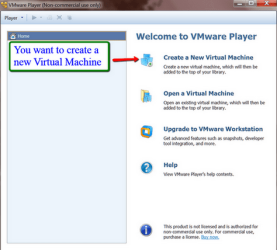
Download the VMware Player from the Filehippo sitebecause the VMware site is very confusing. Install the VMware Player on your system. Then start the VMware Player and you will see this window.
1.png

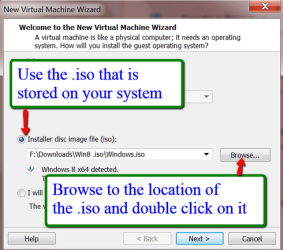
Here you just click on 'Create a new virtual machine' and you get to this window
2.png

Here you select to install from the .iso image and navigate to the Mint Mate .iso file that you have downloaded. Then Next.
3.png

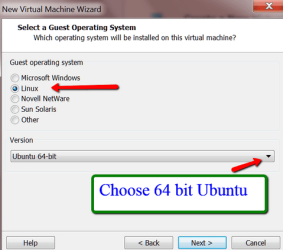
Mark Linux and choose the Ubuntu 64bit. Then Next.

4.png

Browse to the disk/partition and folder where you want to install the virtual partition files. Default is Documents. I recommend predefining a folder in Documents for the VMware installation so that all VMware files are in one place. When you are done with the installation, there will be over 25 files and subfolders. Having those mixed with other folders would be messy.

In the same window you can also change the name of the virtual machine (on the top). I suggest you call it Mint Mate 64bit.

5.png

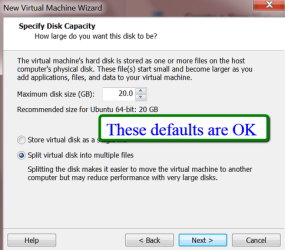
In this window you can take the defaults. Mint Mate will start out with less than 6GB of disk space usage so a maximum of 20GB for the dynamic virtual disk should suffice. Then Next
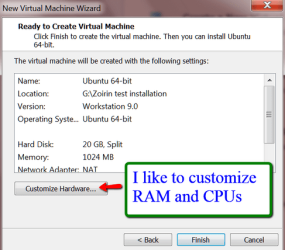
6.0.png

The default allocation is 1GB of RAM and 1 processor. I always assign 2GB of RAM and 2 processors. But you should take what is suitable for your PC.
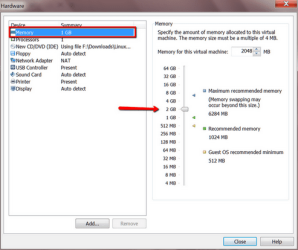
6.1.png

This would be the setting for an allocation of 2GB of RAM
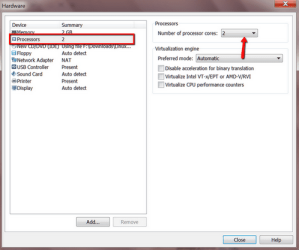
6.2.png

This setting gives the virtual machine 2 cores. Any more cores would probably not be used by Mint. If you are done with that, click on Close and then on Finish. Then you get the VMware start screen were you highlight your new system (top left) and click on ' Play virtual Machine (bottom right). Then VMware Player will install the bootstrap system of Mint Mate.
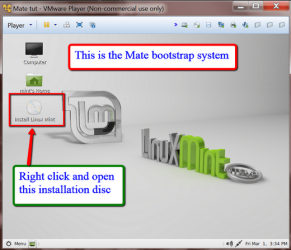
8.png

This bootstrap system you have right now is NOT a fully operational system. You need to right click on the "Install DVD" as shown in the picture and Open that. This will start the full installation of Mint Mate.
7.png

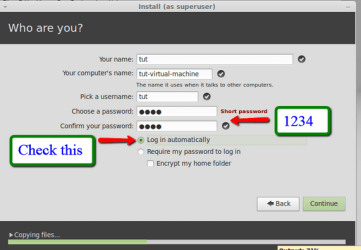
The Mint Mate installation process is very similar to the Windows installation process. You set the language, keyboard layout, time zone, and give the system a name.

You must define a password - I always use 1234 because Linux distros ask many times for authentication with the password. A complicated password will make the operation more cumbersome.

There is one big difference to a Windows installation - you do not need a product key. Mint Mate is freeware.

Once your installation is completed, restart Mint Mate - click on the Mint Menu button (bottom left) and then on the power symbol (bottom right in the start menu). That will bring up the various options (restart, shutdown, etc.)

2.2.2. Installing the VMware Tools in Mint Mate

The VMware tools are needed for communicating between the host system and Mint Mate. It allows you to drag and drop files from one system to the other.

The Terminal commands used in this video for the installation of the VMware Tools are:

cd Desktop/vmware-tools-distrib
sudo ./vmware-install.pl -d


   Information
In the meantime I have found out that the shared clipboard works to copy URLs and text from the host to Mint and vice versa. But it still does not work for copying files and folders. There you need to use the drag and drop method.


3. Operating Mint Mate

The following video will show you the easy steps for surfing the web and for a security check of downloaded files. The video was recorded from my virtual partition, but Mint Mate from the flash drive would look exactly the same.
If you care to make all the nice settings in Mint Mate, refer to the Settings Chapter 4 below.


4. Mint Mate Settings
Here is a set of my video tutorials that explain how to setup Mint Mate.

Basic setup after installation - Duration 12 minutes

· Set the screen resolution
· Choose an initial Theme
· Desktop background
· Application sections in the Start Menu
· Notification area
· Home Folder

Refining the Theme and Skin - Duration 7 minutes

· Themes
· Skins
· Fonts

Start Menu and Taskbar settings - Duration 17 minutes

· Set sizes and colors
· Favorites
· Pin to Taskbar
· Notification area

Terminal window setup

· A really fancy Command Prompt setup - you will be stunned

Installing and uninstalling Programs - Duration 9 minutes

Two methods are shown
· The Windows way
· the Linux way

5. What if there is a problem

It is always good to be prepared for any disaster even if there is only a minimal chance of that happening.

For the flash drive, it is easiest to reformat the drive and reinstall Mint Mate.

For the virtual partition it is even easier. After the initial installation of Mint Mate in the virtual partition, make a copy of the VMware folder (which is per default in Documents) to a safe place, e.g. an external disk. As you evolve the virtual system, you may want to make up-to-date copies from time to time. Should anything happen to the virtual system, delete the VMware folder in Documents and replace it with one of the copies from your backup.

6. The Bottom Line

So next time you are at the airport or use some other open WiFi, boot your PC from your Linux flash drive or start your virtual VMware Player partition and do your internet browsing from there.

Make sure you have scanned any downloads where you are not 100% sure of the origin with Virus Total before you transfer them to your main Operating System.

I also recommend you browse the internet from the virtual partition when you are at home. It is so much safer and so easy to repair should you encounter a problem - which is very unlikely though when operating in Linux.
 
Last edited:
You did it again. A good written, easy to follow tutorial.

Kari
 

My Computer

Computer type
Laptop
Computer Manufacturer/Model Number
HP ENVY 17-1150eg
OS
Windows 10 Pro x64 EN-GB
CPU
1.6 GHz Intel Core i7-720QM Processor
Memory
6 GB
Graphics Card(s)
ATI Mobility Radeon HD 5850 Graphics
Sound Card
Beats sound system with integrated subwoofer
Monitor(s) Displays
17" laptop display, 22" LED and 32" Full HD TV through HDMI
Screen Resolution
1600*900 (1), 1920*1080 (2&3)
Hard Drives
Internal: 2 x 500 GB SATA Hard Disk Drive 7200 rpm
External: 2TB for backups, 3TB USB3 network drive for media
Cooling
As Envy runs a bit warm, I have it on a Cooler Master pad
Keyboard
Logitech diNovo Media Desktop Laser (bluetooth)
Mouse
Logitech Performance Mouse MX
Internet Speed
50/10 Mbps VDSL
Antivirus
Windows Defender 4.3.9431.0
Browser
Maxthon 3.5.2., IE11
the text doesn't show using the sf black skin.
 

My Computer

Computer Manufacturer/Model Number
Hewlett packard/p6512uk
OS
Microsoft Windows 7 Home Premium 64-bit 7600
CPU
IIx4 amd athelon 635 processor
Motherboard
FOXCONN 2AA9
Memory
2x2gb
Graphics Card(s)
ati radeon HD 5450
Sound Card
(1) Realtek High Definition Audio (2) AMD High Definition
Monitor(s) Displays
samsung lcd tv 32"
Screen Resolution
1360x 768
Hard Drives
(1) WDC WD10 01FAES-60Z2A0 SATA Disk Device (2) Maxtor OneTouch USB Device (3) ST310003 33AS USB Device (4) WD My Book 1111 USB Device
PSU
?
Cooling
air!
Keyboard
wireless hp
Mouse
wireless Hp,optical
Internet Speed
1.10mb/s
Antivirus
MSE
Browser
Firefox
the text doesn't show using the sf black skin.
No idea why. I use the SF Default.

@Kari, A man has to have hobbies, LOL.
 

My Computer

Computer Manufacturer/Model Number
HP, Dell, Gateway, Toshiba - 4 laptops and 2 desktops
OS
Vista, Windows7, Mint Mate, Zorin, Windows 8
CPU
from 1.6GHz Duo to i7
Monitor(s) Displays
2x HP w2207
Hard Drives
5x HDD, 7x SSD, 12x Externals
Keyboard
with trackball - no mices
Mouse
Trackball mice
Internet Speed
DSL 6000
Could it be you have used text color tags ?
 

My Computer

Computer type
Laptop
Computer Manufacturer/Model Number
HP ENVY 17-1150eg
OS
Windows 10 Pro x64 EN-GB
CPU
1.6 GHz Intel Core i7-720QM Processor
Memory
6 GB
Graphics Card(s)
ATI Mobility Radeon HD 5850 Graphics
Sound Card
Beats sound system with integrated subwoofer
Monitor(s) Displays
17" laptop display, 22" LED and 32" Full HD TV through HDMI
Screen Resolution
1600*900 (1), 1920*1080 (2&3)
Hard Drives
Internal: 2 x 500 GB SATA Hard Disk Drive 7200 rpm
External: 2TB for backups, 3TB USB3 network drive for media
Cooling
As Envy runs a bit warm, I have it on a Cooler Master pad
Keyboard
Logitech diNovo Media Desktop Laser (bluetooth)
Mouse
Logitech Performance Mouse MX
Internet Speed
50/10 Mbps VDSL
Antivirus
Windows Defender 4.3.9431.0
Browser
Maxthon 3.5.2., IE11
Could it be you have used text color tags ?

Nah, I would not use such advanced features. I am a plain guy. I think it is a problem with the skin. Julian can to use another skin.
 

My Computer

Computer Manufacturer/Model Number
HP, Dell, Gateway, Toshiba - 4 laptops and 2 desktops
OS
Vista, Windows7, Mint Mate, Zorin, Windows 8
CPU
from 1.6GHz Duo to i7
Monitor(s) Displays
2x HP w2207
Hard Drives
5x HDD, 7x SSD, 12x Externals
Keyboard
with trackball - no mices
Mouse
Trackball mice
Internet Speed
DSL 6000
Wolfgang what a great job. I think I will give it a shot on my old grandpa computer now.
 

My Computer

Computer type
PC/Desktop
Computer Manufacturer/Model Number
Home made Desktop
OS
Windows 10 Pro. 64/ version 1709 Windows 7 Pro/64
CPU
Intel i7-6800K @ 4.3
Motherboard
ASUS X-99 Deluxe II
Memory
Corsair Platinum 16 gig @2400
Graphics Card(s)
EVGA GTX 1070 OC
Monitor(s) Displays
Asus 27" LED LCD/VE278Q
Screen Resolution
1920-1080 or 1280-720 HDMI
Hard Drives
INTEL SSD 730-240 Gb Sata 3.0/
PSU
EVGA Platium 1200W
Case
Phanteks Luxe Tempered Glass 8 fans/ one radiator
Cooling
XSPC/ Water Cooled CPU
Keyboard
Das 4 Professional
Mouse
Logitech M705/MX Anywhere 2-S
Internet Speed
100 mbits
Antivirus
Microsoft Security Essentials/ Malwarebytes Premium 3.0/ SAS
Browser
I.E. 11 default/Firefox/ ISP Time Warner Cable/Spectrum
Other Info
LG BluRay Burner/
Sound system-KLipsch-THX/
Icy Dock ssd Hot Swap bays.
Thank you Jack. For the USB stick version check whether your PC will boot from USB.
 

My Computer

Computer Manufacturer/Model Number
HP, Dell, Gateway, Toshiba - 4 laptops and 2 desktops
OS
Vista, Windows7, Mint Mate, Zorin, Windows 8
CPU
from 1.6GHz Duo to i7
Monitor(s) Displays
2x HP w2207
Hard Drives
5x HDD, 7x SSD, 12x Externals
Keyboard
with trackball - no mices
Mouse
Trackball mice
Internet Speed
DSL 6000
Did anybody try one of the two solutions. I would be interested in feedback.
 

My Computer

Computer Manufacturer/Model Number
HP, Dell, Gateway, Toshiba - 4 laptops and 2 desktops
OS
Vista, Windows7, Mint Mate, Zorin, Windows 8
CPU
from 1.6GHz Duo to i7
Monitor(s) Displays
2x HP w2207
Hard Drives
5x HDD, 7x SSD, 12x Externals
Keyboard
with trackball - no mices
Mouse
Trackball mice
Internet Speed
DSL 6000
Wolfgang,

Whilst there tends to be far fewer Linux-based malware, I think its always prudent to install an anti-malware product into the Linux OS, even if running in a virtual machine. This is especially important if you enable networking between the VM and HOST using the VMWare Tools - there are a few cross-platform malware, but with the popularity of Linux increasing, you can bet that more cross-platform/Linux-based malware will increase significantly. I have used CLAMAV in the past - its an on-demand scanner only.

For passwords, I do not recommend simple passwords - it may be annoying everytime you want to run as root, but its far safer (think Windows UAC). I think each person should weigh up the risks themselves.

Perhaps its also best to get an opinion from Jacee, being a security MVP?


Regards,
Golden
 

My Computer

Computer type
PC/Desktop
Computer Manufacturer/Model Number
Golden Mk. I.4
OS
Windows 10 Pro x64 ; Xubuntu x64
CPU
Intel i7 860 @ 2.80 GHz O/C'ed to 4.0GHz
Motherboard
Gigabyte P55A-UD3R Rev.1. Award BIOS F13
Memory
16GB Corsair Vengance DDR3 @ 661 MHz Dual Channel (9-9-9-24)
Graphics Card(s)
EVGA NVidia GTX 560 1024MB
Sound Card
Realtek Integrated
Monitor(s) Displays
Dual Samsung SyncMaster 2494HS
Screen Resolution
1920*1080 and 1920*1080
Hard Drives
1*Samsung 840 EVO 120GB SSD;
1*OCZ Vertex 2 60GB SSD;
2*Samsung F3 SpinPoint 1TB in RAID0;
1*Samsung F1 SpinPoint 1TB;
2*Western Digital 1TB External USB 3.0
1*Western Digital 500GB External USB 3.0
1*Seagate 500GB External USB 2.0
PSU
Thermaltake ToughPower QFan 750W
Case
Thermaltake Element S VK60001W2Z
Cooling
Corsair H60 Water Cooling, 2*230mm and 2*80mm case fans
Keyboard
Logitech G110
Mouse
Logitech MX518
You are probably right for the VMware solution. We know the malware risk is low, but it still exists.

On the stick version there is very little risk. It can muck up your stick but that is easy to replace.

The important thing is that you do not transfer files from the Linux system to the normal system without scanning them. Virus Total does a really good job on that. And on the password you are probably right, but it is just such a pain. In Windows I have never used a password for my systems.
 

My Computer

Computer Manufacturer/Model Number
HP, Dell, Gateway, Toshiba - 4 laptops and 2 desktops
OS
Vista, Windows7, Mint Mate, Zorin, Windows 8
CPU
from 1.6GHz Duo to i7
Monitor(s) Displays
2x HP w2207
Hard Drives
5x HDD, 7x SSD, 12x Externals
Keyboard
with trackball - no mices
Mouse
Trackball mice
Internet Speed
DSL 6000
Common sense. All that's needed for safe browsing.
 

My Computer

Computer type
PC/Desktop
Computer Manufacturer/Model Number
Systems by SmartEyeball
OS
8 Pro x64
CPU
i7 3770K 4.6GHz
Motherboard
ASUS P8Z77 WS
Memory
16GB G.Skill Trident X 2666mhz
Graphics Card(s)
x2 EVGA 780 Ti Superclocked SLI
Sound Card
SB X-FI Surround 5.1 PRO USB / ATH-AD900 Headphones
Monitor(s) Displays
x3 Dell U2410 / 58" Samsung
Screen Resolution
5760*1200/ 1920*1200
Hard Drives
2x Intel 520 240GB (RAID 0) * 2x WD Caviar Blacks 2TB (RAID 0) * 2TB WD Caviar Black * Sony Optirac DVD
PSU
Silverstone Strider Evolution 1200W
Case
Thermaltake Level 10 GT Snow Edition
Cooling
Noctua NH-D14
Keyboard
Topre Realforce // Ducky Shine MX Black // Filco Ninja TKL
Mouse
Thermaltake Theron (Highly Recommended) + Razer Imperator
Antivirus
MSE
Browser
IE, FF, WaterFox
Other Info
GT Extreme V2 Sim Racing Cockpit + 40" LCD and K/B Mouse stand ▼
Fanatec CSR Elite Wheel + Clubsport V1 Pedals + CSR shifter/7G-H ▼Saitek X52 Pro ▼ TrackIR 5 Pro
Buttkicker v2 Seat Rumbler with Dedicated 5.1 and Sub Woofer attached to frame ▼
=
Bloody Big Grin
Common sense. All that's needed for safe browsing.
I don't think that common sense is enough. Many people with common sense have caught malware and especially when you are on an open hotspot, anything can happen. A virus is the smallest disease you can get. It is better to be safe than sorry.
 

My Computer

Computer Manufacturer/Model Number
HP, Dell, Gateway, Toshiba - 4 laptops and 2 desktops
OS
Vista, Windows7, Mint Mate, Zorin, Windows 8
CPU
from 1.6GHz Duo to i7
Monitor(s) Displays
2x HP w2207
Hard Drives
5x HDD, 7x SSD, 12x Externals
Keyboard
with trackball - no mices
Mouse
Trackball mice
Internet Speed
DSL 6000
great tutorial, and very well explained. I appreciate the effort you have put creating those videos. Thanks a lot and keep up the good work (:
 

My Computer

Computer Manufacturer/Model Number
Custom self assembled
OS
Windows 7 Ultimate x64
CPU
Intel Core i7 930
Motherboard
Gigabyte GA X58A UD7
Memory
Gskill 2x3 GB Ram
Graphics Card(s)
Sapphire ATI Radeon HD 5870
Monitor(s) Displays
LG 24MP88 24" LED Monitor
Screen Resolution
1920 X 1080
Hard Drives
Seagate barracuda 1 TB
PSU
Corsair GS 600W
Case
Cooler Master 690 II Plus
Cooling
Cooler Master Hyper 212X
Keyboard
Logitech G15 Gaming keyboard
Mouse
Logitech MX518 Gaming Mouse
Internet Speed
Broadband 50 Mbps speed [Hathway]
Other Info
Xbox 360 Wired Controller (x2)
AverMedia TV tuner Card [Internal]
Logitech HD C110 Web Camera
Netgear WGR614 Wireless-N 150 Router
Razer Goliathus Fragged Alpha Control Edition Mouse Pad
Doesn't this tutorial defeats the purpose of using Windows in the first place? Really, If I were to use Linux for browsing, I would just throw away Windows and install Linux on the real machine and use that full time. For a security tutorial I would have expected to see real methods of making Windows safer that just mounting a Linux on top of it.


Common sense. All that's needed for safe browsing.

BEST ANSWER!!!
Although most users don't practice that frequently. Maybe it's not perfect and "all you need" really, but that makes 90% of viruses run away. For the rest, properly configured firewalls, and updated antivirus and a good system setup can do the rest.
 

My Computer

Computer type
Laptop
Computer Manufacturer/Model Number
Toshiba Sattelite A665-S6092
OS
Windows 7 Ultimate x64
CPU
Intel Core i7-740QM
Memory
8 GB DDR3
Graphics Card(s)
NVIDIA GeForce 330GT
Screen Resolution
1366x768
Hard Drives
Samsung 840 SSD 500GB
1TB USB3 external HD
Cooling
Coolermaster Notepal U3 notebook cooling pad
Internet Speed
3mbps ASDL
Antivirus
ClamWin 0.98.7
Browser
Opera 12.17 x86 (main), Firefox 38 (sec), IE11 (last resort)
There is no way you can make Windows safe. With all the AV programs and firewalls you are still liable to catch malware. It is in the design of windows. That's why Linux is a good option for browsing. And the Mint version that is shown is a fine operating system that has at least as much appeal as Windows - more than Windows 8 for me.

But there is no obligation to use it. If you feel comfortable on the net using Windows, that's OK.
 

My Computer

Computer Manufacturer/Model Number
HP, Dell, Gateway, Toshiba - 4 laptops and 2 desktops
OS
Vista, Windows7, Mint Mate, Zorin, Windows 8
CPU
from 1.6GHz Duo to i7
Monitor(s) Displays
2x HP w2207
Hard Drives
5x HDD, 7x SSD, 12x Externals
Keyboard
with trackball - no mices
Mouse
Trackball mice
Internet Speed
DSL 6000
I actually use the virtualbox with Zorin for any iffy internet work. Works great. Just make sure to don't allow file sharing.
 

My Computer

Computer type
PC/Desktop
Computer Manufacturer/Model Number
Custom Build
OS
Microsoft Windows 7 Home Premium 64-bit 7601 Multiprocessor Free Service Pack 1
CPU
AMD Phenom(tm) II X4 965 Processor
Motherboard
ASUSTeK Computer INC. M4A785-M
Memory
8.0 GB
Graphics Card(s)
NVIDIA GeForce GTX 560 Ti
Sound Card
(1) NVIDIA High Definition Audio (2) NVIDIA High Definitio
Monitor(s) Displays
Samsung SyncMaster T220G
Screen Resolution
1680 x 1050 x 32 bits (4294967296 colors) @ 59 Hz
Hard Drives
WDC WD7500AADS-00M2B0
PSU
650 Watt
Case
Cooler Master HAF XM
Cooling
Air
Keyboard
CompUSA SK-6200
Mouse
Logitech M-510
Internet Speed
Comcast
Antivirus
MSE
Browser
Firefox 27.0 IE 11
Other Info
Belkin Hub To Go F5U706
There is no way you can make Windows safe. With all the AV programs and firewalls you are still liable to catch malware. It is in the design of windows. That's why Linux is a good option for browsing. And the Mint version that is shown is a fine operating system that has at least as much appeal as Windows - more than Windows 8 for me.

But there is no obligation to use it. If you feel comfortable on the net using Windows, that's OK.

It really depends on how many user does an OS have that is why Linux and Mac don't get newer malwares.
 

My Computer

Computer type
PC/Desktop
Computer Manufacturer/Model Number
ASUS X550ZE
OS
Windows 7 Home Premium 64-BIT
CPU
AMD A8 7200P
Motherboard
N/A
Memory
8GB 1600mhz
Graphics Card(s)
Radeon R5 (APU) + Radeon R5 M230 2GB Dual Graphics
Sound Card
Realtek ALC269 with SonicMaster
Monitor(s) Displays
Laptop Display
Screen Resolution
1920 x 1080 @60hz
Hard Drives
WDC WD50 00LPVX-80V0TT0 (500GB)
PSU
Laptop Charger
Mouse
ARMAGGEDON TEXTRON SCORPION 7
Internet Speed
100 mbps DOWN / 50 mbps UP
Antivirus
Windows Defender
Browser
Mozzila FireFox, Valve Steam in-game internet browser
can I stop browser virus by doing these as you mentioned? I always get infected by hijakcer, redirect or somthing like that when I am browsing.
 

My Computer

Computer type
PC/Desktop
OS
Windows 10

My Computer

Computer Manufacturer/Model Number
HP, Dell, Gateway, Toshiba - 4 laptops and 2 desktops
OS
Vista, Windows7, Mint Mate, Zorin, Windows 8
CPU
from 1.6GHz Duo to i7
Monitor(s) Displays
2x HP w2207
Hard Drives
5x HDD, 7x SSD, 12x Externals
Keyboard
with trackball - no mices
Mouse
Trackball mice
Internet Speed
DSL 6000
Back
Top