Solved Windows 7 disk.sys/classpnp.sys hang safe mode

Windows7DiskSys

New member
Local time
6:25 PM
Messages
10
I have something of a unique situation I am trying to find a solution to: I have a HP 14a-na0037nr chromebook and I'm trying to run windows 7 on it. Linux (ubuntu) runs fine, and windows 7 runs fine within a virtual machine in linux. I've gotten windows 8.1 to install from linux and that also boots without issue, but the system requirements for 8.1 are close enough to the maximum specs, especially with regards to ram, that I can only do one thing at once, and its quite frustrating.

With that background given, the problem with installing 7 seems to be singularly with hanging at the loading of either disk.sys or classpnp.sys. Obviously the disk itself is not corrupted, as Linux and windows 8.1 boot just fine on it. My best guess after many hours of troubleshooting is due to either (or both) disk.sys and classpnp.sys not recognizing eMMC memory correctly. I have tried to avoid the issue by installing the windows 7 x64 image onto a USB thumb drive and booting directly to the drive, but the disk.sys/classpnp.sys still load (in fact, the time I got past disk.sys and to classpnp.sys was when I had installed it to a USB drive via the instructions here: Windows 10 & Windows 7 Dual Boot - Can it be done Solved - Page 3 - Windows 10 Forums)
If I rename disk.sys/classpnp.sys to *.old, it will just freeze at the file, which I do not remember the name of, that loads before disk.sys.
To be clear, I am running the UEFI bios by MrChroomBox here: MrChromebox.tech which lacks the ability to change the eMMC storage from ACHI to IDE or whatever other option existed before ACHI. (I think in this case SATa?)

PS 22.04 Ubuntu
I would very much like to be able to boot into Windows as the primary operating system, as I can literally feel my blood pressure rising whenever I use linux. Anyone want to brain storm with me?
 

My Computers

System One System Two

  • Computer type
    Laptop
    Computer Manufacturer/Model Number
    HP 14a-na0037nr
    OS
    Windows 7
    CPU
    Intel® Celeron® N4020
    Motherboard
    Intel® Integrated SoC
    Memory
    4GB
    Graphics Card(s)
    Intel® UHD Graphics 600
    Hard Drives
    64GB eMMC
    Browser
    Brave
  • Computer type
    PC/Desktop
hanging at the loading of either disk.sys or classpnp.sys.

When? At what point?

Are you able to load boot.wim ?

does it see the disk?

Do you get that issue after setup has applied the image then going for the reboot ?


There have been a few queries about booting win7 /installing to emmc.

Somebody got it working using sd card reader drivers as I recall.

I am not sure that is the issue you are having. One would expect boot.wim to load up and then be unable to find a disk to install windows onto.
 

My Computers

System One System Two

  • Computer type
    PC/Desktop
    OS
    7 X64
    CPU
    i5 8400
    Motherboard
    gigabyte b365m ds3h
    Memory
    2x8gb 3200mhz
    Hard Drives
    various
    PSU
    pure power 11 400w cm
    Case
    Coolermaster
    Cooling
    cryorig m9i
  • Computer type
    PC/Desktop
    OS
    7x64
    CPU
    g5400
    Motherboard
    ga b365m ds3h
    Memory
    8gb ddr4 2400
    PSU
    xfx pro 450w
[FONT=&quot]hanging at the loading of either disk.sys or classpnp.sys.

[/FONT]

[FONT=&quot]When? At what point?[/FONT]

[FONT=&quot]Are you able to load boot.wim ?[/FONT]

[FONT=&quot]does it see the disk?[/FONT]

[FONT=&quot]Do you get that issue after setup has applied the image then going for the reboot ?[/FONT]


[FONT=&quot]There have been a few queries about booting win7 /installing to emmc.[/FONT]

[FONT=&quot]Somebody got it working using sd card reader drivers as I recall.[/FONT]

[FONT=&quot]I am not sure that is the issue you are having. One would expect boot.wim to load up and then be unable to find a disk to install windows onto.


[/FONT]

for clarification: I have not been able to install W7 through the installer, period, it has always been through the DISM process. Going through the normal installation process, the furthest I've been able to get is to this:

"A media driver your computer needs is missing" or "A required CD/DVD drive device driver is missing" error message when you install Windows.

I've tried including eMMC drivers as listed here:

windows 7 Slipstream drivers to the install dvd/iso - Super User

I've also tried to put the same drivers on a separate USB stick and windows does not recognize any of them.

Using the DISM process, it will install the operating system, but booting normally immediately freezes at a completely blank screen. After resetting, the "windows startup failed" option screen comes up, and if I select "boot into safe mode" the list of files loaded comes by, at which point it stops at disk.sys if I have done the DISM process to a eMMC partiation, or classpnp.sys if I put it on a flash drive.

I hope this is clear, if it is not please let me know and I can try to rephrase.

Thanks.
 

My Computers

System One System Two

  • Computer type
    Laptop
    Computer Manufacturer/Model Number
    HP 14a-na0037nr
    OS
    Windows 7
    CPU
    Intel® Celeron® N4020
    Motherboard
    Intel® Integrated SoC
    Memory
    4GB
    Graphics Card(s)
    Intel® UHD Graphics 600
    Hard Drives
    64GB eMMC
    Browser
    Brave
  • Computer type
    PC/Desktop
Last edited:

My Computers

System One System Two

  • Computer type
    PC/Desktop
    OS
    7 X64
    CPU
    i5 8400
    Motherboard
    gigabyte b365m ds3h
    Memory
    2x8gb 3200mhz
    Hard Drives
    various
    PSU
    pure power 11 400w cm
    Case
    Coolermaster
    Cooling
    cryorig m9i
  • Computer type
    PC/Desktop
    OS
    7x64
    CPU
    g5400
    Motherboard
    ga b365m ds3h
    Memory
    8gb ddr4 2400
    PSU
    xfx pro 450w
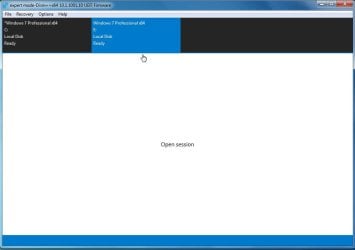
I am not familiar with DISM++, google offers nothing outside of the DISM cmd arguments. I am at this screen (I assume its from this section):

DISM++.png

if it isn't too much trouble could you give me a quick walk through of what I need to do? or point me in the direction of already written instructions?

This is from the windows 7 VM I made, which has access to my linux download folder (which has the original bootable win7.iso in it, as well as the drivers you listed and others I have saved both in the zip and extracted form).

edit: after playing around with it a bit, toolkit -> imageex -> select WIM -> export ->

replace disk.sys with the drivers from the zip? ->

repack into source
 
Last edited:

My Computers

System One System Two

  • Computer type
    Laptop
    Computer Manufacturer/Model Number
    HP 14a-na0037nr
    OS
    Windows 7
    CPU
    Intel® Celeron® N4020
    Motherboard
    Intel® Integrated SoC
    Memory
    4GB
    Graphics Card(s)
    Intel® UHD Graphics 600
    Hard Drives
    64GB eMMC
    Browser
    Brave
  • Computer type
    PC/Desktop
dism++ to apply the image, then use dism++ to install those drivers into the applied image


Select the os you want to work on the top pane to highlight it in blue.

C is the running os and E is the partition to which the image has just been applied

dism++-select-os2.jpg


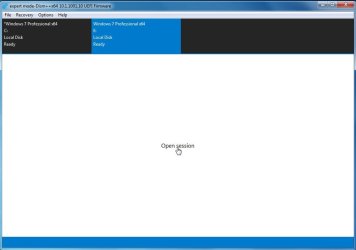
click open session
open-seesion.jpg

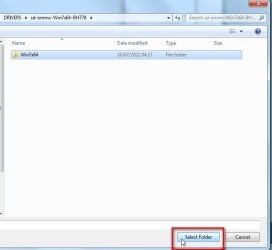
click drivers in the left pane then click ADD and browse to the drivers fOLDER
ADD-DRIVERS.jpg

alternatively, you could integrate the drivers into the wim.

mount the image from the wimfile ( make sure you mount the correct Edition home, pro, ultimate or whatever), then select the mounted image in the top pane, click open session, click drivers in the left pane, click Add, browse to the drivers folder.

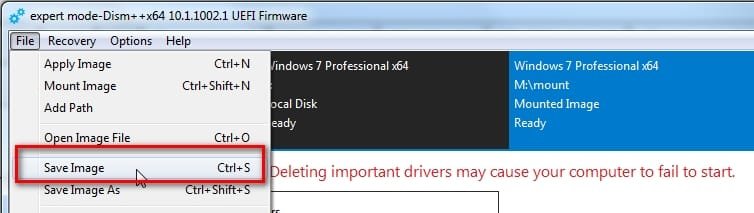
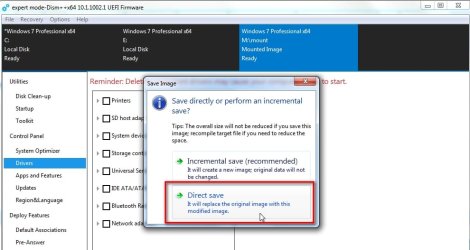
when done, Save the Image, and then finally unmount the image.

If you also want to integrate the drivers into boot.wim, mount image 2 which is the setup image
 

My Computers

System One System Two

  • Computer type
    PC/Desktop
    OS
    7 X64
    CPU
    i5 8400
    Motherboard
    gigabyte b365m ds3h
    Memory
    2x8gb 3200mhz
    Hard Drives
    various
    PSU
    pure power 11 400w cm
    Case
    Coolermaster
    Cooling
    cryorig m9i
  • Computer type
    PC/Desktop
    OS
    7x64
    CPU
    g5400
    Motherboard
    ga b365m ds3h
    Memory
    8gb ddr4 2400
    PSU
    xfx pro 450w
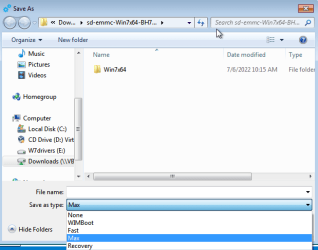
I do not recognize the filetypes that are available to save as:

filetype.png

I do recognize ISO here:

iso filetype.png

Do I save as wimboot, then wim ->ESD -> ISO?
 

My Computers

System One System Two

  • Computer type
    Laptop
    Computer Manufacturer/Model Number
    HP 14a-na0037nr
    OS
    Windows 7
    CPU
    Intel® Celeron® N4020
    Motherboard
    Intel® Integrated SoC
    Memory
    4GB
    Graphics Card(s)
    Intel® UHD Graphics 600
    Hard Drives
    64GB eMMC
    Browser
    Brave
  • Computer type
    PC/Desktop
:huh:

TO INTEGRATE DRIVERS INTO A WIM FILE

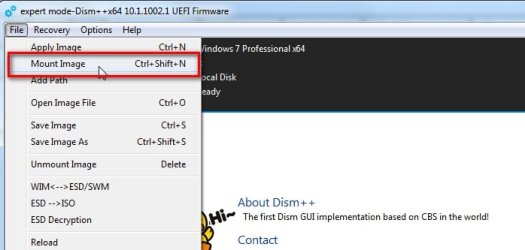
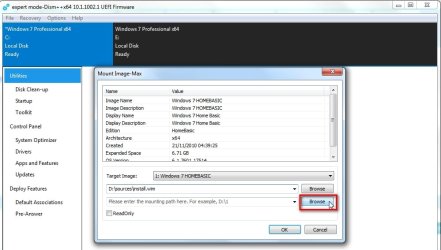
click File > mount image

dism++-mount1.jpg


click the browse button and browse to the wim . In this example it is D:\sources\install.wim

dism++-mount2.jpg


Then click the button and browse to the mount folder. It can be any empty folder with any name.

It is sensible to create a folder called mount so you know what it is.

dism++-mount3.jpg


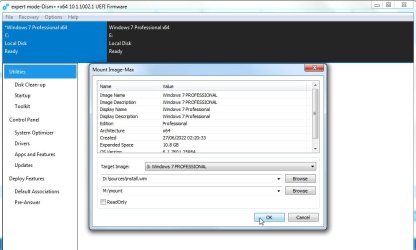
Select the Edition you want to mount in the dropdown

( NOTE: if you are adding drivers to a bootable wim file they should be added to the bootable image.

Winre.wim and most winpe has one image but the boot.wim that comes with installation media has 2 images )

dism++-mount4.jpg


click ok

dism++-mount5.jpg

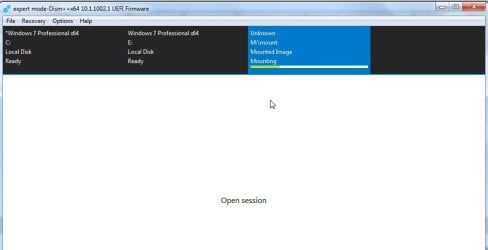
it is mounting

dism++-mount6.jpg

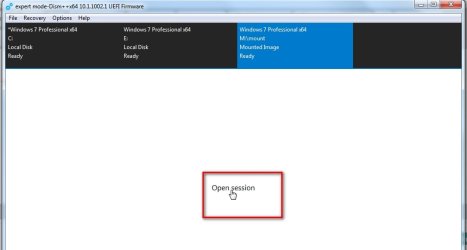
when it has completed mounting
click open session

dism++-mount7.jpg

click drivers in the left pane, then click ADD

dism++-mount8.jpg

Browse to the FOLDER that contains the drivers you want to add

dism++-mount89jpg.jpg

operation successful ok

dism++-mount10jpg.jpg

File >Save Image

dism++-mount11jpg.jpg


dism++-mount12..jpg

It is saving the image which now contains the added drivers

dism++-mount13..jpg

after it has finished saving

File>Unmount image

dism++-mount14..jpg
 
Last edited:

My Computers

System One System Two

  • Computer type
    PC/Desktop
    OS
    7 X64
    CPU
    i5 8400
    Motherboard
    gigabyte b365m ds3h
    Memory
    2x8gb 3200mhz
    Hard Drives
    various
    PSU
    pure power 11 400w cm
    Case
    Coolermaster
    Cooling
    cryorig m9i
  • Computer type
    PC/Desktop
    OS
    7x64
    CPU
    g5400
    Motherboard
    ga b365m ds3h
    Memory
    8gb ddr4 2400
    PSU
    xfx pro 450w
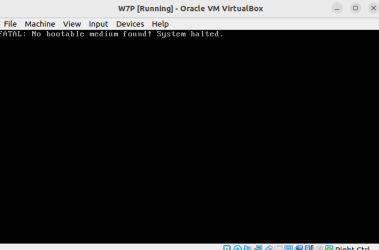
I did all that, then extracted the original W7 iso to a folder, replaced the install.wim with the updated drivers .wim, then created a new ISO out of the directory that housed the entirety of the extracted ISO. Now when I try to select the new ISO as a bootable drive on my VM software for a new install, I get this:

image.png

image.png


in the original ISO, all four version of 7 are present, H, HP, P, and ultimate, with a total size of ~7GB with the install.wim file itself being close to 6. the new file is about 2.3. Since I selected P out of the four, it would make sense for a smaller total file size, but I don't see how that effects the ability for the otherwise exact same files and directory structure to no longer boot.

What am I missing?
 

My Computers

System One System Two

  • Computer type
    Laptop
    Computer Manufacturer/Model Number
    HP 14a-na0037nr
    OS
    Windows 7
    CPU
    Intel® Celeron® N4020
    Motherboard
    Intel® Integrated SoC
    Memory
    4GB
    Graphics Card(s)
    Intel® UHD Graphics 600
    Hard Drives
    64GB eMMC
    Browser
    Brave
  • Computer type
    PC/Desktop

My Computers

System One System Two

  • Computer type
    PC/Desktop
    OS
    7 X64
    CPU
    i5 8400
    Motherboard
    gigabyte b365m ds3h
    Memory
    2x8gb 3200mhz
    Hard Drives
    various
    PSU
    pure power 11 400w cm
    Case
    Coolermaster
    Cooling
    cryorig m9i
  • Computer type
    PC/Desktop
    OS
    7x64
    CPU
    g5400
    Motherboard
    ga b365m ds3h
    Memory
    8gb ddr4 2400
    PSU
    xfx pro 450w
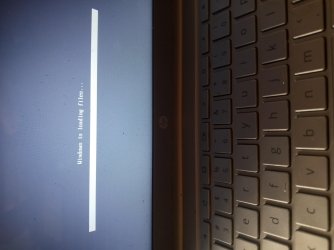
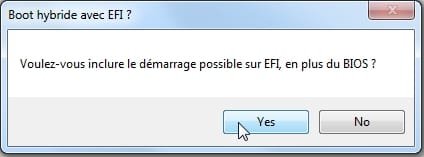
Using that software the VM was able to use the ISO as a bootable image. Im going to create a USB stick of the image and see if it boots on the physical machine. I made two ISOs, since I have no idea what the question was asking in whatever (french?) language it was. Give me an hour, more or less, and I'll let you know the results.

Thanks for your help.

- - - Updated - - -

The installer hangs here when booting:

20220716_155840.jpg
anthe other ISO created, the one I answered YES for...whatever the question was asking...UEFI does not recognize a bootable operating system.

This is where I've hit a roadblock before. In windows 8.1, I was able to use the DISM command listed in the first post to install via that method. it would completely freeze when normal boot, while in safe mode freeze at disk.sys/classpnp.sys. trying to boot directly into the installer from UEFI had these results.
 

My Computers

System One System Two

  • Computer type
    Laptop
    Computer Manufacturer/Model Number
    HP 14a-na0037nr
    OS
    Windows 7
    CPU
    Intel® Celeron® N4020
    Motherboard
    Intel® Integrated SoC
    Memory
    4GB
    Graphics Card(s)
    Intel® UHD Graphics 600
    Hard Drives
    64GB eMMC
    Browser
    Brave
  • Computer type
    PC/Desktop
1. Did you integrate the emmc drivers into boot.wim image 2 ?

2. In addition does the bios have csm support ?


3. lancer-1.jpg


It is asking if you want it to support efi boot in addition to bios boot . It only asks if it finds efisys.bin which is needed for efiboot.
 

My Computers

System One System Two

  • Computer type
    PC/Desktop
    OS
    7 X64
    CPU
    i5 8400
    Motherboard
    gigabyte b365m ds3h
    Memory
    2x8gb 3200mhz
    Hard Drives
    various
    PSU
    pure power 11 400w cm
    Case
    Coolermaster
    Cooling
    cryorig m9i
  • Computer type
    PC/Desktop
    OS
    7x64
    CPU
    g5400
    Motherboard
    ga b365m ds3h
    Memory
    8gb ddr4 2400
    PSU
    xfx pro 450w
Both images contain the updated drivers, as well as the USB 3.0 drivers in your signature and additional eMMC/USB drivers from intel and sumsung. I'm a bit tired to give it a try today, but tomorrow I'll make an 8.1 VM and see if usng the new images makes a difference using the cmd line DISM from the first post. DISM in win 7 doesn't support the commands necessary, forwhatever reason.

- - - Updated - - -

It is asking if you want it to support efi boot in addition to bios boot . It only asks if it finds efisys.bin which is needed for efiboot.

then invert what I said - the "Yes" image boots but freezes at boot, the "No" is not recognized as bootable. I'm in the process of setting up the 8.1 VM, I'll let you know what the result of the DISM process is, if it still hangs at disk.sys/classpnp.sys with the drivers included in the image.

- - - Updated - - -

Wanted to update you - I did a bit of a tour yesterday: I tried installing both windows 10 and windows 11, both from USB (in case its relevant, I only have one USB port), and from an SD card. Neither would boot past the "A media driver is missing" error that occurs right after booting into the installer. I've looked through these forums and through google, and there does not seem to be any singularity solution to the issue, and none of the answers I tried resolved it. Windows 7 with the slipstreamed drivers also did not work.

Given that I've been able to install Win8.1 onto my hard drive, and given that you seem to know much more about this than I do, do you think there would be any benefit to having Win 10 or 11 installed via the same DISM method, and then grabbing whatever generic Microsoft drivers the newer operating systems use and slipstreaming THOSE into a win7 image? Win 8.1, while it installed, was hellishly bugged, and as far as I understand - and correct me if I am wrong on this point - after the switch to x64, generic microsoft drivers are interchangeable between 7/8/10/11

Thanks again
 

My Computers

System One System Two

  • Computer type
    Laptop
    Computer Manufacturer/Model Number
    HP 14a-na0037nr
    OS
    Windows 7
    CPU
    Intel® Celeron® N4020
    Motherboard
    Intel® Integrated SoC
    Memory
    4GB
    Graphics Card(s)
    Intel® UHD Graphics 600
    Hard Drives
    64GB eMMC
    Browser
    Brave
  • Computer type
    PC/Desktop
I doubt win 8 or win10 drivers will work on win7. There are some win 8 drivers that have been specially modified by enthusiasts to install on win7, but only for nvme and usb3 and network cards as far as I know.
 

My Computers

System One System Two

  • Computer type
    PC/Desktop
    OS
    7 X64
    CPU
    i5 8400
    Motherboard
    gigabyte b365m ds3h
    Memory
    2x8gb 3200mhz
    Hard Drives
    various
    PSU
    pure power 11 400w cm
    Case
    Coolermaster
    Cooling
    cryorig m9i
  • Computer type
    PC/Desktop
    OS
    7x64
    CPU
    g5400
    Motherboard
    ga b365m ds3h
    Memory
    8gb ddr4 2400
    PSU
    xfx pro 450w
OK. so back to step 2. here's where I'm at:

The Windows 7 installer with added drivers fails to load entirely on boot. It freezes at the "windows is loading files" picture I posted before. Meanwhile, 8.1 and 10 installers have the same problem when booting directly to the USB bootable thumb drive: they all will not go further than the media driver is missing error: windows a media driver is missing - Brave Search . As I said before, I had windows 8.1 installed directly to the eMMC drive (it was partitioned, half the drive being ubuntu half being 8.1) through the DISM instructions included in the first post, and it booted without issue, although I had to use an external wifi adapter, mouse, and other peripherals. In trying the same method for windows 7 while in 8.1, the DISM above, I inadvertently completely borked the boot manager and had to start from scratch, reinstalling Ubuntu. Windows 10 was released after eMMC and flash memory became commonplace, so I can't venturea guess as to why that version would have the same (seemingly...after a good amount of research, there are many different causes of that error unique to different hardware profiles.) driver error as 8.1.

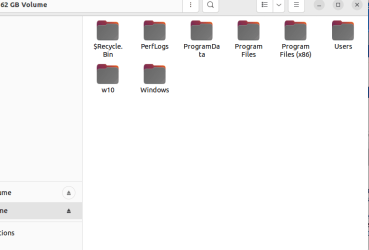
Ubuntu 22.04 runs fine. Well, its ubuntu, so half the stuff doesn't work, and the instructions to fix it end up making everything worse than it was to begin with. But I think you get the point. It boots, the drivers load, and I can get work done on it. All three versions of windows install without issue into a VM. From the VM, I was able to use the DISM command within the windows 10 instance to create the typical windows file structure:

image.png

I don't have the windows boot manager installed, nor am I sure how I did it before with windows 8.1. I would wager a guess, and I'm not a betting man, that if I had a working windows boot manager it would boot. I don't see why 8.1 would work and 10 wouldn't. I'm currently searching the bowels of google to see if there is a way to take the base windows file structure above and slap the windows boot manager onto the partition (or well, onto the drive onto a separate boot partition, but again, given that you seem to know a lot about this stuff, I think you know what I mean).

Being able to have a booting version of windows would make all of this much easier than having to continuously switch in and out of ubuntu, and in and out of VMs.

- - - Updated - - -

Up date! with the help of some nice folks at the tenforums, I have been able to rebuild the windows boot partition on my secondary drive, and boot into WIN 10. It runs into an error during the initial setup, which I think I will have fixed tomorrow (the wifi here is captive, you have to log into to use it, which cannot be done during the initial windows setup.).

Once I have a working windows instance I will come back to this primary problem. Thanks again!
 

My Computers

System One System Two

  • Computer type
    Laptop
    Computer Manufacturer/Model Number
    HP 14a-na0037nr
    OS
    Windows 7
    CPU
    Intel® Celeron® N4020
    Motherboard
    Intel® Integrated SoC
    Memory
    4GB
    Graphics Card(s)
    Intel® UHD Graphics 600
    Hard Drives
    64GB eMMC
    Browser
    Brave
  • Computer type
    PC/Desktop
it seems I have misplaced my mouse - the trackpack on my chromebook does not work in the windows installers or in the OS proper, so I'm going to have to take a break until the 4th of next month when I can buy a new one. be back then.
 

My Computers

System One System Two

  • Computer type
    Laptop
    Computer Manufacturer/Model Number
    HP 14a-na0037nr
    OS
    Windows 7
    CPU
    Intel® Celeron® N4020
    Motherboard
    Intel® Integrated SoC
    Memory
    4GB
    Graphics Card(s)
    Intel® UHD Graphics 600
    Hard Drives
    64GB eMMC
    Browser
    Brave
  • Computer type
    PC/Desktop
Just Ef Why Eye, I have decided to boot into a linux distribution with a low resource display environment, allowing ~2 GB of RAM to be used for a Windows 7 VM. Allocating half the devices RAM to linux and half to Windows seems to resolve the main problem I was having, of one or the other continually crashing. I had tried to see if installing to an external USB hard drive that had a SATA bridge would do the trick, as it would sidestep the eMMC/flash drive issue, and I was still coming up short.

In any case, the 7 VM works nearly perfectly, and 8.1 when I had it booting ran...not well. I can only imagine if I did get 7 to boot, the effort involved in getting the basics to function would probably defeat the small benefits of running natively instead of virtually.

Thanks for your help though, hopefully this can be useful to someone else in the future trying to do something similar.
 

My Computers

System One System Two

  • Computer type
    Laptop
    Computer Manufacturer/Model Number
    HP 14a-na0037nr
    OS
    Windows 7
    CPU
    Intel® Celeron® N4020
    Motherboard
    Intel® Integrated SoC
    Memory
    4GB
    Graphics Card(s)
    Intel® UHD Graphics 600
    Hard Drives
    64GB eMMC
    Browser
    Brave
  • Computer type
    PC/Desktop
Back
Top