Solved Safely remove hardware & eject media popup notification is missing

adhiraj30

New member
Local time
2:57 AM
Messages
16
At the time of ejecting my San Disk pen drive i can't see anymore the pop up notification message " Safely remove hardware & eject media"

Please help me.

I have Windows 7 ultimate 64 bit operating system and my laptop model is hp pavilion dv4 2106tx
 

My Computer

Computer type
Laptop
Computer Manufacturer/Model Number
hp Pavilion dv4 2106tx
OS
Window 7 Ultimate x64
CPU
M [email protected] GHz
Memory
3 GB
Graphics Card(s)
Intel HD Graphics
Hard Drives
500 GB
Antivirus
Microsoft Security Essentials
Browser
Google chrome
If you right click the Start orb to the bottom left in the taskbar and chose properties and select the Taskbar tab you have some options there. Particularly with the Customize options. Make sure the eject icon is A) not being combined and B) always shown.

After doing all this and the eject option is still not there, then you have other issues that need to be addressed and that could be a lot of things...


The way you framed your question has me asking this question: if you plug in another USB device (a storage device), the eject button simply isn't there anymore? What about other USB storage devices?
 

My Computer

Computer type
PC/Desktop
OS
Windows 7 Ultimate x64
Going on from F22 comment... if other devices show,, there was a problem with SanDisk media the showing the same error
 

My Computer

Computer type
PC/Desktop
Computer Manufacturer/Model Number
medionl/Aspire 6930G/acer x55a
OS
W7 home premium 32bit/W7HP 64bit/w10 tp insider ring
CPU
E5300 dual core
Motherboard
medion MS7366
Memory
3gb
Graphics Card(s)
Nvidia Geforce 7100 Nforce 630i
Monitor(s) Displays
avixc
Internet Speed
n (isp resticted to 72)
Antivirus
mse/pands
Browser
palemoon
Other Info
Belkin Fd7050 n USB using Railink RT2870 drivers, more upto date
@ F22Simplilot

1.This is to inform you that i have no issue with eject icon but the issue i am facing that, the eject icon not showing any pop up message notification" Safely remove the hardware & eject media"
My question is how to resolve it so that i can see that particular pop up message notification from the eject icon?

2. Moreover i am facing this issue with every USB device not only with the San Disk Pen drive.
 

My Computer

Computer type
Laptop
Computer Manufacturer/Model Number
hp Pavilion dv4 2106tx
OS
Window 7 Ultimate x64
CPU
M [email protected] GHz
Memory
3 GB
Graphics Card(s)
Intel HD Graphics
Hard Drives
500 GB
Antivirus
Microsoft Security Essentials
Browser
Google chrome
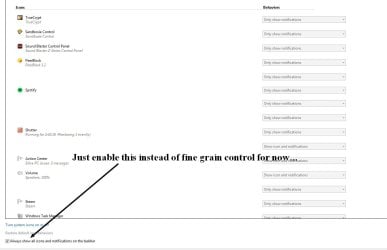
Follow my instructions again and make sure notifications are turned on. See screenshot. If notifications are on and you still don't see the balloon popup message, please take a screenshot and post here of the same image I have here so I can verify. Then I can move forward with some other possible solutions.


tryfjhytt.jpg


Note: I've omitted some of my programs.
 

My Computer

Computer type
PC/Desktop
OS
Windows 7 Ultimate x64
simPlilot
Thanks for the reply. This is to inform you that i had done already whatever you suggested. The Screen hot is not possible as no error message is showing after right click on eject icon the same becomes vanished without leaving any pop pup message notification. If you have other solutions please let me know.
Thanks
 

My Computer

Computer type
Laptop
Computer Manufacturer/Model Number
hp Pavilion dv4 2106tx
OS
Window 7 Ultimate x64
CPU
M [email protected] GHz
Memory
3 GB
Graphics Card(s)
Intel HD Graphics
Hard Drives
500 GB
Antivirus
Microsoft Security Essentials
Browser
Google chrome
Go to the search start box and enter, services. In services make sure Plug and Play is on and set to automatic. If this fixes the issue then you're good. If not, move on.


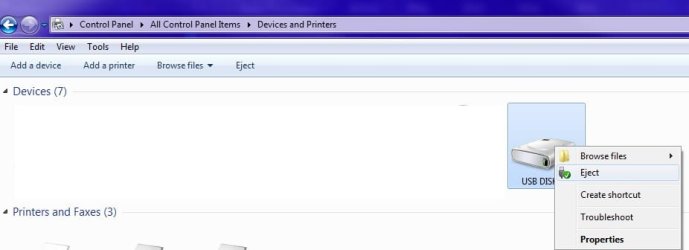
If that doesn't work, go to the Control Panel | Devices and Printers. While a USB storage device is plugged in, right click it in Devices and Printers and select the eject option. Does this option show up?

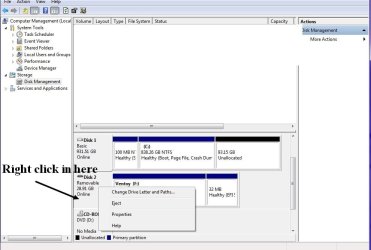
You can do the same thing in Disk Management. Do these options show up?


1.jpg


2.jpg


Reboot the computer in safe mode. To do this keep tapping the F8 key while the computer boots. Chose the first safe mode option. Insert a USB storage device. Does the popup appear?


I'm trying to see what works and doesn't work to narrow done the issue. So answer all questions. Even if the option to eject is there under Devices and Printers and in Disk management, I need to know.
 

My Computer

Computer type
PC/Desktop
OS
Windows 7 Ultimate x64
Hello simPlilot very sorry for the late reply.
According to your screenshot i found the item in devices and printers.
But before that i went for system restore and now for the time being i can see the message while ejecting the USB.
If you have other solution please let me know however thanks for helping me.
 

My Computer

Computer type
Laptop
Computer Manufacturer/Model Number
hp Pavilion dv4 2106tx
OS
Window 7 Ultimate x64
CPU
M [email protected] GHz
Memory
3 GB
Graphics Card(s)
Intel HD Graphics
Hard Drives
500 GB
Antivirus
Microsoft Security Essentials
Browser
Google chrome
Back
Top