Solved Safely remove usb devices tray icon Poblem!

support4u

New member
Member
Local time
9:10 AM
Messages
43
Hey i got a very weird problem!
I cannot LEFT or RICHT click, the Safely remove usb devices tray icon.


So its there allright, if i hover over the tray icon with the mouse, it even shows me a pop-up "Safely remove usb devices"
but i cannot click on it..!!!?

wtf is this? anyone ever had this before?
can i fix this.

USB flash driver can be ejected thru "this computer" but a usb HDD can't, so its very annoying!

maby it has something to do with a service i disabled? i allready checkt some things thru, maby i miss something here.. or maby its just an annoying bug.


looking forward for a solution, or a idea!

thanks in advance!
 

My Computer My Computer

Computer Manufacturer/Model Number
-
OS
Windows 7
CPU
Intel Core 2 Quad Q6600
Motherboard
ASUS P5N32e SLI
Memory
OCZ2N1066SR2GK 4gb total
Graphics Card(s)
Sapphire ATI HD5770,1GB
Sound Card
Creative Sounblaster Live!
Monitor(s) Displays
Samsung Syncmaster 206BW
Hard Drives
1x WD Raptor 250gb
2x 500 gb Hitachi Deskstar
PSU
-
Case
Coolermaster Cosmos
Cooling
-
Welcome to the sevenforums support4u.

A strange problem indeed... a few questions and thoughts:

What version Win7 and where did you get it?
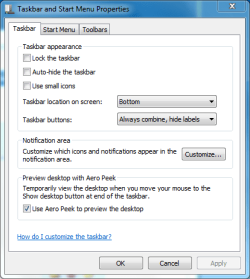
Do you have any non default settings for the Notification area turned on? (right click on taskbar choose properties)
taskbar properties.PNG
Any custom toolbars?
Try turning off AV, does it still happen?
 

My Computer My Computer

Computer Manufacturer/Model Number
Homebrew PC - "Alpha_Dawg"
OS
Windows 7 Ultimate 64 bit Steve Ballmer Signature Edition
CPU
Intel Core 2 Quad - Q9550 - 2.83GHz stock - OC'd to 3.6GHz
Motherboard
Gigabyte EP45-UD3P
Memory
4GB DDR2 800MHz (PC6400) OCZ Reaper
Graphics Card(s)
Nvidia GE Force 8800 GTS
Sound Card
Asus Xonar DX
Monitor(s) Displays
Samsung SyncMaster 2333HD
Screen Resolution
1920 x 1080
Hard Drives
WD Caviar Black 750GB - 7200RPM - 32MB cache
WD Caviar Green 1.5TB - 5400RPM - 64MB cache
WD Caviar Green 2.0TB - 5400RPM - 64MB cache
PSU
PC Power & Cooling Silencer 750
Case
Gigabyte 3D Aurora
Cooling
Case is Air - 5ea. 120mm fans (mix of Arctic and Xigmatec)
Keyboard
MS Natural Wireless KB
Mouse
MS Wireless Mouse
Internet Speed
50 mbps down/5 mbps up
Other Info
AVerMedia - AVerTVHD G2 Dual Tuner Card
Hey, Darryl Licht

I have windows 7 profesional from MSDN
The icon workt before, but i did some service tweaking.

- Windows Firewall is completly shutdown
- I got Zonealarm extreme, i turnd it off also, still cant click the icon!
- Got no custom bars!
- Got no custom notifications.
 

My Computer My Computer

Computer Manufacturer/Model Number
-
OS
Windows 7
CPU
Intel Core 2 Quad Q6600
Motherboard
ASUS P5N32e SLI
Memory
OCZ2N1066SR2GK 4gb total
Graphics Card(s)
Sapphire ATI HD5770,1GB
Sound Card
Creative Sounblaster Live!
Monitor(s) Displays
Samsung Syncmaster 206BW
Hard Drives
1x WD Raptor 250gb
2x 500 gb Hitachi Deskstar
PSU
-
Case
Coolermaster Cosmos
Cooling
-
Tried these thru run:

"%windir%\system32\rundll32.exe shell32.dll,Control_RunDLL hotplug.dll"

and

"rundll32.exe shell32.dll,Control_RunDLL hotplug.dll"

both show me the remove dialog.


why the hell can't i click on the sys tray icon?

can i re-add the sys icon somehow?
 

My Computer My Computer

Computer Manufacturer/Model Number
-
OS
Windows 7
CPU
Intel Core 2 Quad Q6600
Motherboard
ASUS P5N32e SLI
Memory
OCZ2N1066SR2GK 4gb total
Graphics Card(s)
Sapphire ATI HD5770,1GB
Sound Card
Creative Sounblaster Live!
Monitor(s) Displays
Samsung Syncmaster 206BW
Hard Drives
1x WD Raptor 250gb
2x 500 gb Hitachi Deskstar
PSU
-
Case
Coolermaster Cosmos
Cooling
-
Sounds like you need to undo the service tweaks you did that caused this in the first place... or maybe a Windows repair might work?

Remember this saying: "If it aint broke, dont fix it"
 

My Computer My Computer

Computer Manufacturer/Model Number
Homebrew PC - "Alpha_Dawg"
OS
Windows 7 Ultimate 64 bit Steve Ballmer Signature Edition
CPU
Intel Core 2 Quad - Q9550 - 2.83GHz stock - OC'd to 3.6GHz
Motherboard
Gigabyte EP45-UD3P
Memory
4GB DDR2 800MHz (PC6400) OCZ Reaper
Graphics Card(s)
Nvidia GE Force 8800 GTS
Sound Card
Asus Xonar DX
Monitor(s) Displays
Samsung SyncMaster 2333HD
Screen Resolution
1920 x 1080
Hard Drives
WD Caviar Black 750GB - 7200RPM - 32MB cache
WD Caviar Green 1.5TB - 5400RPM - 64MB cache
WD Caviar Green 2.0TB - 5400RPM - 64MB cache
PSU
PC Power & Cooling Silencer 750
Case
Gigabyte 3D Aurora
Cooling
Case is Air - 5ea. 120mm fans (mix of Arctic and Xigmatec)
Keyboard
MS Natural Wireless KB
Mouse
MS Wireless Mouse
Internet Speed
50 mbps down/5 mbps up
Other Info
AVerMedia - AVerTVHD G2 Dual Tuner Card
I tried, booting in save mode,

there i had no problems.

I only got 1 account: administrator
so no other accounts,

which services apply to my problem?
cause i already undone/undo/undid my tweaks!
yes and i rebooted..


plz, help me out!
 

My Computer My Computer

Computer Manufacturer/Model Number
-
OS
Windows 7
CPU
Intel Core 2 Quad Q6600
Motherboard
ASUS P5N32e SLI
Memory
OCZ2N1066SR2GK 4gb total
Graphics Card(s)
Sapphire ATI HD5770,1GB
Sound Card
Creative Sounblaster Live!
Monitor(s) Displays
Samsung Syncmaster 206BW
Hard Drives
1x WD Raptor 250gb
2x 500 gb Hitachi Deskstar
PSU
-
Case
Coolermaster Cosmos
Cooling
-
usb HDD <-- does this have an off and on switch? If it's turned off, you can safely remove it.
 

My Computer My Computer

Computer type
PC/Desktop
Computer Manufacturer/Model Number
Bruce ... somewhere in his 40's
OS
Windows 7 Ultimate 32bit SP1
CPU
Intel(R) Core(TM)2 Quad CPU @ 2.40GHz, 2400 MHz
Motherboard
INTEL/D975XBX2
Memory
4 GB
Graphics Card(s)
ATI Radeon HD 2600 Pro
Monitor(s) Displays
Samsung SyncMaster 914v
Screen Resolution
1280 x 1024
Hard Drives
2/500GB each ... ST3500630AS ATA Device.
One is not connected
PSU
Rocketfish 700 W
Case
G.Skill Gigabyte Chassis
Keyboard
Standard PS/2 Keyboard
Mouse
Microsoft PS/2 Mouse
Internet Speed
DSL
Antivirus
Avira Internet Security
Browser
IE 11
Other Info
ATI HDMI Audio
Humz. its funny, i get the same questions and awnsers back form other people :D

Its my fault offcourse. i should supply such info myself within the post.
but hey, i'm only human.

No, no on/off switch

Its an WD passport.
but still it does not matter about what kind of usb where talking.
i cannot click on the damn sys tray icon! ( and yes i tried several different devices)


anyone know which services are needed for that damn icon/process.

and read the previous posts,.. plz for more info..

damn, damn, what a weird problem i got... i cannot find anything about it on google..
its realy frustrading.

And a awnser in advance. no system recovery! i got that disabled :party:
 

My Computer My Computer

Computer Manufacturer/Model Number
-
OS
Windows 7
CPU
Intel Core 2 Quad Q6600
Motherboard
ASUS P5N32e SLI
Memory
OCZ2N1066SR2GK 4gb total
Graphics Card(s)
Sapphire ATI HD5770,1GB
Sound Card
Creative Sounblaster Live!
Monitor(s) Displays
Samsung Syncmaster 206BW
Hard Drives
1x WD Raptor 250gb
2x 500 gb Hitachi Deskstar
PSU
-
Case
Coolermaster Cosmos
Cooling
-
Have you tried either of these two methods?

1. Right click on the USB drive icon in My Computer.
Select the Hardware tab.
Select your USB drive and click on Properties.
Now click on Policies tab.

2. Right Click on My Computer.
Select Manage.
Select USB Mass Storage Device under the USB Controller.
Right Click and Disable it.
Remove your USB drive and Enable it again
 

My Computer My Computer

Computer type
PC/Desktop
Computer Manufacturer/Model Number
Bruce ... somewhere in his 40's
OS
Windows 7 Ultimate 32bit SP1
CPU
Intel(R) Core(TM)2 Quad CPU @ 2.40GHz, 2400 MHz
Motherboard
INTEL/D975XBX2
Memory
4 GB
Graphics Card(s)
ATI Radeon HD 2600 Pro
Monitor(s) Displays
Samsung SyncMaster 914v
Screen Resolution
1280 x 1024
Hard Drives
2/500GB each ... ST3500630AS ATA Device.
One is not connected
PSU
Rocketfish 700 W
Case
G.Skill Gigabyte Chassis
Keyboard
Standard PS/2 Keyboard
Mouse
Microsoft PS/2 Mouse
Internet Speed
DSL
Antivirus
Avira Internet Security
Browser
IE 11
Other Info
ATI HDMI Audio
dear jacee

1 done
2 done, but still this will not cover my problem!
i cannot click the damn icon. so disabling services/drivers and then remove hardware is not a solution.

thanks anyway :cry:
 

My Computer My Computer

Computer Manufacturer/Model Number
-
OS
Windows 7
CPU
Intel Core 2 Quad Q6600
Motherboard
ASUS P5N32e SLI
Memory
OCZ2N1066SR2GK 4gb total
Graphics Card(s)
Sapphire ATI HD5770,1GB
Sound Card
Creative Sounblaster Live!
Monitor(s) Displays
Samsung Syncmaster 206BW
Hard Drives
1x WD Raptor 250gb
2x 500 gb Hitachi Deskstar
PSU
-
Case
Coolermaster Cosmos
Cooling
-
Have you tried a system restore to a date when it was working?
 

My Computer My Computer

Computer Manufacturer/Model Number
Homebrew PC - "Alpha_Dawg"
OS
Windows 7 Ultimate 64 bit Steve Ballmer Signature Edition
CPU
Intel Core 2 Quad - Q9550 - 2.83GHz stock - OC'd to 3.6GHz
Motherboard
Gigabyte EP45-UD3P
Memory
4GB DDR2 800MHz (PC6400) OCZ Reaper
Graphics Card(s)
Nvidia GE Force 8800 GTS
Sound Card
Asus Xonar DX
Monitor(s) Displays
Samsung SyncMaster 2333HD
Screen Resolution
1920 x 1080
Hard Drives
WD Caviar Black 750GB - 7200RPM - 32MB cache
WD Caviar Green 1.5TB - 5400RPM - 64MB cache
WD Caviar Green 2.0TB - 5400RPM - 64MB cache
PSU
PC Power & Cooling Silencer 750
Case
Gigabyte 3D Aurora
Cooling
Case is Air - 5ea. 120mm fans (mix of Arctic and Xigmatec)
Keyboard
MS Natural Wireless KB
Mouse
MS Wireless Mouse
Internet Speed
50 mbps down/5 mbps up
Other Info
AVerMedia - AVerTVHD G2 Dual Tuner Card
i got that disabled.
 

My Computer My Computer

Computer Manufacturer/Model Number
-
OS
Windows 7
CPU
Intel Core 2 Quad Q6600
Motherboard
ASUS P5N32e SLI
Memory
OCZ2N1066SR2GK 4gb total
Graphics Card(s)
Sapphire ATI HD5770,1GB
Sound Card
Creative Sounblaster Live!
Monitor(s) Displays
Samsung Syncmaster 206BW
Hard Drives
1x WD Raptor 250gb
2x 500 gb Hitachi Deskstar
PSU
-
Case
Coolermaster Cosmos
Cooling
-
Bummer!
 

My Computer My Computer

Computer Manufacturer/Model Number
Homebrew PC - "Alpha_Dawg"
OS
Windows 7 Ultimate 64 bit Steve Ballmer Signature Edition
CPU
Intel Core 2 Quad - Q9550 - 2.83GHz stock - OC'd to 3.6GHz
Motherboard
Gigabyte EP45-UD3P
Memory
4GB DDR2 800MHz (PC6400) OCZ Reaper
Graphics Card(s)
Nvidia GE Force 8800 GTS
Sound Card
Asus Xonar DX
Monitor(s) Displays
Samsung SyncMaster 2333HD
Screen Resolution
1920 x 1080
Hard Drives
WD Caviar Black 750GB - 7200RPM - 32MB cache
WD Caviar Green 1.5TB - 5400RPM - 64MB cache
WD Caviar Green 2.0TB - 5400RPM - 64MB cache
PSU
PC Power & Cooling Silencer 750
Case
Gigabyte 3D Aurora
Cooling
Case is Air - 5ea. 120mm fans (mix of Arctic and Xigmatec)
Keyboard
MS Natural Wireless KB
Mouse
MS Wireless Mouse
Internet Speed
50 mbps down/5 mbps up
Other Info
AVerMedia - AVerTVHD G2 Dual Tuner Card

My Computer My Computer

Computer Manufacturer/Model Number
Home built
OS
Windows 7 Ultimate 32 bit
CPU
Intel(R) Pentium(R) 4 CPU 3.00GHz
Motherboard
ASUS P4P800-VM Motherboard Chipset: Intel 865G + ICH5
Memory
2.50 GB RAM
Graphics Card(s)
NVIDIA GeForce 7600 GS
Sound Card
SoundMax Integrated Digital Audio (Chip)
Monitor(s) Displays
ViewSonic VX 1962 wm
Screen Resolution
1680 X 1050
Hard Drives
Seagate Barracuda 7200.10 80 GB
ST380215A ATA Device 18.6 GB
Western Digital "My Book" external hard drive 750 GB
Cooling
Fan based
Keyboard
Microsoft Comfort Curve Keyboard 2000 v10 USB
Mouse
Logitec optic USB
Internet Speed
3.01 Mb/s download 0.64 Mb/s upload
typical windows user talk. no offence!
but for serious problems we got backups.

this is something small, and enoying. that u can live with, but u like to see it fixt.

so, no i will never enable it.. :P

but i can see, no one has a solution for me. and thats bummer.
ill skip the problem. and leave it for what it is.!

anyway, all thanks for thinking with me!
 

My Computer My Computer

Computer Manufacturer/Model Number
-
OS
Windows 7
CPU
Intel Core 2 Quad Q6600
Motherboard
ASUS P5N32e SLI
Memory
OCZ2N1066SR2GK 4gb total
Graphics Card(s)
Sapphire ATI HD5770,1GB
Sound Card
Creative Sounblaster Live!
Monitor(s) Displays
Samsung Syncmaster 206BW
Hard Drives
1x WD Raptor 250gb
2x 500 gb Hitachi Deskstar
PSU
-
Case
Coolermaster Cosmos
Cooling
-
typical windows user talk. no offence!
but for serious problems we got backups.

this is something small, and enoying. that u can live with, but u like to see it fixt.

so, no i will never enable it.. :P

but i can see, no one has a solution for me. and thats bummer.
ill skip the problem. and leave it for what it is.!

anyway, all thanks for thinking with me!

I agree with you. I have image backups. But for a quick fix for a small problem, the restore points work well for me.

If you figure it out, please let us know.
 

My Computer My Computer

Computer Manufacturer/Model Number
Home built
OS
Windows 7 Ultimate 32 bit
CPU
Intel(R) Pentium(R) 4 CPU 3.00GHz
Motherboard
ASUS P4P800-VM Motherboard Chipset: Intel 865G + ICH5
Memory
2.50 GB RAM
Graphics Card(s)
NVIDIA GeForce 7600 GS
Sound Card
SoundMax Integrated Digital Audio (Chip)
Monitor(s) Displays
ViewSonic VX 1962 wm
Screen Resolution
1680 X 1050
Hard Drives
Seagate Barracuda 7200.10 80 GB
ST380215A ATA Device 18.6 GB
Western Digital "My Book" external hard drive 750 GB
Cooling
Fan based
Keyboard
Microsoft Comfort Curve Keyboard 2000 v10 USB
Mouse
Logitec optic USB
Internet Speed
3.01 Mb/s download 0.64 Mb/s upload
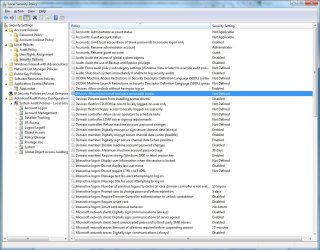
Have you tried: secpol.msc
 

Attachments

  • SecPol.jpg
    SecPol.jpg
    170.9 KB · Views: 258

My Computer My Computer

Computer type
PC/Desktop
Computer Manufacturer/Model Number
Dell OP7010
OS
Windows 7 Enterprise (x64); Windows Server 2008 R2 (x64)
Memory
16GB
Monitor(s) Displays
4 Dell 24" LCD
Screen Resolution
1280x1024
Keyboard
Dell
Mouse
Dell Optical
Internet Speed
40meg
humz, that was a pretty good suggestion windowsstar

it was not defined, but i was already the one and only administrator.
so it dident work.
i don't understand, in safe mode i don't have this problem!
 

My Computer My Computer

Computer Manufacturer/Model Number
-
OS
Windows 7
CPU
Intel Core 2 Quad Q6600
Motherboard
ASUS P5N32e SLI
Memory
OCZ2N1066SR2GK 4gb total
Graphics Card(s)
Sapphire ATI HD5770,1GB
Sound Card
Creative Sounblaster Live!
Monitor(s) Displays
Samsung Syncmaster 206BW
Hard Drives
1x WD Raptor 250gb
2x 500 gb Hitachi Deskstar
PSU
-
Case
Coolermaster Cosmos
Cooling
-
How about creating a 2nd "test" user with admin rights... see if issues exists there...?
 

My Computer My Computer

Computer Manufacturer/Model Number
Homebrew PC - "Alpha_Dawg"
OS
Windows 7 Ultimate 64 bit Steve Ballmer Signature Edition
CPU
Intel Core 2 Quad - Q9550 - 2.83GHz stock - OC'd to 3.6GHz
Motherboard
Gigabyte EP45-UD3P
Memory
4GB DDR2 800MHz (PC6400) OCZ Reaper
Graphics Card(s)
Nvidia GE Force 8800 GTS
Sound Card
Asus Xonar DX
Monitor(s) Displays
Samsung SyncMaster 2333HD
Screen Resolution
1920 x 1080
Hard Drives
WD Caviar Black 750GB - 7200RPM - 32MB cache
WD Caviar Green 1.5TB - 5400RPM - 64MB cache
WD Caviar Green 2.0TB - 5400RPM - 64MB cache
PSU
PC Power & Cooling Silencer 750
Case
Gigabyte 3D Aurora
Cooling
Case is Air - 5ea. 120mm fans (mix of Arctic and Xigmatec)
Keyboard
MS Natural Wireless KB
Mouse
MS Wireless Mouse
Internet Speed
50 mbps down/5 mbps up
Other Info
AVerMedia - AVerTVHD G2 Dual Tuner Card
I had this exact problem.... After a clean install the icon would work fine. I like to take full ownership of my PC (C drive). Why? Because its my computer, not Microsoft's. They aren't about to tell me what I can or can not access on my PC.

Anyway, I noticed if I assigned full ownership to the username I had in place, the problem you are experiencing would start immediately afterwards. I searched for a resolution for weeks, but had no luck. This would only happen whenever I took full ownership of my PC.

Long story short, I decided one day to do a little tinkering. I did another clean install, and when I got to the point during the rebuild where I would normally take full ownership of C:, I decided to assign ownership to the administrators group, rather than to a specific user. And wouldn't you know, this resolved the problem and the remove hardware icon worked as it should from that point on. To verifiy that I had identified the problem, I did another clean install on a separate HDD, assigned full ownership of C: to the username, and the problem immediately returned.

I'm stumped as to why messing with rights and ownership would have anything to do with an icon for safely removing hardware, but it did. You may want to try this and see if works for you.


FYI: I am using the same version of windows as you (from MSDN) and I have the same portable HDD.
 

My Computer My Computer

Computer Manufacturer/Model Number
Asus G71G
OS
Win 7 Pro x64
CPU
Core 2 Duo T9400
Motherboard
ASUSTeK Computer INC. G71G
Memory
6.0GB Dual-Channel DDR2 @ 332MHz 5-5-5-15
Graphics Card(s)
Nvidia 9800m GTX
Sound Card
NVIDIA High Definition Audio
Monitor(s) Displays
17" HD display
Screen Resolution
1440x900
Hard Drives
Dual 250GB ST9250421AS ATA Device
Back
Top