Solved Samba network share issue with Windows 7

  • Thread starter Thread starter Jibbs
  • Start date Start date

My Computer

Computer Manufacturer/Model Number
DELL GX280
OS
Win 7 Ultimate RC1
CPU
Pentium 4 3.4Ghz
Motherboard
Dell
Memory
2GB
Graphics Card(s)
Onboard
Sound Card
Onboard
Monitor(s) Displays
Dell 2001FP
Hard Drives
80G
300G
500G
gpedit.msc write that in start - search progam and files or in cmd :)
 

My Computer

OS
win 7 64
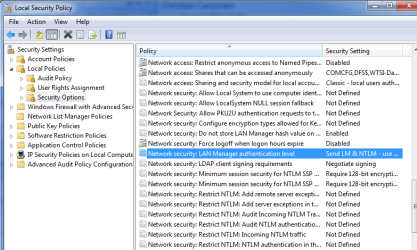
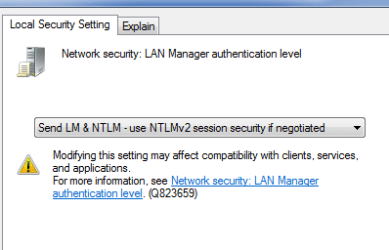
I tried H2SO4's suggestion to change the policy setting and it worked. Thanks!

I got to the same setting differently on my computer so I am posting it in case someone else needs it:
 

Attachments

  • NAS 2.PNG
    NAS 2.PNG
    25.2 KB · Views: 1,984
  • NAS 1.PNG
    NAS 1.PNG
    6.5 KB · Views: 994

My Computer

OS
Windows 7
Creating Registry d-word worked

I just did this to access my network server that runs OSX 10.4 and it worked. Thanks a bunch.

Using The reg value is called "LmCompatibilityLevel", in D-word and setting it to 1 work just great. I've been seraching for hours trying to resolve this issue. They used to have this key on Vista Home Premium but it went away in vista. Now its back.

Thanks again
 

My Computer

OS
Window7 home premium
Samba (even version 1.9.18p10 on HP-UX 10.20 works)

Used the LM+NTLM security setting (from above), and also the settings in the registry (Windows7 - SambaWiki)

HKLM\System\CCS\Services\LanmanWorkstation\Parameters
DWORD DomainCompatibilityMode = 1
DWORD DNSNameResolutionRequired = 0

Also modified (as on the XP workstation)
HKLM\System\CCS\Services\NetLogon\Parameters
DWORD requirestrongkey=0

Able to use the HP9000 shares (athentication using SERVER (windows 2003 PDC))
 

My Computer

Computer Manufacturer/Model Number
Intel
OS
Windows 7 Pro x64
CPU
Core2Quad
Hi Friends,
I have tried the NTLM thing and no success. I have two computers, one running Windows 7 Ultimate 32 bit and the other Ubuntu 10.04 Lucid Lynx. My HP 6110 All-In-One printer is connected via USB to the Win 7 computer, and I cannot access the print shares from Ubuntu via Samba, try as I may. Connecting the printer to the Ubuntu machine works fine and can be printed to from the Win 7, but not the other way around.
Also, I can access shared files via Samba and can mount on Ubuntu, but when it comes to adding a printer on Ubuntu, I get permission denied or password may be incorrect when I try to log on to the Win 7 machine, in spite of using the correct username and signon for the Win 7.
Any help would be sincerely appreciated.

 

My Computer

Computer Manufacturer/Model Number
HP
OS
Windows 7 Ultimate 32 bit
Memory
4 gig
Sound Card
Realtek Hi Def
Hard Drives
Maxtor
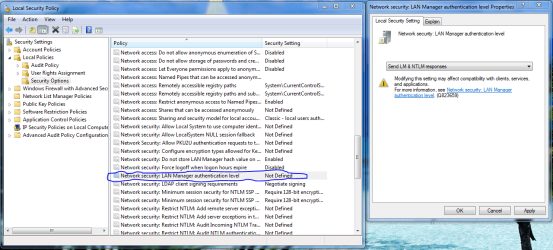
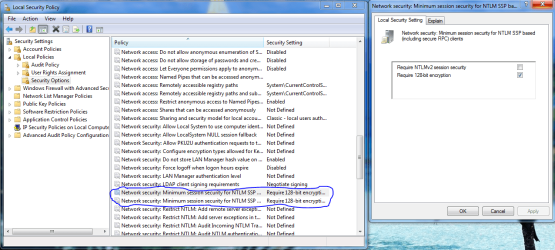
In case you guys are still having problems with this. These adjustments should take care of problems with older servers and Samba share problems.

Control Panel - Administrative Tools - Local Security Policy

Local Policies - Security Options

Network security: LAN Manager authentication level
Send LM & NTLM responses

Minimum session security for NTLM SSP
Disable Require 128-bit encryption "uncheck"
 

Attachments

  • LAN MANAGER SETTINGS FOR OLD SERVERS.PNG
    LAN MANAGER SETTINGS FOR OLD SERVERS.PNG
    72.1 KB · Views: 1,411
  • MINIMUM SESSION SECURITY SETTINGS FOR OLD SERVERS.PNG
    MINIMUM SESSION SECURITY SETTINGS FOR OLD SERVERS.PNG
    67 KB · Views: 1,563

My Computer

Computer type
PC/Desktop
Computer Manufacturer/Model Number
Home built
OS
Windows 7 Ult, Windows 8.1 Pro,
CPU
Q9650-4.275GHz, E8600 4.5GHz, E6750-3.8GHz
Motherboard
Evga 780i FTW
Memory
G.Skill PC2 9600 1200Mhz 5 5 5 15 2T
Graphics Card(s)
GTX480
Sound Card
Asus Xonar D2
Monitor(s) Displays
HannsG
Screen Resolution
1680X1050
Hard Drives
GSkill Phoenix Pro 120GB SSD
PSU
ThermalTake Toughpower 1000Watt modular
Case
ThermalTake XaserV
Cooling
Xigmatek S1283
Keyboard
Logitech G15
Mouse
Logitech G9
Internet Speed
T1
Wish it was that easy with Win7 Home Premium

I did add the reg key and apparently nothing

changed some context menu options in network connections (checked group by IP and Mac addressed)

So I can see my mac/ubuntu machines in win7 now - but can only write to the mac.

And oddly my mac mounts fine in Ubuntu, but no ubuntu share being identified by the mac - I would surmise Samba would make it easier.

so my suspicions sit with the Ubuntu machine.
 

My Computer

OS
Windows 7
All to no avail

Tried everything. LM & NTLM, unchecked 128 bit encyption, created the D Words with values.
I cannot add a printer on my Ubuntu machine via Samba or CUPS which is connected to my Windows 7 machine. I keep getting authentication dialog box when I try to access the printer on my Win 7 machine. And despite the correct username and password, it gives me either "Permission Denied" or "Password Maybe Incorrect".

I even applied the "hot fix" as per the Samba wiki!

Nowhere to turn?
 

My Computer

Computer Manufacturer/Model Number
HP
OS
Windows 7 Ultimate 32 bit
Memory
4 gig
Sound Card
Realtek Hi Def
Hard Drives
Maxtor
Is your Ubuntu machine connected via DHCP or manual?

Oddly enough my Win7 no longer displays the mac and ubuntu share in network connections. But after changing the advanced sharing options (checked share everything/Full control) for my Win7 User folder - I can now successfully mount that share on my mac and ubuntu machine and write to it as well.

not sure if it matters - but I changed both mac/ubuntu to static IPs for extra measure. Ubuntu machine has both Samba/NFS installed - not sure if having both helps with sharing to the Win7 machine.

Now if only I can get my Windows machine to see the Mac/Ubuntu machines - and my Mac to mount the Ubuntu share (I would guess connecting to the IP or machine name in connect to server would be successful)

At least I can successfully get the data from each machine to the other albeit not as ideal as I would like.
 

My Computer

OS
Windows 7
Tried everything. LM & NTLM, unchecked 128 bit encyption, created the D Words with values.
I cannot add a printer on my Ubuntu machine via Samba or CUPS which is connected to my Windows 7 machine. I keep getting authentication dialog box when I try to access the printer on my Win 7 machine. And despite the correct username and password, it gives me either "Permission Denied" or "Password Maybe Incorrect".

I even applied the "hot fix" as per the Samba wiki!

Nowhere to turn?

This Msoft .xps white paper document shows how to downlevel share with other Op systems. You want the third one down .xps.

Download details: Windows 7 & HomeGroup: Sharing with Windows XP, Windows Vista, and other operating systems
 

My Computer

Computer type
PC/Desktop
Computer Manufacturer/Model Number
Home built
OS
Windows 7 Ult, Windows 8.1 Pro,
CPU
Q9650-4.275GHz, E8600 4.5GHz, E6750-3.8GHz
Motherboard
Evga 780i FTW
Memory
G.Skill PC2 9600 1200Mhz 5 5 5 15 2T
Graphics Card(s)
GTX480
Sound Card
Asus Xonar D2
Monitor(s) Displays
HannsG
Screen Resolution
1680X1050
Hard Drives
GSkill Phoenix Pro 120GB SSD
PSU
ThermalTake Toughpower 1000Watt modular
Case
ThermalTake XaserV
Cooling
Xigmatek S1283
Keyboard
Logitech G15
Mouse
Logitech G9
Internet Speed
T1
My Ubuntu machine is connected to the router via ethernet, which I guess is DHCP. Samba works fine as far as mounting shares and sharing files with my Win 7 machine and vice versa. It's only the printer I am having problems with. And besides, if I connect the printer to my Ubuntu, I can print from Win 7!
 

My Computer

Computer Manufacturer/Model Number
HP
OS
Windows 7 Ultimate 32 bit
Memory
4 gig
Sound Card
Realtek Hi Def
Hard Drives
Maxtor

My Computer

Computer Manufacturer/Model Number
HP
OS
Windows 7 Ultimate 32 bit
Memory
4 gig
Sound Card
Realtek Hi Def
Hard Drives
Maxtor

My Computer

Computer Manufacturer/Model Number
HP
OS
Windows 7 Ultimate 32 bit
Memory
4 gig
Sound Card
Realtek Hi Def
Hard Drives
Maxtor
Shares login problem

I have a very specific problem.

I have win7 shares working 100% with most devices - eg. other PCs (Vista), an Android file viewer, etc. These all have 'everyone' access and no passwords.

One device (Technisat sat box) can access shares on all other devices EXCEPT win7 when a login box appears and no combination of user/password works.

I have changed every possible value (regedit policies) recommended in 100s of posts. Nothing works.

I have been told that the failure is due to MS-RAP being deprecated in win7. There is no possibility to modify the network parameters on the sat box. The only solution offered by Microsoft is to install and use Xp-mode!!! Can this be really the case?

Is there no known fix to reinstate the ms-rap protocol in win7 so that other devices can use shares as in Vista and Xp (and linux, etc).

This is driving me nuts.

Help please!!!????
 

My Computer

OS
Vista
i searched around one year for this solution. THANKS!!
I was already afraid to have to replace my old, but good Linux Samba server.
Now i have the same problem with android apps (samba clients) which cannot access my Linux Samba server, maybe because of the same problem. (ES-file explorer e.g. has no settings about smb)
 

My Computer

Computer type
PC/Desktop
OS
Linux
Back
Top