
Solved Samsung 2TB External HDD, disappears from My Computer.

shinsaber

Banned
Local time
9:46 AM
Messages
40
Hi,

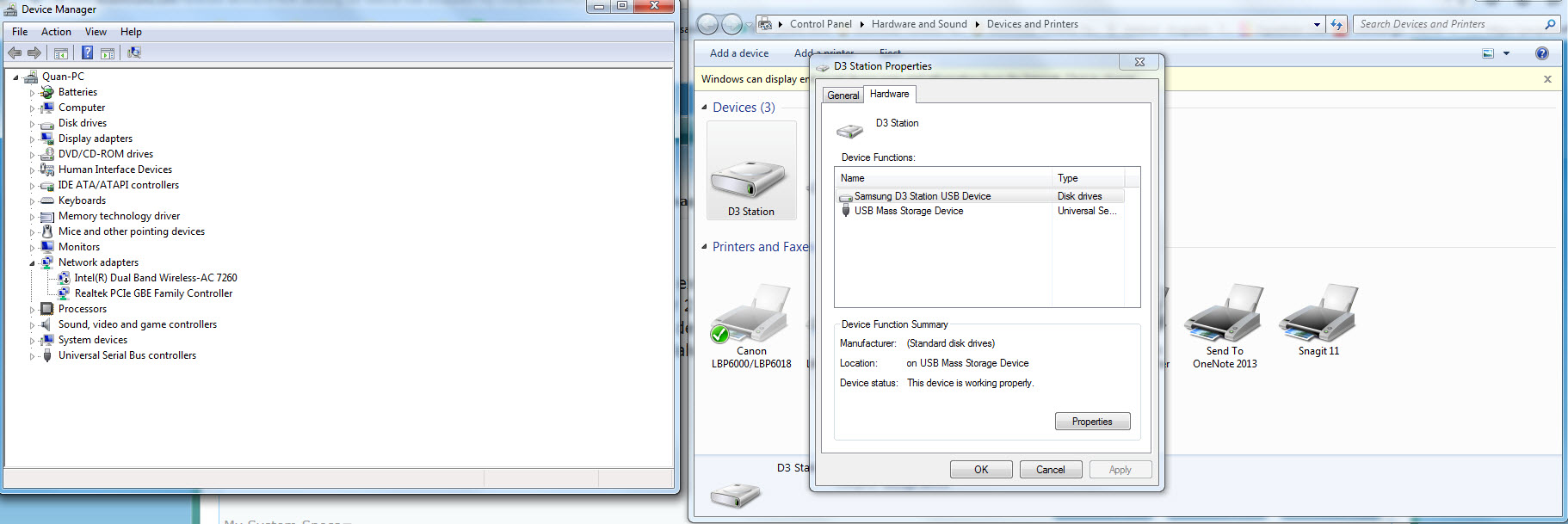
I'm having problem with my external HDD, it is a Samsung D3 Station 2TB that I bought last year. It suddenly disappeared from my computer 2 days ago and I couldn't access to it. I checked Device and Printer and it still showed the D3 Station with status "This device is working properly". Device Manager also showed that it recognised the HDD. I used NOD32 Antivirus and Malwarebyte to scan for potential threats but no luck.
og3OClr.jpg


Please help me,

Quan
 

My Computer My Computer

At a glance

Windows 7 Ultimate x64Intel(R) Core(TM) i7-4700MQ 2.40GHz12 GBGTX 765M
Computer type
Laptop
Computer Manufacturer/Model Number
Sager
OS
Windows 7 Ultimate x64
CPU
Intel(R) Core(TM) i7-4700MQ 2.40GHz
Motherboard
Notebook W35xSTQ_370ST
Memory
12 GB
Graphics Card(s)
GTX 765M
Screen Resolution
1080p
Hard Drives
750 GB
Internet Speed
3 MB
Antivirus
NOD 32 Antivirus
Browser
Firefox
Hi shinsaber.

Maybe your drive is recognized by your computer, but the drive letters are gone. Try to start 'Disk Management'.
If you can't find the program, press the start icon > Run... > Enter 'diskmgmt.msc' and press OK.

You will see a screen just like this:


IC235918.png


Search on the left colom the 2TB Disk you've inserted. Is there a drive letter on the colom next to the left colom where your 2TB Hard drive is listed, like (G:)?
 
Last edited:

My Computer My Computer

At a glance

Windows 7 Professional x64, Windows 8.1 Pro x...Intel(R) Pentium(R) CPU B960 @ 2.20GHz, 2200 ...4GB Installed (3.87 available)Intel(R) HD Graphics ver. 9.17.10.4229
Computer type
Laptop
Computer Manufacturer/Model Number
Dell Inspiron (15) 3520
OS
Windows 7 Professional x64, Windows 8.1 Pro x64, Windows 10 Home x64
CPU
Intel(R) Pentium(R) CPU B960 @ 2.20GHz, 2200 MHz,
Motherboard
Dell Inc. (or else Unknown)
Memory
4GB Installed (3.87 available)
Graphics Card(s)
Intel(R) HD Graphics ver. 9.17.10.4229
Sound Card
Cirrus LogicHigh Definition Audio
Monitor(s) Displays
General PnP Display
Screen Resolution
1366x768
Hard Drives
WDC WD5000LPVT-75G33T0 (Internal 500GB)
WD My Passport 0741 USB Device (External 1TB)
PSU
Dell LA64NS2-01
Cooling
Dell Inspiron 3520 CPU Cooling Fan Heatsink 60.4TZ01.011 0T0
Keyboard
Standard PS/2 Keyboard
Mouse
Dell Touchpad + Ewent EW3218
Internet Speed
60 MB/s
Antivirus
Windows Defender + Eset System Rescue CD (Linux A-V)
Browser
Google Chrome (Mozilla FireFox on Windows 10)
Hi,

Thank you, I have solved the issue after scanning and deleting some malwares. Now I can access the HDD normally again.
 

My Computer My Computer

At a glance

Windows 7 Ultimate x64Intel(R) Core(TM) i7-4700MQ 2.40GHz12 GBGTX 765M
Computer type
Laptop
Computer Manufacturer/Model Number
Sager
OS
Windows 7 Ultimate x64
CPU
Intel(R) Core(TM) i7-4700MQ 2.40GHz
Motherboard
Notebook W35xSTQ_370ST
Memory
12 GB
Graphics Card(s)
GTX 765M
Screen Resolution
1080p
Hard Drives
750 GB
Internet Speed
3 MB
Antivirus
NOD 32 Antivirus
Browser
Firefox
Nice, so we didn't solve this question :D
 

My Computer My Computer

At a glance

Windows 7 Professional x64, Windows 8.1 Pro x...Intel(R) Pentium(R) CPU B960 @ 2.20GHz, 2200 ...4GB Installed (3.87 available)Intel(R) HD Graphics ver. 9.17.10.4229
Computer type
Laptop
Computer Manufacturer/Model Number
Dell Inspiron (15) 3520
OS
Windows 7 Professional x64, Windows 8.1 Pro x64, Windows 10 Home x64
CPU
Intel(R) Pentium(R) CPU B960 @ 2.20GHz, 2200 MHz,
Motherboard
Dell Inc. (or else Unknown)
Memory
4GB Installed (3.87 available)
Graphics Card(s)
Intel(R) HD Graphics ver. 9.17.10.4229
Sound Card
Cirrus LogicHigh Definition Audio
Monitor(s) Displays
General PnP Display
Screen Resolution
1366x768
Hard Drives
WDC WD5000LPVT-75G33T0 (Internal 500GB)
WD My Passport 0741 USB Device (External 1TB)
PSU
Dell LA64NS2-01
Cooling
Dell Inspiron 3520 CPU Cooling Fan Heatsink 60.4TZ01.011 0T0
Keyboard
Standard PS/2 Keyboard
Mouse
Dell Touchpad + Ewent EW3218
Internet Speed
60 MB/s
Antivirus
Windows Defender + Eset System Rescue CD (Linux A-V)
Browser
Google Chrome (Mozilla FireFox on Windows 10)
Back
Top