Samsung 850 EVO mediocre performance

magmag

New member
Local time
3:12 AM
Messages
31
Hello,

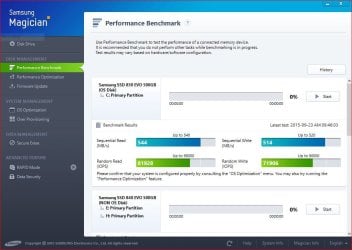
My setup is a Gigabyte P55A-UD3P MB running an intel core i5 @ 2.6 MHz (stock speeds and voltages). I'm using G.Skill 8GB DDR3 RAM & I'm using a good shielded SATA 3 cable and SATA 3 itself is managed by the built-in Marvell 9128 chip. My setup is kinda old nowadays but everything still works perfectly fine for my purposes so I thought of refreshing my hardware and implementing the Samsung 850 EVO (using firmware emt02b6q) and the system's overall speed is faster compared to my old drive (WD 500GB green) but I don't think I'm getting the most out of my drive. I'm on AHCI mode and I started with a fresh new installation of Windows 7 Professional using all latest drivers and patches. Trim is enabled and partition alignments on SSD are in good shape. Benchmarks using the magician software gave me these kinda humbled results with the marvell 9128 chip:
dvmwoy.jpg


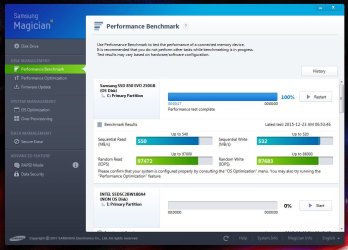
After a lot of googling, I found out that I'm indeed not lucky with hardware in general as I tend to pick the bad/oudated hardware because I found lots of complaints from the marvell chip so I pulled the sata 3 cable from the marvell chip and sticked it into my old sata2 connector (which i guess is a jmb362 chip or a gigabyte chip - I'm not sure) and these are the results:
332x8g4.jpg


and now based on these results, I'm confused about what to do: should I stay with marvell or the other sata2 chip? in other words, do you think guys that the second result is better (even though the sequential read have dropped almost to 1/2)?

Any advices would be highlgy appreciated to get the most out of my drive and mobo as much as i can.


Thx
 
Last edited:

My Computer My Computer

Computer type
PC/Desktop
OS
Windows 7 Ultimate X64
Here is mine with an Intel controller.
 

Attachments

  • Capture.JPG
    Capture.JPG
    80.1 KB · Views: 0

My Computer My Computer

Computer type
PC/Desktop
Computer Manufacturer/Model Number
My Own Build
OS
Windows 10 64 bit
CPU
Intel i7 6700K
Motherboard
ASUS ROG Maximus VIII Hero
Memory
16GB Corsair Dominator
Graphics Card(s)
Intel CPU Graphics
Sound Card
RealTek
Monitor(s) Displays
27" Dell S2719dgf
Screen Resolution
2560X1440
Hard Drives
1 TB Samsung 850 EVO SSD for Win 10 Pro
500GB Samsung 850 EVO SSD for Win 10 Insider
2 TB drive for backup
PSU
EVGA Supernova 750G2
Case
BeQuiet Silent Base 600
Cooling
Deepcool Captain 120EX
Keyboard
Microsoft Wireless 2000
Mouse
Microsoft wireless
Internet Speed
100 MB/sec (Cable)
Antivirus
Microsoft Defender and Malwarebytes
Browser
Edge/Firefox
Other Info
Cakewalk (Sonar) by BandLab and Studio One 4.1 Pro recording studio software. MOTU 896Mk3 Hybrid recording interface, Frontier Tranzport wireless control unit, Behringer X-Touch Control Surface.
Five USB connected optical drives for CD Audio production using Nero BurningROM
Only the 2 Marvell sata ports are sata 3 6 Gbps, you have to have the ssd connected to them to get full potential. That would be port 6 and 7, or 7 and 8 depending on how they are marked on the board, but the specs say sata port 6 and 7

Your numbers are not good at all.

These are the specs so I don`t understand why it`s so slow.

2 x SATA 6Gb/s connectors (GSATA3_6, GSATA3_7) supporting up to 2 SATA 6Gb/s devices

Are you sure you have the Marvel drivers installed, and are you positive you have AHCI enabled in the bios.

Run ATTO and post a snip.

Also run AS SSD benchmark and post a snip.

My 850 EVO on an Intel controller.
 

Attachments

  • Capture.JPG
    Capture.JPG
    85.9 KB · Views: 0
Last edited:

My Computer My Computer

Computer type
PC/Desktop
Computer Manufacturer/Model Number
Skylake Special #666
OS
Windows 10 Pro x64
CPU
Intel Core i7 6700K
Motherboard
Asus Sabertooth Z170 Mark 1
Memory
GSkill TridentZ RGB 16GB 3600 16-16-16-36
Graphics Card(s)
EVGA GTX 980 Ti SC x2
Sound Card
Realtek High Definition
Monitor(s) Displays
AOC G2460PG
Screen Resolution
1920 x 1080 144Hz
Hard Drives
Samsung 860 Pro 256GB, Seagate Barracuda 4TB x2
PSU
EVGA 1000 P2, EVGA White Custom Braided Cables
Case
Corsair Vengeance C70 Gunmetal Black
Cooling
Corsair H100i v2, Corsair ML120 x2, Thermal Grizzly Kryonaut
Keyboard
Logitech G910 Orion Spectrum
Mouse
Logitech G700s
Internet Speed
Verizon Fios Quantum Gateway 75/75
Antivirus
Windows Defender, Malwarebytes Free 3.8.3
Browser
Chrome
Other Info
Corsair SP120 x4, LG Blu-ray Drive, Durabrand HT-395 100 Watt Dolby Digital Amp, Corsair H2100 Wireless 7.1 Headset
Only the 2 Marvell sata ports are sata 3 6 Gbps, you have to have the ssd connected to them to get full potential. That would be port 6 and 7, or 7 and 8 depending on how they are marked on the board, but the specs say sata port 6 and 7

Your numbers are not good at all.

These are the specs so I don`t understand why it`s so slow.

2 x SATA 6Gb/s connectors (GSATA3_6, GSATA3_7) supporting up to 2 SATA 6Gb/s devices

Are you sure you have the Marvel drivers installed, and are you positive you have AHCI enabled in the bios.

Run ATTO and post a snip.

Also run AS SSD benchmark and post a snip.

My 850 EVO on an Intel controller.
Yes latest Marvell driver is installed and AHCI is indeed chosen before hand in bios before installing the fresh OS. I'm not sure if it is because of my outdated marvell chip 9128 or what? and what to do from my side to get the maximum peformance using my current hardware.
 

My Computer My Computer

Computer type
PC/Desktop
OS
Windows 7 Ultimate X64

My Computer My Computer

Computer type
PC/Desktop
Computer Manufacturer/Model Number
Skylake Special #666
OS
Windows 10 Pro x64
CPU
Intel Core i7 6700K
Motherboard
Asus Sabertooth Z170 Mark 1
Memory
GSkill TridentZ RGB 16GB 3600 16-16-16-36
Graphics Card(s)
EVGA GTX 980 Ti SC x2
Sound Card
Realtek High Definition
Monitor(s) Displays
AOC G2460PG
Screen Resolution
1920 x 1080 144Hz
Hard Drives
Samsung 860 Pro 256GB, Seagate Barracuda 4TB x2
PSU
EVGA 1000 P2, EVGA White Custom Braided Cables
Case
Corsair Vengeance C70 Gunmetal Black
Cooling
Corsair H100i v2, Corsair ML120 x2, Thermal Grizzly Kryonaut
Keyboard
Logitech G910 Orion Spectrum
Mouse
Logitech G700s
Internet Speed
Verizon Fios Quantum Gateway 75/75
Antivirus
Windows Defender, Malwarebytes Free 3.8.3
Browser
Chrome
Other Info
Corsair SP120 x4, LG Blu-ray Drive, Durabrand HT-395 100 Watt Dolby Digital Amp, Corsair H2100 Wireless 7.1 Headset
The Marvell 9128 chip is an early implementation of the SATA 3 standard by Gigabytes. The actual chip uses PCIe 2.0 lanes. The read throughput that you see is correct, since the single PCIe 2.0 lane has a maximum nominal transfer rate of 5 Gb/s or 625 MB/s. As for reference the SATA 3 has a maximum nominal transfer rate of 6 Gb/s 750 MB/s. The actual transfer rate is less, about 20%, due to the 8b/10b encoding overhead.

I have a Gigabyte MB with SATA 3 ports by Intel and Marvell. While I prefer to use the Intel SATA 3 ports, the Marvell ports are also used and for that matter, all SATA ports are used.... Marvell chip is still much faster than the SATA 2 ports and my system has no issues with the Marvell ports.

If the Marvell ports don't give you any issues, you'd be better off connecting your Samsung SSD there...
 
Last edited:

My Computer My Computer

Computer type
PC/Desktop
Computer Manufacturer/Model Number
Custom built at Home
OS
Windows 7 64-bit, Windows 8.1 64-bit, OSX El Capitan, Windows 10 (VMware)
CPU
Intel i5-3350P 3.1 GHz
Motherboard
Gigabyte GA-Z77X-UP5 TH
Memory
16 GBs GSkill Sniper
Graphics Card(s)
Radeon HD 7850
Sound Card
VIA HD Audio
Monitor(s) Displays
Dell U2410 24"
Screen Resolution
1920x1200
Hard Drives
1 x Intel 520 240 GBs
1 x Seagate 1TBs SATA 2.0,
1 x Seagate 1TBs eSATA 2.0
PSU
Thermaltake 850W
Case
Antec P183
Cooling
Noctua NH-D14 Heatsink 2 x 120mm fans, 4 x 120mm case fans
Keyboard
Dell Multimedia keyboard
Mouse
Logitech Trackball
Internet Speed
28.5 Mb/s
The Marvell 9128 chip is an early implementation of the SATA 3 standard by Gigabytes. The actual chip uses PCIe 2.0 lanes. The read throughput that you see is correct, since the single PCIe 2.0 lane has a maximum nominal transfer rate of 4 Gb/s or 500 MB/s. As for reference the SATA 3 has a maximum nominal transfer rate of 6 Gb/s 750 MB/s. The actual transfer rate is less, about 20%, due to the 8b/10b encoding overhead.

I have a Gigabyte MB with SATA 3 ports by Intel and Marvell. While I prefer to use the Intel SATA 3 ports, the Marvell ports are also used and for that matter, all SATA ports are used.... Marvell chip is still much faster than the SATA 2 ports and my system has no issues with the Marvell ports.

If the Marvell ports don't give you any issues, you'd be better off connecting your Samsung SSD there...
There are no issues with the marvell chip except that the IOPS results for my drive when connected to SATA 2 are generally better than the IOPS results when connected to marvell!. I haven no idea what chip is powering the SATA 2 because it says nothing in the manual other than 6 x SATA 3 Gb/s connectors & since the results given from IOPS are more practical and related to the real world (as it is said on the internet), I've attached my drive, for now, to the first port in SATA2 untill there are more crucial evidence that the marvell chip is generally better. I'm confused myself and I'm new in the SSD world to tell the difference myself.
 

My Computer My Computer

Computer type
PC/Desktop
OS
Windows 7 Ultimate X64
There are no issues with the marvell chip except that the IOPS results for my drive when connected to SATA 2 are generally better than the IOPS results when connected to marvell!. I haven no idea what chip is powering the SATA 2 because it says nothing in the manual other than 6 x SATA 3 Gb/s connectors & since the results given from IOPS are more practical and related to the real world (as it is said on the internet), I've attached my drive, for now, to the first port in SATA2 untill there are more crucial evidence that the marvell chip is generally better. I'm confused myself and I'm new in the SSD world to tell the difference myself.
In my view...

Most of your activities on your PC are read files, such at times when the system boots, loads applications, etc. While with Windows there's always some writing, like log files, performance data, etc., you really don't write that much to the drive. As such, connecting your SSD to the Marvell chip would result in faster performance vs. having the same SSD connected to the SATA 2 port.

IOPS performance of a drive is overrated in my view for desktop systems; however, it is certainly important for servers that are used by number of other servers and people. In your case, I seriously doubt that your activity on the system is going to max out the 39K+ IOPS of the SSD. You or your system would probably use 10% the most, if that in extreme cases.

I'd suggest that don't look at the performance number, just use the system and see how it performs for about a week. Then switch to the other ports and see which performance you like better.
 

My Computer My Computer

Computer type
PC/Desktop
Computer Manufacturer/Model Number
Custom built at Home
OS
Windows 7 64-bit, Windows 8.1 64-bit, OSX El Capitan, Windows 10 (VMware)
CPU
Intel i5-3350P 3.1 GHz
Motherboard
Gigabyte GA-Z77X-UP5 TH
Memory
16 GBs GSkill Sniper
Graphics Card(s)
Radeon HD 7850
Sound Card
VIA HD Audio
Monitor(s) Displays
Dell U2410 24"
Screen Resolution
1920x1200
Hard Drives
1 x Intel 520 240 GBs
1 x Seagate 1TBs SATA 2.0,
1 x Seagate 1TBs eSATA 2.0
PSU
Thermaltake 850W
Case
Antec P183
Cooling
Noctua NH-D14 Heatsink 2 x 120mm fans, 4 x 120mm case fans
Keyboard
Dell Multimedia keyboard
Mouse
Logitech Trackball
Internet Speed
28.5 Mb/s
Back
Top