
Solved Samsung 850 PRO 256GB Anomalies

timw128

New member
Member
VIP
Local time
5:59 AM
Messages
294
Location
Michigan, USA
Hello-

I have enjoyed this Samsung 850 PRO 256GB SSD since purchase in Nov 2015.

We used the Samsung Magician (v4.5) disc that came with it and tuned the drive accordingly, plus

we changed the other recommended system settings for SSD's.

Moved the Page File to the 1TB Storage drive, along with My Documents, My Pictures, My Videos,

and Downloads. System Restore was turned off.

About a week or two ago (maybe a tad longer) Boot seemed to take a bit longer and the machine

seemed like it was slowing down since the SSD installation. By most standards, it's still rather quick.

Found out that there was a v5.0 of Magician available, so we installed it and removed the other

version. Tuning options are not available on the v5.0 compared to other version.

I had the SSD set to 'Rapid Mode' since the beginning. However, it sure seems like it's a tad snappier

without 'Rapid Mode'.

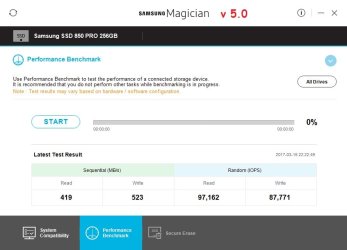
We're getting significantly worse read/write values since install- when that happened, can't be certain,

as we benchmark drive as infrequently as possible.

Samsung has agreed to RMA the drive, but we'll buy a new one first to keep up and running.

Our research back in 11/2015 prior to purchase indicated the 850 PRO was top shelf.

Please take a look at the Magician attachment, using ver. 5.0, and also the User Benchmarks

average based on 16K samples... we're backed up and have full system images at 3 sources,

so not worried there.

I would like to hear some constructive opinions about this issue, and offer appreciation in advance.

Thank you!
 

Attachments
  • Version 5.0.jpg
    Version 5.0.jpg
    40.7 KB · Views: 0
  • bench.jpg
    bench.jpg
    34.7 KB · Views: 0

My Computer My Computer

At a glance

Windows 7 Pro SP1 x64Intel Haswell i7-4770 3.4GHzG. SKILLS 32GB Ripjaws X Series DDR3 1600 SDRAMIntegrated HD4600- upgrade coming!
Computer type
PC/Desktop
Computer Manufacturer/Model Number
HP ENVY 700-515xt CTO, with more cam, headers, and 4.11 gears.
OS
Windows 7 Pro SP1 x64
CPU
Intel Haswell i7-4770 3.4GHz
Motherboard
OEM Kaili2 (MSI MS-7826 v2.0)
Memory
G. SKILLS 32GB Ripjaws X Series DDR3 1600 SDRAM
Graphics Card(s)
Integrated HD4600- upgrade coming!
Sound Card
Integrated...for now.
Monitor(s) Displays
Dell ST-2310 Digital
Screen Resolution
I like 1920x1080
Hard Drives
C\:-Samsung 850PRO SSD-256gb, D:\-SG Barracuda 7200 HDD 1 TB (Storage)
PSU
350w OEM (About to become a display in the aquarium!)
Case
ENVY OEM
Cooling
FANS
Keyboard
Logitech and HP- USB.
Mouse
Logitech LS1 (Alltime favorite of mine!) and HP- both USB
Internet Speed
65Mbps Down (min)/4.5Mbps UP- Charter Comm HS cable
Antivirus
avast! Internet Security 2015/MBAM
Browser
Opera, at present. Love that Chromium horsepower!
Hello Tim mate if it were me I would dump the magician period.

I had a problem quite a while back where the USB ports in my main desktop stopped functioning and to cut a long story short a member told me that this was caused by the magician software - uninstalled it and bingo the ports came back.

So have never used it since and I am running at least six Samsung SSD's and to be honest the features in the software were of no real use when I used it before and I find apart from the odd sfc and chkdsk and using CCleaner to keep the drives tidy I don't do anything else.

You might try this before and after uninstalling the magician if that is what you decide to do.
Download AS SSD benchmark 1.9.5986 - Technical Details - FileHippo.com sometimes it is in German but that is no problem as the readout is obviously read and write rates.
 

My Computer My Computer

At a glance

Desk1 7 Home Prem / Desk2 10 Pro / Main lap A...Desk1 i5 3750K / Laptop i7 GTX 860M / Desk2 i...Desk1 8GB (1866) / Desk2 16GB (1333) / Laptop...Desk 1& 2NVidia GTX 650 & Laptops on board Intel
Computer type
PC/Desktop
Computer Manufacturer/Model Number
Own build (new) Desk1 / Asus ROG Win 7 / Desk2 1st build
OS
Desk1 7 Home Prem / Desk2 10 Pro / Main lap Asus ROG 10 Pro 2 laptop Toshiba 7 Pro Asus P2520 7 & 10
CPU
Desk1 i5 3750K / Laptop i7 GTX 860M / Desk2 i5 2500
Motherboard
Desk1 Asus P877-V / Desk2 Gigabyte H67 UD3H / Laptop ?
Memory
Desk1 8GB (1866) / Desk2 16GB (1333) / Laptop 8Gb DDR3
Graphics Card(s)
Desk 1& 2NVidia GTX 650 & Laptops on board Intel
Sound Card
Desk 1 & 2 -XONAR DG Realtek High Def audio Laptop
Monitor(s) Displays
Desk 1 Benq HD 2450 / Desk2 Philips 24" / Laptop 17.5"
Screen Resolution
1920x1080 D1 & D2 & Laptop 1
Hard Drives
Desk1 Samsung 120GB 830 SSD
Asus ROG 256GB 850 Pro SSD
Desk2 Samsung 840 256 SSD
Toshiba 120GB EVO
PSU
Desk 1 Corsair HX 1050/ Laptop ? / Desk 2 Corsair HX 650
Case
Desk 1 Cooler HAF XM ? Toshiba laptop / Desk2 Coolermaster
Cooling
Fans on all Desk1 -2 Desk2 - all Coolermasters 5 Laptop ?
Keyboard
Desk 1 MS Sidewinder X6 Desk 2 MS Sidewinder X 4
Mouse
Desk 1&2 - Gigabyte MS 900 gamer - laptop - Logitec wireless
Internet Speed
ADSL2+
Other Info
One other Desktop (tester) and spare Toshba laptop both with SSD's
Running Kaspersky 2016 ISS on all machines config'd identically
Logitec audio stereo systems on each machine (x3)
Canon MG5250MFC
Router/modem TP-Link running WPA2SK
You might try this before and after uninstalling the magician if that is what you decide to do.
Download AS SSD benchmark 1.9.5986 - Technical Details - FileHippo.com sometimes it is in German but that is no problem as the readout is obviously read and write rates.

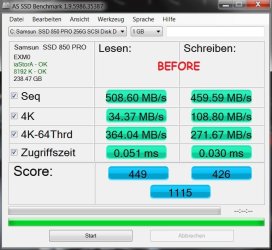
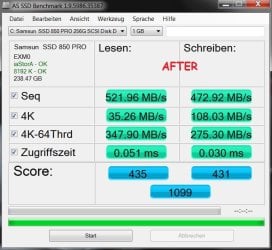
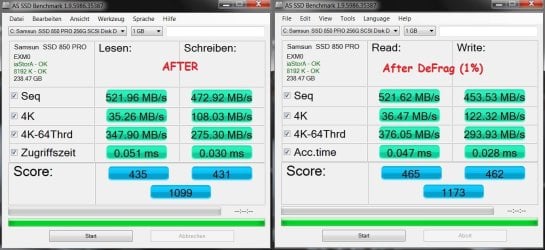
OK, here's the Before and After Magician uninstall using AS SSD Benchmark.

I just don't understand how the read/write values would degrade like this since Nov. 2015.

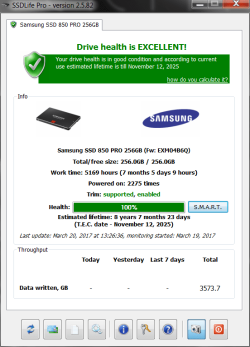
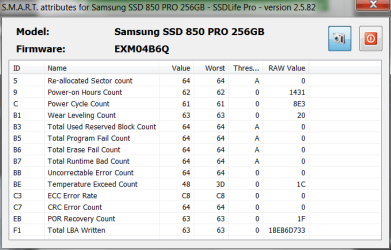
According to SSDLife (see attached screenshots) the drive is 100% healthy.

Again, thanks!
 

Attachments

  • Before.jpg
    Before.jpg
    60.8 KB · Views: 20
  • After.jpg
    After.jpg
    58.2 KB · Views: 20
  • SSDLife.png
    SSDLife.png
    26.6 KB · Views: 0
  • SSDLife_SMART.png
    SSDLife_SMART.png
    17.5 KB · Views: 20

My Computer My Computer

At a glance

Windows 7 Pro SP1 x64Intel Haswell i7-4770 3.4GHzG. SKILLS 32GB Ripjaws X Series DDR3 1600 SDRAMIntegrated HD4600- upgrade coming!
Computer type
PC/Desktop
Computer Manufacturer/Model Number
HP ENVY 700-515xt CTO, with more cam, headers, and 4.11 gears.
OS
Windows 7 Pro SP1 x64
CPU
Intel Haswell i7-4770 3.4GHz
Motherboard
OEM Kaili2 (MSI MS-7826 v2.0)
Memory
G. SKILLS 32GB Ripjaws X Series DDR3 1600 SDRAM
Graphics Card(s)
Integrated HD4600- upgrade coming!
Sound Card
Integrated...for now.
Monitor(s) Displays
Dell ST-2310 Digital
Screen Resolution
I like 1920x1080
Hard Drives
C\:-Samsung 850PRO SSD-256gb, D:\-SG Barracuda 7200 HDD 1 TB (Storage)
PSU
350w OEM (About to become a display in the aquarium!)
Case
ENVY OEM
Cooling
FANS
Keyboard
Logitech and HP- USB.
Mouse
Logitech LS1 (Alltime favorite of mine!) and HP- both USB
Internet Speed
65Mbps Down (min)/4.5Mbps UP- Charter Comm HS cable
Antivirus
avast! Internet Security 2015/MBAM
Browser
Opera, at present. Love that Chromium horsepower!
"I just don't understand how the read/write values would degrade like this since Nov. 2015."

I am not seeing a clear 2015 vs 2017 picture based on the above. Can you summarize briefly what exactly your good 2015 and bad 2017 numbers are? Just a few words of text is all.
 

My Computer My Computer

At a glance

Win7 pro x64stock i7 7700kCorsair Vengeance LPX 16GB (2x8GB) DDR4 @ 320...integrated Intel HD 630
Computer type
PC/Desktop
Computer Manufacturer/Model Number
diy
OS
Win7 pro x64
CPU
stock i7 7700k
Motherboard
Gigabyte Z270N-WIFI mini-ITX
Memory
Corsair Vengeance LPX 16GB (2x8GB) DDR4 @ 3200MHz
Graphics Card(s)
integrated Intel HD 630
Sound Card
onboard Realtek ALC1220
Monitor(s) Displays
two vertically mounted samsung 55" 4k un55mu8000
Screen Resolution
1920x1280
Hard Drives
256GB Samsung EVO 960 M.2 pci-e NVMe SSD
PSU
SilverStone Nightjar ST45NF 450Watt Fanless
Case
No case. Motherboard is mounted directly onto power supply
Cooling
Evercool low profile 815EP with Panaflow 12L fan at 7v
Keyboard
Ortek MCK-86 mini
Mouse
Belkin 5-button USB
Internet Speed
spectrum 400mbps
Well John I was just after those figures for comparison after uninstalling that magician software which I mentioned to the OP I will not use because I cannot see any value in it and it caused more issues than without it. Besides there are plenty of softwares out there that will keep these things in top shape.

I just don't understand how the read/write values would degrade like this since Nov. 2015.

Now the wear level is really arbitrary it depends on the use you give the SSD if for example you regularly clean install or save and delete a lot of documents pics etc then it might but that would have to be a very heavy usage.
All the same SSD's do degrade over time. See the section at the end of this
How to: Delete Your Data Securely on Windows | Surveillance Self-Defense 1 and click on the links re wear levelling.

According to SSDLife (see attached screenshots) the drive is 100% healthy.

Yes that is probably down to the current status of the SSD memory "blocks" that are free it might not reflect the ones that have worn out for want of a better term.
 

My Computer My Computer

At a glance

Desk1 7 Home Prem / Desk2 10 Pro / Main lap A...Desk1 i5 3750K / Laptop i7 GTX 860M / Desk2 i...Desk1 8GB (1866) / Desk2 16GB (1333) / Laptop...Desk 1& 2NVidia GTX 650 & Laptops on board Intel
Computer type
PC/Desktop
Computer Manufacturer/Model Number
Own build (new) Desk1 / Asus ROG Win 7 / Desk2 1st build
OS
Desk1 7 Home Prem / Desk2 10 Pro / Main lap Asus ROG 10 Pro 2 laptop Toshiba 7 Pro Asus P2520 7 & 10
CPU
Desk1 i5 3750K / Laptop i7 GTX 860M / Desk2 i5 2500
Motherboard
Desk1 Asus P877-V / Desk2 Gigabyte H67 UD3H / Laptop ?
Memory
Desk1 8GB (1866) / Desk2 16GB (1333) / Laptop 8Gb DDR3
Graphics Card(s)
Desk 1& 2NVidia GTX 650 & Laptops on board Intel
Sound Card
Desk 1 & 2 -XONAR DG Realtek High Def audio Laptop
Monitor(s) Displays
Desk 1 Benq HD 2450 / Desk2 Philips 24" / Laptop 17.5"
Screen Resolution
1920x1080 D1 & D2 & Laptop 1
Hard Drives
Desk1 Samsung 120GB 830 SSD
Asus ROG 256GB 850 Pro SSD
Desk2 Samsung 840 256 SSD
Toshiba 120GB EVO
PSU
Desk 1 Corsair HX 1050/ Laptop ? / Desk 2 Corsair HX 650
Case
Desk 1 Cooler HAF XM ? Toshiba laptop / Desk2 Coolermaster
Cooling
Fans on all Desk1 -2 Desk2 - all Coolermasters 5 Laptop ?
Keyboard
Desk 1 MS Sidewinder X6 Desk 2 MS Sidewinder X 4
Mouse
Desk 1&2 - Gigabyte MS 900 gamer - laptop - Logitec wireless
Internet Speed
ADSL2+
Other Info
One other Desktop (tester) and spare Toshba laptop both with SSD's
Running Kaspersky 2016 ISS on all machines config'd identically
Logitec audio stereo systems on each machine (x3)
Canon MG5250MFC
Router/modem TP-Link running WPA2SK
"I just don't understand how the read/write values would degrade like this since Nov. 2015."

I am not seeing a clear 2015 vs 2017 picture based on the above. Can you summarize briefly what exactly your good 2015 and bad 2017 numbers are? Just a few words of text is all.

Sequential's were in the 550 range and Random's were 100K+ when new.
 

My Computer My Computer

At a glance

Windows 7 Pro SP1 x64Intel Haswell i7-4770 3.4GHzG. SKILLS 32GB Ripjaws X Series DDR3 1600 SDRAMIntegrated HD4600- upgrade coming!
Computer type
PC/Desktop
Computer Manufacturer/Model Number
HP ENVY 700-515xt CTO, with more cam, headers, and 4.11 gears.
OS
Windows 7 Pro SP1 x64
CPU
Intel Haswell i7-4770 3.4GHz
Motherboard
OEM Kaili2 (MSI MS-7826 v2.0)
Memory
G. SKILLS 32GB Ripjaws X Series DDR3 1600 SDRAM
Graphics Card(s)
Integrated HD4600- upgrade coming!
Sound Card
Integrated...for now.
Monitor(s) Displays
Dell ST-2310 Digital
Screen Resolution
I like 1920x1080
Hard Drives
C\:-Samsung 850PRO SSD-256gb, D:\-SG Barracuda 7200 HDD 1 TB (Storage)
PSU
350w OEM (About to become a display in the aquarium!)
Case
ENVY OEM
Cooling
FANS
Keyboard
Logitech and HP- USB.
Mouse
Logitech LS1 (Alltime favorite of mine!) and HP- both USB
Internet Speed
65Mbps Down (min)/4.5Mbps UP- Charter Comm HS cable
Antivirus
avast! Internet Security 2015/MBAM
Browser
Opera, at present. Love that Chromium horsepower!
...Besides there are plenty of softwares out there that will keep these things in top shape.

Now the wear level is really arbitrary it depends on the use you give the SSD if for example you regularly clean install or save and delete a lot of documents pics etc then it might but that would have to be a very heavy usage.

And what progs do you refer to, specifically?...

Clean install on this drive, only once... as far as 'save and delete a lot', well, that's subjective. One would

have to define 'a lot'.

I don't like a lot of cookies, temp files, etc. hanging around, so I clean with CCleaner usually once a day

if usage is high. Gave that a thought and decided that maybe that's not such a good idea.

Like I mentioned prior, the SSD was bought and installed back in Nov 2015 and it's had over 3500GB of

data written to it...

I was just looking at the Samsung specs for the drive and the numbers we were getting when new were the

MAX values- in other words, it's like saying 'up to' in advertising lingo. If you want to take a look, here's a

link-

Access Denied

We'll go read that link you provided.

Thanks.
 

My Computer My Computer

At a glance

Windows 7 Pro SP1 x64Intel Haswell i7-4770 3.4GHzG. SKILLS 32GB Ripjaws X Series DDR3 1600 SDRAMIntegrated HD4600- upgrade coming!
Computer type
PC/Desktop
Computer Manufacturer/Model Number
HP ENVY 700-515xt CTO, with more cam, headers, and 4.11 gears.
OS
Windows 7 Pro SP1 x64
CPU
Intel Haswell i7-4770 3.4GHz
Motherboard
OEM Kaili2 (MSI MS-7826 v2.0)
Memory
G. SKILLS 32GB Ripjaws X Series DDR3 1600 SDRAM
Graphics Card(s)
Integrated HD4600- upgrade coming!
Sound Card
Integrated...for now.
Monitor(s) Displays
Dell ST-2310 Digital
Screen Resolution
I like 1920x1080
Hard Drives
C\:-Samsung 850PRO SSD-256gb, D:\-SG Barracuda 7200 HDD 1 TB (Storage)
PSU
350w OEM (About to become a display in the aquarium!)
Case
ENVY OEM
Cooling
FANS
Keyboard
Logitech and HP- USB.
Mouse
Logitech LS1 (Alltime favorite of mine!) and HP- both USB
Internet Speed
65Mbps Down (min)/4.5Mbps UP- Charter Comm HS cable
Antivirus
avast! Internet Security 2015/MBAM
Browser
Opera, at present. Love that Chromium horsepower!
My Computer My Computer

At a glance

Win7 pro x64stock i7 7700kCorsair Vengeance LPX 16GB (2x8GB) DDR4 @ 320...integrated Intel HD 630
Computer type
PC/Desktop
Computer Manufacturer/Model Number
diy
OS
Win7 pro x64
CPU
stock i7 7700k
Motherboard
Gigabyte Z270N-WIFI mini-ITX
Memory
Corsair Vengeance LPX 16GB (2x8GB) DDR4 @ 3200MHz
Graphics Card(s)
integrated Intel HD 630
Sound Card
onboard Realtek ALC1220
Monitor(s) Displays
two vertically mounted samsung 55" 4k un55mu8000
Screen Resolution
1920x1280
Hard Drives
256GB Samsung EVO 960 M.2 pci-e NVMe SSD
PSU
SilverStone Nightjar ST45NF 450Watt Fanless
Case
No case. Motherboard is mounted directly onto power supply
Cooling
Evercool low profile 815EP with Panaflow 12L fan at 7v
Keyboard
Ortek MCK-86 mini
Mouse
Belkin 5-button USB
Internet Speed
spectrum 400mbps
... SSD's do degrade over time. See the section at the end of this
How to: Delete Your Data Securely on Windows | Surveillance Self-Defense 1 and click on the links re wear leveling.

OK, read that last paragraph, pretty much understood how SSD architecture works... liked the pencil,

paper, eraser analogy.

Samsung V-NAND technology features a unique design that stacks 48 layers on top of one another instead

of trying to decrease the cells’ pitch size. That vertical architecture was new and cutting edge in 2015... the

850 PRO is STILL pretty much the highest rated SSD out there, the exception, perhaps, is their lower

priced EVO variant. (Best SSDs: Q1 2017)

I think I'm going to have to teach myself a better user strategy and refrain from cleaning up so

frequently. It's my first SSD and I've learned a lot from it.

Thanks for the input
 

My Computer My Computer

At a glance

Windows 7 Pro SP1 x64Intel Haswell i7-4770 3.4GHzG. SKILLS 32GB Ripjaws X Series DDR3 1600 SDRAMIntegrated HD4600- upgrade coming!
Computer type
PC/Desktop
Computer Manufacturer/Model Number
HP ENVY 700-515xt CTO, with more cam, headers, and 4.11 gears.
OS
Windows 7 Pro SP1 x64
CPU
Intel Haswell i7-4770 3.4GHz
Motherboard
OEM Kaili2 (MSI MS-7826 v2.0)
Memory
G. SKILLS 32GB Ripjaws X Series DDR3 1600 SDRAM
Graphics Card(s)
Integrated HD4600- upgrade coming!
Sound Card
Integrated...for now.
Monitor(s) Displays
Dell ST-2310 Digital
Screen Resolution
I like 1920x1080
Hard Drives
C\:-Samsung 850PRO SSD-256gb, D:\-SG Barracuda 7200 HDD 1 TB (Storage)
PSU
350w OEM (About to become a display in the aquarium!)
Case
ENVY OEM
Cooling
FANS
Keyboard
Logitech and HP- USB.
Mouse
Logitech LS1 (Alltime favorite of mine!) and HP- both USB
Internet Speed
65Mbps Down (min)/4.5Mbps UP- Charter Comm HS cable
Antivirus
avast! Internet Security 2015/MBAM
Browser
Opera, at present. Love that Chromium horsepower!
I was hoping you had a clear apples to apples comparison with the same benchmark in 2015 and in 2017. If 2015 performance is not documented in your environment its hard to say there is a problem. Also, have you seen this?

Yes, file system fragmentation DOES affect SSD read speed

I may have, John...I'll have to go and dig around in the cloud. Usually, I benchmark new products and save

for future reference/troubleshooting.

Of further note, when I had Magician software installed I ran the drive in Rapid Mode 100% of the time.

I have the RAM maxed out (32GB) with some pretty quick G.SKILL memory, and Rapid Mode simply

caches off from that to increase SSD speed up to 1.8 times faster.

Hey, I'm glad you brought that up regarding fragmentation, as that's what got me into analyzing this

drive. No, I didn't read that particular link, but will.

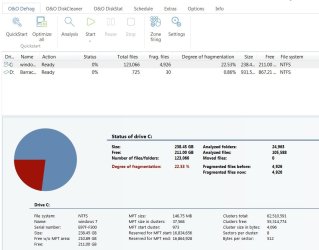
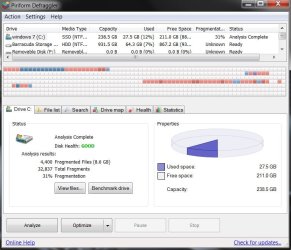
I used Piriform Defraggler AND Windows internal defrag to do an analysis ONLY... I had read at a tech site

that Defraggler did an excellent job of analyzing an SSD. Defraggler indicated 30% and Windows 20%

fragmentation (Can provide graphics if needed). Piriform, along with a couple of other sources, claim that

it's OK to defrag/optimize an SSD occasionally. I have not done so, because I'm not sold on it. I've heard

that Windows 8/10 automatically optimize SSD's, but personally have not used those systems.

Thanks.
 

My Computer My Computer

At a glance

Windows 7 Pro SP1 x64Intel Haswell i7-4770 3.4GHzG. SKILLS 32GB Ripjaws X Series DDR3 1600 SDRAMIntegrated HD4600- upgrade coming!
Computer type
PC/Desktop
Computer Manufacturer/Model Number
HP ENVY 700-515xt CTO, with more cam, headers, and 4.11 gears.
OS
Windows 7 Pro SP1 x64
CPU
Intel Haswell i7-4770 3.4GHz
Motherboard
OEM Kaili2 (MSI MS-7826 v2.0)
Memory
G. SKILLS 32GB Ripjaws X Series DDR3 1600 SDRAM
Graphics Card(s)
Integrated HD4600- upgrade coming!
Sound Card
Integrated...for now.
Monitor(s) Displays
Dell ST-2310 Digital
Screen Resolution
I like 1920x1080
Hard Drives
C\:-Samsung 850PRO SSD-256gb, D:\-SG Barracuda 7200 HDD 1 TB (Storage)
PSU
350w OEM (About to become a display in the aquarium!)
Case
ENVY OEM
Cooling
FANS
Keyboard
Logitech and HP- USB.
Mouse
Logitech LS1 (Alltime favorite of mine!) and HP- both USB
Internet Speed
65Mbps Down (min)/4.5Mbps UP- Charter Comm HS cable
Antivirus
avast! Internet Security 2015/MBAM
Browser
Opera, at present. Love that Chromium horsepower!

Attachments

  • o&o.jpg
    o&o.jpg
    64.8 KB · Views: 0
  • piriform.jpg
    piriform.jpg
    73.1 KB · Views: 0

My Computer My Computer

At a glance

Windows 7 Pro SP1 x64Intel Haswell i7-4770 3.4GHzG. SKILLS 32GB Ripjaws X Series DDR3 1600 SDRAMIntegrated HD4600- upgrade coming!
Computer type
PC/Desktop
Computer Manufacturer/Model Number
HP ENVY 700-515xt CTO, with more cam, headers, and 4.11 gears.
OS
Windows 7 Pro SP1 x64
CPU
Intel Haswell i7-4770 3.4GHz
Motherboard
OEM Kaili2 (MSI MS-7826 v2.0)
Memory
G. SKILLS 32GB Ripjaws X Series DDR3 1600 SDRAM
Graphics Card(s)
Integrated HD4600- upgrade coming!
Sound Card
Integrated...for now.
Monitor(s) Displays
Dell ST-2310 Digital
Screen Resolution
I like 1920x1080
Hard Drives
C\:-Samsung 850PRO SSD-256gb, D:\-SG Barracuda 7200 HDD 1 TB (Storage)
PSU
350w OEM (About to become a display in the aquarium!)
Case
ENVY OEM
Cooling
FANS
Keyboard
Logitech and HP- USB.
Mouse
Logitech LS1 (Alltime favorite of mine!) and HP- both USB
Internet Speed
65Mbps Down (min)/4.5Mbps UP- Charter Comm HS cable
Antivirus
avast! Internet Security 2015/MBAM
Browser
Opera, at present. Love that Chromium horsepower!
Ok Tim it seems from the post #7 that you and I are not on the same page, and that I get the impression that my views are not really to your liking - so I shall leave this one to John when I find the software I referred to - at the moment the site is down for maintenance I shall just link in what they have when it comes up again.

I have Samsungs I think as I mentioned back early in this thread in all my machines right now that have never given me any problems and all I use is CCleaner because I don't think it has much if any deleterious effects on the drives. As a matter of interest I am not a fan of fancy software that claims to make anything from hardware to software perform faster or more efficiently. In fact I have in the distant past found myself reinstalling many times through inexperience from using such rubbish.
I do have 10 on two machines right now and the drives are or seem to be taken care of by the OS though as I have been away from home for some three months (hospital) I have not been able to keep up with what has gone on with them.

I have also got other brand drives such as SanDisk and Crucial all much of a muchness the only real difference between them and the Samsung is the warranty period.

Anyway I do hope you sort something out re your query.
 

My Computer My Computer

At a glance

Desk1 7 Home Prem / Desk2 10 Pro / Main lap A...Desk1 i5 3750K / Laptop i7 GTX 860M / Desk2 i...Desk1 8GB (1866) / Desk2 16GB (1333) / Laptop...Desk 1& 2NVidia GTX 650 & Laptops on board Intel
Computer type
PC/Desktop
Computer Manufacturer/Model Number
Own build (new) Desk1 / Asus ROG Win 7 / Desk2 1st build
OS
Desk1 7 Home Prem / Desk2 10 Pro / Main lap Asus ROG 10 Pro 2 laptop Toshiba 7 Pro Asus P2520 7 & 10
CPU
Desk1 i5 3750K / Laptop i7 GTX 860M / Desk2 i5 2500
Motherboard
Desk1 Asus P877-V / Desk2 Gigabyte H67 UD3H / Laptop ?
Memory
Desk1 8GB (1866) / Desk2 16GB (1333) / Laptop 8Gb DDR3
Graphics Card(s)
Desk 1& 2NVidia GTX 650 & Laptops on board Intel
Sound Card
Desk 1 & 2 -XONAR DG Realtek High Def audio Laptop
Monitor(s) Displays
Desk 1 Benq HD 2450 / Desk2 Philips 24" / Laptop 17.5"
Screen Resolution
1920x1080 D1 & D2 & Laptop 1
Hard Drives
Desk1 Samsung 120GB 830 SSD
Asus ROG 256GB 850 Pro SSD
Desk2 Samsung 840 256 SSD
Toshiba 120GB EVO
PSU
Desk 1 Corsair HX 1050/ Laptop ? / Desk 2 Corsair HX 650
Case
Desk 1 Cooler HAF XM ? Toshiba laptop / Desk2 Coolermaster
Cooling
Fans on all Desk1 -2 Desk2 - all Coolermasters 5 Laptop ?
Keyboard
Desk 1 MS Sidewinder X6 Desk 2 MS Sidewinder X 4
Mouse
Desk 1&2 - Gigabyte MS 900 gamer - laptop - Logitec wireless
Internet Speed
ADSL2+
Other Info
One other Desktop (tester) and spare Toshba laptop both with SSD's
Running Kaspersky 2016 ISS on all machines config'd identically
Logitec audio stereo systems on each machine (x3)
Canon MG5250MFC
Router/modem TP-Link running WPA2SK
Ok Tim it seems from the post #7 that you and I are not on the same page, and that I get the impression that my views are not really to your liking...

Hmmm, I guess I'm missing something here... I certainly wasn't trying to leave you with that impression,

and we're sorry you took it as such.

As stated in latter comments, we mentioned that we've used the drive a lot, in essence, and that more than

likely should implement different habits.

The link you presented was useful- especially the sub-link within to Wikipedia on wear leveling.

I think the fact that we thanked you for your input pretty much says it all, let alone that we've added

to your rep.

We found a program that has specific algorithms for dealing with fragments on a flash memory disk, per

John's input on the matter (link). We tried MyDefrag, it analyzed at 32.9% fragmentation, and reduced

it to 1%. MyDefrag knows nothing about memory block fragmentation because MyDefrag operates at the

file system level, not the hardware level. However, the MyDefrag script for flash memory disks will

consolidate free space, and this reduces the problems caused by this kind of fragmentation, with minimal

writes.

Programs such as PerfectDisk/O&O Defrag & MyDefrag all state that a consolidation of free space WILL

improve performance - contradicting the first rule of SSD's (not to defrag). with minimal writes.

I feel comfortable that this SSD is performing well and within its designed performance intent,

according to Samsung spec.

Again, thanks for your input.
 

Attachments

  • after defrag.jpg
    after defrag.jpg
    115.2 KB · Views: 0

My Computer My Computer

At a glance

Windows 7 Pro SP1 x64Intel Haswell i7-4770 3.4GHzG. SKILLS 32GB Ripjaws X Series DDR3 1600 SDRAMIntegrated HD4600- upgrade coming!
Computer type
PC/Desktop
Computer Manufacturer/Model Number
HP ENVY 700-515xt CTO, with more cam, headers, and 4.11 gears.
OS
Windows 7 Pro SP1 x64
CPU
Intel Haswell i7-4770 3.4GHz
Motherboard
OEM Kaili2 (MSI MS-7826 v2.0)
Memory
G. SKILLS 32GB Ripjaws X Series DDR3 1600 SDRAM
Graphics Card(s)
Integrated HD4600- upgrade coming!
Sound Card
Integrated...for now.
Monitor(s) Displays
Dell ST-2310 Digital
Screen Resolution
I like 1920x1080
Hard Drives
C\:-Samsung 850PRO SSD-256gb, D:\-SG Barracuda 7200 HDD 1 TB (Storage)
PSU
350w OEM (About to become a display in the aquarium!)
Case
ENVY OEM
Cooling
FANS
Keyboard
Logitech and HP- USB.
Mouse
Logitech LS1 (Alltime favorite of mine!) and HP- both USB
Internet Speed
65Mbps Down (min)/4.5Mbps UP- Charter Comm HS cable
Antivirus
avast! Internet Security 2015/MBAM
Browser
Opera, at present. Love that Chromium horsepower!
We thank all who involved themselves on this thread.

Kind Regards-

tim
 

My Computer My Computer

At a glance

Windows 7 Pro SP1 x64Intel Haswell i7-4770 3.4GHzG. SKILLS 32GB Ripjaws X Series DDR3 1600 SDRAMIntegrated HD4600- upgrade coming!
Computer type
PC/Desktop
Computer Manufacturer/Model Number
HP ENVY 700-515xt CTO, with more cam, headers, and 4.11 gears.
OS
Windows 7 Pro SP1 x64
CPU
Intel Haswell i7-4770 3.4GHz
Motherboard
OEM Kaili2 (MSI MS-7826 v2.0)
Memory
G. SKILLS 32GB Ripjaws X Series DDR3 1600 SDRAM
Graphics Card(s)
Integrated HD4600- upgrade coming!
Sound Card
Integrated...for now.
Monitor(s) Displays
Dell ST-2310 Digital
Screen Resolution
I like 1920x1080
Hard Drives
C\:-Samsung 850PRO SSD-256gb, D:\-SG Barracuda 7200 HDD 1 TB (Storage)
PSU
350w OEM (About to become a display in the aquarium!)
Case
ENVY OEM
Cooling
FANS
Keyboard
Logitech and HP- USB.
Mouse
Logitech LS1 (Alltime favorite of mine!) and HP- both USB
Internet Speed
65Mbps Down (min)/4.5Mbps UP- Charter Comm HS cable
Antivirus
avast! Internet Security 2015/MBAM
Browser
Opera, at present. Love that Chromium horsepower!
Ok Tim this is the link to a great site you might even know of Best Free Hard Drive Health Monitoring and Diagnostic Programs | Gizmo's Freeware and well I might have been a little presumptuous and I apologise for that being in this hospital for over 12 weeks has been a real trial but not that it is any excuse really.

I thought if you haven't seen it before might like to try this tutorial in my ditty here as I often include it when posting back to members.
Just a little something that will make your machine a little faster and more efficient is this Optimize Windows 7
It is my bible when installing an OS on my machines and also when I am fixing friends and family machines too.
Now if you go through it slowly you will find lots of tweaks and they are all really thoroughly done by the authour Brink a fellow who is in my mind brilliant and if you need to ask questions he is just the most obliging person around.
The other thing is that you may lose some of the "bling" such as transparency (you don't have to I find it unnecessary) and all the tweaks are reversible.
If you do get stuck just post back in that tutorial and you will get help. Another bonus using this tutorial is that it helps you find your way around your machine and Windows 7!
Just one tip I would say you start with is do this Registry - Backup and Restore do this and it will save you a lot of grief if you are ever doing things in the registry and even if you don't it is a good back up to have if your system ever gets corrupted.
(pretyped to save time)

John:)
 

My Computer My Computer

At a glance

Desk1 7 Home Prem / Desk2 10 Pro / Main lap A...Desk1 i5 3750K / Laptop i7 GTX 860M / Desk2 i...Desk1 8GB (1866) / Desk2 16GB (1333) / Laptop...Desk 1& 2NVidia GTX 650 & Laptops on board Intel
Computer type
PC/Desktop
Computer Manufacturer/Model Number
Own build (new) Desk1 / Asus ROG Win 7 / Desk2 1st build
OS
Desk1 7 Home Prem / Desk2 10 Pro / Main lap Asus ROG 10 Pro 2 laptop Toshiba 7 Pro Asus P2520 7 & 10
CPU
Desk1 i5 3750K / Laptop i7 GTX 860M / Desk2 i5 2500
Motherboard
Desk1 Asus P877-V / Desk2 Gigabyte H67 UD3H / Laptop ?
Memory
Desk1 8GB (1866) / Desk2 16GB (1333) / Laptop 8Gb DDR3
Graphics Card(s)
Desk 1& 2NVidia GTX 650 & Laptops on board Intel
Sound Card
Desk 1 & 2 -XONAR DG Realtek High Def audio Laptop
Monitor(s) Displays
Desk 1 Benq HD 2450 / Desk2 Philips 24" / Laptop 17.5"
Screen Resolution
1920x1080 D1 & D2 & Laptop 1
Hard Drives
Desk1 Samsung 120GB 830 SSD
Asus ROG 256GB 850 Pro SSD
Desk2 Samsung 840 256 SSD
Toshiba 120GB EVO
PSU
Desk 1 Corsair HX 1050/ Laptop ? / Desk 2 Corsair HX 650
Case
Desk 1 Cooler HAF XM ? Toshiba laptop / Desk2 Coolermaster
Cooling
Fans on all Desk1 -2 Desk2 - all Coolermasters 5 Laptop ?
Keyboard
Desk 1 MS Sidewinder X6 Desk 2 MS Sidewinder X 4
Mouse
Desk 1&2 - Gigabyte MS 900 gamer - laptop - Logitec wireless
Internet Speed
ADSL2+
Other Info
One other Desktop (tester) and spare Toshba laptop both with SSD's
Running Kaspersky 2016 ISS on all machines config'd identically
Logitec audio stereo systems on each machine (x3)
Canon MG5250MFC
Router/modem TP-Link running WPA2SK
Ok Tim this is the link to a great site you might even know of Best Free Hard Drive Health Monitoring and Diagnostic Programs | Gizmo's Freeware and well I might have been a little presumptuous and I apologise for that being in this hospital for over 12 weeks has been a real trial but not that it is any excuse really.

I thought if you haven't seen it before might like to try this tutorial in my ditty here as I often include it when posting back to members.
Just a little something that will make your machine a little faster and more efficient is this Optimize Windows 7
It is my bible when installing an OS on my machines and also when I am fixing friends and family machines too.
Now if you go through it slowly you will find lots of tweaks and they are all really thoroughly done by the authour Brink a fellow who is in my mind brilliant and if you need to ask questions he is just the most obliging person around.
The other thing is that you may lose some of the "bling" such as transparency (you don't have to I find it unnecessary) and all the tweaks are reversible.
If you do get stuck just post back in that tutorial and you will get help. Another bonus using this tutorial is that it helps you find your way around your machine and Windows 7!
Just one tip I would say you start with is do this Registry - Backup and Restore do this and it will save you a lot of grief if you are ever doing things in the registry and even if you don't it is a good back up to have if your system ever gets corrupted.
(pretyped to save time)

John:)

All's well, John, and we sincerely hope you're doing better. I know the feelings of exasperation regarding

health issues, having went through chemo 5 yrs. ago that forever changed my health, let alone the

depressive dealings with a slowing mind from getting older... just hang in there. :)

I'll check out the prog link from Gizmo's... thanks for that.

Yes, Brink is a wizard, without doubt. He was kind enough to oblige me on a couple of occasions directly

whilst jammed up- back when I first went with Win 7, typical new system anomalies. I jumped on Win 7

late in the game, and am about to use this machine as a spring board to leap to 10...at least get Pro on a

disk under this machines COA key, get it all tuned in and build a new machine around it. Hopefully!

A bit of a rant: This OEM machine is built on an mATX platform; i-7 Haswell, etc. I'm running HD4600

graphics, had went out and purchased a new Corsair 750w PSU and a 4GB DDR5 GPU. The issue is that

it's going to require some creativity to shoehorn all of that into this case! :roflmao:

Perhaps the Dremel Moto Tool will come into play... more :roflmao:

OK, thanks for listening to that bit of side bar ranting...

Let me take a look at that SSD Optimizing tutorial here- I may have already done that... I know I did

implement this one- 10 Tips for SSD Optimization SSD in Windows 7 - Part 1 (3 parts)

In the beginning of my SSD experience, we used MiniTool Partition Wizard to set the drive up. Nice, easy,

and intuitive lil' program.

Of further note, using MyDefrag (with script for flash memory disks setting) noticeably improved boot

time and the drive 'feels' more seamless and smoother, even quicker. This is an excellent thread that the

other John provided on the SSD Defrag debate- there's a couple of Brink caliber geniuses there that have

it all figured out, it seems-

Yes, file system fragmentation DOES affect SSD read speed

Well, coffee's done been brewed, so time to fuel up and launch... TTYL, and be well, John.

Kind Regards-

tim
 

My Computer My Computer

At a glance

Windows 7 Pro SP1 x64Intel Haswell i7-4770 3.4GHzG. SKILLS 32GB Ripjaws X Series DDR3 1600 SDRAMIntegrated HD4600- upgrade coming!
Computer type
PC/Desktop
Computer Manufacturer/Model Number
HP ENVY 700-515xt CTO, with more cam, headers, and 4.11 gears.
OS
Windows 7 Pro SP1 x64
CPU
Intel Haswell i7-4770 3.4GHz
Motherboard
OEM Kaili2 (MSI MS-7826 v2.0)
Memory
G. SKILLS 32GB Ripjaws X Series DDR3 1600 SDRAM
Graphics Card(s)
Integrated HD4600- upgrade coming!
Sound Card
Integrated...for now.
Monitor(s) Displays
Dell ST-2310 Digital
Screen Resolution
I like 1920x1080
Hard Drives
C\:-Samsung 850PRO SSD-256gb, D:\-SG Barracuda 7200 HDD 1 TB (Storage)
PSU
350w OEM (About to become a display in the aquarium!)
Case
ENVY OEM
Cooling
FANS
Keyboard
Logitech and HP- USB.
Mouse
Logitech LS1 (Alltime favorite of mine!) and HP- both USB
Internet Speed
65Mbps Down (min)/4.5Mbps UP- Charter Comm HS cable
Antivirus
avast! Internet Security 2015/MBAM
Browser
Opera, at present. Love that Chromium horsepower!

My Computer My Computer

At a glance

Windows 7 Pro SP1 x64Intel Haswell i7-4770 3.4GHzG. SKILLS 32GB Ripjaws X Series DDR3 1600 SDRAMIntegrated HD4600- upgrade coming!
Computer type
PC/Desktop
Computer Manufacturer/Model Number
HP ENVY 700-515xt CTO, with more cam, headers, and 4.11 gears.
OS
Windows 7 Pro SP1 x64
CPU
Intel Haswell i7-4770 3.4GHz
Motherboard
OEM Kaili2 (MSI MS-7826 v2.0)
Memory
G. SKILLS 32GB Ripjaws X Series DDR3 1600 SDRAM
Graphics Card(s)
Integrated HD4600- upgrade coming!
Sound Card
Integrated...for now.
Monitor(s) Displays
Dell ST-2310 Digital
Screen Resolution
I like 1920x1080
Hard Drives
C\:-Samsung 850PRO SSD-256gb, D:\-SG Barracuda 7200 HDD 1 TB (Storage)
PSU
350w OEM (About to become a display in the aquarium!)
Case
ENVY OEM
Cooling
FANS
Keyboard
Logitech and HP- USB.
Mouse
Logitech LS1 (Alltime favorite of mine!) and HP- both USB
Internet Speed
65Mbps Down (min)/4.5Mbps UP- Charter Comm HS cable
Antivirus
avast! Internet Security 2015/MBAM
Browser
Opera, at present. Love that Chromium horsepower!
I have read all the posts but I may have missed some things.

I know of know manufacture that wants or recommends their SSD's defragged.

So you know where I'm coming from. I have only owned and used one Samsung SSD. (EVO 500 GB) I use Magician on the SSD and it stopped working.

I RMA the SSD and got a return one back. I gave it away. I don't need the head aches.

Magician does many strange things to Samsung SSD's.
So using my short life with Samsung SSD's as a example, I recommend not using Magician.

Jack

PS:
I did try a while back a defrag on a Intel SSD just to see if any good came of it.
It was a waste of time and wear and tear on the SSD. The SSD shows no signs of damage in any way. But that is a lot of read/wrights for no good reason.
I use several SSD's. I use them just like I would a hard drive except no defrag. I just use them and don't worry about them.
If they die they die. If it's under 5 years, I can RMA them.

Jack
 

My Computer My Computer

At a glance

Windows 10 Pro. 64/ version 1709 Windows 7 Pr...Intel i7-6800K @ 4.3Corsair Platinum 16 gig @2400EVGA GTX 1070 OC
Computer type
PC/Desktop
Computer Manufacturer/Model Number
Home made Desktop
OS
Windows 10 Pro. 64/ version 1709 Windows 7 Pro/64
CPU
Intel i7-6800K @ 4.3
Motherboard
ASUS X-99 Deluxe II
Memory
Corsair Platinum 16 gig @2400
Graphics Card(s)
EVGA GTX 1070 OC
Monitor(s) Displays
Asus 27" LED LCD/VE278Q
Screen Resolution
1920-1080 or 1280-720 HDMI
Hard Drives
INTEL SSD 730-240 Gb Sata 3.0/
PSU
EVGA Platium 1200W
Case
Phanteks Luxe Tempered Glass 8 fans/ one radiator
Cooling
XSPC/ Water Cooled CPU
Keyboard
Das 4 Professional
Mouse
Logitech M705/MX Anywhere 2-S
Internet Speed
100 mbits
Antivirus
Microsoft Security Essentials/ Malwarebytes Premium 3.0/ SAS
Browser
I.E. 11 default/Firefox/ ISP Time Warner Cable/Spectrum
Other Info
LG BluRay Burner/
Sound system-KLipsch-THX/
Icy Dock ssd Hot Swap bays.
I have read all the posts but I may have missed some things.

I know of know manufacture that wants or recommends their SSD's defragged.

So you know where I'm coming from. I have only owned and used one Samsung SSD. (EVO 500 GB) I use Magician on the SSD and it stopped working.

I RMA the SSD and got a return one back. I gave it away. I don't need the head aches.

Magician does many strange things to Samsung SSD's.
So using my short life with Samsung SSD's as a example, I recommend not using Magician.

Jack

PS:
I did try a while back a defrag on a Intel SSD just to see if any good came of it.
It was a waste of time and wear and tear on the SSD. The SSD shows no signs of damage in any way. But that is a lot of read/wrights for no good reason.
I use several SSD's. I use them just like I would a hard drive except no defrag. I just use them and don't worry about them.
If they die they die. If it's under 5 years, I can RMA them.

Jack

Hi Jack, and thanks for weighing in.

Yes, I've come to the same conclusion regarding Magician. I've talked to Samsung and they'll RMA the

drive.

There's some interesting info out there regarding SSD defrag. I'll not bore you with repetition, but the

links are provided above. The MyDefrag prog helped my drive immensely. It's all about File System

fragments, not the drive itself. MyDefrag's algorithm for flash memory disk script avoids excessive writes.

Knock on wood, but my 850 PRO is working as good now as when it was new, even with over 3500GB

of data written to it over the last year and a half.

Again, thanks!
 

My Computer My Computer

At a glance

Windows 7 Pro SP1 x64Intel Haswell i7-4770 3.4GHzG. SKILLS 32GB Ripjaws X Series DDR3 1600 SDRAMIntegrated HD4600- upgrade coming!
Computer type
PC/Desktop
Computer Manufacturer/Model Number
HP ENVY 700-515xt CTO, with more cam, headers, and 4.11 gears.
OS
Windows 7 Pro SP1 x64
CPU
Intel Haswell i7-4770 3.4GHz
Motherboard
OEM Kaili2 (MSI MS-7826 v2.0)
Memory
G. SKILLS 32GB Ripjaws X Series DDR3 1600 SDRAM
Graphics Card(s)
Integrated HD4600- upgrade coming!
Sound Card
Integrated...for now.
Monitor(s) Displays
Dell ST-2310 Digital
Screen Resolution
I like 1920x1080
Hard Drives
C\:-Samsung 850PRO SSD-256gb, D:\-SG Barracuda 7200 HDD 1 TB (Storage)
PSU
350w OEM (About to become a display in the aquarium!)
Case
ENVY OEM
Cooling
FANS
Keyboard
Logitech and HP- USB.
Mouse
Logitech LS1 (Alltime favorite of mine!) and HP- both USB
Internet Speed
65Mbps Down (min)/4.5Mbps UP- Charter Comm HS cable
Antivirus
avast! Internet Security 2015/MBAM
Browser
Opera, at present. Love that Chromium horsepower!
Hmm well this has been quite informative because I would never have been game to defrag a SSD. The Samsungs I have bought have never been much trouble excepting that one time the software stopped my Ivy B USB ports from working and hence why I have never used it since.

Right now I am waiting to trial a couple of Crucial MX 300's as the read/write rate is not far behind the Samsung readings although I guess we all assume that the figures they put out are correct and I don't have any special devices like a techies bench top tool to run such tests.

My next build and probably my last because everything has got so over priced out here and limited to a lot of the Z270 chipset stuff is going to be Skylake based because of the apparent collusion between Intel and Microsoft to make Kabylake only 10 supportable.

But anyway as soon as I get back home and run those drives I shall post back how they perform as best I can do at least.

Thanks for the links Tim and Jack I think maybe the Samsungs you used nay have been the older 830?? it was a bit of a slug to be honest the 840 and 850 are pretty darn good.
John:)
 

My Computer My Computer

At a glance

Desk1 7 Home Prem / Desk2 10 Pro / Main lap A...Desk1 i5 3750K / Laptop i7 GTX 860M / Desk2 i...Desk1 8GB (1866) / Desk2 16GB (1333) / Laptop...Desk 1& 2NVidia GTX 650 & Laptops on board Intel
Computer type
PC/Desktop
Computer Manufacturer/Model Number
Own build (new) Desk1 / Asus ROG Win 7 / Desk2 1st build
OS
Desk1 7 Home Prem / Desk2 10 Pro / Main lap Asus ROG 10 Pro 2 laptop Toshiba 7 Pro Asus P2520 7 & 10
CPU
Desk1 i5 3750K / Laptop i7 GTX 860M / Desk2 i5 2500
Motherboard
Desk1 Asus P877-V / Desk2 Gigabyte H67 UD3H / Laptop ?
Memory
Desk1 8GB (1866) / Desk2 16GB (1333) / Laptop 8Gb DDR3
Graphics Card(s)
Desk 1& 2NVidia GTX 650 & Laptops on board Intel
Sound Card
Desk 1 & 2 -XONAR DG Realtek High Def audio Laptop
Monitor(s) Displays
Desk 1 Benq HD 2450 / Desk2 Philips 24" / Laptop 17.5"
Screen Resolution
1920x1080 D1 & D2 & Laptop 1
Hard Drives
Desk1 Samsung 120GB 830 SSD
Asus ROG 256GB 850 Pro SSD
Desk2 Samsung 840 256 SSD
Toshiba 120GB EVO
PSU
Desk 1 Corsair HX 1050/ Laptop ? / Desk 2 Corsair HX 650
Case
Desk 1 Cooler HAF XM ? Toshiba laptop / Desk2 Coolermaster
Cooling
Fans on all Desk1 -2 Desk2 - all Coolermasters 5 Laptop ?
Keyboard
Desk 1 MS Sidewinder X6 Desk 2 MS Sidewinder X 4
Mouse
Desk 1&2 - Gigabyte MS 900 gamer - laptop - Logitec wireless
Internet Speed
ADSL2+
Other Info
One other Desktop (tester) and spare Toshba laptop both with SSD's
Running Kaspersky 2016 ISS on all machines config'd identically
Logitec audio stereo systems on each machine (x3)
Canon MG5250MFC
Router/modem TP-Link running WPA2SK
Back
Top
