Solved Samsung laptop doesn't boot after downgrading to Windows 7

DoubleSide

New member
Local time
9:01 AM
Messages
5
I'm not sure if this is the right forum to post this question, but i'll post it anyway since it's a big problem for me. ;)

I wanted to help a friend of mine by downgrading his Windows 8 laptop.
I installed Windows 7 x64 by DVD without any problems.
I've formatted al drives.

After the installation the laptop tried to boot, but it only shows a black screen after the BIOS splash screen.

Bios settings:
Fast BIOS : enabled
AHCI Mode Control : Auto
Secure Boot : Disabled
OS Mode Selection : UEFI and Legacy OS

The laptop is a Samsung NP355E7C-S04NL
The BIOS version is: P02ABF

The HDD is set up as the primary boot device.
The strange thing is that if I use the Boot Override option and select this HDD, Windows boot normally!
Of course this only works once, so I always need to go into the BIOS to use the boot override option.

Does anybody have any experience with this problem and maybe a way to fix it?
 

My Computer My Computer

At a glance

Windows 7 x64
Computer type
Laptop
Computer Manufacturer/Model Number
samsung np335e7c
OS
Windows 7 x64
I wanted to help a friend of mine by downgrading his Windows 8 laptop.

YES & NO, down to your UEFI/BIOS firmware setting.

As this a OEM manufacturer's PC with Pre-installed Windows 8.

1) Downgrade to Windows 7.
Downgrade Windows 8 to Windows 7
Warning you must have the UEFI/BIOS firmware setting in Step Three set.

Make sure you read the NOTE at Step three.

2) If Using a USB Pen drive on a PC with a UEFI BIOS.
USB Pen drive need to be formatted to FAT32 as in
UEFI Bootable USB Flash Drive - Create in Windows
Take note of Step 11 for Windows 7.
Also you will need to use a USB 2.0 port, as there are no USB 3.0 drivers in Windows 7.
 

My Computer My Computer

At a glance

ME/XP/Vista/Win7
OS
ME/XP/Vista/Win7
Prior to the downgrade I've reinstalled Windows 8(.1), so I could use the Powershell.
I found out that Windows says that Secure Boot is Not Supported.
Also, the UEFI firmware settings are nowehere to be found in the Advanced Options.

The strange thing is that the laptop doesn't boot automatically , when I use the Factory settings for the BIOS, with Windows 8.1 installed.
Windows is probably installed in a legacy setup, because there isn't an EFI boot partition.

Long story short, the laptop will only boot to Windows using the Boot Override option in the BIOS. Not using this option only results in a black screen...:confused:
 

My Computer My Computer

At a glance

Windows 7 x64
Computer type
Laptop
Computer Manufacturer/Model Number
samsung np335e7c
OS
Windows 7 x64
Thank you for your quick reply gregrocker.

I've added a screenshot of 'Disk Management'.
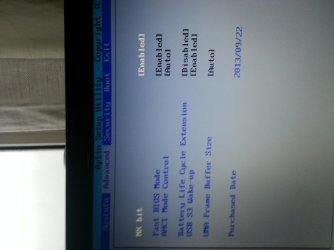
I've also added some screenshots to show you how the BIOS is configured.

I just want you to know that it doesn't matter to me in wich mode de laptop is able to boot automatically to Windows, just as long as it does automatically boot to Windows. :p

diskmanagement.PNG

20140314_082753.jpg

20140314_082758.jpg

20140314_082807.jpg

20140314_082810.jpg
 

My Computer My Computer

At a glance

Windows 7 x64
Computer type
Laptop
Computer Manufacturer/Model Number
samsung np335e7c
OS
Windows 7 x64
Please highlight with your mouse the choice for OS Mode selection, click Enter to see the exact choices available.

Where did you get the Win7 installation media? Has it been used successfully before? Is it for the same licensed version as came on the Samsung?
 
The choises available are:
- UEFI OS
- CMS OS
- UEFI and Legacy OS

The laptop came without installation Media, so I had to use my own Windows 7 DVD.
The installation media is not the problem, since Windows does boot when I use the Boot override option. The problem seems to be the BIOS, wich doesn't detect the Windows installation automatically. As you can see in the top screenshot, I can boot to Windows.
 

My Computer My Computer

At a glance

Windows 7 x64
Computer type
Laptop
Computer Manufacturer/Model Number
samsung np335e7c
OS
Windows 7 x64
You have an MBR install so you can change the BIOS setting to CSM OS so there is no doubt its set fully correct and you are rid of all UEFI.

If this doesn't help boot into Win7 installation media's System Recovery Options to run Startup Repair - Run 3 Separate Times to repair or rewrite the System boot files to the Active partition.

If that fails try settting the BIOS Boot Order Priority to HD first to boot, then AHCI control set to AHCI mode.

You may need to reinstall, so look over the steps to get a perfect Clean Reinstall - Factory OEM Windows 7 which assures a perfect install every time. This time I'd wipe the HD of all boot code first from Command Line with Diskpart Clean Command
 
Thnx gregrocker!
I think the Diskpart Clean Command did the trick!!! :D:party:

The laptop now automatically boots to Windows 7.

Thanks to everybody who helped!
 

My Computer My Computer

At a glance

Windows 7 x64
Computer type
Laptop
Computer Manufacturer/Model Number
samsung np335e7c
OS
Windows 7 x64
Back
Top