Sapphire HD 6850 driver not recognized

Dominik523

New member
Local time
4:29 AM
Messages
4
Hey everyone! I need your help please. So this is my story.
I had few weeks ago AMD HD 4650 graphics card and recently I've got Sapphire HD 6850.
I haven't uninstalled my old drivers and I installed new. Device manager was showing "Standard VGA Graphics Adapter". I uninstalled everything and installed AMD Catalyst Suite which was for automatic detection of drivers. After the installation, I was still getting that Standard VGA Adapter. I went to Update Driver button and I specified the folder where I installed AMD Catalyst and my graphics card was recognized. Everything was alright for 2-3 weeks.
Yesterday my screen started to get black, with stripes on it and many other things. Most of the people wrote it's a case of a bad driver. I went to the safe mode and uninstalled my driver. I also ran Driver Sweeper which removed all the remains. I went to full version of my windows 7 64-bit. I downloaded Catalyst Suite from Sapphire's website and I'm still getting Standard VGA Adapter under Device Manager. Can someone please tell me what to do?
Thank you very much in advance.

-Kindly regards, Dominik
 

My Computer My Computer

Computer type
PC/Desktop
OS
Windows 7 Ultimate x64
Hello and welcome Dominic mate I find it is much better to go the manufacturers site for drivers and I know you have tried Sapphires site but personally I would be trying it form here and see what happens AMD Catalyst

Have you also thought it might be the monitor mate? so has it got any software for it - just out of curiosity what brand is it?
 

My Computer My Computer

Computer type
PC/Desktop
Computer Manufacturer/Model Number
Own build (new) Desk1 / Asus ROG Win 7 / Desk2 1st build
OS
Desk1 7 Home Prem / Desk2 10 Pro / Main lap Asus ROG 10 Pro 2 laptop Toshiba 7 Pro Asus P2520 7 & 10
CPU
Desk1 i5 3750K / Laptop i7 GTX 860M / Desk2 i5 2500
Motherboard
Desk1 Asus P877-V / Desk2 Gigabyte H67 UD3H / Laptop ?
Memory
Desk1 8GB (1866) / Desk2 16GB (1333) / Laptop 8Gb DDR3
Graphics Card(s)
Desk 1& 2NVidia GTX 650 & Laptops on board Intel
Sound Card
Desk 1 & 2 -XONAR DG Realtek High Def audio Laptop
Monitor(s) Displays
Desk 1 Benq HD 2450 / Desk2 Philips 24" / Laptop 17.5"
Screen Resolution
1920x1080 D1 & D2 & Laptop 1
Hard Drives
Desk1 Samsung 120GB 830 SSD
Asus ROG 256GB 850 Pro SSD
Desk2 Samsung 840 256 SSD
Toshiba 120GB EVO
PSU
Desk 1 Corsair HX 1050/ Laptop ? / Desk 2 Corsair HX 650
Case
Desk 1 Cooler HAF XM ? Toshiba laptop / Desk2 Coolermaster
Cooling
Fans on all Desk1 -2 Desk2 - all Coolermasters 5 Laptop ?
Keyboard
Desk 1 MS Sidewinder X6 Desk 2 MS Sidewinder X 4
Mouse
Desk 1&2 - Gigabyte MS 900 gamer - laptop - Logitec wireless
Internet Speed
ADSL2+
Other Info
One other Desktop (tester) and spare Toshba laptop both with SSD's
Running Kaspersky 2016 ISS on all machines config'd identically
Logitec audio stereo systems on each machine (x3)
Canon MG5250MFC
Router/modem TP-Link running WPA2SK
I've posted the same topic there. Waiting for an answer.
This is video of what happens sometimes:
https://www.youtube.com/watch?v=hqn40hOvWd4
I don't think it's the monitor since it's working fine and then it's f****d up. I also get message "display driver stopped responding...". My monitor is samsung brand but I don't know the model.
 

My Computer My Computer

Computer type
PC/Desktop
OS
Windows 7 Ultimate x64
Ok well all I can suggest is to uninstall all the AMD stuff to make sure the old driver settings are gone.

My other thought is the Sapphire maybe a dud mate and worth trying the Furmark FurMark: VGA Stress Test, Graphics Card and GPU Stability Test, Burn-in Test, OpenGL Benchmark and GPU Temperature | oZone3D.Net ansd if this comes up with an issue then RMA the thing.

Personally I went off AMD stuff a long time ago and NVidia has not let me down but it is your choice of course.

Have you tried cleaning the slots too? see this thing of mine

SLOT CLEANING
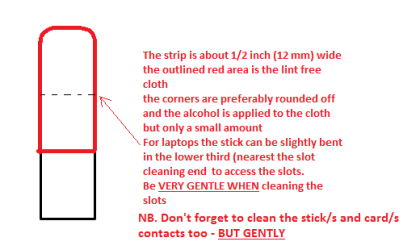
Now as for the slots to clean them use a strip of old credit card (or any card thin enough some are better than others ) about 1/2 inch wide nip the corners off one end - preferably round them off hold a piece of thin lint free cloth over the end dab on some form of alcohol - isopropyl alcohol (what we swab the skin with before an injection) is good and GENTLY swipe along the slots.
This can also be done for the GPU slot/s and also the contacts of the sticks or cards - not the stick but some lint free cloth of course. But please be very gentle doing it if you are in any doubt - please ask before doing it but I use this all the time and have yet to damage anything.
 

My Computer My Computer

Computer type
PC/Desktop
Computer Manufacturer/Model Number
Own build (new) Desk1 / Asus ROG Win 7 / Desk2 1st build
OS
Desk1 7 Home Prem / Desk2 10 Pro / Main lap Asus ROG 10 Pro 2 laptop Toshiba 7 Pro Asus P2520 7 & 10
CPU
Desk1 i5 3750K / Laptop i7 GTX 860M / Desk2 i5 2500
Motherboard
Desk1 Asus P877-V / Desk2 Gigabyte H67 UD3H / Laptop ?
Memory
Desk1 8GB (1866) / Desk2 16GB (1333) / Laptop 8Gb DDR3
Graphics Card(s)
Desk 1& 2NVidia GTX 650 & Laptops on board Intel
Sound Card
Desk 1 & 2 -XONAR DG Realtek High Def audio Laptop
Monitor(s) Displays
Desk 1 Benq HD 2450 / Desk2 Philips 24" / Laptop 17.5"
Screen Resolution
1920x1080 D1 & D2 & Laptop 1
Hard Drives
Desk1 Samsung 120GB 830 SSD
Asus ROG 256GB 850 Pro SSD
Desk2 Samsung 840 256 SSD
Toshiba 120GB EVO
PSU
Desk 1 Corsair HX 1050/ Laptop ? / Desk 2 Corsair HX 650
Case
Desk 1 Cooler HAF XM ? Toshiba laptop / Desk2 Coolermaster
Cooling
Fans on all Desk1 -2 Desk2 - all Coolermasters 5 Laptop ?
Keyboard
Desk 1 MS Sidewinder X6 Desk 2 MS Sidewinder X 4
Mouse
Desk 1&2 - Gigabyte MS 900 gamer - laptop - Logitec wireless
Internet Speed
ADSL2+
Other Info
One other Desktop (tester) and spare Toshba laptop both with SSD's
Running Kaspersky 2016 ISS on all machines config'd identically
Logitec audio stereo systems on each machine (x3)
Canon MG5250MFC
Router/modem TP-Link running WPA2SK
Thanks for the reply. I tried to remove anything from old drivers.
Now everything works fine after updating the drivers with Drive The Life program. I hope it will stay this way.
I'll try one day to clean the slots.
 

My Computer My Computer

Computer type
PC/Desktop
OS
Windows 7 Ultimate x64
Ok good luck glad it is going.

Oh and by the by the slot cleaner should look like in my pic - the dotted line is where it should be bent slightly for doing laptop RAM slots;)
 

Attachments

  • STICK CLEANER.PNG
    STICK CLEANER.PNG
    6.1 KB · Views: 10

My Computer My Computer

Computer type
PC/Desktop
Computer Manufacturer/Model Number
Own build (new) Desk1 / Asus ROG Win 7 / Desk2 1st build
OS
Desk1 7 Home Prem / Desk2 10 Pro / Main lap Asus ROG 10 Pro 2 laptop Toshiba 7 Pro Asus P2520 7 & 10
CPU
Desk1 i5 3750K / Laptop i7 GTX 860M / Desk2 i5 2500
Motherboard
Desk1 Asus P877-V / Desk2 Gigabyte H67 UD3H / Laptop ?
Memory
Desk1 8GB (1866) / Desk2 16GB (1333) / Laptop 8Gb DDR3
Graphics Card(s)
Desk 1& 2NVidia GTX 650 & Laptops on board Intel
Sound Card
Desk 1 & 2 -XONAR DG Realtek High Def audio Laptop
Monitor(s) Displays
Desk 1 Benq HD 2450 / Desk2 Philips 24" / Laptop 17.5"
Screen Resolution
1920x1080 D1 & D2 & Laptop 1
Hard Drives
Desk1 Samsung 120GB 830 SSD
Asus ROG 256GB 850 Pro SSD
Desk2 Samsung 840 256 SSD
Toshiba 120GB EVO
PSU
Desk 1 Corsair HX 1050/ Laptop ? / Desk 2 Corsair HX 650
Case
Desk 1 Cooler HAF XM ? Toshiba laptop / Desk2 Coolermaster
Cooling
Fans on all Desk1 -2 Desk2 - all Coolermasters 5 Laptop ?
Keyboard
Desk 1 MS Sidewinder X6 Desk 2 MS Sidewinder X 4
Mouse
Desk 1&2 - Gigabyte MS 900 gamer - laptop - Logitec wireless
Internet Speed
ADSL2+
Other Info
One other Desktop (tester) and spare Toshba laptop both with SSD's
Running Kaspersky 2016 ISS on all machines config'd identically
Logitec audio stereo systems on each machine (x3)
Canon MG5250MFC
Router/modem TP-Link running WPA2SK
Thanks for the picture and everything :)
 

My Computer My Computer

Computer type
PC/Desktop
OS
Windows 7 Ultimate x64
Back
Top