SATA Drivers for XP 64-Bit?

Infernochaos

New member
Local time
7:12 AM
Messages
11
From my searches, i couldn't find any working SATA drivers for my installation.
Do someone here knows a good working driver?
Thank you.
 

My Computer

OS
Windows 7/Windows XP/Mac OS X/Debian GNU/
From my searches, i couldn't find any working SATA drivers for my installation.
Do someone here knows a good working driver?
Thank you.


Can we get your systems specs so we know what hardware you have?
 

My Computer

Computer Manufacturer/Model Number
HP Pavillion dv-7 1005 Tx
OS
Win 8 Release candidate 8400
CPU
[email protected]
Memory
4 gigs
Graphics Card(s)
Nvidia 9600M
Sound Card
HD built-in
Monitor(s) Displays
17" Wxga
Screen Resolution
1440x900
Cooling
none
Internet Speed
45Mb down 5Mb up
I hope someone with more experience can weigh on this, but I think that you can't change from IDE to SATA without reinstalling Windows XP. On Vista and 7 it is possible, but not on XP.
 

My Computer

Computer Manufacturer/Model Number
Asus N73SV
OS
Windows 7 x64 Ultimate SP1
CPU
Core i7-2630QM
Motherboard
Intel HM 65
Memory
6 GB DDR3
Graphics Card(s)
Nvidia GT 540M / Intel HD 3000 - Optimus switching
Sound Card
HD Audio (Intel Azalia/Realtek) ALC269
Monitor(s) Displays
LED flat panel
Screen Resolution
1920 x 1080
Hard Drives
2x Seagate Momentus 640 GB - 1,28 TB in total
Internet Speed
4 MB/256 kbps
Other Info
External HDs

WD Elements 1,5 TB
WD MyBook 500 GB
Here's some of my specs:
I managed to install XP x64 on my SATA HDD but I would reinstall it if they were any drivers.


Time of this report: 5/31/2010, 10:31:21
Operating System: Windows 7 Ultimate 64-bit (6.1, Build 7600) (7600.win7_gdr.100226-1909)
Language: English (Regional Setting: English)
System Manufacturer: Acer
System Model: Aspire M5802
BIOS: Default System BIOS
Processor: Intel(R) Core(TM)2 Quad CPU Q8400 @ 2.66GHz (4 CPUs), ~2.7GHz
Memory: 8192MB RAM
Available OS Memory: 8192MB RAM
Page File: 3441MB used, 12939MB available
Windows Dir: C:\Windows
DirectX Version: DirectX 11
DX Setup Parameters: Not found
User DPI Setting: Using System DPI
System DPI Setting: 96 DPI (100 percent)
DWM DPI Scaling: Disabled
DxDiag Version: 6.01.7600.16385 64bit Unicode
 

My Computer

OS
Windows 7/Windows XP/Mac OS X/Debian GNU/
Did anyone find something about it, i contacted the Acer departement but all they say is some b.s and i really mean b.s
 

My Computer

OS
Windows 7/Windows XP/Mac OS X/Debian GNU/
I think you'll need to download the Intel Chipset Intel Chipset Driver, v.9.1.1.1015, 2009/10/16 and the Intel SATA Drivers Intel SATA AHCI Driver, v.8.9.0.1023, 2009/10/16 at a minimum for now should be accessible from the Acer Site.
 

My Computer

Computer Manufacturer/Model Number
DELL XPS Studio 435T
OS
Vista 64 Ultimate, Windows 7 64 Ultimate, Ubuntu 9.10
CPU
i7 975 3.3 GHz Extreme (Factory OC'd to 3.6 GHz)
Motherboard
DELL provided
Memory
18 Gb Tri-Channel 1066
Graphics Card(s)
ATI 5970 2048 Mb
Sound Card
X-Fi Extreme Gamer
Monitor(s) Displays
Vizio 37" HD-TV
Screen Resolution
1920 x 1080
Hard Drives
1.5 Tb HDD
1.5 Tb HDD
2.0 Tb Network Drive
512 Gb Crucial SSD
PSU
DELL Provided 475 watts
Case
DELL
Cooling
3 fans
Keyboard
Logitech Performance K350 Wireless
Mouse
Logitech Performance MX Wireless
Internet Speed
3 Mb up 750 Kb down
Other Info
Bamboo Fun Tablet, Belkin N+ Wireless router, Pioneer Dolby System Wireless Headphones, Bose 5.1 Dolby Surround Sound System, LifeCam VX 3000 Webcam, Blu-Ray/Hi Def DVD +RW combo and Blu-ray +RW,l 15 in 1 media card reader, Logitech Rumblepad 2, Hauppauge 2250 DTV Tuner with MS Media Center Remote

Laptop:Alienware M17x, Q9100 CPU, 8Gb RAM, 1920x1200 WUXGA LCD driven by 4870's in CrossFireX, Bl
Thank you so much guys but can you tell which is the right one?There is too many drivers and im not that advanced in this field... XD
 

My Computer

OS
Windows 7/Windows XP/Mac OS X/Debian GNU/
Hmm...I don't see that? By the way ,I am going to use the slipstream method so i can't be possibly using the 64-bit driver for floppy configuration right >
 

My Computer

OS
Windows 7/Windows XP/Mac OS X/Debian GNU/
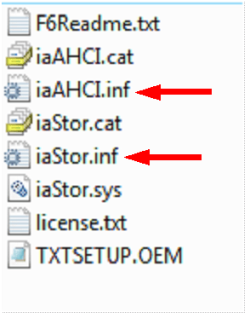
Those are the two inf file you need at step 12.

Capture3-1.PNG
 

My Computer

OS
ME/XP/Vista/Win7
Oh thanks! What's the driver? Intel SATA AHCI Controller from de Acer website?
 

My Computer

OS
Windows 7/Windows XP/Mac OS X/Debian GNU/
wow what XD ? Im lost ... So AFTER i installed XP on a partition i must install these drivers?
 

My Computer

OS
Windows 7/Windows XP/Mac OS X/Debian GNU/
When you have finished installing Win XP, you will need to update all your hardware drivers & windows updates.
 

My Computer

OS
ME/XP/Vista/Win7
No, the floppy comes before Windows and 32-bit versus 64-bit have been called up. The drivers on your floppy would be for either 32-bit or 64-bit in anticipation of whichever you intend to set up. If you have a floppy drive, you can follow the excellent instructions that theog linked for you, above.

My experiences were with an AMD system I built myself.

BUT—having said that, I was personally unsuccessful in using F6 to add SATA after XP was already on my computer in Dec 2008. I think now I may simply have indicated the wrong drivers. Maybe I know more now, and would be able to do it okay. At the time, there were oodles of peoole failing at F6 SATA driver installs on XP. Using nLite and slipstreaming—both for the first time I'd ever done either—I was successful on my first try.

At the time (Dec 08) I got the distinct impression that my experiences were the same as most people's. Slipstream was a lot less scary and it worked. (But I'd be ready to try F6 again now.)

 

My Computer

Computer Manufacturer/Model Number
self built
OS
XP 64
CPU
AMD Athlon 64 x2 5600+
Memory
8 GB GSkill
Graphics Card(s)
ATI Radeon HD 4670
Monitor(s) Displays
LG Flatron W2242TQ
Hard Drives
Seagate total usable 1.7 TB
3 x 500 SATA
1 x 320 PATA
1 x external 500
No, the floppy comes before Windows and 32-bit versus 64-bit have been called up. The drivers on your floppy would be for either 32-bit or 64-bit in anticipation of whichever you intend to set up. If you have a floppy drive, you can follow the excellent instructions that theog linked for you, above.

My experiences were with an AMD system I built myself.

BUT—having said that, I was personally unsuccessful in using F6 to add SATA after XP was already on my computer in Dec 2008. I think now I may simply have indicated the wrong drivers. Maybe I know more now, and would be able to do it okay. At the time, there were oodles of peoole failing at F6 SATA driver installs on XP. Using nLite and slipstreaming—both for the first time I'd ever done either—I was successful on my first try.

At the time (Dec 08) I got the distinct impression that my experiences were the same as most people's. Slipstream was a lot less scary and it worked. (But I'd be ready to try F6 again now.)

Floppy disk is the better way.
 

My Computer

OS
ME/XP/Vista/Win7
Slipstream the drivers into a build and burn it to disk. You'll never have to worry about keeping a damn floppy drive around. The floppy should have died years ago...
 

My Computer

OS
XP, Win7 Pro, Ubuntu LL
Slipstream the drivers into a build and burn it to disk. You'll never have to worry about keeping a damn floppy drive around. The floppy should have died years ago...

Up the Floppy, I use one at leased once a week.
 

My Computer

OS
ME/XP/Vista/Win7
I hope someone with more experience can weigh on this, but I think that you can't change from IDE to SATA without reinstalling Windows XP. On Vista and 7 it is possible, but not on XP.

Its possible in XP.
All the you need is the proper iastor.sys and a few reg keys.
Its just a pain because its a 'catch 22' with typical installers.

If you want to add sata drivers after the XP load grab this...
www.doodnet.com/images/sata.zip

Its the intel storage matrix driver 8.6.3
(Sure there are newer ones..bu you can update after you get over this part)

Download it...unzip.
Go into the PREPARE directory and run INSTALL.CMD.
Reboot.
Go into your bios and flip it to ahci (or whatever your bios specifies as Sata)
Save...
Fire up xp...enjoy.
You can update iastor.sys with later versions if you like.
 

My Computer

Computer Manufacturer/Model Number
HomeBrew
OS
Win7/XP
CPU
INTEL E8600 @ 4.2GHz
Motherboard
Asus P5E w/Formula Rampage BIOS
Memory
8GB PC8500 Corsiar Dominator
Graphics Card(s)
nVidia GTX 280
Sound Card
Asus FXII (SoundMax controlled)
Monitor(s) Displays
2 x I-INC 28'
Screen Resolution
1920x1200
Hard Drives
2 x Seagate 1.5TB
PSU
Ultra 700W
Case
Something..with alot of air
Cooling
Tuniq 120 CPU - Several 80mm and one 120MM fan
Keyboard
IBM MODEL M - YA BABY!!! NEVER SAY DIE!
Mouse
MS Intellimouse
Internet Speed
50/5
Back
Top