SATA Drivers - Slipstream into Windows XP CD

How to slipstream SATA drivers into Windows XP setup CD, on your dual boot PC with Windows 7 or Vista

When you install Win XP, setup can not find your Hard Drive.

1.PNG

2.PNG


1) Download & Install nLite
nLite - Deployment Tool for the bootable Unattended Windows installation

2) Make a new folder for your Windows XP image.
Note: for this example, I am using the name Win XP Sata.

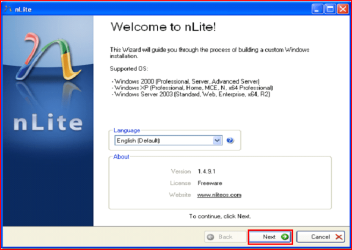
3) Insert XP CD & start nLite

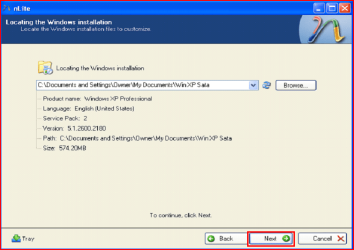
4) Click Next.
3.PNG
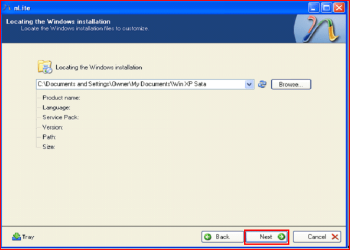
5) Choose your Windows XP image folder, & Click Next, than OK.
Note: nLite will put the image into your folder.
4.PNG

5.PNG
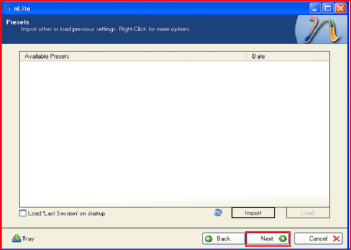
6) Click Next.
6.PNG
7) Click Next.
7.PNG
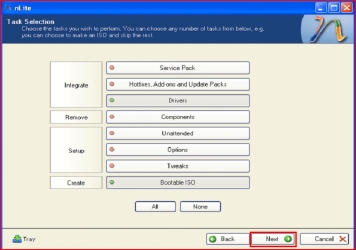
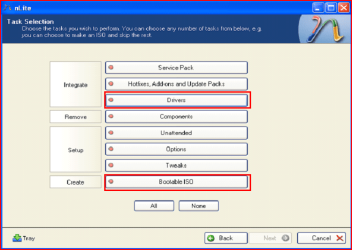
8) Choose Integrate Drivers & Create Bootable ISO
8.PNG
9) Click Next.
9.PNG
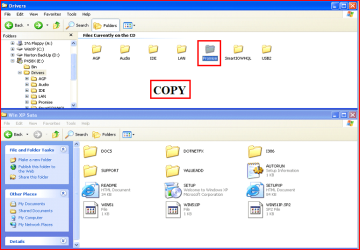
10) Copy & Paste your Sata Driver to your image folder.
Note: for this example, I am using Promise Fastrak 376.
10.PNG

11.PNG
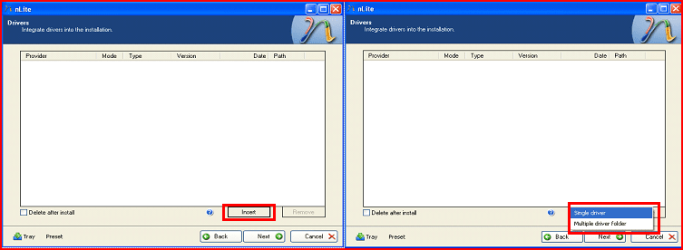
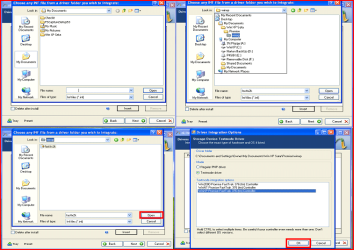
11) Click Insect, than Single Driver.
12.PNG
12) Locate your Sata Setup Inf file.
Click Open, than OK.
Note: for this example the file is called fasttx2k.
Note: for this example, I am using Promise Fastrak 376.
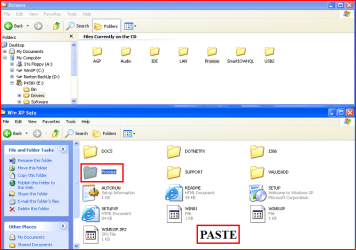
13.PNG
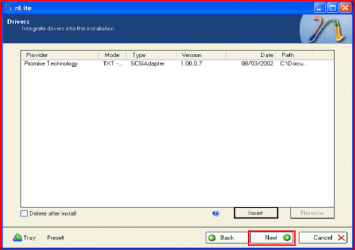
13) Click Next.
14.PNG
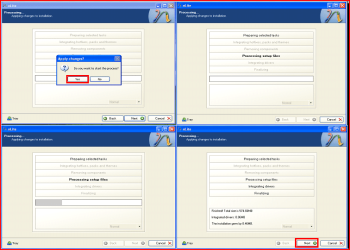
14) Click Yes, than Next.
15.PNG
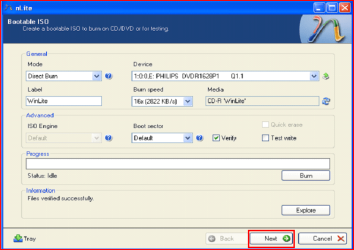
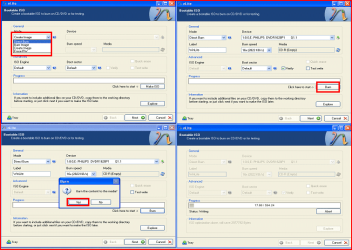
15) Choose Direct Burn.
Click Burn, than Yes.
Note: nLite will now burn your new CD.
16.PNG
16) Click Next.
17.PNG
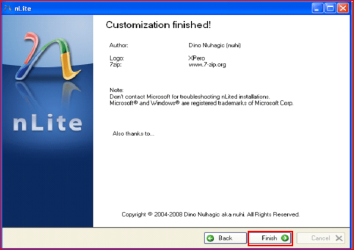
17) Click Finish.
18.PNG
Your Sata drive will now show up in setup.
19.PNG

 
Last edited by a moderator:

My Computer My Computer

OS
ME/XP/Vista/Win7
Another idea that occurs to me is this: can I install the XP OS on an external caddy USB hard drive (I have a 100Gb one going spare) and then clone that to the partition I have ready for the XP installation on my Windows 7 HDD?

NO, you can not use USB HD drive.

Ok I have the f6flyp3289.zip and I have unzipped the files.

I have run nlite and created a folder on my desktop (XPR) to which nlite has copied the WinXP master CD. I have created a folder in the XPR folder, and have included both the iastor.inf and iastor.sys in a folder in that directory called 'microstar'. When nlite asks me to point to the .inf file, I point it to that one and it runs and burns the CD.

Was that correct to do it that way, or should I have copied the entire contents of the F6 floppy zip file to the folder?

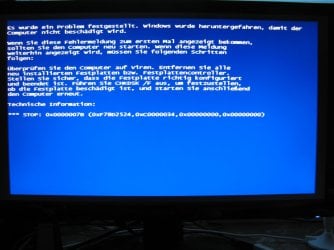
Booting from the new nlite Windows CD still produces a STOP error. This is getting really frustrating; is it really possible to actually run a 32-bit and a 64-bit OS on the same machine?

One other thing is that I have removed the Intel IMSM system from my machine using Add/Remove Programs. The IMSM system will now no longer install from the apps CD that came with the computer. I removed it because I wanted to simplify the problem: IMSM is as far as I know a RAID system so I wanted to remove the necessity for an XP RAID driver. If I have sinned then please forgive me

Take a look at step 11.(option Multple Drivers)

Choose both setup inf files.
Choose all drivers.
Choose all sata controllers.

View attachment 149858

View attachment 149859
 

My Computer My Computer

OS
ME/XP/Vista/Win7
Hehe well I not only copied in the items you suggested, I copied in the entire contents of the F6 folder into the drivers folder and referenceed them as you suggested.

The boot disk then worked and I have installed XP successfully.

Now I have problems getting the boot menu to fire up, but that's a thread for the other forum (Dual Boot Installation)

Thanks for your help, everyone who has contributed. I'm nearly there :)
 

My Computer My Computer

Computer Manufacturer/Model Number
Novatech
OS
Windows 7 Home Premium SP1 64-bit
CPU
Celeron P4600 2.00GHz
Motherboard
MicroStar, model not known
Memory
2Gb
Graphics Card(s)
Intel HD Graphics
Sound Card
Realtek onboard HD Audio
Screen Resolution
1366 x 768 @ 60Hz
Hard Drives
250Gb Toshiba SATA
Hehe well I not only copied in the items you suggested, I copied in the entire contents of the F6 folder into the drivers folder and referenceed them as you suggested.

The boot disk then worked and I have installed XP successfully.

Now I have problems getting the boot menu to fire up, but that's a thread for the other forum (Dual Boot Installation)

Thanks for your help, everyone who has contributed. I'm nearly there :)

Take a look at Method two Step 6 onward in Dual Boot Installation.
 

My Computer My Computer

OS
ME/XP/Vista/Win7
Last edited:

My Computer My Computer

Computer Manufacturer/Model Number
Novatech
OS
Windows 7 Home Premium SP1 64-bit
CPU
Celeron P4600 2.00GHz
Motherboard
MicroStar, model not known
Memory
2Gb
Graphics Card(s)
Intel HD Graphics
Sound Card
Realtek onboard HD Audio
Screen Resolution
1366 x 768 @ 60Hz
Hard Drives
250Gb Toshiba SATA

My Computer My Computer

Computer Manufacturer/Model Number
Wortmann AG
OS
Windows 7 Home Premium
CPU
Intel Core i5 750 2.6 GHz
Motherboard
ASUS P7P55-M
Memory
8GB DDR3
Graphics Card(s)
Radeon HD 5850 1024MB
Hi :) I followed the installation, but with these drivers:
http://www.sevenforums.com/drivers/19163-fasttrak-376-378-windows-7-driver-help.html#post414207During the Windows XP Setup, this Bluescreen shwos up, where the HD-Select screen should come:
View attachment 172165

Has anybody an idea what could be the problem?

Do you have a Fastrak Sata Controller on the MOBO??????????

For better help with problems, Can you post your specs.
http://www.sevenforums.com/general-discussion/22550-filling-out-system-specs.html
http://www.sevenforums.com/tutorials/180324-system-info-see-your-system-specs.html

http://www.sevenforums.com/hardware-devices/6936-dont-know-what-hardware-you-have.html
VistaForums SysInfo Tool - Vista Forums
 

My Computer My Computer

OS
ME/XP/Vista/Win7
Man how stupid am I xD
No, I simply didn't realize I needed drivers fitting my hardware. I filled out my specs now.
So I have to take the correct drivers, but I don't know how to find them.
 

My Computer My Computer

Computer Manufacturer/Model Number
Wortmann AG
OS
Windows 7 Home Premium
CPU
Intel Core i5 750 2.6 GHz
Motherboard
ASUS P7P55-M
Memory
8GB DDR3
Graphics Card(s)
Radeon HD 5850 1024MB
First check for all the Win XP drivers for your hardware on the manufacturer's web site.
ASUSTeK Computer Inc. - Motherboards- ASUS P7P55-M
If your Win XP CD, does not support your Sata Controller, you will need to load drivers to uses at F6.
Load Sata Controller drivers with a floppy disk is the best way.
http://www.sevenforums.com/tutorials/66010-sata-drivers-load-windows-xp-setup-dual-boot.html
OR
http://www.sevenforums.com/tutorials/72185-sata-drivers-slipstream-into-windows-xp-cd.html
Your Asus has a Intel Sata Controller.
You can download your F6 Sata Controller drivers from here:
F6 Intel Sata Controller

You need to start a fresh.


Take a look at step 11.(option Multple Drivers)

Choose both setup inf files.
Choose all drivers.
Choose all sata controllers.

Attachment 149858

Attachment 149859
 

My Computer My Computer

OS
ME/XP/Vista/Win7
I don't have a floppy drive, so I'll try and integrate them in a CD with nLite again, the ones I found on the ASUSTEK Website. Will that work?
 

My Computer My Computer

Computer Manufacturer/Model Number
Wortmann AG
OS
Windows 7 Home Premium
CPU
Intel Core i5 750 2.6 GHz
Motherboard
ASUS P7P55-M
Memory
8GB DDR3
Graphics Card(s)
Radeon HD 5850 1024MB
I got it now, with the correct drivers from the ASUS website :) thx for your help
 

My Computer My Computer

Computer Manufacturer/Model Number
Wortmann AG
OS
Windows 7 Home Premium
CPU
Intel Core i5 750 2.6 GHz
Motherboard
ASUS P7P55-M
Memory
8GB DDR3
Graphics Card(s)
Radeon HD 5850 1024MB
I got same problem as Reygok with message showing that Windows XP installation failed. Tried several drivers found online, none works. See most people don't have Dell computers any more. Checked Dell drivers page, no drivers seem to be for XP. Would appreciate if you can point me to the right direction on where to get them.

Dell Inspiron 560
Hardrive: 500GB Serial ATA Hard Drive (7200RPM) w/DataBurst Cache™
Processor: Intel® Celeron® 450

Thank you!
 

My Computer My Computer

OS
Windows 7 Home Professional
I got same problem as Reygok with message showing that Windows XP installation failed. Tried several drivers found online, none works. See most people don't have Dell computers any more. Checked Dell drivers page, no drivers seem to be for XP. Would appreciate if you can point me to the right direction on where to get them.

Dell Inspiron 560
Hardrive: 500GB Serial ATA Hard Drive (7200RPM) w/DataBurst Cache™
Processor: Intel® Celeron® 450

Thank you!

First check for all the Win XP drivers for your hardware.Check with your tag No:
Dell Inspiron 560 drivers for Win XP:
XP Drivers for Inspiron 560 - Microsoft OS Forum - Software & Operating Systems - Dell Community
If your Win XP CD, does not support your Sata Controller, you will need to load drivers to uses at F6.
Load Sata Controller drivers with a floppy disk is the best way.
http://www.sevenforums.com/tutorials/66010-sata-drivers-load-windows-xp-setup-dual-boot.html
OR
http://www.sevenforums.com/tutorials/72185-sata-drivers-slipstream-into-windows-xp-cd.html

Your Dell Inspiron 560 has a Intel Sata Controller.
You can download your F6 Sata Controller drivers from here:
http://downloadcenter.intel.com/Det...&OSFullName=Windows XP Professional*&lang=eng
 

My Computer My Computer

OS
ME/XP/Vista/Win7
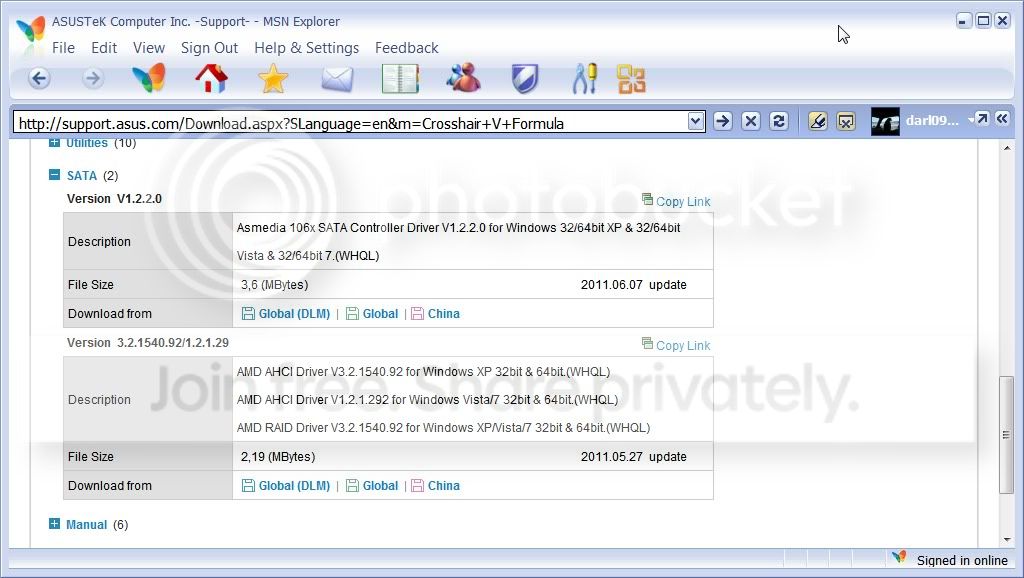
Do I need both Version V1.2.2.0 & Version 3.3.1540.92/1.2.1.29 to slipstream the SATA drivers? Or just the Version V1.2.2.0 of the SATA drivers. Thank's

ScreenShot001.jpg
 

My Computer My Computer

Computer Manufacturer/Model Number
Stealth Machine
OS
Windows 7 Pro 64 bit
CPU
AMD 1100t
Motherboard
ASUS Crosshair V Formula AM3+ 990FX USB 3.0
Memory
Mushkin Redline 8GB
Graphics Card(s)
EVGA 580GTX
Sound Card
Motherboard's sound card
Monitor(s) Displays
1
Hard Drives
WD 1TB 7200
PSU
1000W
Case
Antec Twelve Hundred
Cooling
Zalman Performance Cooling

My Computer My Computer

OS
ME/XP/Vista/Win7
Thank you for your reply.

I do have XP mode setup already... but it doesn't support 3D for gaming. One of the main reasons I am setting up a dual boot. But will go back and reread all of the install/re me instructions before going ahead with the install.

Again Thank's for your help in this matter.
 

My Computer My Computer

Computer Manufacturer/Model Number
Stealth Machine
OS
Windows 7 Pro 64 bit
CPU
AMD 1100t
Motherboard
ASUS Crosshair V Formula AM3+ 990FX USB 3.0
Memory
Mushkin Redline 8GB
Graphics Card(s)
EVGA 580GTX
Sound Card
Motherboard's sound card
Monitor(s) Displays
1
Hard Drives
WD 1TB 7200
PSU
1000W
Case
Antec Twelve Hundred
Cooling
Zalman Performance Cooling
Ray, I've been trying to do this on my Getac B300 for two days now, following your instructions to the letter, and I seem to have been slip-streaming the wrong drivers or something. I keep getting the message "XP could not find the iastor.sys file" message, even though I made sure to include it in the slip-streaming process. I downloaded the chipset driver zip file from Getac, but it doesn't seem to contain the iaahci and the iastor.sys files. What am I doing wrong? Please help me out here.
 

My Computer My Computer

Computer type
Laptop
Computer Manufacturer/Model Number
Getac B300, Dell Latitude E6420, Toshiba Tecra R940, wife's Toshiba Satellite U500, ThinkPad T60
OS
Windows 7 Professional 32-bit on E6420, Windows 7 Professional 64-bit on other three
Hi sjanzeir

As the Getac B300 Fully Rugged Notebook comes with Windows 7 Professional, have you tried the FREE XP Mode?
http://www.sevenforums.com/tutorials/8247-windows-xp-mode-install-setup.html?ltr=W

First check for all the Win XP drivers for your hardware on the manufacturer's web site.
If your Win XP CD, does not support your Sata Controller, you will need to load drivers to uses at F6.
Load Sata Controller drivers with a floppy disk is the best way.
http://www.sevenforums.com/tutorials/66010-sata-drivers-load-windows-xp-setup-dual-boot.html
OR
http://www.sevenforums.com/tutorials/72185-sata-drivers-slipstream-into-windows-xp-cd.html

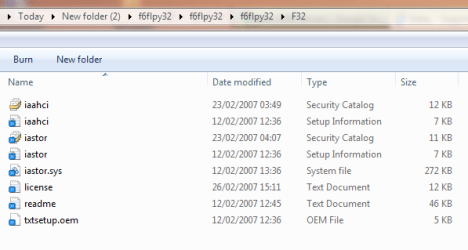
Unzipped download from Getac.

Capture.PNG

Using Intel Sata Controller Drivers:

Take a look at step 11.(option Multple Drivers)


Choose both setup inf files.

Choose all drivers.

Choose all sata controllers.


View attachment 149858


View attachment 149859
 

My Computer My Computer

OS
ME/XP/Vista/Win7
Back
Top