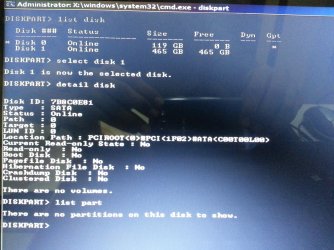
i have a Dell XPS 14, i7 intel core, 8 gb RAM.
When i installed windows 7, i deleted the partitions of my internal hard drive 465 gb as it is necessary for a clean install of windows 7. i have installed all the drivers that matches my dell service code and the windows updates. But the internal hard disk did not show up. It does show in the "Intel Rapid Storage Technology" software (Screen shot in attachment) but does not show up on "My Computer" or in "Disk Management". I can only see the one drive (Screen shot in attachment).
How can i make windows detect it?
When i installed windows 7, i deleted the partitions of my internal hard drive 465 gb as it is necessary for a clean install of windows 7. i have installed all the drivers that matches my dell service code and the windows updates. But the internal hard disk did not show up. It does show in the "Intel Rapid Storage Technology" software (Screen shot in attachment) but does not show up on "My Computer" or in "Disk Management". I can only see the one drive (Screen shot in attachment).
How can i make windows detect it?
Attachments
My Computer
At a glance
Windows 7 Ultimate x64
- Computer type
- Laptop
- Computer Manufacturer/Model Number
- Dell XPS 14 (L421x)
- OS
- Windows 7 Ultimate x64