
"Scan with Microsoft Security Essentials" - Add or Remove Context Menu
EXAMPLE: "Scan with Microsoft Security Essentials" in Context Menu
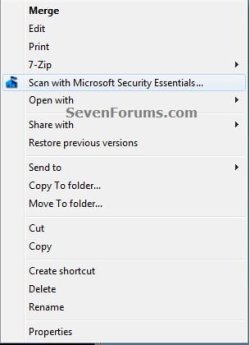
Here's How:
1. Do step 2 or 3 below for what you would like to do.
2. To Add "Scan with Microsoft Security Essentials" to Context Menu
NOTE: This is the default setting. Microsoft Security Essentials must already be installed for this to work.
A) Click on the download button below to download the file below, and go to step 4 below.
Add_Scan_with_Microsoft_Security_Essentials.reg
Download
3. To Remove "Scan with Microsoft Security Essentials" from Context Menu
A) Click on the download button below to download the file below, and go to step 4 below.
Remove_Scan_with_Microsoft_Security_Essentials.reg
Download
4. Save the .reg file to the desktop.
5. Right click on the downloaded .reg file, and click on Merge.
6. When prompted, click on Run, Yes (UAC-Windows 7) or Continue (UAC-Vista), Yes, and OK to approve merging the .reg file.
7. You can now delete the downloaded .reg file if you like.
That's it,
Shawn
How to Add or Remove "Scan with Microsoft Security Essentials" from Context Menu in Windows
Information
When you have Microsoft Security Essentials (MSE) installed, it adds "Scan with Microsoft Security Essentials" to the context menu of files, folders, and drives by default to make it easier to scan them on demand.
This tutorial will show you how to add or remove "Scan with Microsoft Security Essentials" from the context menu of all users in XP (SP3), Vista, and Windows 7.
You must be logged in as an administrator to be able to do the steps in this tutorial.
This tutorial will show you how to add or remove "Scan with Microsoft Security Essentials" from the context menu of all users in XP (SP3), Vista, and Windows 7.
You must be logged in as an administrator to be able to do the steps in this tutorial.
Note
- You cannot install Microsoft Security Essentials in Windows 8 since the default Windows Defender in Windows 8 is the new Microsoft Security Essentials and used instead. This tutorial will not work in Windows 8.
- Even if you removed "Scan with Microsoft Security Essentials" context meu item, Microsoft Security Essentials progam updates may add it back. If it does, you'll just need to remove it again.
Here's How:
1. Do step 2 or 3 below for what you would like to do.
2. To Add "Scan with Microsoft Security Essentials" to Context Menu
NOTE: This is the default setting. Microsoft Security Essentials must already be installed for this to work.
A) Click on the download button below to download the file below, and go to step 4 below.
Add_Scan_with_Microsoft_Security_Essentials.reg
Download
3. To Remove "Scan with Microsoft Security Essentials" from Context Menu
A) Click on the download button below to download the file below, and go to step 4 below.
Remove_Scan_with_Microsoft_Security_Essentials.reg
Download
4. Save the .reg file to the desktop.
5. Right click on the downloaded .reg file, and click on Merge.
6. When prompted, click on Run, Yes (UAC-Windows 7) or Continue (UAC-Vista), Yes, and OK to approve merging the .reg file.
7. You can now delete the downloaded .reg file if you like.
That's it,
Shawn
Related Tutorials
- How to Install and Use Microsoft Security Essentials
- How to Create a Microsoft Security Essentials "Quick Scan" Shortcut
- How to Create a Microsoft Security Essentials "Update" Shortcut
- How to Create a Microsoft Security Essentials "Update & Quick Scan" Shortcut
- How to Create a Microsoft Security Essentials "Full Scan" Shortcut
- How to Create a Microsoft Security Essentials "Settings" Shortcut
- How to Add a "Microsoft Security Essentials" Cascading Desktop Context Menu in Windows 7


