Schedule Windows housekeeping?

coffent

New member
Member
Local time
1:59 PM
Messages
86
Every once in while (usually when I need to get something done quickly) after booting up, the disk drive will run incessantly, the computer will slow down to a glacial pace, especially when I try to load programs, and I'll get numerous "Not responding" messages. I assume this is a result of Windows performing some housekeeping routines. I recognize that this needs to be done, but is there some way to schedule it so that it's done at a time I select rather than when Windows chooses to do it?
 

My Computer

Computer type
PC/Desktop
Computer Manufacturer/Model Number
Custom build
OS
Microsoft Windows 7 Home Premium 64-bit 7601 Multiprocessor Free Service Pack 1
CPU
Intel(R) Core(TM) i7 CPU 920 @ 2.67GHz
Motherboard
Jetway/Kuroshio JBI-600-LF (or BI-600) [Intel Burnside?]
Memory
3.00 GB
Graphics Card(s)
NVIDIA GeForce 210
Sound Card
Creative Sound Blaster X-Fi Titanium HD with THX SB1270
Screen Resolution
1920 x 1080 x 32 bits (4294967296 colors) @ 60 Hz
Hard Drives
(1) Hitachi HDS721010CLA332 ATA Device (2) ST1500DM003-9YN16G ATA Device (3)
Antivirus
Avast Antivirus
Browser
Firefox
First things first. We need your system specs. Use this tutorial by Brink to help you do just that.

http://www.sevenforums.com/tutorials/180324-system-info-see-your-system-specs.html


The way I do my house cleaning and I do it often is do it manually along with manual updates of everything. No Auto or scheduling anything.

Doing it this way means I get done what I want done when I want it done so it doesn't interfere with my work. If done often it really doesn't take long because you are never far behind the cleanups and updates.
 

My Computer

Computer type
PC/Desktop
Computer Manufacturer/Model Number
Home made Desktop
OS
Windows 10 Pro. 64/ version 1709 Windows 7 Pro/64
CPU
Intel i7-6800K @ 4.3
Motherboard
ASUS X-99 Deluxe II
Memory
Corsair Platinum 16 gig @2400
Graphics Card(s)
EVGA GTX 1070 OC
Monitor(s) Displays
Asus 27" LED LCD/VE278Q
Screen Resolution
1920-1080 or 1280-720 HDMI
Hard Drives
INTEL SSD 730-240 Gb Sata 3.0/
PSU
EVGA Platium 1200W
Case
Phanteks Luxe Tempered Glass 8 fans/ one radiator
Cooling
XSPC/ Water Cooled CPU
Keyboard
Das 4 Professional
Mouse
Logitech M705/MX Anywhere 2-S
Internet Speed
100 mbits
Antivirus
Microsoft Security Essentials/ Malwarebytes Premium 3.0/ SAS
Browser
I.E. 11 default/Firefox/ ISP Time Warner Cable/Spectrum
Other Info
LG BluRay Burner/
Sound system-KLipsch-THX/
Icy Dock ssd Hot Swap bays.
OK, I've uploaded system spec's (I think).

I do a number of housekeeping tasks manually (Windows updates, etc.) but there may be others that I'm not aware of that still get done at Windows' convenience.
 

My Computer

Computer type
PC/Desktop
Computer Manufacturer/Model Number
Custom build
OS
Microsoft Windows 7 Home Premium 64-bit 7601 Multiprocessor Free Service Pack 1
CPU
Intel(R) Core(TM) i7 CPU 920 @ 2.67GHz
Motherboard
Jetway/Kuroshio JBI-600-LF (or BI-600) [Intel Burnside?]
Memory
3.00 GB
Graphics Card(s)
NVIDIA GeForce 210
Sound Card
Creative Sound Blaster X-Fi Titanium HD with THX SB1270
Screen Resolution
1920 x 1080 x 32 bits (4294967296 colors) @ 60 Hz
Hard Drives
(1) Hitachi HDS721010CLA332 ATA Device (2) ST1500DM003-9YN16G ATA Device (3)
Antivirus
Avast Antivirus
Browser
Firefox
You job on the specs is very good but a few other things could be added that might be needed later.

Look at my specs and how they are filled out will give you a idea.

The reason this spec thing is done is so other can help better if you ever need help.
The more information others can quickly see when need be is better.

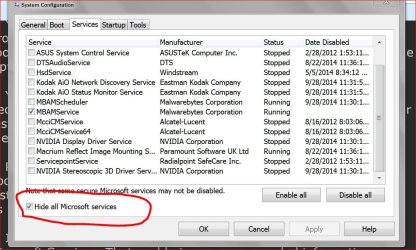
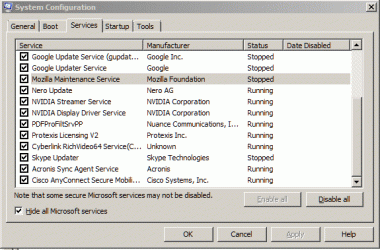
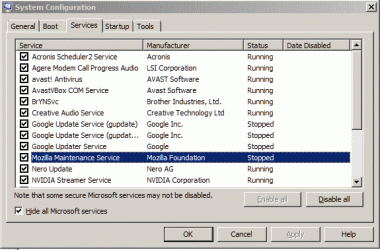
Check msconfig Startup and Non Microsoft Services and see if you have programs auto checking for updates. Like Adobe, Google, Chrome ect. If you find them uncheck them. You will have to check for updates your self.

I use this program on demand to check if things need updated. It only checks when I tell it to, therefore on demand.

Download FileHippo App Manager 1.47 - FileHippo.com
 

My Computer

Computer type
PC/Desktop
Computer Manufacturer/Model Number
Home made Desktop
OS
Windows 10 Pro. 64/ version 1709 Windows 7 Pro/64
CPU
Intel i7-6800K @ 4.3
Motherboard
ASUS X-99 Deluxe II
Memory
Corsair Platinum 16 gig @2400
Graphics Card(s)
EVGA GTX 1070 OC
Monitor(s) Displays
Asus 27" LED LCD/VE278Q
Screen Resolution
1920-1080 or 1280-720 HDMI
Hard Drives
INTEL SSD 730-240 Gb Sata 3.0/
PSU
EVGA Platium 1200W
Case
Phanteks Luxe Tempered Glass 8 fans/ one radiator
Cooling
XSPC/ Water Cooled CPU
Keyboard
Das 4 Professional
Mouse
Logitech M705/MX Anywhere 2-S
Internet Speed
100 mbits
Antivirus
Microsoft Security Essentials/ Malwarebytes Premium 3.0/ SAS
Browser
I.E. 11 default/Firefox/ ISP Time Warner Cable/Spectrum
Other Info
LG BluRay Burner/
Sound system-KLipsch-THX/
Icy Dock ssd Hot Swap bays.
Thanks for the suggestions. I'm still not sure what's causing the problem. I'll have to keep checking, trying to pin down the source while the problem is going on.
 

My Computer

Computer type
PC/Desktop
Computer Manufacturer/Model Number
Custom build
OS
Microsoft Windows 7 Home Premium 64-bit 7601 Multiprocessor Free Service Pack 1
CPU
Intel(R) Core(TM) i7 CPU 920 @ 2.67GHz
Motherboard
Jetway/Kuroshio JBI-600-LF (or BI-600) [Intel Burnside?]
Memory
3.00 GB
Graphics Card(s)
NVIDIA GeForce 210
Sound Card
Creative Sound Blaster X-Fi Titanium HD with THX SB1270
Screen Resolution
1920 x 1080 x 32 bits (4294967296 colors) @ 60 Hz
Hard Drives
(1) Hitachi HDS721010CLA332 ATA Device (2) ST1500DM003-9YN16G ATA Device (3)
Antivirus
Avast Antivirus
Browser
Firefox

My Computer

Computer type
PC/Desktop
Computer Manufacturer/Model Number
Home made Desktop
OS
Windows 10 Pro. 64/ version 1709 Windows 7 Pro/64
CPU
Intel i7-6800K @ 4.3
Motherboard
ASUS X-99 Deluxe II
Memory
Corsair Platinum 16 gig @2400
Graphics Card(s)
EVGA GTX 1070 OC
Monitor(s) Displays
Asus 27" LED LCD/VE278Q
Screen Resolution
1920-1080 or 1280-720 HDMI
Hard Drives
INTEL SSD 730-240 Gb Sata 3.0/
PSU
EVGA Platium 1200W
Case
Phanteks Luxe Tempered Glass 8 fans/ one radiator
Cooling
XSPC/ Water Cooled CPU
Keyboard
Das 4 Professional
Mouse
Logitech M705/MX Anywhere 2-S
Internet Speed
100 mbits
Antivirus
Microsoft Security Essentials/ Malwarebytes Premium 3.0/ SAS
Browser
I.E. 11 default/Firefox/ ISP Time Warner Cable/Spectrum
Other Info
LG BluRay Burner/
Sound system-KLipsch-THX/
Icy Dock ssd Hot Swap bays.
Did you look at my (My System Specs) an notice I listed the power supply and security system I use.

Remember that the more information in your (My System Specs) the less question other members have to ask when trying to help you.
Some anti virus programs can slow your computer down a bunch.
Their are many things that can cause your problem or a combination of things and that is why I ask for so much information.

Your system is long in the tooth but many things can be done to help it along in it's old age. The Intel 920 was a great cpu in it's day.
 

My Computer

Computer type
PC/Desktop
Computer Manufacturer/Model Number
Home made Desktop
OS
Windows 10 Pro. 64/ version 1709 Windows 7 Pro/64
CPU
Intel i7-6800K @ 4.3
Motherboard
ASUS X-99 Deluxe II
Memory
Corsair Platinum 16 gig @2400
Graphics Card(s)
EVGA GTX 1070 OC
Monitor(s) Displays
Asus 27" LED LCD/VE278Q
Screen Resolution
1920-1080 or 1280-720 HDMI
Hard Drives
INTEL SSD 730-240 Gb Sata 3.0/
PSU
EVGA Platium 1200W
Case
Phanteks Luxe Tempered Glass 8 fans/ one radiator
Cooling
XSPC/ Water Cooled CPU
Keyboard
Das 4 Professional
Mouse
Logitech M705/MX Anywhere 2-S
Internet Speed
100 mbits
Antivirus
Microsoft Security Essentials/ Malwarebytes Premium 3.0/ SAS
Browser
I.E. 11 default/Firefox/ ISP Time Warner Cable/Spectrum
Other Info
LG BluRay Burner/
Sound system-KLipsch-THX/
Icy Dock ssd Hot Swap bays.
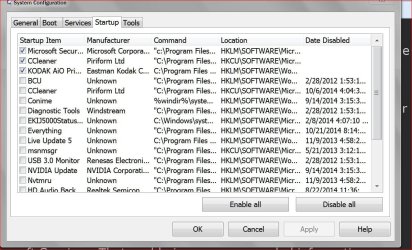
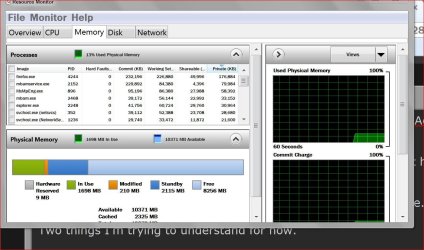
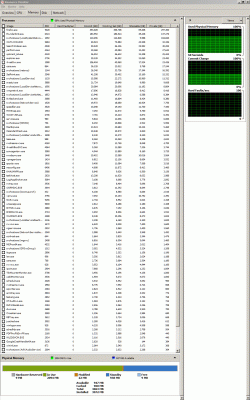
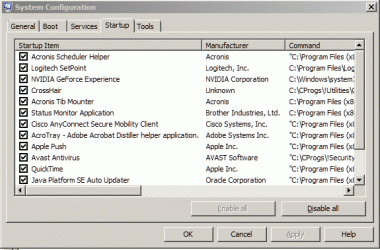
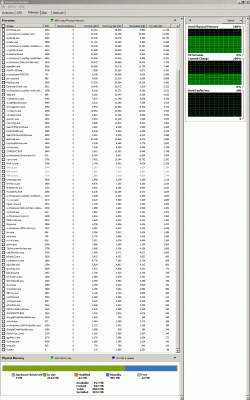
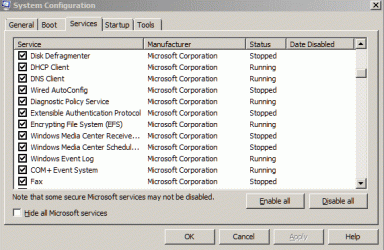
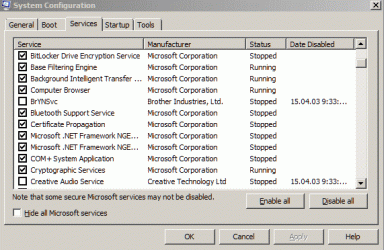
Here are the pictures you asked for. I added the motherboard (Jetway/Kuroshio JBI-600-LF (or BI-600)) & anti-virus (Avast) info to my system specs. I notice under Services that there are some update services that I could disable, if they cause slowdowns. [Gripe of the day - does Microsoft deliberately make the System Configuration window tiny & nonresizeable to make it difficult for the user?]
 

Attachments

  • Memory1.gif
    Memory1.gif
    86.9 KB · Views: 4
  • Startup2.gif
    Startup2.gif
    19.6 KB · Views: 22
  • Startup1.gif
    Startup1.gif
    19.8 KB · Views: 22
  • Services2.gif
    Services2.gif
    19.6 KB · Views: 22
  • Services1.gif
    Services1.gif
    19.8 KB · Views: 21
  • Memory2.gif
    Memory2.gif
    88.1 KB · Views: 2

My Computer

Computer type
PC/Desktop
Computer Manufacturer/Model Number
Custom build
OS
Microsoft Windows 7 Home Premium 64-bit 7601 Multiprocessor Free Service Pack 1
CPU
Intel(R) Core(TM) i7 CPU 920 @ 2.67GHz
Motherboard
Jetway/Kuroshio JBI-600-LF (or BI-600) [Intel Burnside?]
Memory
3.00 GB
Graphics Card(s)
NVIDIA GeForce 210
Sound Card
Creative Sound Blaster X-Fi Titanium HD with THX SB1270
Screen Resolution
1920 x 1080 x 32 bits (4294967296 colors) @ 60 Hz
Hard Drives
(1) Hitachi HDS721010CLA332 ATA Device (2) ST1500DM003-9YN16G ATA Device (3)
Antivirus
Avast Antivirus
Browser
Firefox
Way way to many Startups and Services.

Look at mine in the post again. I got 3 checked in Startup and 1 in non Microsoft Services.

Let me explain.
All those you have checked have no need to start at boot.
Just your security programs need to be checked.
Programs that don't start with the boot still we work as normal they just won't be running in the background wasting your computer resources when you are not using those programs.

Now we know for sure where part of your problem is.
 

My Computer

Computer type
PC/Desktop
Computer Manufacturer/Model Number
Home made Desktop
OS
Windows 10 Pro. 64/ version 1709 Windows 7 Pro/64
CPU
Intel i7-6800K @ 4.3
Motherboard
ASUS X-99 Deluxe II
Memory
Corsair Platinum 16 gig @2400
Graphics Card(s)
EVGA GTX 1070 OC
Monitor(s) Displays
Asus 27" LED LCD/VE278Q
Screen Resolution
1920-1080 or 1280-720 HDMI
Hard Drives
INTEL SSD 730-240 Gb Sata 3.0/
PSU
EVGA Platium 1200W
Case
Phanteks Luxe Tempered Glass 8 fans/ one radiator
Cooling
XSPC/ Water Cooled CPU
Keyboard
Das 4 Professional
Mouse
Logitech M705/MX Anywhere 2-S
Internet Speed
100 mbits
Antivirus
Microsoft Security Essentials/ Malwarebytes Premium 3.0/ SAS
Browser
I.E. 11 default/Firefox/ ISP Time Warner Cable/Spectrum
Other Info
LG BluRay Burner/
Sound system-KLipsch-THX/
Icy Dock ssd Hot Swap bays.
Startup hell.
 

My Computer

Computer type
PC/Desktop
Computer Manufacturer/Model Number
Custom Build
OS
W7 Pro x64 SP1 | W10 Pro IP x64 | W8.1 Pro x64 VM | Linux Mint VM
CPU
i7-4790k @ 4GHz (4.4GHz Boost)
Motherboard
ASUS Sabertooth Z87 (BIOS Rev 2004)
Memory
16GB DDR3 Kingston HyperX Fury @ 1600MHz CL 9-9-9-27
Graphics Card(s)
EVGA GTX 980 Classified
Sound Card
Realtek Onboard
Monitor(s) Displays
Samsung S27D390
Screen Resolution
1920 x 1080
Hard Drives
240GB Intel 520 Series SSD |
Samsung 850 EVO 120GB SSD |
2TB WD Caviar Black |
2TB WD Caviar Green
PSU
Corsair HX850-80 Gold Modular
Case
Cooler Master Silencio 650
Cooling
Corsair H80i w/2 x Corsair SP120 | 2 x 120mm Noctua NF-S12B
Keyboard
Microsoft Sidewinder X4
Mouse
Gigabyte M6900 optical
Internet Speed
152mb
Antivirus
F-Secure
Browser
Firefox 38.0
Other Info
Backup Rig: Win 7 Pro 64-bit | AMD A10-5800k | ASUS F2A85-V Pro | 8GB Samsung DDR3 @1600MHz | 120GB Toshiba SDD | 2TB Seagate HDD | Cooler Master Silencio 550
Once the computer get done with all the Startup their is a bunch of checking for updates using the internet.

Way to much going on for 3 gigs of ram on a Windows 7/64 boot.
 

My Computer

Computer type
PC/Desktop
Computer Manufacturer/Model Number
Home made Desktop
OS
Windows 10 Pro. 64/ version 1709 Windows 7 Pro/64
CPU
Intel i7-6800K @ 4.3
Motherboard
ASUS X-99 Deluxe II
Memory
Corsair Platinum 16 gig @2400
Graphics Card(s)
EVGA GTX 1070 OC
Monitor(s) Displays
Asus 27" LED LCD/VE278Q
Screen Resolution
1920-1080 or 1280-720 HDMI
Hard Drives
INTEL SSD 730-240 Gb Sata 3.0/
PSU
EVGA Platium 1200W
Case
Phanteks Luxe Tempered Glass 8 fans/ one radiator
Cooling
XSPC/ Water Cooled CPU
Keyboard
Das 4 Professional
Mouse
Logitech M705/MX Anywhere 2-S
Internet Speed
100 mbits
Antivirus
Microsoft Security Essentials/ Malwarebytes Premium 3.0/ SAS
Browser
I.E. 11 default/Firefox/ ISP Time Warner Cable/Spectrum
Other Info
LG BluRay Burner/
Sound system-KLipsch-THX/
Icy Dock ssd Hot Swap bays.
I think that startup would make my system ponder a bit to be honest.
 

My Computer

Computer type
PC/Desktop
Computer Manufacturer/Model Number
Custom Build
OS
W7 Pro x64 SP1 | W10 Pro IP x64 | W8.1 Pro x64 VM | Linux Mint VM
CPU
i7-4790k @ 4GHz (4.4GHz Boost)
Motherboard
ASUS Sabertooth Z87 (BIOS Rev 2004)
Memory
16GB DDR3 Kingston HyperX Fury @ 1600MHz CL 9-9-9-27
Graphics Card(s)
EVGA GTX 980 Classified
Sound Card
Realtek Onboard
Monitor(s) Displays
Samsung S27D390
Screen Resolution
1920 x 1080
Hard Drives
240GB Intel 520 Series SSD |
Samsung 850 EVO 120GB SSD |
2TB WD Caviar Black |
2TB WD Caviar Green
PSU
Corsair HX850-80 Gold Modular
Case
Cooler Master Silencio 650
Cooling
Corsair H80i w/2 x Corsair SP120 | 2 x 120mm Noctua NF-S12B
Keyboard
Microsoft Sidewinder X4
Mouse
Gigabyte M6900 optical
Internet Speed
152mb
Antivirus
F-Secure
Browser
Firefox 38.0
Other Info
Backup Rig: Win 7 Pro 64-bit | AMD A10-5800k | ASUS F2A85-V Pro | 8GB Samsung DDR3 @1600MHz | 120GB Toshiba SDD | 2TB Seagate HDD | Cooler Master Silencio 550
Gav yours and my system would slow down on boot but it would not grind down to unworkable.
Our systems would still work reasonable well after the slow boot.
When a system has little ram left to use after boot, not much to work with for everything else one wants to do.

Years ago I had a 64 bit system with 3 gigs of ram. Because I kept a lean and mean the system worked nicely. It wasn't a barn burner but it worked for what I was requesting it to do.
That is the secret. Don't ask your system and the way it is set up to do more than it is designed or capable of doing.
 

My Computer

Computer type
PC/Desktop
Computer Manufacturer/Model Number
Home made Desktop
OS
Windows 10 Pro. 64/ version 1709 Windows 7 Pro/64
CPU
Intel i7-6800K @ 4.3
Motherboard
ASUS X-99 Deluxe II
Memory
Corsair Platinum 16 gig @2400
Graphics Card(s)
EVGA GTX 1070 OC
Monitor(s) Displays
Asus 27" LED LCD/VE278Q
Screen Resolution
1920-1080 or 1280-720 HDMI
Hard Drives
INTEL SSD 730-240 Gb Sata 3.0/
PSU
EVGA Platium 1200W
Case
Phanteks Luxe Tempered Glass 8 fans/ one radiator
Cooling
XSPC/ Water Cooled CPU
Keyboard
Das 4 Professional
Mouse
Logitech M705/MX Anywhere 2-S
Internet Speed
100 mbits
Antivirus
Microsoft Security Essentials/ Malwarebytes Premium 3.0/ SAS
Browser
I.E. 11 default/Firefox/ ISP Time Warner Cable/Spectrum
Other Info
LG BluRay Burner/
Sound system-KLipsch-THX/
Icy Dock ssd Hot Swap bays.
Thanks for the suggestion. I've disabled some more startups. I've previously disabled a large number of startups & services using Autoruns. However Autoruns shows that I have many more dll's being loaded at bootup than exe's. I've been hesitant to disable the dll's as I don't know what they do or what the ramifications of disabling them would be (DLL hell?).

Also, I want to emphasize that while my system is not a "barnburner", it normally operates quite satisfactorily for my purposes. It's only on occasion (usually, as I said, when I'm desperate to get something done) that it switches to glacial pace. I don't know why or what causes it.
 

My Computer

Computer type
PC/Desktop
Computer Manufacturer/Model Number
Custom build
OS
Microsoft Windows 7 Home Premium 64-bit 7601 Multiprocessor Free Service Pack 1
CPU
Intel(R) Core(TM) i7 CPU 920 @ 2.67GHz
Motherboard
Jetway/Kuroshio JBI-600-LF (or BI-600) [Intel Burnside?]
Memory
3.00 GB
Graphics Card(s)
NVIDIA GeForce 210
Sound Card
Creative Sound Blaster X-Fi Titanium HD with THX SB1270
Screen Resolution
1920 x 1080 x 32 bits (4294967296 colors) @ 60 Hz
Hard Drives
(1) Hitachi HDS721010CLA332 ATA Device (2) ST1500DM003-9YN16G ATA Device (3)
Antivirus
Avast Antivirus
Browser
Firefox
You have been given reasons this happens and have chose not to do what has been suggested in the fashion those suggested curtailed.
 

My Computer

Computer type
PC/Desktop
Computer Manufacturer/Model Number
Home made Desktop
OS
Windows 10 Pro. 64/ version 1709 Windows 7 Pro/64
CPU
Intel i7-6800K @ 4.3
Motherboard
ASUS X-99 Deluxe II
Memory
Corsair Platinum 16 gig @2400
Graphics Card(s)
EVGA GTX 1070 OC
Monitor(s) Displays
Asus 27" LED LCD/VE278Q
Screen Resolution
1920-1080 or 1280-720 HDMI
Hard Drives
INTEL SSD 730-240 Gb Sata 3.0/
PSU
EVGA Platium 1200W
Case
Phanteks Luxe Tempered Glass 8 fans/ one radiator
Cooling
XSPC/ Water Cooled CPU
Keyboard
Das 4 Professional
Mouse
Logitech M705/MX Anywhere 2-S
Internet Speed
100 mbits
Antivirus
Microsoft Security Essentials/ Malwarebytes Premium 3.0/ SAS
Browser
I.E. 11 default/Firefox/ ISP Time Warner Cable/Spectrum
Other Info
LG BluRay Burner/
Sound system-KLipsch-THX/
Icy Dock ssd Hot Swap bays.
Huh? Did I give offense? I thought I *did* follow your suggestion by disabling more startups! I had also hoped that someone might enlighten me as to whether it's safe to disable dll's. Finally, I can't tell immediately whether your suggestion worked because - as I stressed - the problem only happens occasionally, so I'll have to wait to see if in the long run I no longer get the problem. (Not sure what you mean by "curtailed".) Thank you for your help.
 

My Computer

Computer type
PC/Desktop
Computer Manufacturer/Model Number
Custom build
OS
Microsoft Windows 7 Home Premium 64-bit 7601 Multiprocessor Free Service Pack 1
CPU
Intel(R) Core(TM) i7 CPU 920 @ 2.67GHz
Motherboard
Jetway/Kuroshio JBI-600-LF (or BI-600) [Intel Burnside?]
Memory
3.00 GB
Graphics Card(s)
NVIDIA GeForce 210
Sound Card
Creative Sound Blaster X-Fi Titanium HD with THX SB1270
Screen Resolution
1920 x 1080 x 32 bits (4294967296 colors) @ 60 Hz
Hard Drives
(1) Hitachi HDS721010CLA332 ATA Device (2) ST1500DM003-9YN16G ATA Device (3)
Antivirus
Avast Antivirus
Browser
Firefox
Okay; show us some more pictures of msconfig/Startup and Microsoft Services plus Non Microsoft Services and lets see if we can find some more to trim.

Leave dll alone. Don't mess with them. Nobody posted to fool with dll.
 

My Computer

Computer type
PC/Desktop
Computer Manufacturer/Model Number
Home made Desktop
OS
Windows 10 Pro. 64/ version 1709 Windows 7 Pro/64
CPU
Intel i7-6800K @ 4.3
Motherboard
ASUS X-99 Deluxe II
Memory
Corsair Platinum 16 gig @2400
Graphics Card(s)
EVGA GTX 1070 OC
Monitor(s) Displays
Asus 27" LED LCD/VE278Q
Screen Resolution
1920-1080 or 1280-720 HDMI
Hard Drives
INTEL SSD 730-240 Gb Sata 3.0/
PSU
EVGA Platium 1200W
Case
Phanteks Luxe Tempered Glass 8 fans/ one radiator
Cooling
XSPC/ Water Cooled CPU
Keyboard
Das 4 Professional
Mouse
Logitech M705/MX Anywhere 2-S
Internet Speed
100 mbits
Antivirus
Microsoft Security Essentials/ Malwarebytes Premium 3.0/ SAS
Browser
I.E. 11 default/Firefox/ ISP Time Warner Cable/Spectrum
Other Info
LG BluRay Burner/
Sound system-KLipsch-THX/
Icy Dock ssd Hot Swap bays.
Huh? Did I give offense? I thought I *did* follow your suggestion by disabling more startups! I had also hoped that someone might enlighten me as to whether it's safe to disable dll's. Finally, I can't tell immediately whether your suggestion worked because - as I stressed - the problem only happens occasionally, so I'll have to wait to see if in the long run I no longer get the problem. (Not sure what you mean by "curtailed".) Thank you for your help.
coffent given the many-and-varied startup programs you have left enabled (way, way too many IMO), it is possible (likely?) that the "only occasional" problem is due to one of those startup programs attempting e.g. to "phone home" and then its update server is down or busy (as just one example).

There is a free program I use from R2Studios called Startup Delayer which has a tab for Running Tasks and which shows When (date/time) that running task started. By looking at the long list of startup programs, and the time each starts before the next one starts...you might be able to identify the one(s) that are bogging you down. Just an idea. I leave Startup Delayer running on all my PCs so I can refer to it "just in case".
 

My Computer

Computer type
Laptop
Computer Manufacturer/Model Number
Dell Latitude E6540 Laptop
OS
Windows 7 Professional 64bit
CPU
Intel Core i7 4600M @ 2.90GHz
Motherboard
Dell Inc. 0CYT5F (SOCKET 0)
Memory
16.0GB Dual-Channel DDR3 @ 797MHz (11-11-11-28)
Graphics Card(s)
Intel HD Graphics 4600 (Dell) 2048MB ATI AMD Radeon HD 8790M
Sound Card
Realtek High Definition Audio
Monitor(s) Displays
HP ZR30w (2560x1600@60Hz)
Hard Drives
256GB LITEONIT LMT-256M6M-41 mm SATA (SSD)
1TB Samsung SSD 860 EVO mSATA SATA (SSD)
2TB USB 3.0 USB Device
115GB SanDisk Ultra Fit USB
Other Info
Multiple Dell E-Port Plus II Port Replicator/Docking Stations 0Y72NH USB 3.0 + 130W AC Adapters
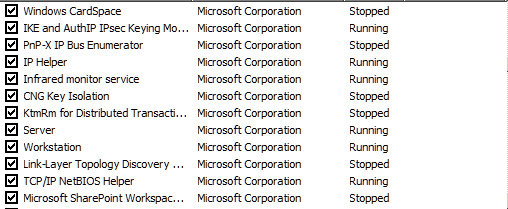
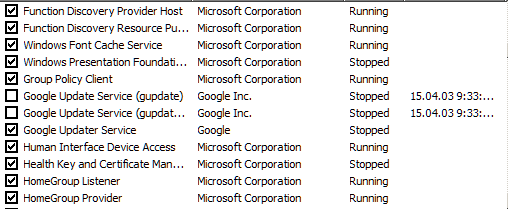
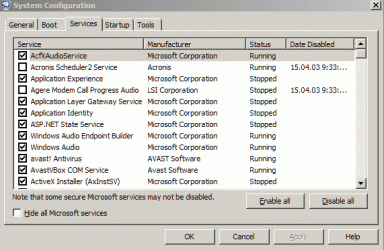
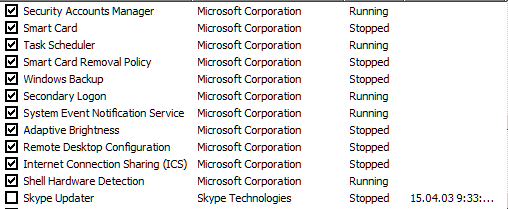
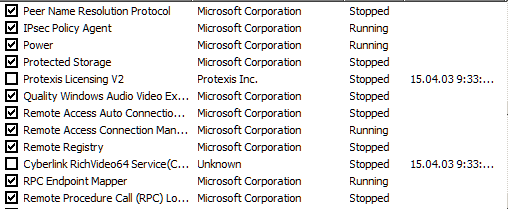
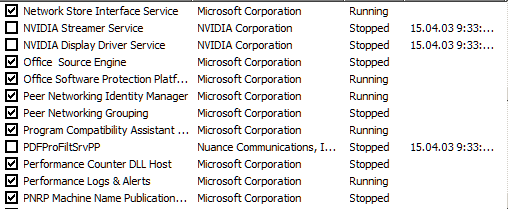
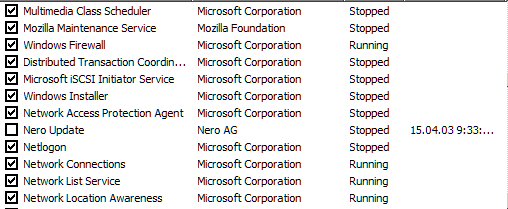
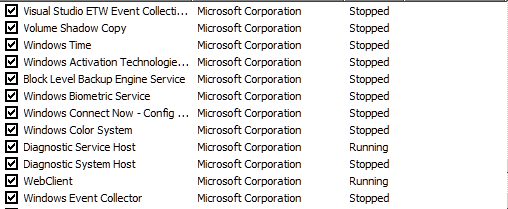
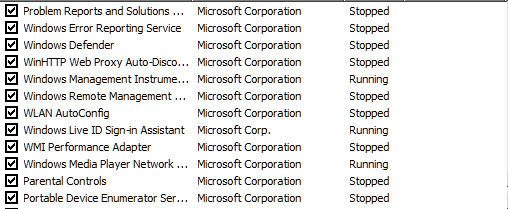
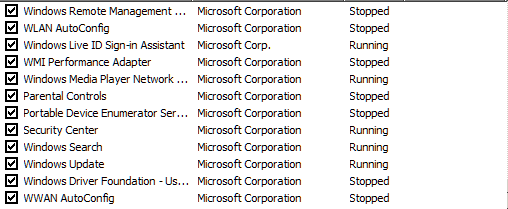
Thanks for the suggestions - I agree that a snafu with a startup program could be causing the problem. I will try Startup Delayer. That said, I have far more Microsoft services loading at startup (which I've been hesitant to disable), and I question whether one (or more) of them may be a cause. The only non-Microsoft programs I have loading at startup are an anti-virus and a VPN service, Java, Google and Mozilla updaters, and a few non-internet-connected programs that I use all the time. Is that "way too many"? FWIW, I'm posting the many Microsoft startup programs shown by msconfig. I'll be more than willing to try disabling any that others have found not to be essential.
 

Attachments

  • MWSnap_146.gif
    MWSnap_146.gif
    8.7 KB · Views: 7
  • MWSnap_145.gif
    MWSnap_145.gif
    9.4 KB · Views: 7
  • MWSnap_144.gif
    MWSnap_144.gif
    19.3 KB · Views: 7
  • MWSnap_143.gif
    MWSnap_143.gif
    20.1 KB · Views: 7
  • MWSnap_142.gif
    MWSnap_142.gif
    20.2 KB · Views: 7
  • MWSnap_151.gif
    MWSnap_151.gif
    8.6 KB · Views: 8
  • MWSnap_150.gif
    MWSnap_150.gif
    8.9 KB · Views: 8
  • MWSnap_149.gif
    MWSnap_149.gif
    9.2 KB · Views: 7
  • MWSnap_148.gif
    MWSnap_148.gif
    10.3 KB · Views: 7
  • MWSnap_147.gif
    MWSnap_147.gif
    8.9 KB · Views: 7
  • MWSnap_152.gif
    MWSnap_152.gif
    8.8 KB · Views: 7
  • MWSnap_153.gif
    MWSnap_153.gif
    9.1 KB · Views: 7
  • MWSnap_154.gif
    MWSnap_154.gif
    9.5 KB · Views: 7
  • MWSnap_155.gif
    MWSnap_155.gif
    9 KB · Views: 7

My Computer

Computer type
PC/Desktop
Computer Manufacturer/Model Number
Custom build
OS
Microsoft Windows 7 Home Premium 64-bit 7601 Multiprocessor Free Service Pack 1
CPU
Intel(R) Core(TM) i7 CPU 920 @ 2.67GHz
Motherboard
Jetway/Kuroshio JBI-600-LF (or BI-600) [Intel Burnside?]
Memory
3.00 GB
Graphics Card(s)
NVIDIA GeForce 210
Sound Card
Creative Sound Blaster X-Fi Titanium HD with THX SB1270
Screen Resolution
1920 x 1080 x 32 bits (4294967296 colors) @ 60 Hz
Hard Drives
(1) Hitachi HDS721010CLA332 ATA Device (2) ST1500DM003-9YN16G ATA Device (3)
Antivirus
Avast Antivirus
Browser
Firefox
Those pictures look okay.
Now the Start up and Non Microsoft Services pictures.
 

My Computer

Computer type
PC/Desktop
Computer Manufacturer/Model Number
Home made Desktop
OS
Windows 10 Pro. 64/ version 1709 Windows 7 Pro/64
CPU
Intel i7-6800K @ 4.3
Motherboard
ASUS X-99 Deluxe II
Memory
Corsair Platinum 16 gig @2400
Graphics Card(s)
EVGA GTX 1070 OC
Monitor(s) Displays
Asus 27" LED LCD/VE278Q
Screen Resolution
1920-1080 or 1280-720 HDMI
Hard Drives
INTEL SSD 730-240 Gb Sata 3.0/
PSU
EVGA Platium 1200W
Case
Phanteks Luxe Tempered Glass 8 fans/ one radiator
Cooling
XSPC/ Water Cooled CPU
Keyboard
Das 4 Professional
Mouse
Logitech M705/MX Anywhere 2-S
Internet Speed
100 mbits
Antivirus
Microsoft Security Essentials/ Malwarebytes Premium 3.0/ SAS
Browser
I.E. 11 default/Firefox/ ISP Time Warner Cable/Spectrum
Other Info
LG BluRay Burner/
Sound system-KLipsch-THX/
Icy Dock ssd Hot Swap bays.
Back
Top