Schools Agreement upgrade disk

leakingpaint

New member
Local time
6:09 PM
Messages
21
If this has been covered elsewhere I'd appreciate a link to that forum, here's my problem.

I work for a school they're running XP SP3 32bit. I ordered the Win 7 64 bit upgrade. Upon inserting the DVD i get the obvious error - "unsupported edition for upgrade...yada yada"

The disk doesn't boot either (tried on several different PC's, different hardware, dvd first boot device)

When I check the bootmgr file using notepad on the disk it reads in one section "BOOTMGR image is corrupt" - I think Microsoft have done that on purpose because it's a school licensed disk (volume license)?why else?

I booted into & installed my copy of Vista 64bit, left the key blank and then installed the Win7 upgrade on top of it. Registered ok over the phone - but now many files don't install or work. Office 2007, Thunderbird among others.

How do I get to install a fresh copy of Win7 64 bit - as the disk doesn't boot. The 32 bit version has the same problem.

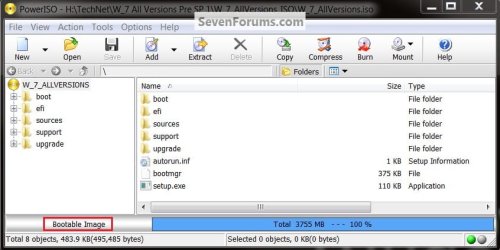
Disk contents: - green disk with silver border says "not for OEM or retail distribution"
boot
efi
sources
support
upgrade
autorun.inf
bootmgr
bootmgr.efi
setup.exe


Not sure if this version will work if i try to make a bootable flash drive

...please help
 

My Computer

OS
Windows 7
First, as you learned, there is not a direct "UPGRADE" path from XP to Win 7.

I'm having a little difficulty with what you want to do.

Do you desire to install Win 7 on one or many computers?

The new windows activation procedure will rise up and bite you if you try to install a single-license version of Win 7 on more than one computer to use on more than one computer at one time. Essentially - one computer = 1 license.

There are several tutorials here on using upgrade discs which also explain the qualifiying conditions. If you are trying to migrate and retain your data when going going from xp to win 7 then you will be using a different procedure.
Download details: Windows 7 Upgrade Paths

also of probably interest is:
Windows 7 Upgrade Advisor - Download - Microsoft Windows
 

My Computer

Computer Manufacturer/Model Number
Toshiba Satellite S875D-S7239 laptop
OS
MS Windows 7 Ultimate SP1 64-bit
CPU
AMD A10-4600M
Motherboard
AMD Pumori (Socket FT1)
Memory
6.00 GB Dual-Channel DDR3 @ 798MHz (11-11-12-28)
Graphics Card(s)
AMD Radeon HD 7660G
Sound Card
High Definition Audio Device
Monitor(s) Displays
Generic PnP Monitor (1600x900@60Hz)
Screen Resolution
1600x900@60Hz
Hard Drives
SSD 119GB Corsair CSSD-V128GB2 ATA Device
Keyboard
Standard PS/2 Keyboard
Mouse
HP Wireless Optical Mobile Mouse Model FHA-3410
Internet Speed
What the local pub, local coffee shop offers.
Other Info
Optical Drive:MATSHITA BD-CMB UJ160B ATA Device


Also have an Asus ha1002xp netbook with Win 7 Ultimate installed.
Thanks for the replies

Do you desire to install Win 7 on one or many computers?
I wish to install Win7 64 bit on all office computers using a volume license key (Microsoft have supplied me with the DVD and a volume license key)
I want to just do a clean format, I don't mind if i have nothing from the previous OS

Wipe the HD first to get rid of the conflicting boot sector code:
I'll try this but the bootmgr doesn't work on the physical media (DVD) as far as I can tell, MS have disabled this making the installation DVD unable to boot. Despite setting the bios to boot from DVD/CD first i still don't get an option to boot from the DVD Microsoft sent me even on a "brand new hard drive off the shelf"

How would I create a new bootable DVD using the files on the un-bootable Win7 64 bit disk?
Can I copy the files from the DVD and create my own bootable disk?

Thanks again.
 

My Computer

OS
Windows 7

My Computer

Computer Manufacturer/Model Number
* BFK Customs *
OS
W 7 64-bit Ultimate
CPU
Intel Q9550 Yorkfield
Motherboard
ASUS P5Q Pro
Memory
8GB Dominator 8500C5D
Graphics Card(s)
ATI : XFX 5870
Sound Card
Realtek HD Audio 7-1
Monitor(s) Displays
1x 47" LCD HDMI & 3x 26" LCD HDMI
Screen Resolution
1920x1080P & 1920x1200
Hard Drives
1x 80GB Intel X25-M G2 SSD : 1x 500GB & 1x 640GB WD Caviar Black(s)
PSU
Corsair 620HX
Case
Cooler Master RC-690
Cooling
Tuniq Tower 120, 2x 140mm and 3x 120mm case fans
Keyboard
Microsoft 500
Mouse
Razer Diamondback 3G
Internet Speed
14 Mb/s
Other Info
1x Koutech 3Gb/s SATA HDD Hot Swap Rack
leakingpaint,
if the dvd is unbootable, then contact the supplier of the DVD.

If that fails,contact Microsoft. I'm very sure that they will be interested in hearing about a supplier of defective dvds.
 

My Computer

Computer Manufacturer/Model Number
Toshiba Satellite S875D-S7239 laptop
OS
MS Windows 7 Ultimate SP1 64-bit
CPU
AMD A10-4600M
Motherboard
AMD Pumori (Socket FT1)
Memory
6.00 GB Dual-Channel DDR3 @ 798MHz (11-11-12-28)
Graphics Card(s)
AMD Radeon HD 7660G
Sound Card
High Definition Audio Device
Monitor(s) Displays
Generic PnP Monitor (1600x900@60Hz)
Screen Resolution
1600x900@60Hz
Hard Drives
SSD 119GB Corsair CSSD-V128GB2 ATA Device
Keyboard
Standard PS/2 Keyboard
Mouse
HP Wireless Optical Mobile Mouse Model FHA-3410
Internet Speed
What the local pub, local coffee shop offers.
Other Info
Optical Drive:MATSHITA BD-CMB UJ160B ATA Device


Also have an Asus ha1002xp netbook with Win 7 Ultimate installed.
How old are the PC's in question? I have a couple of PC's here that have a BIOS that does not support the Windows 7 boot loader. I get a code 5 error and the same DVD is bootable in my newer PC. These same PC's won't boot from a windows 7 USB thumbdrive either, and again I can boot from that same thumbdrive and install windows 7 from it on my new PC. I got around it by booting up into XP and starting the install from there. I just did a custom install. My DVD wasn't an upgrade version though it was a full version.
 

My Computer

Computer type
PC/Desktop
Computer Manufacturer/Model Number
Home Built
OS
Windows 10 Education 64 bit
CPU
AMD Phenom II X4 980 Black Edition Deneb 3.7GHz
Motherboard
Asus M4N68T-M V2 µATX Motherboard
Memory
8GB 4GBx2 Kingston PC10600 DDR3 1333 Memory
Graphics Card(s)
Zotac NVIDIA Geforce GT640 2 Gig DDR3 PCIe
Sound Card
VIA VT1708s High Definition Audio 8-channel Onboard
Monitor(s) Displays
22" LG E2242 1080p and 2 19" I-INC AG191D
Screen Resolution
1280x1024 - 1920x1080 - 1280x1024
Hard Drives
Crucial M100 256 GB SSD and 500 GB WD Blue SATA
PSU
Thermaltake TR 620
Case
Power Up Black ATX Mid-Tower Case
Cooling
Stock heatsink and fan
Keyboard
Logitech Wireless K350 Wave
Mouse
Logitech Wireless M570 Trackman Wheel
Internet Speed
80 Mbps Down 30 Mbps Up
Antivirus
Windows Defender
Browser
Internet Explorer 11
Other Info
HP DVD1040e Lightscribe - External USB2

My Computer

Computer Manufacturer/Model Number
Toshiba Satellite S875D-S7239 laptop
OS
MS Windows 7 Ultimate SP1 64-bit
CPU
AMD A10-4600M
Motherboard
AMD Pumori (Socket FT1)
Memory
6.00 GB Dual-Channel DDR3 @ 798MHz (11-11-12-28)
Graphics Card(s)
AMD Radeon HD 7660G
Sound Card
High Definition Audio Device
Monitor(s) Displays
Generic PnP Monitor (1600x900@60Hz)
Screen Resolution
1600x900@60Hz
Hard Drives
SSD 119GB Corsair CSSD-V128GB2 ATA Device
Keyboard
Standard PS/2 Keyboard
Mouse
HP Wireless Optical Mobile Mouse Model FHA-3410
Internet Speed
What the local pub, local coffee shop offers.
Other Info
Optical Drive:MATSHITA BD-CMB UJ160B ATA Device


Also have an Asus ha1002xp netbook with Win 7 Ultimate installed.
Try DBAN or Partition Wizard CD's which will autostart, wipe the HD with zeroes, then the Win7 DVD should autostart install on empty HD.

Do you have another bootable CD you can try to see if the problem is with your optical drive? If you have XP you can try install from it as Alpha suggests.

USB Windows 7 Installation Key Drive
 
See Option Three in this tutorial at the link below for an out-line on how to use the Partition Wizard program to do a wipe "secure erase" a specific partition on the HDD.


Partition Wizard : Use the Bootable CD
 

My Computer

Computer Manufacturer/Model Number
* BFK Customs *
OS
W 7 64-bit Ultimate
CPU
Intel Q9550 Yorkfield
Motherboard
ASUS P5Q Pro
Memory
8GB Dominator 8500C5D
Graphics Card(s)
ATI : XFX 5870
Sound Card
Realtek HD Audio 7-1
Monitor(s) Displays
1x 47" LCD HDMI & 3x 26" LCD HDMI
Screen Resolution
1920x1080P & 1920x1200
Hard Drives
1x 80GB Intel X25-M G2 SSD : 1x 500GB & 1x 640GB WD Caviar Black(s)
PSU
Corsair 620HX
Case
Cooler Master RC-690
Cooling
Tuniq Tower 120, 2x 140mm and 3x 120mm case fans
Keyboard
Microsoft 500
Mouse
Razer Diamondback 3G
Internet Speed
14 Mb/s
Other Info
1x Koutech 3Gb/s SATA HDD Hot Swap Rack
Will try suggetions

Thanks for the valuable feedback.

  • I will try PowerISO in the mean time to double check whether or not the DVD is bootable.
  • I have tried using different PC's old and new (my PC won't boot it either & it's fairly new)
  • Other bootable disks work fine eg. XP Pro works like a charm when booting.
  • Hardware wise the PC's are capable of running Win7 64 bit (Windows Upgrade Advisor)

I have tried installing to a brand new SATA 500GB - but I will try
...DBAN or Partition Wizard CD's which will autostart, wipe the HD with zeroes, then the Win7 DVD should autostart install on empty HD.
that I can do next week.

if the dvd is unbootable, then contact the supplier of the DVD
The reseller I purchased it from is the official supplier chosen by Microsoft for my area.

Thank you again I will post what I've done next week so I can organize to bring one of the PC's home and work on it from here. Volume License was a pleasure using XP but sadly I feel Microsoft should include a full license for schools instead of only an "upgrade" option which is proving to be very troublesome.
 

My Computer

OS
Windows 7
Hello again.


Well, you've found the issue; have a look at the PowerISO help file to see how to make it bootable.

Be sure to post back with any further questions you may have and to keep us informed.
 

My Computer

Computer Manufacturer/Model Number
* BFK Customs *
OS
W 7 64-bit Ultimate
CPU
Intel Q9550 Yorkfield
Motherboard
ASUS P5Q Pro
Memory
8GB Dominator 8500C5D
Graphics Card(s)
ATI : XFX 5870
Sound Card
Realtek HD Audio 7-1
Monitor(s) Displays
1x 47" LCD HDMI & 3x 26" LCD HDMI
Screen Resolution
1920x1080P & 1920x1200
Hard Drives
1x 80GB Intel X25-M G2 SSD : 1x 500GB & 1x 640GB WD Caviar Black(s)
PSU
Corsair 620HX
Case
Cooler Master RC-690
Cooling
Tuniq Tower 120, 2x 140mm and 3x 120mm case fans
Keyboard
Microsoft 500
Mouse
Razer Diamondback 3G
Internet Speed
14 Mb/s
Other Info
1x Koutech 3Gb/s SATA HDD Hot Swap Rack
You can create a bootable ISO using files with ImgBurn as well.

It may be easier to download the ISO file again, and burn it to DVD this time with ImgBurn.
 
Last edited:

My Computer

Computer Manufacturer/Model Number
* BFK Customs *
OS
W 7 64-bit Ultimate
CPU
Intel Q9550 Yorkfield
Motherboard
ASUS P5Q Pro
Memory
8GB Dominator 8500C5D
Graphics Card(s)
ATI : XFX 5870
Sound Card
Realtek HD Audio 7-1
Monitor(s) Displays
1x 47" LCD HDMI & 3x 26" LCD HDMI
Screen Resolution
1920x1080P & 1920x1200
Hard Drives
1x 80GB Intel X25-M G2 SSD : 1x 500GB & 1x 640GB WD Caviar Black(s)
PSU
Corsair 620HX
Case
Cooler Master RC-690
Cooling
Tuniq Tower 120, 2x 140mm and 3x 120mm case fans
Keyboard
Microsoft 500
Mouse
Razer Diamondback 3G
Internet Speed
14 Mb/s
Other Info
1x Koutech 3Gb/s SATA HDD Hot Swap Rack
Will try ImgBurn as the only help I can see in PowerISO is Action-->Boot-->Add boot information...
what information? I don't have a file or boot file to tell it to boot.

So I'll try ImgBurn perhaps it flags the disc as bootable for me? When you add boot information do you physically have to have the bootable file? I thought the CD/DVD burning software would automatically create it?

Sorry if this is a dumb question :o
 
Last edited:

My Computer

OS
Windows 7

My Computer

Computer Manufacturer/Model Number
* BFK Customs *
OS
W 7 64-bit Ultimate
CPU
Intel Q9550 Yorkfield
Motherboard
ASUS P5Q Pro
Memory
8GB Dominator 8500C5D
Graphics Card(s)
ATI : XFX 5870
Sound Card
Realtek HD Audio 7-1
Monitor(s) Displays
1x 47" LCD HDMI & 3x 26" LCD HDMI
Screen Resolution
1920x1080P & 1920x1200
Hard Drives
1x 80GB Intel X25-M G2 SSD : 1x 500GB & 1x 640GB WD Caviar Black(s)
PSU
Corsair 620HX
Case
Cooler Master RC-690
Cooling
Tuniq Tower 120, 2x 140mm and 3x 120mm case fans
Keyboard
Microsoft 500
Mouse
Razer Diamondback 3G
Internet Speed
14 Mb/s
Other Info
1x Koutech 3Gb/s SATA HDD Hot Swap Rack
Thank you for the link - The DVD seems to boot but I can only test the install when I get back to work next week. I will let everybody know if it is successful.

As far as I can tell, for whatever reason, Microsoft were the ones that disabled the ability to boot. You may think I've lost my marbles but with this Volume License Upgrade disk they actually have disabled it? wtf:sick:

Will test and let everybody know
 

My Computer

OS
Windows 7
error code 0x80070570

After using the guide provided by Bare Foot Kid the DVD booted successfully.
I then followed the guide provided by gregrocker to format the drive

After the format I installed and about half way through I get:
"error code 0x80070570
Windows cannot install files. The file may be corrupt or missing. Make sure all files required for installation are available and restart installation."


I'm phoning Microsoft tomorrow, I don't think the disk is faulty. It could be RAM, but again I doubt it. I actually think it's just that they have disabled something which is the reason it wasn't bootable in the first place.

It's a bright green disk with a thick silver border and clearly reads "previous os license required. Volume License" I just thought that at least you would be able to install it from a formatted HD - turns out you can't. Will let everybody know what Microsoft say. :sick:
 

My Computer

OS
Windows 7
Yes, do keep us informed.
 

My Computer

Computer Manufacturer/Model Number
* BFK Customs *
OS
W 7 64-bit Ultimate
CPU
Intel Q9550 Yorkfield
Motherboard
ASUS P5Q Pro
Memory
8GB Dominator 8500C5D
Graphics Card(s)
ATI : XFX 5870
Sound Card
Realtek HD Audio 7-1
Monitor(s) Displays
1x 47" LCD HDMI & 3x 26" LCD HDMI
Screen Resolution
1920x1080P & 1920x1200
Hard Drives
1x 80GB Intel X25-M G2 SSD : 1x 500GB & 1x 640GB WD Caviar Black(s)
PSU
Corsair 620HX
Case
Cooler Master RC-690
Cooling
Tuniq Tower 120, 2x 140mm and 3x 120mm case fans
Keyboard
Microsoft 500
Mouse
Razer Diamondback 3G
Internet Speed
14 Mb/s
Other Info
1x Koutech 3Gb/s SATA HDD Hot Swap Rack
Back
Top