Screen Capture tools

yousaf465

New member
Member
VIP
Local time
7:25 PM
Messages
194
I have tried cam studio but I'm unable to use the video generated by it. I can't copy or view the file except through the cam studio itself.
 

My Computer

Computer Manufacturer/Model Number
Dell Inspiron 6000
OS
Windows 7 Ultimate x32bit
Memory
1Gb
Hard Drives
60Gb Internal
Mouse
Dell

My Computer

Computer type
PC/Desktop
Computer Manufacturer/Model Number
LENOVO K450 @3.0GHZ
OS
64-bit Windows 8.1 Pro
CPU
Core(TM) i5 CPU 4330 Haswell @ 3.20GHz
Motherboard
LENOVO
Memory
12.00 GB
Graphics Card(s)
Intel(R) HD Graphics
Sound Card
Intel HD integtrated
Monitor(s) Displays
HP 25' ISP Monitor
Screen Resolution
1900/1020
Hard Drives
(1) ST1000DM003-1CH162 (2) Generic STORAGE DEVICE USB Device (3) Generic STORAGE DEVICE USB Device
Internet Speed
100mb down/10mb up
FastStone Capture 5.3 (last freeware version)

Note: Use either of the last 2 (free) links on bottom of page

It captures rectangular/active screen or area, freehand area and also captures a scrolling screen, I have used it many times - an good example would be to capture a lengthy tutorial to use offline. A great find by Barman58
 
Last edited:

My Computer

Computer type
PC/Desktop
Computer Manufacturer/Model Number
My own abomination, I call it the Money Pit
OS
Windows 10 Pro x 2/Windows 11 Home
CPU
Intel i7 2600K @ 3.40 GHz
Motherboard
ASUS Sabertooth P67
Memory
Corsair Vengeance 16GB DDR3 1600MHz CL8 Dual Channel Kit
Graphics Card(s)
EVGA GeForce RTX 3080 XC3 ULTRA GAMING 10GB GDDR6X
Sound Card
Onboard Realtek or Nvidia High Definition Audio (HDMI)
Monitor(s) Displays
Samsung JS7000 50" SUHD TV or Samsung 27" FHD 60Hz 8ms GTG V
Screen Resolution
1920 x 1080
Hard Drives
1 x Samsung 870 EVO 250 GB SSD (Windows 10 Pro), 1 x Samsung 850 EVO 250 GB SSD (Windows 10 Pro)
PSU
Corsair AX860 - 860W Modular Power Supply
Case
Phanteks Enthoo Luxe Full Tower Case - Black
Cooling
CORSAIR Hydro Series H150i PRO RGB 360mm Liquid CPU Cooler
Keyboard
Logitech K830 Illuminated Living-Room Keyboard
Mouse
Logitech MX Anywhere 2S Wireless Mouse
Internet Speed
100 Mbps
Antivirus
ESET Internet Security
Browser
Latest Version Of Firefox & Microsoft Edge Chromium Stable
Other Info
LG Super Multi Blue Internal Blu-ray Disk Rewriter - BH10LS30
6x2 HDMI Switcher (6 inputs, 2 outputs) so I can send the output of my Cable Box, Roku, or any my 4 computers to either my TV or Monitor separately or simultaneously.
I have tried cam studio but I'm unable to use the video generated by it. I can't copy or view the file except through the cam studio itself.

What's the file extension? Do you have a choice as to what format to save your recording to in CamStudio?
My copy saves to an AVI file which plays on all standard players including Windows Media Player!
 

My Computer

Computer type
PC/Desktop
OS
Microsoft Windows 7 Home Premium 64-bit 7601 Multiprocessor Free Service Pack 1
CPU
Intel(R) Core(TM) i7-3770 CPU @ 3.40GHz
Motherboard
ASUSTeK COMPUTER INC. P8H77-M
Memory
8.00 GB
Graphics Card(s)
Intel(R) HD Graphics 4000
Sound Card
On Board
Monitor(s) Displays
Dell 24"
Screen Resolution
1920 x 1080
Hard Drives
(1) INTEL SSDSC2CT180A3 ATA Device (2) ST500DM002-1BD142 ATA Device (3) WDC WD3200AAKS-75L9A0 ATA Device (4) Generic- Compact Flash USB Device (5) Generic- MS/MS-Pro USB Device (6) Generic- SD/MMC USB Device (7) Generic- SM/xD-Picture USB
PSU
500w Corsair
Case
Cooler Master
Cooling
3 Fans
Keyboard
Logitech MK300
Mouse
Logitech WOM
Internet Speed
75Mb
Antivirus
Norton 360
Browser
Firefox, Opera, IE
I have tried cam studio but I'm unable to use the video generated by it. I can't copy or view the file except through the cam studio itself.

What's the file extension? Do you have a choice as to what format to save your recording to in CamStudio?
My copy saves to an AVI file which plays on all standard players including Windows Media Player!

It saves avi files but they have a lock icon on them. And I can't see them except when I browse them through camstudio. I did unhide the files but still there weren't there.
 

My Computer

Computer Manufacturer/Model Number
Dell Inspiron 6000
OS
Windows 7 Ultimate x32bit
Memory
1Gb
Hard Drives
60Gb Internal
Mouse
Dell

My Computer

Computer type
PC/Desktop
OS
Microsoft Windows 7 Home Premium 64-bit 7601 Multiprocessor Free Service Pack 1
CPU
Intel(R) Core(TM) i7-3770 CPU @ 3.40GHz
Motherboard
ASUSTeK COMPUTER INC. P8H77-M
Memory
8.00 GB
Graphics Card(s)
Intel(R) HD Graphics 4000
Sound Card
On Board
Monitor(s) Displays
Dell 24"
Screen Resolution
1920 x 1080
Hard Drives
(1) INTEL SSDSC2CT180A3 ATA Device (2) ST500DM002-1BD142 ATA Device (3) WDC WD3200AAKS-75L9A0 ATA Device (4) Generic- Compact Flash USB Device (5) Generic- MS/MS-Pro USB Device (6) Generic- SD/MMC USB Device (7) Generic- SM/xD-Picture USB
PSU
500w Corsair
Case
Cooler Master
Cooling
3 Fans
Keyboard
Logitech MK300
Mouse
Logitech WOM
Internet Speed
75Mb
Antivirus
Norton 360
Browser
Firefox, Opera, IE
Camtasia records using a specific codec (Techsmith camcorder codec) and is not directley compatible with WMP but will work fine with VLC (Or WMP with the klite codec pack). So even if the file appears to be an .avi file it still may not play.

When using the camtasia recorder you can select the video codec under tools > options > inputs > video settings and select the codec required from the list.
 

My Computer

Computer type
PC/Desktop
OS
openSUSE 13.1 64bit
CPU
i7
Motherboard
Gigabyte UD5
Memory
6gb Gskill matched DDR3
Graphics Card(s)
Radeon HD4600
Sound Card
All onboard
Monitor(s) Displays
HP 2159v
Hard Drives
120gb Samsung SSD for the OS
2 * 1tb WD Caviar Black for storage
PSU
Corsair 750w
Case
Antec 920
Cooling
Aksas Nero
Do you have full Admin rights to the files?

Follow this tutorial and see if that helps;
Context Menu - Take Ownership - Vista Forums
This works on Win 7 as well!
Also try this:
LockHunter is a free 64/32 bit tool to delete files blocked by any processes

Both of these additions are worth having and are constantly useful.

yeah, I'm the only admin of this machine.

I download the camtasia and this is the result TechSmith | Screencast.com, online video sharing, Google Transliterate urdu with Audio commentary with audio commentary. And this one http://www.screencast.com/t/PqjamhrW without the audio commentary.
 

My Computer

Computer Manufacturer/Model Number
Dell Inspiron 6000
OS
Windows 7 Ultimate x32bit
Memory
1Gb
Hard Drives
60Gb Internal
Mouse
Dell
I have Camstudio up and running and it doesn't need any extra codecs installed for it to work with all my video players. Indeed IMHO adding 3rd party codecs often puts a spanner in the works especially codec packs. Often you get a codec in a pack that is a different version to what you already have installed thereby causing a conflict. I use video files in a multitude of formats from four different camcorders and I have never needed to install extra codecs.
yousaf, I note that you are the only admin on your PC but have you carried out my suggestion in post #6?
Your two attachments work fine, how did you get them uploaded if you haven't access to the files?

 

My Computer

Computer type
PC/Desktop
OS
Microsoft Windows 7 Home Premium 64-bit 7601 Multiprocessor Free Service Pack 1
CPU
Intel(R) Core(TM) i7-3770 CPU @ 3.40GHz
Motherboard
ASUSTeK COMPUTER INC. P8H77-M
Memory
8.00 GB
Graphics Card(s)
Intel(R) HD Graphics 4000
Sound Card
On Board
Monitor(s) Displays
Dell 24"
Screen Resolution
1920 x 1080
Hard Drives
(1) INTEL SSDSC2CT180A3 ATA Device (2) ST500DM002-1BD142 ATA Device (3) WDC WD3200AAKS-75L9A0 ATA Device (4) Generic- Compact Flash USB Device (5) Generic- MS/MS-Pro USB Device (6) Generic- SD/MMC USB Device (7) Generic- SM/xD-Picture USB
PSU
500w Corsair
Case
Cooler Master
Cooling
3 Fans
Keyboard
Logitech MK300
Mouse
Logitech WOM
Internet Speed
75Mb
Antivirus
Norton 360
Browser
Firefox, Opera, IE
I have Camstudio up and running and it doesn't need any extra codecs installed for it to work with all my video players. Indeed IMHO adding 3rd party codecs often puts a spanner in the works especially codec packs. Often you get a codec in a pack that is a different version to what you already have installed thereby causing a conflict. I use video files in a multitude of formats from four different camcorders and I have never needed to install extra codecs.
yousaf, I note that you are the only admin on your PC but have you carried out my suggestion in post #6?
Your two attachments work fine, how did you get them uploaded if you haven't access to the files?

I overlooked those. Though I'm going to do it now. These videos were produced by camtasia. Somebody recommended snagit and I went a step further. Downloaded camtasia, and it really working. Cam studio's files are unaccessible except by itself.


I have explained how I can't find the file in this video. I tried both methods but can't find the files.

http://www.screencast.com/t/3UNhowpE
 
Last edited:

My Computer

Computer Manufacturer/Model Number
Dell Inspiron 6000
OS
Windows 7 Ultimate x32bit
Memory
1Gb
Hard Drives
60Gb Internal
Mouse
Dell
Sorry but your last video told me nothing. I found it difficult to read any text but as I didn't know what file you were looking for it made things difficult. How did you upload the video files to screencast.com?
 

My Computer

Computer type
PC/Desktop
OS
Microsoft Windows 7 Home Premium 64-bit 7601 Multiprocessor Free Service Pack 1
CPU
Intel(R) Core(TM) i7-3770 CPU @ 3.40GHz
Motherboard
ASUSTeK COMPUTER INC. P8H77-M
Memory
8.00 GB
Graphics Card(s)
Intel(R) HD Graphics 4000
Sound Card
On Board
Monitor(s) Displays
Dell 24"
Screen Resolution
1920 x 1080
Hard Drives
(1) INTEL SSDSC2CT180A3 ATA Device (2) ST500DM002-1BD142 ATA Device (3) WDC WD3200AAKS-75L9A0 ATA Device (4) Generic- Compact Flash USB Device (5) Generic- MS/MS-Pro USB Device (6) Generic- SD/MMC USB Device (7) Generic- SM/xD-Picture USB
PSU
500w Corsair
Case
Cooler Master
Cooling
3 Fans
Keyboard
Logitech MK300
Mouse
Logitech WOM
Internet Speed
75Mb
Antivirus
Norton 360
Browser
Firefox, Opera, IE
Ok upload a higher resolution version. I use the camtasia builtin share to screencast.com feature. Both are owned by TechSmith.

I was looking for "google roman Urdu.avi" and "test.avi" which I shot with cam studio and are present in c:/program files/camstudio, but I can't find those files using window's explorer.

Now I have uploaded a higher resolution version with audio commentary. I this will hep you understand my problem. Please do watch it in full screen mode, it much more clear to read.

here is the link. http://www.screencast.com/t/3UNhowpE.

For uploading see http://www.techsmith.com/learn/camtasia/6/share/upload-screencast.asp, although this one if for camtasia 6 but the process is similar for Camtasia studio 7.

P.S Sorry for the lower resolution file. Now I have uploaded the higher resolution one.
 
Last edited:

My Computer

Computer Manufacturer/Model Number
Dell Inspiron 6000
OS
Windows 7 Ultimate x32bit
Memory
1Gb
Hard Drives
60Gb Internal
Mouse
Dell
OK Solved the problem. You are perfectly correct when you say that you cannot see the files in Windows Explorer. But save the files to a different folder and they are visible. Just create a folder in say "My Videos" and save your recorded camtasia files to that and all works perfectly. BTW if you do a search for one of the files that you are looking for it will come up in the Camstudio folder. Why you can't see it in WE I don't know at this stage but I will look further after the holiday.
 

My Computer

Computer type
PC/Desktop
OS
Microsoft Windows 7 Home Premium 64-bit 7601 Multiprocessor Free Service Pack 1
CPU
Intel(R) Core(TM) i7-3770 CPU @ 3.40GHz
Motherboard
ASUSTeK COMPUTER INC. P8H77-M
Memory
8.00 GB
Graphics Card(s)
Intel(R) HD Graphics 4000
Sound Card
On Board
Monitor(s) Displays
Dell 24"
Screen Resolution
1920 x 1080
Hard Drives
(1) INTEL SSDSC2CT180A3 ATA Device (2) ST500DM002-1BD142 ATA Device (3) WDC WD3200AAKS-75L9A0 ATA Device (4) Generic- Compact Flash USB Device (5) Generic- MS/MS-Pro USB Device (6) Generic- SD/MMC USB Device (7) Generic- SM/xD-Picture USB
PSU
500w Corsair
Case
Cooler Master
Cooling
3 Fans
Keyboard
Logitech MK300
Mouse
Logitech WOM
Internet Speed
75Mb
Antivirus
Norton 360
Browser
Firefox, Opera, IE
I did searched for these files using windows search in that folder but still they are no visible.
 

My Computer

Computer Manufacturer/Model Number
Dell Inspiron 6000
OS
Windows 7 Ultimate x32bit
Memory
1Gb
Hard Drives
60Gb Internal
Mouse
Dell
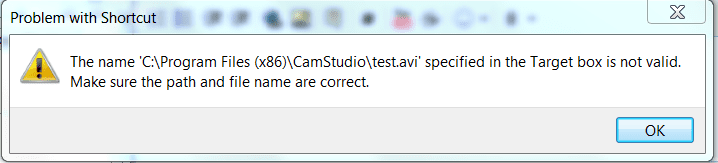
When the files come up in the search if you right click on the file in the list and then click the Security tab you get this Message:
Capture78.PNG

Exactly what this means I don't know but it appears the file is only a "shortcut"
But as I say just save your files to a separate folder and all is well!
 

My Computer

Computer type
PC/Desktop
OS
Microsoft Windows 7 Home Premium 64-bit 7601 Multiprocessor Free Service Pack 1
CPU
Intel(R) Core(TM) i7-3770 CPU @ 3.40GHz
Motherboard
ASUSTeK COMPUTER INC. P8H77-M
Memory
8.00 GB
Graphics Card(s)
Intel(R) HD Graphics 4000
Sound Card
On Board
Monitor(s) Displays
Dell 24"
Screen Resolution
1920 x 1080
Hard Drives
(1) INTEL SSDSC2CT180A3 ATA Device (2) ST500DM002-1BD142 ATA Device (3) WDC WD3200AAKS-75L9A0 ATA Device (4) Generic- Compact Flash USB Device (5) Generic- MS/MS-Pro USB Device (6) Generic- SD/MMC USB Device (7) Generic- SM/xD-Picture USB
PSU
500w Corsair
Case
Cooler Master
Cooling
3 Fans
Keyboard
Logitech MK300
Mouse
Logitech WOM
Internet Speed
75Mb
Antivirus
Norton 360
Browser
Firefox, Opera, IE
What I have no found is that in Windows XP the avi files saved to the C:/Program Files/Camstudio folder can be seen and edited normally. It seems that the problem you are experiencing is peculiar to Windows 7. A compatibility issue perhaps.
Just done another test. Now solved it completely. Uninstall CamStudio and re-install it in Compatability Mode using Windows XP SP2 and it works perfectly.
 

My Computer

Computer type
PC/Desktop
OS
Microsoft Windows 7 Home Premium 64-bit 7601 Multiprocessor Free Service Pack 1
CPU
Intel(R) Core(TM) i7-3770 CPU @ 3.40GHz
Motherboard
ASUSTeK COMPUTER INC. P8H77-M
Memory
8.00 GB
Graphics Card(s)
Intel(R) HD Graphics 4000
Sound Card
On Board
Monitor(s) Displays
Dell 24"
Screen Resolution
1920 x 1080
Hard Drives
(1) INTEL SSDSC2CT180A3 ATA Device (2) ST500DM002-1BD142 ATA Device (3) WDC WD3200AAKS-75L9A0 ATA Device (4) Generic- Compact Flash USB Device (5) Generic- MS/MS-Pro USB Device (6) Generic- SD/MMC USB Device (7) Generic- SM/xD-Picture USB
PSU
500w Corsair
Case
Cooler Master
Cooling
3 Fans
Keyboard
Logitech MK300
Mouse
Logitech WOM
Internet Speed
75Mb
Antivirus
Norton 360
Browser
Firefox, Opera, IE
I will test it when I get back on my machine. Currently I'm also spending some holidays.
 

My Computer

Computer Manufacturer/Model Number
Dell Inspiron 6000
OS
Windows 7 Ultimate x32bit
Memory
1Gb
Hard Drives
60Gb Internal
Mouse
Dell
A little bit of further information:
There is no need to uninstall the program. Navigate to the programs exe file in Program Files (x86) folder and right click on it. In the drop down menu there should be something like "Compatibility issue...." Click that and follow the screen!
 

My Computer

Computer type
PC/Desktop
OS
Microsoft Windows 7 Home Premium 64-bit 7601 Multiprocessor Free Service Pack 1
CPU
Intel(R) Core(TM) i7-3770 CPU @ 3.40GHz
Motherboard
ASUSTeK COMPUTER INC. P8H77-M
Memory
8.00 GB
Graphics Card(s)
Intel(R) HD Graphics 4000
Sound Card
On Board
Monitor(s) Displays
Dell 24"
Screen Resolution
1920 x 1080
Hard Drives
(1) INTEL SSDSC2CT180A3 ATA Device (2) ST500DM002-1BD142 ATA Device (3) WDC WD3200AAKS-75L9A0 ATA Device (4) Generic- Compact Flash USB Device (5) Generic- MS/MS-Pro USB Device (6) Generic- SD/MMC USB Device (7) Generic- SM/xD-Picture USB
PSU
500w Corsair
Case
Cooler Master
Cooling
3 Fans
Keyboard
Logitech MK300
Mouse
Logitech WOM
Internet Speed
75Mb
Antivirus
Norton 360
Browser
Firefox, Opera, IE
I followed your advice, and ran it in XP compatibility mode. Now It is saving files with that lock and they are visible in Windows explorer. Though one problem remains I can't see the files I mentioned in my previous video. I'm currently producing the video to explain this.


Leave everything I found the solution

http://camstudio.org/faq.htm#CantFindVideo

Thanks mitchell65 for you time and efforts. Thanks for helping me out. :) Reputation added.

Visual guide is in production.
 
Last edited:

My Computer

Computer Manufacturer/Model Number
Dell Inspiron 6000
OS
Windows 7 Ultimate x32bit
Memory
1Gb
Hard Drives
60Gb Internal
Mouse
Dell
Hi Yousaf
Thanks for the feedback. So now all your previous files are available? I would still recommend creating a separate folder in say "My Videos" and store all your Camstudio clips there. Then it i much easier to bak them up and reinstate them if you ever need to do a format!
 

My Computer

Computer type
PC/Desktop
OS
Microsoft Windows 7 Home Premium 64-bit 7601 Multiprocessor Free Service Pack 1
CPU
Intel(R) Core(TM) i7-3770 CPU @ 3.40GHz
Motherboard
ASUSTeK COMPUTER INC. P8H77-M
Memory
8.00 GB
Graphics Card(s)
Intel(R) HD Graphics 4000
Sound Card
On Board
Monitor(s) Displays
Dell 24"
Screen Resolution
1920 x 1080
Hard Drives
(1) INTEL SSDSC2CT180A3 ATA Device (2) ST500DM002-1BD142 ATA Device (3) WDC WD3200AAKS-75L9A0 ATA Device (4) Generic- Compact Flash USB Device (5) Generic- MS/MS-Pro USB Device (6) Generic- SD/MMC USB Device (7) Generic- SM/xD-Picture USB
PSU
500w Corsair
Case
Cooler Master
Cooling
3 Fans
Keyboard
Logitech MK300
Mouse
Logitech WOM
Internet Speed
75Mb
Antivirus
Norton 360
Browser
Firefox, Opera, IE
Back
Top