
Screen Pixelated after minutes of usage

jeffagnad01

New member
Local time
10:09 PM
Messages
2
I need help with this problem. It really delays my progress every time the pixelation happens. I'm not sure if this thread goes to the software section or to the graphics section. Does anyone knows how to fix this problem? Thanks.
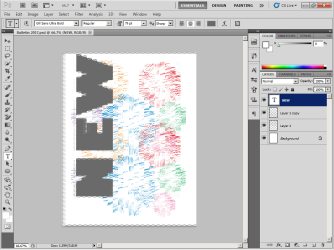
SCREEN.png

SCREEN 2.png
 

My Computer My Computer

At a glance

Microsoft Windows 7 Ultimate 32-bit 7600 Mult...AMD Athlon(tm) 64 Processor 3000+2.00 GBNVIDIA GeForce 6150SE nForce 430
Computer type
PC/Desktop
OS
Microsoft Windows 7 Ultimate 32-bit 7600 Multiprocessor Free
CPU
AMD Athlon(tm) 64 Processor 3000+
Motherboard
ALiveNF6G-VSTA
Memory
2.00 GB
Graphics Card(s)
NVIDIA GeForce 6150SE nForce 430
Sound Card
Realtek High Definition Audio
Screen Resolution
1024 x 768 x 32 bits (4294967296 colors) @ 70 Hz
Hard Drives
ST380215 AS SCSI Disk Device
Hello and welcome:

I'm not sure, but I suspect this is hardware/drivers, rather than "software" per se.

First, obvious thing to check (since I think this is a desktop): the cable connecting the PC tower to the monitor. Is it tightly attached (plugged in) at both ends?

Next, we could better assist you if we knew a bit more about the system. I suggest that you please follow this tutorial to fill in your system specs:

System Info - See Your System Specs

Thanks,
MM
 

My Computer My Computer

At a glance

OEM Windows 7 Ult (x64) SP1Intel Core-i7 3770 @ 3.4 GHz16 GB DDR3 SDRAM @ 1333 MHzNVidia GeForce GT620 1 GB
Computer type
PC/Desktop
Computer Manufacturer/Model Number
Dell Studio XPS 8500
OS
OEM Windows 7 Ult (x64) SP1
CPU
Intel Core-i7 3770 @ 3.4 GHz
Motherboard
"Dell" branded
Memory
16 GB DDR3 SDRAM @ 1333 MHz
Graphics Card(s)
NVidia GeForce GT620 1 GB
Sound Card
THX TruStudio PC
Monitor(s) Displays
Dell U2410 Full HD
Hard Drives
2.0 TB SATA2 @ 7200 RPM
PSU
350W
Keyboard
MS 4000 Ergon - Wired
Mouse
Logitech Anywhere MX
Internet Speed
Cable HSI w/Turbo (router)
Antivirus
KIS-MBAM Premium-MBAE Premium
Browser
Fx (current version); IE
Other Info
And a Win7/64 Pro laptop; And a Win10/64 Pro desktop.
Thanks for the reply and the cable connecting to the PC and the monitor is tightly intact.

I'll be filling up the system specs. By the way this is an old PC. I guess.

Thanks again. :D
 

My Computer My Computer

At a glance

Microsoft Windows 7 Ultimate 32-bit 7600 Mult...AMD Athlon(tm) 64 Processor 3000+2.00 GBNVIDIA GeForce 6150SE nForce 430
Computer type
PC/Desktop
OS
Microsoft Windows 7 Ultimate 32-bit 7600 Multiprocessor Free
CPU
AMD Athlon(tm) 64 Processor 3000+
Motherboard
ALiveNF6G-VSTA
Memory
2.00 GB
Graphics Card(s)
NVIDIA GeForce 6150SE nForce 430
Sound Card
Realtek High Definition Audio
Screen Resolution
1024 x 768 x 32 bits (4294967296 colors) @ 70 Hz
Hard Drives
ST380215 AS SCSI Disk Device
Hi:

Thanks for the info.

Do you have the latest drivers for your GPU?

Other than that, I have no idea. Sorry.
Perhaps one of the smarter folks will have some suggestions.

MM
 

My Computer My Computer

At a glance

OEM Windows 7 Ult (x64) SP1Intel Core-i7 3770 @ 3.4 GHz16 GB DDR3 SDRAM @ 1333 MHzNVidia GeForce GT620 1 GB
Computer type
PC/Desktop
Computer Manufacturer/Model Number
Dell Studio XPS 8500
OS
OEM Windows 7 Ult (x64) SP1
CPU
Intel Core-i7 3770 @ 3.4 GHz
Motherboard
"Dell" branded
Memory
16 GB DDR3 SDRAM @ 1333 MHz
Graphics Card(s)
NVidia GeForce GT620 1 GB
Sound Card
THX TruStudio PC
Monitor(s) Displays
Dell U2410 Full HD
Hard Drives
2.0 TB SATA2 @ 7200 RPM
PSU
350W
Keyboard
MS 4000 Ergon - Wired
Mouse
Logitech Anywhere MX
Internet Speed
Cable HSI w/Turbo (router)
Antivirus
KIS-MBAM Premium-MBAE Premium
Browser
Fx (current version); IE
Other Info
And a Win7/64 Pro laptop; And a Win10/64 Pro desktop.
Have you checked your NVIDIA Control Panel to see if changing the Refresh Rate or the Resolution might help. To open the NVIDIA Control Panel, right click on the Desktop & select NVIDIA Control Panel.

You could also reset NVIDIA to the Default setting, which is up on the top RH edge of the screen.

Before you make any changes just note down the existing ones in case you need those again.
 

My Computer My Computer

At a glance

Windows 7 Home Premium 64 bit sp1Intel i5 3570 3.4Ghz Ivy Bridge SKT 1155 quad...G-Skill Rip Jaws 16Gb (8x2) DDR3 -1600 PC3 12...Gigabyte NVIDIA GT610 1Gb DDR3 810/1200 PCI-E...
Computer type
PC/Desktop
Computer Manufacturer/Model Number
Self built using existing case
OS
Windows 7 Home Premium 64 bit sp1
CPU
Intel i5 3570 3.4Ghz Ivy Bridge SKT 1155 quad core
Motherboard
Gigabyte Z77-HD3 SKT 1155 2xSata 3, 4x USB 3.0
Memory
G-Skill Rip Jaws 16Gb (8x2) DDR3 -1600 PC3 12800 CL 10 red
Graphics Card(s)
Gigabyte NVIDIA GT610 1Gb DDR3 810/1200 PCI-E 2.0 Silent
Sound Card
NVIDIA High Definition & Realtech High Definition Audio
Monitor(s) Displays
2 x Philips 226V4L 16:9 aspect ratio
Screen Resolution
1920 x 1080 HD
Hard Drives
Samsung 840 Pro 256gb SSD, SATA 3.
Hitachi Touro Portable 1tb, USB 3.0 HDD used for image b/ups.
PSU
Corsair VS450
Case
Codeng
Cooling
PSU fan & CPU fan
Keyboard
Logitech
Mouse
Logitech Wireless trackball M570
Internet Speed
Wireless 3G. 3mg down & 550kb up.
Antivirus
Bitdefender Internet Security 2020
Browser
Opera (Current Version) & Firefox
Other Info
MS Office 2013 Pro. Davis weather station software. MGE Nova 600 avr UPS.
Back
Top