
Hi All,
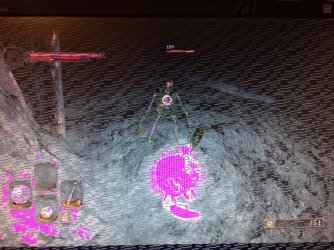
Yesterday, whilst playing Dark Souls 2, my PC froze, and it looked like this.

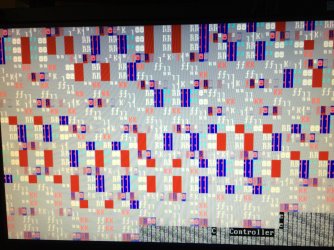
Ctrl-Alt-Delete wouldn't work, so I hit the reset button on my desktop tower. The graphical issue has persisted, and I'm not sure how to fix the issue. I assume it is a hardware problem, as opposed to software, but I am not sure.
I used AVG 2013 to fully scan my PC and it came up clean, no issues.
I used PC TuneUp to identify any other problems.
Firstly, it told me to use the Disk Doctor to scan all my disks; I did, all fine.
It also highlighted that there was 'a problem' with the Graphics Card, and suggested I use Device Manager to update to the latest drivers. I did so, and Device Manager informed me that I was running the latest drivers for my card (Nvidia GeForce 9800 GTX).
This is following uninstalling, and allowing Windows to reinstall the card following advice from a seemingly similar problem my search turned up on this site. Now, having allowed Windows to ensure that I'm running the latest drivers, I still have TuneUp telling me there is 'a device not working properly' pointing to the card.
I'm at a loss now, I'm not hugely knowledgeable with computers and I've done all I know. I'll include some more images, anybody guess the issue? I'll provide any info required.
[Pictures Attached]
Thanks,
Tom.
Yesterday, whilst playing Dark Souls 2, my PC froze, and it looked like this.
Ctrl-Alt-Delete wouldn't work, so I hit the reset button on my desktop tower. The graphical issue has persisted, and I'm not sure how to fix the issue. I assume it is a hardware problem, as opposed to software, but I am not sure.
I used AVG 2013 to fully scan my PC and it came up clean, no issues.
I used PC TuneUp to identify any other problems.
Firstly, it told me to use the Disk Doctor to scan all my disks; I did, all fine.
It also highlighted that there was 'a problem' with the Graphics Card, and suggested I use Device Manager to update to the latest drivers. I did so, and Device Manager informed me that I was running the latest drivers for my card (Nvidia GeForce 9800 GTX).
This is following uninstalling, and allowing Windows to reinstall the card following advice from a seemingly similar problem my search turned up on this site. Now, having allowed Windows to ensure that I'm running the latest drivers, I still have TuneUp telling me there is 'a device not working properly' pointing to the card.
I'm at a loss now, I'm not hugely knowledgeable with computers and I've done all I know. I'll include some more images, anybody guess the issue? I'll provide any info required.
[Pictures Attached]
Thanks,
Tom.
Attachments


My Computer
- Computer type
- PC/Desktop
- Computer Manufacturer/Model Number
- Custom
- OS
- Windows 7 32 Bit
- CPU
- Intel Core 2 Duo CPU E8400 3.0GHz x 2
- Graphics Card(s)
- Nvidia GeForce 9800 GTX/9800GTX+
- Antivirus
- AVG 2013
- Browser
- Chrome

