Screen resolution problem?

cesar3594

New member
Local time
6:53 PM
Messages
36
Okay so i've always ran my pc on 1920x1080 because it's the resolution of my monitor. Today i upgraded my graphic card from (5970 x2 to GTX 780ti), once i turned on my pc and install the latest driver for the gtx 780t it set the resolution to 1920x1080 which is the recommendation setting, only the resolution seem to be to big, like i can't see half of my desktop icon because it's all the way to left side, and i can't see the window start button. nor the application that is running, i have to set the reslution to 1768x992 which is apparently the next level down. I keep getting resolution notices to set my resolution to 1920x1080 when i lower it. I didnt have this problem when i ran my 5970 card, it was set at 1920x1080 and everything was visible on the screen, but now icons are missing and i can't see the window start button. I've tried to take a screen shot of the problem but when i paste it on to paint everything looks normal, i'm confuse, does anyone know what's going on?
 

My Computer

Computer type
PC/Desktop
Computer Manufacturer/Model Number
Dell
OS
Window 7 64bit
CPU
intel i7 920 (2.66ghz)
Memory
Dominator GT 12GB 2133mhz
Graphics Card(s)
Geforce GTX 78ti

My Computer

Computer type
PC/Desktop
Computer Manufacturer/Model Number
Self Built Custom
OS
Windows 7 Ultimate Retail Box (64-bit installed) + Service Pack 1
CPU
AMD FX-8350 CPU v1.15 (or 1.0F) BIOS was required!
Motherboard
MSI 890FXA-GD70
Memory
8G CAS-7 G-Skill DDR3 @1333 (2 fours) [mobo nonOC max rec'd]
Graphics Card(s)
Radeon HD 7950 [3 gigs of GDDR5] MSI Twin Frozr model
Sound Card
Realtek High Definition Audio (onboard mobo, ALC-889 chip)
Monitor(s) Displays
2 WS LED Monitors: One LG One Viewsonic
Screen Resolution
1920 by 1080
Hard Drives
SSD for OS: Samsung 840 Pro
SSD for VM and utilities: Adata SX900
7200 RPM SATA HDs for the rest: Hitachi and Seagate
PSU
Corsair TX850 - 850W max, in service since August 2010.
Case
Thermaltake Armor A90
Cooling
Thermaltake Spin Q CPU Cooler, in service since August 2010
Keyboard
Logitech G11
Mouse
Logitech M310 Wireless
Internet Speed
100 Megabit broadband supposedly upgraded from 50 (Cable)
Antivirus
Bitdefender Internet Security 2014 suite
Browser
Pale Moon 64-bit main, also IceDragon, Opera, and Maxthon.
Other Info
CompTIA A+ certified (220-800 series) in July 2013.
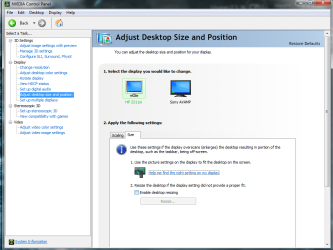
OK i tried using the Nvidia control panel, I went to adjust desktop size and position, went to size, and had to go to resize. I had to re size my screen resolution to 1804x1014, why can't i run it at 1920x1080 if that is that is my monitor resolution?
 

My Computer

Computer type
PC/Desktop
Computer Manufacturer/Model Number
Dell
OS
Window 7 64bit
CPU
intel i7 920 (2.66ghz)
Memory
Dominator GT 12GB 2133mhz
Graphics Card(s)
Geforce GTX 78ti
Does you monitor have an auto size button?

Every now and than my comp doesn't look right and i just hit that button on the monitor.

Depending on your monitor and how new it is and what model it might be in menu or just on the outside next to all the other buttons.
 

My Computer

Computer type
PC/Desktop
Computer Manufacturer/Model Number
self build
OS
7 home premium 64 bit
CPU
AMD Phenom II X6 1055T
Motherboard
Asus M4A785TD-M EVO
Memory
DDR3 1333 6144 MBytes each modual 2048 mb
Graphics Card(s)
Power Color ATI R9 270x bluescreen edition
Sound Card
s/pdif part of my motherboard
Monitor(s) Displays
It is a 42" lcd tv :D
Screen Resolution
1920 X 1080
Hard Drives
Samsung 120gb SSD (EVO 840)
Hitachi 500gb 3gb\s sata hard drive, slow boring but gets the job done
PSU
Orion 585w psu Model# HP585D (updated to EVGA 600W)
Case
A shoebox
Cooling
Box fan....
Keyboard
I telepathically convay what I want said.
Mouse
Cat
Internet Speed
Loading...
Antivirus
A facial mask
Browser
Firefail, Internet Exploder
Other Info
I love my gaming rig, FreeCell and Solitaire never looked so good.
Does you monitor have an auto size button?

Every now and than my comp doesn't look right and i just hit that button on the monitor.

Depending on your monitor and how new it is and what model it might be in menu or just on the outside next to all the other buttons.

No my monitor doesnt have an auto size button
 

My Computer

Computer type
PC/Desktop
Computer Manufacturer/Model Number
Dell
OS
Window 7 64bit
CPU
intel i7 920 (2.66ghz)
Memory
Dominator GT 12GB 2133mhz
Graphics Card(s)
Geforce GTX 78ti
are you using HDMI or DVI-D? and do you have this option? also is your scaling set to aspect ratio?
 

Attachments

  • size.png
    size.png
    131.4 KB · Views: 2

My Computer

Computer type
PC/Desktop
Computer Manufacturer/Model Number
Custom
OS
10 Pro x64
CPU
Ryzen 9 3900X
Motherboard
Asrock x370 Tachi
Memory
64GB(4x16GB) DDR4
Graphics Card(s)
EVGA 1080ti FTW3
Sound Card
ASUS Xonar Essence STX (V4 Bursons), ODAC rev B, NFB-11, O2
Monitor(s) Displays
3xASUS PB278Q/R, Optoma HD142X
Screen Resolution
3x1440p, 1080p
Hard Drives
512GB 850 EVO(OS, Programs)
4TB (Movies)
3TB (Downloads)
3TB (Programs)
1TB HDD (Games)
2x6TB R1 (videos)
PSU
AX760
Case
Fractal Define R5
Cooling
NH-D15S
Keyboard
Massdrop Ctrl with Box Navy's
Mouse
G903, Alioth XXL Mat
Internet Speed
280/40
Antivirus
MBAM, ESET
Browser
Canary 64 Bit
Other Info
I also own a Thinkpad P50 Xeon 4K, X220T, X1C5
are you using HDMI or DVI-D? and do you have this option? also is your scaling set to aspect ratio?

Sorry for late reply, but yes i'm using an HDMI, yeah i do have the option, that is what i used, i had to set the resolution to like 1804x1014 to make everything fit on the resize option.
 

My Computer

Computer type
PC/Desktop
Computer Manufacturer/Model Number
Dell
OS
Window 7 64bit
CPU
intel i7 920 (2.66ghz)
Memory
Dominator GT 12GB 2133mhz
Graphics Card(s)
Geforce GTX 78ti
Back
Top