Screen Resolution W7 64-bit vs Virtual XP

PhillyAcct

New member
Local time
3:53 PM
Messages
2
32-bit programs installed and launched in Windows 7 64-bit have LOWER
resolution than the same program installed and launched in Virtual XP Mode.

In the attached example, The left Chrome was opened in 64-bit, the right
in XP Mode. The resolution on the right is visibly greater.

?????
Thanks
 

Attachments

  • Left 64 bit Right Virtual XP.PNG
    Left 64 bit Right Virtual XP.PNG
    237.6 KB · Views: 195

My Computer

Computer Manufacturer/Model Number
HP Elite 7000 mt
OS
Windows 7 64-bit
CPU
i-5
Memory
3gb ddr3
Graphics Card(s)
ATI Radeon 4550
Monitor(s) Displays
HP L2445w
Uhhhh well hello, you have the DPI settings way hella up. And as it is Google Chrome is a DPI failed application. (Meaning it does not understand DPI.)
 

My Computer

Computer type
PC/Desktop
Computer Manufacturer/Model Number
Alienware Aurora ALX R4
OS
Windows 10 Pro (x64)
CPU
Intel Core i7-3930K (3.2GHz - 4.5GHz)
Motherboard
Alienware Aurora-R4 x79
Memory
4x Samsung 4GB PC3-12800 DDR3 (16GB 1600MHz)
Graphics Card(s)
Nvidia Geforce GTX 690
Sound Card
SteelSeries Siberia Elite
Monitor(s) Displays
Dell UltraSharp U3011
Screen Resolution
2560x1600
Hard Drives
Samsung 850 Pro 256 GB, Seagate 1TB Desktop Hybrid HDD, 2x Western Digital 4TB Green HDD
PSU
875W Some Dell PSU <.<
Case
Alienware Aurora ALX
Cooling
Custom Liquid Cooling (EK CPU & GPU blocks) dual EK 480RAD
Keyboard
Logitech G710+ Mechanical
Mouse
Logitech G700s
Internet Speed
Verizon Fios (50 mbps average)
Other Info
Server: Intel NUC D54250WYK: i5-4250U, 16GB, 256 GB mSATA, Windows Server 2012 R2
How do I Fix it?

My DPI (1920 x 1200) works for:
a) All 64-bit programs (IE8 for example)
b) All 32-bit programs installed in Virtual XP Mode (Chrome for example)

My DPI (1920 x 1200) Does not work for:
32-bit programs installed directly in 64-bit mode (This may not be
(the correct technical usage) (Chrome for example)
[That was the point of the attachment]

I understand your link to mean that I need to change something(?)
in the registry to make 32-bit/64bit programs "point" to the correct
DPI.

But I'm confused as to what I should change. (Plus, I may have completely
misunderstood your reply.)

Thanks,
John
 

My Computer

Computer Manufacturer/Model Number
HP Elite 7000 mt
OS
Windows 7 64-bit
CPU
i-5
Memory
3gb ddr3
Graphics Card(s)
ATI Radeon 4550
Monitor(s) Displays
HP L2445w
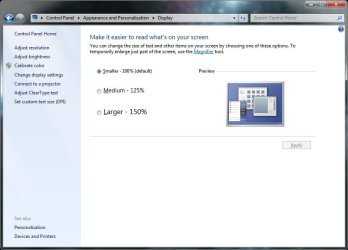
I'm talking about this DPI:
 

Attachments

  • Untitled.jpg
    Untitled.jpg
    44.1 KB · Views: 136

My Computer

Computer type
PC/Desktop
Computer Manufacturer/Model Number
Alienware Aurora ALX R4
OS
Windows 10 Pro (x64)
CPU
Intel Core i7-3930K (3.2GHz - 4.5GHz)
Motherboard
Alienware Aurora-R4 x79
Memory
4x Samsung 4GB PC3-12800 DDR3 (16GB 1600MHz)
Graphics Card(s)
Nvidia Geforce GTX 690
Sound Card
SteelSeries Siberia Elite
Monitor(s) Displays
Dell UltraSharp U3011
Screen Resolution
2560x1600
Hard Drives
Samsung 850 Pro 256 GB, Seagate 1TB Desktop Hybrid HDD, 2x Western Digital 4TB Green HDD
PSU
875W Some Dell PSU <.<
Case
Alienware Aurora ALX
Cooling
Custom Liquid Cooling (EK CPU & GPU blocks) dual EK 480RAD
Keyboard
Logitech G710+ Mechanical
Mouse
Logitech G700s
Internet Speed
Verizon Fios (50 mbps average)
Other Info
Server: Intel NUC D54250WYK: i5-4250U, 16GB, 256 GB mSATA, Windows Server 2012 R2
Back
Top