
How to Specify a Default Screen Saver for All Users in Windows 7
Information
This will show you how to set or change a specific screen saver of your choice to be used as the default screen saver for all users on the computer with the users also prevented from being able to change the screen saver.
You will have to be logged in as an administrator to be able to do this tutorial.
You will have to be logged in as an administrator to be able to do this tutorial.
Note
Screen Savers that come with Windows 7
Screen Saver
|
Location (full path)
Bubbles.scr
| C:\Windows\System32\Bubbles.scr
Mystify.scr | C:\Windows\System32\Mystify.scr
PhotoScreensaver.scr (Photos) | C:\Windows\System32\PhotoScreensaver.scr
Ribbons.scr | C:\Windows\System32\Ribbons.scr
scrnsave.scr (Blank) | C:\Windows\System32\scrnsave.scr
ssText3d.scr (3D Text) | C:\Windows\System32\ssText3d.scr
Mystify.scr | C:\Windows\System32\Mystify.scr
PhotoScreensaver.scr (Photos) | C:\Windows\System32\PhotoScreensaver.scr
Ribbons.scr | C:\Windows\System32\Ribbons.scr
scrnsave.scr (Blank) | C:\Windows\System32\scrnsave.scr
ssText3d.scr (3D Text) | C:\Windows\System32\ssText3d.scr
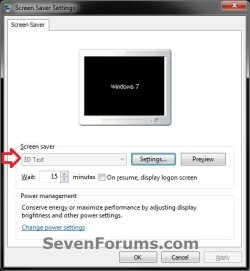
EXAMPLE: Screen Saver Settings
NOTE: The Screen Saver selectionis grayed out if you specified a default screen saver for all users.
OPTION ONE
Through the Local Group Policy Editor
2. In the left pane, click on to expand User Configuration, Administrative Templates, Control Panel, and Personalization. (see screenshot below)
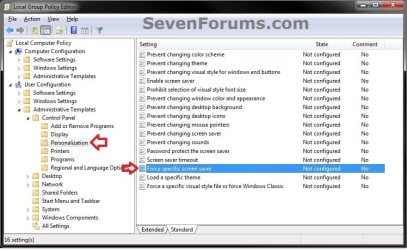
3. In the right pane, double click on Force a specific screen saver to edit it. (see screenshot above)
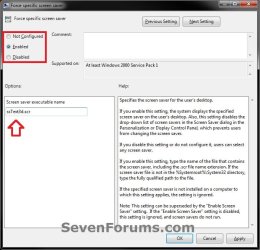
4. To Allow Users to Select their own Screen Saver A) Dot Disabled or Not Configured, and go to step 6 below. (see screenshot below step 6)
NOTE: Not Configured is the default setting.
5. To Set a Default Screen Saver for All Users A) Select (dot) Enabled, and go to step 6 below. (see screenshot below step 6)
B) Under Options, type in the full path of the .scr screen saver file.
NOTE: If the .scr screen saver file is located in the C:\Windows\System32 folder, then you will only need to type in the .scr screen saver file with it's extension included (ex: ssText3d.scr).
6. Click on OK. (see screenshot below)
7. Close the Local Group Policy Editor window.
OPTION TWO
Manually in Registry Editor
2. If prompted by UAC, then click on Yes.
3. To Set a Default Screen Saver for All Users A) In regedit, navigate to the location below. (see screenshot below) HKEY_CURRENT_USER\Software\Policies\Microsoft\Windows

B) In the left pane right click on Windows, and click on New and Key. (see screenshot above)
NOTE: If you already have the Control Panel key (step 3C), then skip this step and go to step 3D.
C) Type in Control Panel, and press Enter. (see screenshot below)
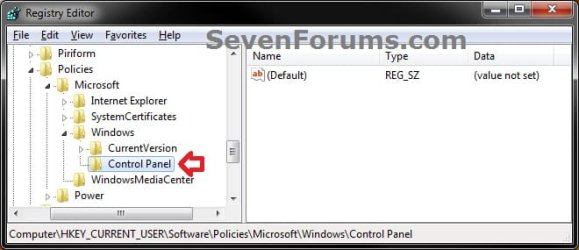
D) Right click on Control Panel, and click on New and Key. (see screenshot above)
NOTE: If you already have the Desktop key (step 3E), then skip this step and go to step 3F.
E) Type in Desktop, and press Enter. (see screenshot below)
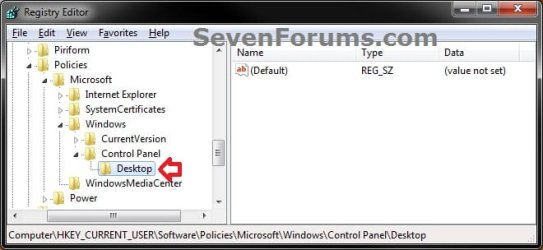
F) In the right pane of Desktop, right click on an empty space, and click on New and String Value. (see screenshot above)
NOTE: If you already have the SCRNSAVE.EXE string value (step 3G), then skip this step and go to step 3H.
G) Type in SCRNSAVE.EXE, and press Enter. (see screenshot below)
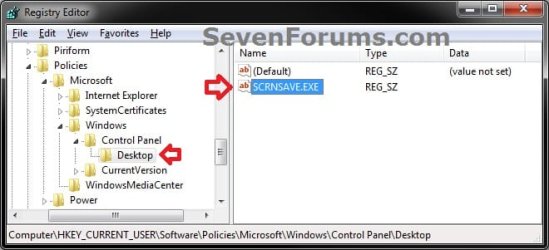
H) In the right pane of Desktop, right click on SCRNSAVE.EXE, and click on Modify. (see screenshot above)
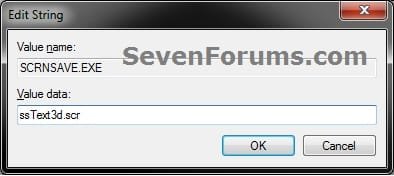
I) Type in the full path of the .scr screen saver file, then click on OK. (see screenshot below)
NOTE: If the .scr screen saver file is located in the C:\Windows\System32 folder, then you will only need to type in the .scr screen saver file with it's extension included (ex: ssText3d.scr).
J) Go to step 5.
4. To Allow Users to Select their own Screen Saver A) In regedit, navigate to the location below. (see screenshot below)
Code:
HKEY_CURRENT_USER\Software\Policies\Microsoft\Windows\Control Panel\Desktop
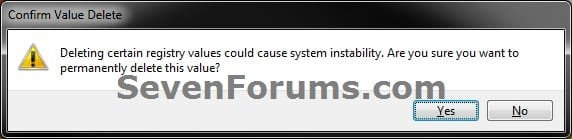
C) Click on Yes to approve deletion. (see screenshot below)
D) In regedit, navigate to the location below, and repeat steps 4B and 4C if there is a SCRNSAVE.EXE entry here as well.
Code:
HKEY_LOCAL_MACHINE\SOFTWARE\Policies\Microsoft\Windows\Control Panel\DesktopThat's it,
Shawn
Related Tutorials
- How to Turn Screen Saver On or Off in Windows 7
- How to Change the Screen Saver in Windows 7
- How to Add and Restore the Windows Energy Screen Saver Back in Windows 7
- How to Add and Restore the Aurora Screen Saver Back in Windows 7
- How to Enable or Disable the Windows 7 Log On Screen Saver
- How to Create a Screen Saver Settings Shortcut in Windows
- How to Enable or Disable Windows 7 Screen Saver Password Protection
- How to Allow or Prevent Changing Screen Saver in Windows 7
- How to Set or Change the Screen Saver Timeout Period in Windows 7
- How to Enable or Disable Screen Savers in Windows 7 and Vista
Last edited:


