
salvinorum
New member
- Local time
- 1:49 PM
- Messages
- 52
Is there a way to start a screen saver with a hot-key or a mouse gesture (or perhaps by putting the mouse into a certain corner for a certain amount of seconds)?
I would like the ability to start the screen saver on command without going to the display option and clicking the preview button. For example, when surfing the web or watching a video, I would like to push alt-s or something similar, or perhaps move the mouse to a corner, and the screen saver starts automatically, right away, then acts normally as if it started by itself (meaning, it is "on" until I move the mouse or push a key).
Any way to do this?
Win7U64
I would like the ability to start the screen saver on command without going to the display option and clicking the preview button. For example, when surfing the web or watching a video, I would like to push alt-s or something similar, or perhaps move the mouse to a corner, and the screen saver starts automatically, right away, then acts normally as if it started by itself (meaning, it is "on" until I move the mouse or push a key).
Any way to do this?
Win7U64
My Computer
- OS
- Windows 7 Ultimate 64bit
- CPU
- AMD Opteron 165
- Motherboard
- DFI Ultra-D
- Memory
- OCZ 3GB
- Graphics Card(s)
- ATI Radeon HD3870
- Sound Card
- Onboard
- Monitor(s) Displays
- 2 x Dell 2405fpw
- Hard Drives
- WD Raptor 150GB OS Drive *
WD 1TB Storage Drive *
Seagate 640GB Backup Drive
- PSU
- OCZ Powerstream 520
- Case
- Antec P180
- Cooling
- 2 x 120mm intake, 2 x 120mm exhaust
- Keyboard
- Logitech Navigator & Gyration Ultra
- Mouse
- MX1000 & Gyration Ultra
- Internet Speed
- 8Mbit down / 1Mbit up


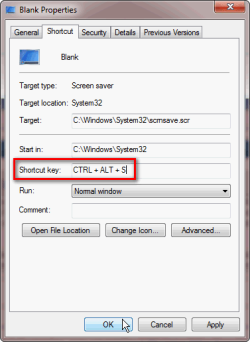

 Works great! thank you....

