
Screen Saver - Turn On or Off

How to Turn Screen Saver On or Off in Windows 7

   Information
A screen Saver is a moving picture or pattern that appears on a computer screen when the mouse or keyboard has not been used for a specified period of time. This will show you how to turn screen saver on or off in Windows 7.

   Note
If you checked the on resume, display logon screen box, it will still resume to the logon screen even if you have selected (None) for your screen saver.


OPTION ONE

To Turn the Screen Saver On or Off in Windows 7 Starter and Home Basic


1. Open the Control Panel (icons view), and click on the Display icon.

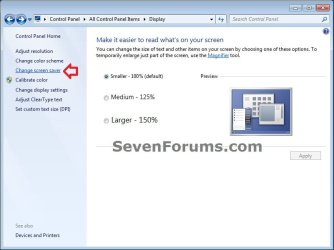
2. In the left blue pane, click on the Change screen saver link. (see screenshot below)
Starter_Basic-1.jpg
3. Close the Display window. (see screenshot above)

4. Go to step 3 in OPTION TWO below.


OPTION TWO

To Turn the Screen Saver On or Off in Windows 7 Home Premium, Professional, Ultimate, and Enterprise


1. Right click on a empty space on the desktop and click on Personalize.

2. Click on the Screen Saver link at the bottom of the window. (see screenshots below)
NOTE: Under Screen Saver is the name of the screen saver in gray used in your current theme. If the screen saver name is None, then it is turned off.
Personalization.jpg

Personalization_off.jpg
3. Do either step 4 or 5 below for what you would like to do.

4. To Turn Off All Screen Savers
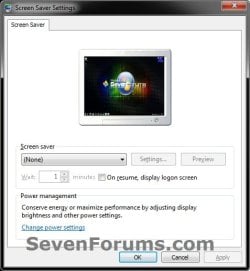
A) Under Screen saver, click on the drop down menu and select (None). (see screenshot below)
Off.jpg
B) Decide if you wanted to turn the screen saver password protection on or off (option one at link).

C) Go to step 6.
5. To Turn On a Selected Screen Saver
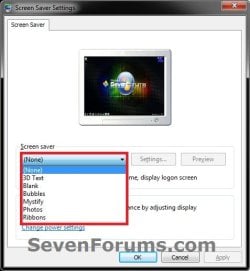
A) Under Screen saver, click on the drop down menu and change the screen saver to a listed screen saver other than (None). (see screenshot below)
On.jpg
B) Select how many idle minutes to Wait before the selected screen saver displays.

C) Decide if you wanted to turn the screen saver password protection on or off (option one at link).
6. Click on OK. (see screenshot below step 4A or 5A)
That's it,
Shawn


Last edited:
when i right click on my desktop the last entry is "gadgets" there is no "personalize" button. how do i turn screensaver on or off?
 

My Computer

OS
Windows 7 home basic

My Computer

Computer type
PC/Desktop
Computer Manufacturer/Model Number
Self built custom
OS
64-bit Windows 11 Pro for Workstations
CPU
Intel i7-8700K OC'd to 5 GHz
Motherboard
ASUS ROG Maximus XI Formula Z390
Memory
64 GB (4x16GB) G.SKILL TridentZ RGB DDR4 3600 MHz
Graphics Card(s)
ASUS ROG-STRIX-GTX1080TI-O11G-GAMING
Sound Card
Integrated
Monitor(s) Displays
2 x Samsung Odyssey G7 27"
Screen Resolution
2560x1440
Hard Drives
1TB Samsung 990 PRO M.2,
4TB Samsung 990 PRO PRO M.2,
TerraMaster F8 SSD Plus NAS
PSU
Seasonic Prime Titanium 850W
Case
Thermaltake Core P3
Cooling
Corsair Hydro H115i
Keyboard
Logitech wireless K800
Mouse
Logitech MX Master 4
Internet Speed
2 Gb/s Download and 100 Mb/s Upload
Antivirus
Malwarebyte Anti-Malware Premium
Browser
Google Chrome
Other Info
Logitech Z625 speaker system,
Logitech BRIO 4K Pro webcam,
HP Color LaserJet Pro MFP M477fdn,
APC SMART-UPS RT 1000 XL - SURT1000XLI,
Galaxy S23 Plus phone
Turning screen saver on or off

Hi Brink!

Thanx for the reply. I checked, I have Windows 7 Home Basic, which seems also not to have the Personalize feature.

I managed though = by going to Control Panel > Appearance > Display > Screen Resolution and doing a search in that screen for "Screen Saver" got me there. :)

There seems to be no other way to get there in the version of Windows 7 I am using. Why MicroSoft changed a simple operation (which required one right click on the desktop before) to something so complicated defies logic.

Happy New Year!
 

My Computer

OS
Windows 7 home basic

My Computer

Computer type
PC/Desktop
Computer Manufacturer/Model Number
Self built custom
OS
64-bit Windows 11 Pro for Workstations
CPU
Intel i7-8700K OC'd to 5 GHz
Motherboard
ASUS ROG Maximus XI Formula Z390
Memory
64 GB (4x16GB) G.SKILL TridentZ RGB DDR4 3600 MHz
Graphics Card(s)
ASUS ROG-STRIX-GTX1080TI-O11G-GAMING
Sound Card
Integrated
Monitor(s) Displays
2 x Samsung Odyssey G7 27"
Screen Resolution
2560x1440
Hard Drives
1TB Samsung 990 PRO M.2,
4TB Samsung 990 PRO PRO M.2,
TerraMaster F8 SSD Plus NAS
PSU
Seasonic Prime Titanium 850W
Case
Thermaltake Core P3
Cooling
Corsair Hydro H115i
Keyboard
Logitech wireless K800
Mouse
Logitech MX Master 4
Internet Speed
2 Gb/s Download and 100 Mb/s Upload
Antivirus
Malwarebyte Anti-Malware Premium
Browser
Google Chrome
Other Info
Logitech Z625 speaker system,
Logitech BRIO 4K Pro webcam,
HP Color LaserJet Pro MFP M477fdn,
APC SMART-UPS RT 1000 XL - SURT1000XLI,
Galaxy S23 Plus phone
Hi again Brink!
Thank you once again for your help.
Sadly, I have had a burglary at my house and my new laptop with Windows7 OS was stolen. The police came and took fingerprints and made all the right noises, but the chances are slim of recovering my loss.
Once my insurers have replaced the laptop, I will be sure to be in touch again.
With warm regards.
 

My Computer

OS
Windows 7 home basic
I'm sorry to hear that Guru. I hope that they at least catch the crook, and hopefully recover the laptop as well. :(
 

My Computer

Computer type
PC/Desktop
Computer Manufacturer/Model Number
Self built custom
OS
64-bit Windows 11 Pro for Workstations
CPU
Intel i7-8700K OC'd to 5 GHz
Motherboard
ASUS ROG Maximus XI Formula Z390
Memory
64 GB (4x16GB) G.SKILL TridentZ RGB DDR4 3600 MHz
Graphics Card(s)
ASUS ROG-STRIX-GTX1080TI-O11G-GAMING
Sound Card
Integrated
Monitor(s) Displays
2 x Samsung Odyssey G7 27"
Screen Resolution
2560x1440
Hard Drives
1TB Samsung 990 PRO M.2,
4TB Samsung 990 PRO PRO M.2,
TerraMaster F8 SSD Plus NAS
PSU
Seasonic Prime Titanium 850W
Case
Thermaltake Core P3
Cooling
Corsair Hydro H115i
Keyboard
Logitech wireless K800
Mouse
Logitech MX Master 4
Internet Speed
2 Gb/s Download and 100 Mb/s Upload
Antivirus
Malwarebyte Anti-Malware Premium
Browser
Google Chrome
Other Info
Logitech Z625 speaker system,
Logitech BRIO 4K Pro webcam,
HP Color LaserJet Pro MFP M477fdn,
APC SMART-UPS RT 1000 XL - SURT1000XLI,
Galaxy S23 Plus phone
Hotkey to start screen Saver immediately

I am using my computer but need to step away, is there a way to start the screen saver immediately instead of waiting for the time to elapse before it starts?
 

My Computer

OS
Windows 7
Hello Wino, and welcome to Seven Forums.

Yes. You can create a shortcut from the screen saver .SCR file itself, then just click on the shortcut to start the screen saver at will. The blue NOTE box at the top of the tutorial below will show you the default screen savers .SCR file locations to be able to create a shortcut from.

http://www.sevenforums.com/tutorials/2109-screen-saver-change.html

Hope this helps,
Shawn
 

My Computer

Computer type
PC/Desktop
Computer Manufacturer/Model Number
Self built custom
OS
64-bit Windows 11 Pro for Workstations
CPU
Intel i7-8700K OC'd to 5 GHz
Motherboard
ASUS ROG Maximus XI Formula Z390
Memory
64 GB (4x16GB) G.SKILL TridentZ RGB DDR4 3600 MHz
Graphics Card(s)
ASUS ROG-STRIX-GTX1080TI-O11G-GAMING
Sound Card
Integrated
Monitor(s) Displays
2 x Samsung Odyssey G7 27"
Screen Resolution
2560x1440
Hard Drives
1TB Samsung 990 PRO M.2,
4TB Samsung 990 PRO PRO M.2,
TerraMaster F8 SSD Plus NAS
PSU
Seasonic Prime Titanium 850W
Case
Thermaltake Core P3
Cooling
Corsair Hydro H115i
Keyboard
Logitech wireless K800
Mouse
Logitech MX Master 4
Internet Speed
2 Gb/s Download and 100 Mb/s Upload
Antivirus
Malwarebyte Anti-Malware Premium
Browser
Google Chrome
Other Info
Logitech Z625 speaker system,
Logitech BRIO 4K Pro webcam,
HP Color LaserJet Pro MFP M477fdn,
APC SMART-UPS RT 1000 XL - SURT1000XLI,
Galaxy S23 Plus phone
Thank you, but...

That does work but it does not prompt me for a password. You used to be able to move the cursor to a corner of the screen specified and that would start the screensave. This may have been a third party thing. What is needed is for you to be able to provide a "Hotkey" and that would start the screensaver.
 

My Computer

OS
Windows 7
I'm not sure if you can do this on demand with a screen saver, but you could use a Lock computer shortcut or Windows Key + L to instantly lock the computer to the log on screen.
 

My Computer

Computer type
PC/Desktop
Computer Manufacturer/Model Number
Self built custom
OS
64-bit Windows 11 Pro for Workstations
CPU
Intel i7-8700K OC'd to 5 GHz
Motherboard
ASUS ROG Maximus XI Formula Z390
Memory
64 GB (4x16GB) G.SKILL TridentZ RGB DDR4 3600 MHz
Graphics Card(s)
ASUS ROG-STRIX-GTX1080TI-O11G-GAMING
Sound Card
Integrated
Monitor(s) Displays
2 x Samsung Odyssey G7 27"
Screen Resolution
2560x1440
Hard Drives
1TB Samsung 990 PRO M.2,
4TB Samsung 990 PRO PRO M.2,
TerraMaster F8 SSD Plus NAS
PSU
Seasonic Prime Titanium 850W
Case
Thermaltake Core P3
Cooling
Corsair Hydro H115i
Keyboard
Logitech wireless K800
Mouse
Logitech MX Master 4
Internet Speed
2 Gb/s Download and 100 Mb/s Upload
Antivirus
Malwarebyte Anti-Malware Premium
Browser
Google Chrome
Other Info
Logitech Z625 speaker system,
Logitech BRIO 4K Pro webcam,
HP Color LaserJet Pro MFP M477fdn,
APC SMART-UPS RT 1000 XL - SURT1000XLI,
Galaxy S23 Plus phone
Why does my screen saver keep reverting to OFF On it's own. Really starting to bug me now.
 

My Computer

OS
Win 7 Ultimate x64
CPU
Intel i7 950 OC'd @ 4.0Ghz (SpeedStep ON)
Motherboard
ASUS P6X58D-E BIOS 0303
Memory
3x2GB Patriot Extreme Viper II Sector 7 DDR3 @ 1600mhz
Graphics Card(s)
ATI MSI 5870 900mhz/1300mhz
Sound Card
Onboard Realtek ALC889
Monitor(s) Displays
2 X 24" BenQ G2412HD
Screen Resolution
1920x1080p
Hard Drives
Intel X25-M 80 GB (SSD)
W.D. Caviar Black 1TB (SATA)
Seagate Barricuda 1TB (SATA)
Seagate Barricuda 80GB (SATA)
PSU
Corsair AX850
Case
Antec 1200
Cooling
Lots and Lots of Air!
Keyboard
Razer Lycosa
Mouse
Microsoft Sidewinder
Internet Speed
25Mbps/1Mbps

My Computer

Computer type
PC/Desktop
Computer Manufacturer/Model Number
Self built custom
OS
64-bit Windows 11 Pro for Workstations
CPU
Intel i7-8700K OC'd to 5 GHz
Motherboard
ASUS ROG Maximus XI Formula Z390
Memory
64 GB (4x16GB) G.SKILL TridentZ RGB DDR4 3600 MHz
Graphics Card(s)
ASUS ROG-STRIX-GTX1080TI-O11G-GAMING
Sound Card
Integrated
Monitor(s) Displays
2 x Samsung Odyssey G7 27"
Screen Resolution
2560x1440
Hard Drives
1TB Samsung 990 PRO M.2,
4TB Samsung 990 PRO PRO M.2,
TerraMaster F8 SSD Plus NAS
PSU
Seasonic Prime Titanium 850W
Case
Thermaltake Core P3
Cooling
Corsair Hydro H115i
Keyboard
Logitech wireless K800
Mouse
Logitech MX Master 4
Internet Speed
2 Gb/s Download and 100 Mb/s Upload
Antivirus
Malwarebyte Anti-Malware Premium
Browser
Google Chrome
Other Info
Logitech Z625 speaker system,
Logitech BRIO 4K Pro webcam,
HP Color LaserJet Pro MFP M477fdn,
APC SMART-UPS RT 1000 XL - SURT1000XLI,
Galaxy S23 Plus phone
My theme is already saved
 

My Computer

OS
Win 7 Ultimate x64
CPU
Intel i7 950 OC'd @ 4.0Ghz (SpeedStep ON)
Motherboard
ASUS P6X58D-E BIOS 0303
Memory
3x2GB Patriot Extreme Viper II Sector 7 DDR3 @ 1600mhz
Graphics Card(s)
ATI MSI 5870 900mhz/1300mhz
Sound Card
Onboard Realtek ALC889
Monitor(s) Displays
2 X 24" BenQ G2412HD
Screen Resolution
1920x1080p
Hard Drives
Intel X25-M 80 GB (SSD)
W.D. Caviar Black 1TB (SATA)
Seagate Barricuda 1TB (SATA)
Seagate Barricuda 80GB (SATA)
PSU
Corsair AX850
Case
Antec 1200
Cooling
Lots and Lots of Air!
Keyboard
Razer Lycosa
Mouse
Microsoft Sidewinder
Internet Speed
25Mbps/1Mbps
Chris,

Is it a 3rd party screen saver that you are using?

If not, then you might see if doing a sfc /scannow may help, and if not, then a repair install.
 

My Computer

Computer type
PC/Desktop
Computer Manufacturer/Model Number
Self built custom
OS
64-bit Windows 11 Pro for Workstations
CPU
Intel i7-8700K OC'd to 5 GHz
Motherboard
ASUS ROG Maximus XI Formula Z390
Memory
64 GB (4x16GB) G.SKILL TridentZ RGB DDR4 3600 MHz
Graphics Card(s)
ASUS ROG-STRIX-GTX1080TI-O11G-GAMING
Sound Card
Integrated
Monitor(s) Displays
2 x Samsung Odyssey G7 27"
Screen Resolution
2560x1440
Hard Drives
1TB Samsung 990 PRO M.2,
4TB Samsung 990 PRO PRO M.2,
TerraMaster F8 SSD Plus NAS
PSU
Seasonic Prime Titanium 850W
Case
Thermaltake Core P3
Cooling
Corsair Hydro H115i
Keyboard
Logitech wireless K800
Mouse
Logitech MX Master 4
Internet Speed
2 Gb/s Download and 100 Mb/s Upload
Antivirus
Malwarebyte Anti-Malware Premium
Browser
Google Chrome
Other Info
Logitech Z625 speaker system,
Logitech BRIO 4K Pro webcam,
HP Color LaserJet Pro MFP M477fdn,
APC SMART-UPS RT 1000 XL - SURT1000XLI,
Galaxy S23 Plus phone

My Computer

OS
Win 7 Ultimate x64
CPU
Intel i7 950 OC'd @ 4.0Ghz (SpeedStep ON)
Motherboard
ASUS P6X58D-E BIOS 0303
Memory
3x2GB Patriot Extreme Viper II Sector 7 DDR3 @ 1600mhz
Graphics Card(s)
ATI MSI 5870 900mhz/1300mhz
Sound Card
Onboard Realtek ALC889
Monitor(s) Displays
2 X 24" BenQ G2412HD
Screen Resolution
1920x1080p
Hard Drives
Intel X25-M 80 GB (SSD)
W.D. Caviar Black 1TB (SATA)
Seagate Barricuda 1TB (SATA)
Seagate Barricuda 80GB (SATA)
PSU
Corsair AX850
Case
Antec 1200
Cooling
Lots and Lots of Air!
Keyboard
Razer Lycosa
Mouse
Microsoft Sidewinder
Internet Speed
25Mbps/1Mbps
scan complete, I got some message about a repair needing a reboot, just curious though, on a side note, is it possible that "sfc /scannow" could've reverted my custom icon set (MrGrim's) I had installed? It would appear now that any new folder's I create are the original Win7 icons now.
 

My Computer

OS
Win 7 Ultimate x64
CPU
Intel i7 950 OC'd @ 4.0Ghz (SpeedStep ON)
Motherboard
ASUS P6X58D-E BIOS 0303
Memory
3x2GB Patriot Extreme Viper II Sector 7 DDR3 @ 1600mhz
Graphics Card(s)
ATI MSI 5870 900mhz/1300mhz
Sound Card
Onboard Realtek ALC889
Monitor(s) Displays
2 X 24" BenQ G2412HD
Screen Resolution
1920x1080p
Hard Drives
Intel X25-M 80 GB (SSD)
W.D. Caviar Black 1TB (SATA)
Seagate Barricuda 1TB (SATA)
Seagate Barricuda 80GB (SATA)
PSU
Corsair AX850
Case
Antec 1200
Cooling
Lots and Lots of Air!
Keyboard
Razer Lycosa
Mouse
Microsoft Sidewinder
Internet Speed
25Mbps/1Mbps
Yes, a sfc /scannow command will restore the system files back to their original unmodified state, and replace any corrupted ones if able. Sometimes a restart is needed afterwards to finish fixing corrupted or modified system files that are in use. That's all.
 

My Computer

Computer type
PC/Desktop
Computer Manufacturer/Model Number
Self built custom
OS
64-bit Windows 11 Pro for Workstations
CPU
Intel i7-8700K OC'd to 5 GHz
Motherboard
ASUS ROG Maximus XI Formula Z390
Memory
64 GB (4x16GB) G.SKILL TridentZ RGB DDR4 3600 MHz
Graphics Card(s)
ASUS ROG-STRIX-GTX1080TI-O11G-GAMING
Sound Card
Integrated
Monitor(s) Displays
2 x Samsung Odyssey G7 27"
Screen Resolution
2560x1440
Hard Drives
1TB Samsung 990 PRO M.2,
4TB Samsung 990 PRO PRO M.2,
TerraMaster F8 SSD Plus NAS
PSU
Seasonic Prime Titanium 850W
Case
Thermaltake Core P3
Cooling
Corsair Hydro H115i
Keyboard
Logitech wireless K800
Mouse
Logitech MX Master 4
Internet Speed
2 Gb/s Download and 100 Mb/s Upload
Antivirus
Malwarebyte Anti-Malware Premium
Browser
Google Chrome
Other Info
Logitech Z625 speaker system,
Logitech BRIO 4K Pro webcam,
HP Color LaserJet Pro MFP M477fdn,
APC SMART-UPS RT 1000 XL - SURT1000XLI,
Galaxy S23 Plus phone
Ok now what, I've reinstalled the icon set by Mr. GriM, reboot, and nothing, icons are still messed up.
 

My Computer

OS
Win 7 Ultimate x64
CPU
Intel i7 950 OC'd @ 4.0Ghz (SpeedStep ON)
Motherboard
ASUS P6X58D-E BIOS 0303
Memory
3x2GB Patriot Extreme Viper II Sector 7 DDR3 @ 1600mhz
Graphics Card(s)
ATI MSI 5870 900mhz/1300mhz
Sound Card
Onboard Realtek ALC889
Monitor(s) Displays
2 X 24" BenQ G2412HD
Screen Resolution
1920x1080p
Hard Drives
Intel X25-M 80 GB (SSD)
W.D. Caviar Black 1TB (SATA)
Seagate Barricuda 1TB (SATA)
Seagate Barricuda 80GB (SATA)
PSU
Corsair AX850
Case
Antec 1200
Cooling
Lots and Lots of Air!
Keyboard
Razer Lycosa
Mouse
Microsoft Sidewinder
Internet Speed
25Mbps/1Mbps

My Computer

Computer type
PC/Desktop
Computer Manufacturer/Model Number
Self built custom
OS
64-bit Windows 11 Pro for Workstations
CPU
Intel i7-8700K OC'd to 5 GHz
Motherboard
ASUS ROG Maximus XI Formula Z390
Memory
64 GB (4x16GB) G.SKILL TridentZ RGB DDR4 3600 MHz
Graphics Card(s)
ASUS ROG-STRIX-GTX1080TI-O11G-GAMING
Sound Card
Integrated
Monitor(s) Displays
2 x Samsung Odyssey G7 27"
Screen Resolution
2560x1440
Hard Drives
1TB Samsung 990 PRO M.2,
4TB Samsung 990 PRO PRO M.2,
TerraMaster F8 SSD Plus NAS
PSU
Seasonic Prime Titanium 850W
Case
Thermaltake Core P3
Cooling
Corsair Hydro H115i
Keyboard
Logitech wireless K800
Mouse
Logitech MX Master 4
Internet Speed
2 Gb/s Download and 100 Mb/s Upload
Antivirus
Malwarebyte Anti-Malware Premium
Browser
Google Chrome
Other Info
Logitech Z625 speaker system,
Logitech BRIO 4K Pro webcam,
HP Color LaserJet Pro MFP M477fdn,
APC SMART-UPS RT 1000 XL - SURT1000XLI,
Galaxy S23 Plus phone
Back
Top