
Screen Saver - Turn On or Off

How to Turn Screen Saver On or Off in Windows 7

   Information
A screen Saver is a moving picture or pattern that appears on a computer screen when the mouse or keyboard has not been used for a specified period of time. This will show you how to turn screen saver on or off in Windows 7.

   Note
If you checked the on resume, display logon screen box, it will still resume to the logon screen even if you have selected (None) for your screen saver.


OPTION ONE

To Turn the Screen Saver On or Off in Windows 7 Starter and Home Basic


1. Open the Control Panel (icons view), and click on the Display icon.

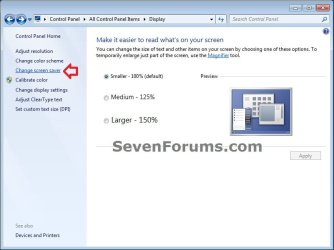
2. In the left blue pane, click on the Change screen saver link. (see screenshot below)
Starter_Basic-1.jpg
3. Close the Display window. (see screenshot above)

4. Go to step 3 in OPTION TWO below.


OPTION TWO

To Turn the Screen Saver On or Off in Windows 7 Home Premium, Professional, Ultimate, and Enterprise


1. Right click on a empty space on the desktop and click on Personalize.

2. Click on the Screen Saver link at the bottom of the window. (see screenshots below)
NOTE: Under Screen Saver is the name of the screen saver in gray used in your current theme. If the screen saver name is None, then it is turned off.
Personalization.jpg

Personalization_off.jpg
3. Do either step 4 or 5 below for what you would like to do.

4. To Turn Off All Screen Savers
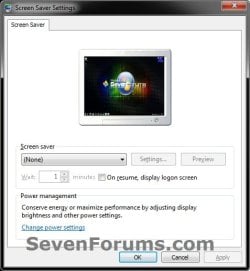
A) Under Screen saver, click on the drop down menu and select (None). (see screenshot below)
Off.jpg
B) Decide if you wanted to turn the screen saver password protection on or off (option one at link).

C) Go to step 6.
5. To Turn On a Selected Screen Saver
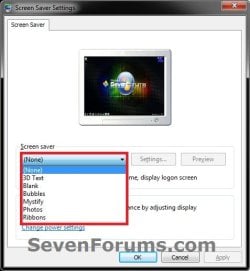
A) Under Screen saver, click on the drop down menu and change the screen saver to a listed screen saver other than (None). (see screenshot below)
On.jpg
B) Select how many idle minutes to Wait before the selected screen saver displays.

C) Decide if you wanted to turn the screen saver password protection on or off (option one at link).
6. Click on OK. (see screenshot below step 4A or 5A)
That's it,
Shawn


Last edited:
I just restored back to a couple of days ago and my icons are back to the way I had them, now let's see if the screensaver I initially posted about is fixed or not.
 

My Computer My Computer

OS
Win 7 Ultimate x64
CPU
Intel i7 950 OC'd @ 4.0Ghz (SpeedStep ON)
Motherboard
ASUS P6X58D-E BIOS 0303
Memory
3x2GB Patriot Extreme Viper II Sector 7 DDR3 @ 1600mhz
Graphics Card(s)
ATI MSI 5870 900mhz/1300mhz
Sound Card
Onboard Realtek ALC889
Monitor(s) Displays
2 X 24" BenQ G2412HD
Screen Resolution
1920x1080p
Hard Drives
Intel X25-M 80 GB (SSD)
W.D. Caviar Black 1TB (SATA)
Seagate Barricuda 1TB (SATA)
Seagate Barricuda 80GB (SATA)
PSU
Corsair AX850
Case
Antec 1200
Cooling
Lots and Lots of Air!
Keyboard
Razer Lycosa
Mouse
Microsoft Sidewinder
Internet Speed
25Mbps/1Mbps
If I may, here is a way to run a video as screensaver. It is a little different than in Vista.

In Windows 7 you have to go via Windows Live Photo Gallery. If you do not have it yet on your system, download it from Windows Live Essentials http://download.live.com/?wa=wsignin1.0

Then do the following steps:

· Open Live Essentials Photo Gallery
· Click on File
· Click on > Screen Saver Settings (This will open the Screen Saver Settings)
· Browse to your folder with the video and open it (OK)
· In the Use this theme list box, select Album
· Then do Save
· Now run Preview and see whether it works

Remind you that the video format must be .wmv. If you have another format, convert it with Format factory http://www.formatoz.com/
 

My Computer My Computer

Computer Manufacturer/Model Number
HP, Dell, Gateway, Toshiba - 4 laptops and 2 desktops
OS
Vista, Windows7, Mint Mate, Zorin, Windows 8
CPU
from 1.6GHz Duo to i7
Monitor(s) Displays
2x HP w2207
Hard Drives
5x HDD, 7x SSD, 12x Externals
Keyboard
with trackball - no mices
Mouse
Trackball mice
Internet Speed
DSL 6000
hi shawn,there is a way that i can put scren saver on window 7starter??if yes how???plase reply thanks
 

My Computer My Computer

Computer Manufacturer/Model Number
Dell Inspiron Mini 1018 Black
OS
Windows 7
Memory
1GB
Graphics Card(s)
intel GMA 3150
Sound Card
way for microphone
Monitor(s) Displays
10.1 cali
Hard Drives
250GB

My Computer My Computer

Computer type
PC/Desktop
Computer Manufacturer/Model Number
Self built custom
OS
64-bit Windows 11 Pro for Workstations
CPU
Intel i7-8700K OC'd to 5 GHz
Motherboard
ASUS ROG Maximus XI Formula Z390
Memory
64 GB (4x16GB) G.SKILL TridentZ RGB DDR4 3600 MHz
Graphics Card(s)
ASUS ROG-STRIX-GTX1080TI-O11G-GAMING
Sound Card
Integrated
Monitor(s) Displays
2 x Samsung Odyssey G7 27"
Screen Resolution
2560x1440
Hard Drives
1TB Samsung 990 PRO M.2,
4TB Samsung 990 PRO PRO M.2,
TerraMaster F8 SSD Plus NAS
PSU
Seasonic Prime Titanium 850W
Case
Thermaltake Core P3
Cooling
Corsair Hydro H115i
Keyboard
Logitech wireless K800
Mouse
Logitech MX Master 4
Internet Speed
2 Gb/s Download and 100 Mb/s Upload
Antivirus
Malwarebyte Anti-Malware Premium
Browser
Google Chrome
Other Info
Logitech Z625 speaker system,
Logitech BRIO 4K Pro webcam,
HP Color LaserJet Pro MFP M477fdn,
APC SMART-UPS RT 1000 XL - SURT1000XLI,
Galaxy S23 Plus phone
Hi Brink

I have the following problem in Windows 7 Home P: one or the browser websites is delaying the screensaver setting I enter via the personalize settings, I put in
Ex: 2 min actually turns out to be about 20-30 min. There is no relation between input and actual value for the delay

The screensaver works but with a random delay
Can you give some suggestions or help

Ralph
 

My Computer My Computer

Computer Manufacturer/Model Number
HP notebook g62
OS
Windows 7 Home Premium 64bit
CPU
AMD
Hello Ralph, and welcome to Seven Forums.

Is the website running anything that may be preventing the computer from being idle?
 

My Computer My Computer

Computer type
PC/Desktop
Computer Manufacturer/Model Number
Self built custom
OS
64-bit Windows 11 Pro for Workstations
CPU
Intel i7-8700K OC'd to 5 GHz
Motherboard
ASUS ROG Maximus XI Formula Z390
Memory
64 GB (4x16GB) G.SKILL TridentZ RGB DDR4 3600 MHz
Graphics Card(s)
ASUS ROG-STRIX-GTX1080TI-O11G-GAMING
Sound Card
Integrated
Monitor(s) Displays
2 x Samsung Odyssey G7 27"
Screen Resolution
2560x1440
Hard Drives
1TB Samsung 990 PRO M.2,
4TB Samsung 990 PRO PRO M.2,
TerraMaster F8 SSD Plus NAS
PSU
Seasonic Prime Titanium 850W
Case
Thermaltake Core P3
Cooling
Corsair Hydro H115i
Keyboard
Logitech wireless K800
Mouse
Logitech MX Master 4
Internet Speed
2 Gb/s Download and 100 Mb/s Upload
Antivirus
Malwarebyte Anti-Malware Premium
Browser
Google Chrome
Other Info
Logitech Z625 speaker system,
Logitech BRIO 4K Pro webcam,
HP Color LaserJet Pro MFP M477fdn,
APC SMART-UPS RT 1000 XL - SURT1000XLI,
Galaxy S23 Plus phone
Hello Ralph, and welcome to Seven Forums.

Is the website running anything that may be preventing the computer from being idle?

thanks for yr suggestion

I will try to disable all sites to see which one is preventing the computer
from idling
I will post results later
 

My Computer My Computer

Computer Manufacturer/Model Number
HP notebook g62
OS
Windows 7 Home Premium 64bit
CPU
AMD
Hi Brink,

The problem was a site with streaming audio/internet radio
When I stop or mute the audio the screensaver works like it should
The ob vious question.....
Is there no way to have audio and screensaver working?
Thanks for your help
 

My Computer My Computer

Computer Manufacturer/Model Number
HP notebook g62
OS
Windows 7 Home Premium 64bit
CPU
AMD
Yep, it's preventing the computer from being idle, thus screen saver never turns on.

You might see if changing your advanced power plan settings for "When sharing media" as below may allow it to.

Power-Options.jpg
 
Last edited:

My Computer My Computer

Computer type
PC/Desktop
Computer Manufacturer/Model Number
Self built custom
OS
64-bit Windows 11 Pro for Workstations
CPU
Intel i7-8700K OC'd to 5 GHz
Motherboard
ASUS ROG Maximus XI Formula Z390
Memory
64 GB (4x16GB) G.SKILL TridentZ RGB DDR4 3600 MHz
Graphics Card(s)
ASUS ROG-STRIX-GTX1080TI-O11G-GAMING
Sound Card
Integrated
Monitor(s) Displays
2 x Samsung Odyssey G7 27"
Screen Resolution
2560x1440
Hard Drives
1TB Samsung 990 PRO M.2,
4TB Samsung 990 PRO PRO M.2,
TerraMaster F8 SSD Plus NAS
PSU
Seasonic Prime Titanium 850W
Case
Thermaltake Core P3
Cooling
Corsair Hydro H115i
Keyboard
Logitech wireless K800
Mouse
Logitech MX Master 4
Internet Speed
2 Gb/s Download and 100 Mb/s Upload
Antivirus
Malwarebyte Anti-Malware Premium
Browser
Google Chrome
Other Info
Logitech Z625 speaker system,
Logitech BRIO 4K Pro webcam,
HP Color LaserJet Pro MFP M477fdn,
APC SMART-UPS RT 1000 XL - SURT1000XLI,
Galaxy S23 Plus phone
Th is procedure:

How to Change the Power Plan Settings in Windows 7

gives different screens -nothing about power plan settings- Every thing I tried
nothing works. I will upgrade to professional W7 and try agin
 

My Computer My Computer

Computer Manufacturer/Model Number
HP notebook g62
OS
Windows 7 Home Premium 64bit
CPU
AMD
I have the windows seven home premium and no matter what I do, the screen saver won't work. My computer will sit idle for about a minute and a half and then the screen goes dark. The power settings on my computer are set to never dim and never turn the screen off and I made sure that I saved the changes I made. No matter what the screen saver is on, the screen just goes dark after about a minute and a half.
 

My Computer My Computer

OS
Windows Home Premium 64bit
Hello dazzlingglass, and welcome to Seven Forums.

If this just recently started to happen, then you might consider doing a system restore using a restore point (if available) dated before this started to hopefully fix it. :)

Hope this helps,
Shawn
 

My Computer My Computer

Computer type
PC/Desktop
Computer Manufacturer/Model Number
Self built custom
OS
64-bit Windows 11 Pro for Workstations
CPU
Intel i7-8700K OC'd to 5 GHz
Motherboard
ASUS ROG Maximus XI Formula Z390
Memory
64 GB (4x16GB) G.SKILL TridentZ RGB DDR4 3600 MHz
Graphics Card(s)
ASUS ROG-STRIX-GTX1080TI-O11G-GAMING
Sound Card
Integrated
Monitor(s) Displays
2 x Samsung Odyssey G7 27"
Screen Resolution
2560x1440
Hard Drives
1TB Samsung 990 PRO M.2,
4TB Samsung 990 PRO PRO M.2,
TerraMaster F8 SSD Plus NAS
PSU
Seasonic Prime Titanium 850W
Case
Thermaltake Core P3
Cooling
Corsair Hydro H115i
Keyboard
Logitech wireless K800
Mouse
Logitech MX Master 4
Internet Speed
2 Gb/s Download and 100 Mb/s Upload
Antivirus
Malwarebyte Anti-Malware Premium
Browser
Google Chrome
Other Info
Logitech Z625 speaker system,
Logitech BRIO 4K Pro webcam,
HP Color LaserJet Pro MFP M477fdn,
APC SMART-UPS RT 1000 XL - SURT1000XLI,
Galaxy S23 Plus phone
I tried doing the system restore, but the only date that it had available was a couple of days ago. However, even after the system restore, the screen saver still won't work and the screen still turns off after a little over a minute.
 

My Computer My Computer

OS
Windows Home Premium 64bit
In that case, you might see if running a sfc /scannow command may be able to help. Otherwise, you may need to do a repair install.
 

My Computer My Computer

Computer type
PC/Desktop
Computer Manufacturer/Model Number
Self built custom
OS
64-bit Windows 11 Pro for Workstations
CPU
Intel i7-8700K OC'd to 5 GHz
Motherboard
ASUS ROG Maximus XI Formula Z390
Memory
64 GB (4x16GB) G.SKILL TridentZ RGB DDR4 3600 MHz
Graphics Card(s)
ASUS ROG-STRIX-GTX1080TI-O11G-GAMING
Sound Card
Integrated
Monitor(s) Displays
2 x Samsung Odyssey G7 27"
Screen Resolution
2560x1440
Hard Drives
1TB Samsung 990 PRO M.2,
4TB Samsung 990 PRO PRO M.2,
TerraMaster F8 SSD Plus NAS
PSU
Seasonic Prime Titanium 850W
Case
Thermaltake Core P3
Cooling
Corsair Hydro H115i
Keyboard
Logitech wireless K800
Mouse
Logitech MX Master 4
Internet Speed
2 Gb/s Download and 100 Mb/s Upload
Antivirus
Malwarebyte Anti-Malware Premium
Browser
Google Chrome
Other Info
Logitech Z625 speaker system,
Logitech BRIO 4K Pro webcam,
HP Color LaserJet Pro MFP M477fdn,
APC SMART-UPS RT 1000 XL - SURT1000XLI,
Galaxy S23 Plus phone
I discovered that my facial recognition software had its own power saving options. After detecting no movement after a certain period of time it would go to sleep. Thank you for your help anyway though!:)
 

My Computer My Computer

OS
Windows Home Premium 64bit
Hello dazzlingglass,

Ah, that would explain it then. Thank you for posting back with your results. :)
 

My Computer My Computer

Computer type
PC/Desktop
Computer Manufacturer/Model Number
Self built custom
OS
64-bit Windows 11 Pro for Workstations
CPU
Intel i7-8700K OC'd to 5 GHz
Motherboard
ASUS ROG Maximus XI Formula Z390
Memory
64 GB (4x16GB) G.SKILL TridentZ RGB DDR4 3600 MHz
Graphics Card(s)
ASUS ROG-STRIX-GTX1080TI-O11G-GAMING
Sound Card
Integrated
Monitor(s) Displays
2 x Samsung Odyssey G7 27"
Screen Resolution
2560x1440
Hard Drives
1TB Samsung 990 PRO M.2,
4TB Samsung 990 PRO PRO M.2,
TerraMaster F8 SSD Plus NAS
PSU
Seasonic Prime Titanium 850W
Case
Thermaltake Core P3
Cooling
Corsair Hydro H115i
Keyboard
Logitech wireless K800
Mouse
Logitech MX Master 4
Internet Speed
2 Gb/s Download and 100 Mb/s Upload
Antivirus
Malwarebyte Anti-Malware Premium
Browser
Google Chrome
Other Info
Logitech Z625 speaker system,
Logitech BRIO 4K Pro webcam,
HP Color LaserJet Pro MFP M477fdn,
APC SMART-UPS RT 1000 XL - SURT1000XLI,
Galaxy S23 Plus phone
Back
Top