Screen Shots with single key press

Internet Badass

(null)
Member
VIP
Local time
1:45 PM
Messages
141
Location
Colorado
I dont like it how if i take screenshots i have to go to paint and paste them and save them. Id like to be able to just press prt scr and have it save to a certain folder. I have fraps but thats only for games....
 

My Computer

Computer type
PC/Desktop
Computer Manufacturer/Model Number
custom
OS
Windows 7 Home Premium 64 bit
CPU
AMD Phenom 9950
Motherboard
ASUS m3a32-mvp deluxe
Memory
12gb ddr2, 2gbx2+4gbx2
Graphics Card(s)
Zotac nvidia gt 730
Sound Card
integrated
Monitor(s) Displays
Samsung syncmaster 213t, dell 13 in
Screen Resolution
1600x1200
Hard Drives
Seagate 750 gb 7200 rpm harddrive, Seagate 7200 rpm120 gb harddrive, samsung 1TB 5400rpm
Case
Alienware Aurora
Cooling
fans yo
Keyboard
Logitech G15
Mouse
microsoft intellimouse explorer 3.0
Internet Speed
10mbps
Antivirus
microsoft security suite
Browser
chrome
After thinking on this for some time I cannot think of one thing so far :huh:
 

My Computer

Computer Manufacturer/Model Number
Proline
OS
Windows 7 Pro 64 bit
CPU
Intel(R) Core(TM) i7 CPU 870 @ 2.93GHz
Motherboard
H55-G43(MS-7638)
Memory
4GB
Graphics Card(s)
NVIDIA GeForce GTX 470
Sound Card
Onboard
Monitor(s) Displays
Proline LCD 19 inch
Screen Resolution
1280 x 1024
Hard Drives
2 x SATA 250 Gig 1 x External 2TB
PSU
RX 730 SS
Case
Proline
Cooling
Standard
Keyboard
PS2
Mouse
PS2
Internet Speed
To embarrassed to tell lol
I dont like it how if i take screenshots i have to go to paint and paste them and save them. Id like to be able to just press prt scr and have it save to a certain folder. I have fraps but thats only for games....
Try FastStone Capture, that's the only one I can think of off the top of my head that will take screenshots like that... It's not free though. I've been using it at work to do screenshots for the last 2 years (I'm a help manual author), works like a dream.
 

My Computer

Computer type
PC/Desktop
OS
Win 10 x64 Pro x64 / Ubuntu 15.10 x64
CPU
Intel i7-4960X
Motherboard
Asus Rampage IV Black Edition
Memory
4x8GB Corsair Dominator Platinum @2400MHz 10-12-12-31
Graphics Card(s)
2x MSI GTX780Ti 3GB (SLI)
Sound Card
Onboard SupremeFX (Cirrus Logic CS4398)
Monitor(s) Displays
3x LG Cinema 27" IPS LED (27MP65)
Screen Resolution
[1920x1080]x3
Hard Drives
Crucial M500 120GB, Crucial M500 480GB, Toshiba DT01ACA200 2TB
PSU
CoolerMaster V1000
Case
Corsair Obsidian 750D
Cooling
ThermalTake Water 3.0 Extreme, 4xSP120, 3xAF120
Keyboard
Moshi Luna
Mouse
Logitech G700s / Roccat Tyon
Internet Speed
4Mb uncapped ADSL (Afrihost)
Antivirus
MS Security Essentials
Browser
Chrome... Duh. (:
I dont like it how if i take screenshots i have to go to paint and paste them and save them. Id like to be able to just press prt scr and have it save to a certain folder. I have fraps but thats only for games....


snipping tool does not work?
 

My Computer

Computer Manufacturer/Model Number
Gateway/NV7923u & NV79C52u Laptops
OS
windows 7 professional & ultimate 64bit laptops
CPU
2.27 boost to 2.53 & 2.53 boost to 2.80
Motherboard
Mobile Intel® HM55 Express Chipset ???
Memory
4GB
Graphics Card(s)
Intel® Graphics Media Accelerator HD
Sound Card
realtek High-definition audio support
Monitor(s) Displays
17.3 " HD 1600 x 900
Hard Drives
hatachi Travelstar 5400 500GB & west digital 500GB
Internet Speed
35MB fios
I dont like it how if i take screenshots i have to go to paint and paste them and save them. Id like to be able to just press prt scr and have it save to a certain folder. I have fraps but thats only for games....

snipping tool does not work?

That was the first thing I thought too. But it seems like he wants to have it make a picture file without having to actually do anything beyond pressing a single key.

IB, I agree with you. That would save some time. The only problem I see with it is, what if it is pressed accidentally. On a desktop keyboard, or USB keyboard, chances seems slim, but on a laptop keyboard, the chances a lot higher. Of course, an option to turn it on and off in control panel would take care of that problem.
 

My Computer

Computer type
Laptop
Computer Manufacturer/Model Number
Toshiba P775-S7100
OS
Windows 7 Professional SP1 64-bit
CPU
Intel Core i5-2450M @2.5 GHz
Memory
6 GB DDR3 1333MHz
Graphics Card(s)
Intel HD 3000
Monitor(s) Displays
Built-in 17.3" LED; 22" Insignia NS-L22Q-10A
Screen Resolution
1600x900; 1360x768
Hard Drives
750 GB Hitachi
1TB Seagate FreeAgent External
Internet Speed
Verizon DSL Speed(Down/Up): 3360 Kbps / 800 Kbps
Antivirus
MSE and MBAM Pro
Browser
IE10
snipping tool does not work if you want to copy screen w/ an open context menu:cry:
 

My Computer

Computer Manufacturer/Model Number
Gateway/NV7923u & NV79C52u Laptops
OS
windows 7 professional & ultimate 64bit laptops
CPU
2.27 boost to 2.53 & 2.53 boost to 2.80
Motherboard
Mobile Intel® HM55 Express Chipset ???
Memory
4GB
Graphics Card(s)
Intel® Graphics Media Accelerator HD
Sound Card
realtek High-definition audio support
Monitor(s) Displays
17.3 " HD 1600 x 900
Hard Drives
hatachi Travelstar 5400 500GB & west digital 500GB
Internet Speed
35MB fios
I dont like it how if i take screenshots i have to go to paint and paste them and save them. Id like to be able to just press prt scr and have it save to a certain folder. I have fraps but thats only for games....

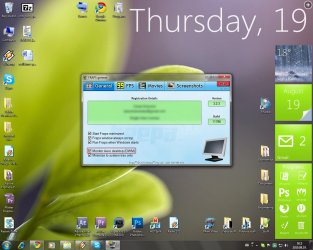
Actually you can capture desktop with Fraps. Take a look in attach.
 

Attachments

  • Dwm 2010-08-19 09-12-05-20.jpg
    Dwm 2010-08-19 09-12-05-20.jpg
    162.8 KB · Views: 36

My Computer

Computer Manufacturer/Model Number
Custom built
OS
Windows 7 Ultimate 64-Bit
CPU
AMD Phenom II X4 940
Motherboard
Gigabyte GA-M57SLI-S4
Memory
4Gb
Graphics Card(s)
Asus GeForce 8800GT
Monitor(s) Displays
Samsung SyncMaster 710n
Hard Drives
Samsung SpinPoint F1 1TB,
Samsung 120Gb
PSU
Chieftec 450w
Cooling
Zalman CNPS7000B-Cu LED
Mouse
Logitech
Internet Speed
93.8MB/s
That was the first thing I thought too. But it seems like he wants to have it make a picture file without having to actually do anything beyond pressing a single key.
Have a look here: Assign a Shortcut Key to the Snipping Tool in Windows Vista - How-To Geek

snipping tool does not work if you want to copy screen w/ an open context menu:cry:
You can take a snip of menus, have a look at the notes at the end of this article: Use Snipping Tool to capture screen shots

Edit Yay... 600th post.
picture.php
 

My Computer

Computer type
PC/Desktop
OS
Win 10 x64 Pro x64 / Ubuntu 15.10 x64
CPU
Intel i7-4960X
Motherboard
Asus Rampage IV Black Edition
Memory
4x8GB Corsair Dominator Platinum @2400MHz 10-12-12-31
Graphics Card(s)
2x MSI GTX780Ti 3GB (SLI)
Sound Card
Onboard SupremeFX (Cirrus Logic CS4398)
Monitor(s) Displays
3x LG Cinema 27" IPS LED (27MP65)
Screen Resolution
[1920x1080]x3
Hard Drives
Crucial M500 120GB, Crucial M500 480GB, Toshiba DT01ACA200 2TB
PSU
CoolerMaster V1000
Case
Corsair Obsidian 750D
Cooling
ThermalTake Water 3.0 Extreme, 4xSP120, 3xAF120
Keyboard
Moshi Luna
Mouse
Logitech G700s / Roccat Tyon
Internet Speed
4Mb uncapped ADSL (Afrihost)
Antivirus
MS Security Essentials
Browser
Chrome... Duh. (:
worked...


I have to hold the Fn key and the Ctrl then PrtSc
 

My Computer

Computer Manufacturer/Model Number
Gateway/NV7923u & NV79C52u Laptops
OS
windows 7 professional & ultimate 64bit laptops
CPU
2.27 boost to 2.53 & 2.53 boost to 2.80
Motherboard
Mobile Intel® HM55 Express Chipset ???
Memory
4GB
Graphics Card(s)
Intel® Graphics Media Accelerator HD
Sound Card
realtek High-definition audio support
Monitor(s) Displays
17.3 " HD 1600 x 900
Hard Drives
hatachi Travelstar 5400 500GB & west digital 500GB
Internet Speed
35MB fios
That was the first thing I thought too. But it seems like he wants to have it make a picture file without having to actually do anything beyond pressing a single key.
Have a look here: Assign a Shortcut Key to the Snipping Tool in Windows Vista - How-To Geek

Congrats on the 600th post.

It seem like that just opens the snipping tool. I meant something more like it creating a new jpeg on the desktop that is whatever was on the screen when you pressed a button.
 

My Computer

Computer type
Laptop
Computer Manufacturer/Model Number
Toshiba P775-S7100
OS
Windows 7 Professional SP1 64-bit
CPU
Intel Core i5-2450M @2.5 GHz
Memory
6 GB DDR3 1333MHz
Graphics Card(s)
Intel HD 3000
Monitor(s) Displays
Built-in 17.3" LED; 22" Insignia NS-L22Q-10A
Screen Resolution
1600x900; 1360x768
Hard Drives
750 GB Hitachi
1TB Seagate FreeAgent External
Internet Speed
Verizon DSL Speed(Down/Up): 3360 Kbps / 800 Kbps
Antivirus
MSE and MBAM Pro
Browser
IE10
That was the first thing I thought too. But it seems like he wants to have it make a picture file without having to actually do anything beyond pressing a single key.
Have a look here: Assign a Shortcut Key to the Snipping Tool in Windows Vista - How-To Geek

Congrats on the 600th post.

It seem like that just opens the snipping tool. I meant something more like it creating a new jpeg on the desktop that is whatever was on the screen when you pressed a button.
Yeah, Snipping Tool unfortunately does require more than just one keystroke. Try FastStone Capture though, that definitely does what you mentioned (and a heck of a lot more).

While $20 (USD) does seem quite expensive for a screenshot program, once you've used it and also considering it's a lifetime license, it's not actually that bad a price..
 

My Computer

Computer type
PC/Desktop
OS
Win 10 x64 Pro x64 / Ubuntu 15.10 x64
CPU
Intel i7-4960X
Motherboard
Asus Rampage IV Black Edition
Memory
4x8GB Corsair Dominator Platinum @2400MHz 10-12-12-31
Graphics Card(s)
2x MSI GTX780Ti 3GB (SLI)
Sound Card
Onboard SupremeFX (Cirrus Logic CS4398)
Monitor(s) Displays
3x LG Cinema 27" IPS LED (27MP65)
Screen Resolution
[1920x1080]x3
Hard Drives
Crucial M500 120GB, Crucial M500 480GB, Toshiba DT01ACA200 2TB
PSU
CoolerMaster V1000
Case
Corsair Obsidian 750D
Cooling
ThermalTake Water 3.0 Extreme, 4xSP120, 3xAF120
Keyboard
Moshi Luna
Mouse
Logitech G700s / Roccat Tyon
Internet Speed
4Mb uncapped ADSL (Afrihost)
Antivirus
MS Security Essentials
Browser
Chrome... Duh. (:
Since you have FRAPS and as FORWOX said, FRAPS is not just for games and can also be used to save screenshots.

Select the "Monitor Aero Desktop (DWM)"

Quote from FRAPS website...
Benchmarking Software - Show how many Frames Per Second (FPS) you are getting in a corner of your screen. Perform custom benchmarks and measure the frame rate between any two points. Save the statistics out to disk and use them for your own reviews and applications.
Screen Capture Software - Take a screenshot with the press of a key! There's no need to paste into a paint program every time you want a new shot. Your screen captures are automatically named and timestamped.
Realtime Video Capture Software - Have you ever wanted to record video while playing your favourite game? Come join the Machinima revolution! Throw away the VCR, forget about using a DV cam, game recording has never been this easy! Fraps can capture audio and video up to 2560x1600 with custom frame rates from 10 to 120 frames per second!
 

My Computer

Computer type
Laptop
Computer Manufacturer/Model Number
HP EliteBook 8530w Mobile Workstation
OS
Windows 7 Ultimate x64 (XP, 98SE, 95, 3.11, DOS 7.10 on VM) + Ubuntu 10.04 LTS Lucid Lynx
CPU
Intel Core 2 Duo Processor P8600 (2.40 GHz, 3 MB L2 cache)
Motherboard
Mobile Intel PM45 Express Chipset ICH9M-Enhanced
Memory
4GB 800 MHz DDR2 SDRAM
Graphics Card(s)
ATI Mobility FireGL V5700 with 256 MB
Sound Card
SoundMAX Integrated Digital HD Audio
Monitor(s) Displays
15.4-inch WXGA anti-glare (1280 x 800 resolution)
Screen Resolution
1280 x 800
Hard Drives
500GB + 1TB
Mouse
Synaptics PS/2 Port Touchpad, USB Mouse
Internet Speed
4 Mbps
Antivirus
MSE
Browser
Firefox, Chrome, IE
Other Info
Authentec AES2810 Fingerprint Reader
I dont like it how if I take screenshots i have to go to paint and paste them and save them. Id like to be able to just press prt scr and have it save to a certain folder. I have fraps but thats only for games....
I doubt this would be possible. You would be asking one keystroke to, copy an image, open a program (say Paint) , paste the image and save the image. If it could do this then how would we choose which format to save the image to?

I offer the following not to create an argument but to say how and why I use screenshots as I think I am a fairly average user so many others probably have the same experience:
I use screenshots a lot (I have 52 here on this Forum at the moment) and I need to be able to choose different formats according to what I am going to use the screenshot for. Of the 50 odd screenshots I have on the forum not one is a full screen so even if one keystroke did work I would still need to open Paint, open the image and crop it, then save it again so all I would save is one "Paste " operation!
Anyway why are we talking about Prnt Scrn when we have the Snippet tool? Has always done whatever I have asked of it.
 

My Computer

Computer type
PC/Desktop
OS
Microsoft Windows 7 Home Premium 64-bit 7601 Multiprocessor Free Service Pack 1
CPU
Intel(R) Core(TM) i7-3770 CPU @ 3.40GHz
Motherboard
ASUSTeK COMPUTER INC. P8H77-M
Memory
8.00 GB
Graphics Card(s)
Intel(R) HD Graphics 4000
Sound Card
On Board
Monitor(s) Displays
Dell 24"
Screen Resolution
1920 x 1080
Hard Drives
(1) INTEL SSDSC2CT180A3 ATA Device (2) ST500DM002-1BD142 ATA Device (3) WDC WD3200AAKS-75L9A0 ATA Device (4) Generic- Compact Flash USB Device (5) Generic- MS/MS-Pro USB Device (6) Generic- SD/MMC USB Device (7) Generic- SM/xD-Picture USB
PSU
500w Corsair
Case
Cooler Master
Cooling
3 Fans
Keyboard
Logitech MK300
Mouse
Logitech WOM
Internet Speed
75Mb
Antivirus
Norton 360
Browser
Firefox, Opera, IE
You can take a snip of menus, have a look at the notes at the end of this article: Use Snipping Tool to capture screen shots
picture.php
What a good spot that was. The way to capure a drop down menu, I mean!
I didn't know this so your post has now cured the only little niggle I had with Snippet. It now really does do everyjthing I ask of it.
 

My Computer

Computer type
PC/Desktop
OS
Microsoft Windows 7 Home Premium 64-bit 7601 Multiprocessor Free Service Pack 1
CPU
Intel(R) Core(TM) i7-3770 CPU @ 3.40GHz
Motherboard
ASUSTeK COMPUTER INC. P8H77-M
Memory
8.00 GB
Graphics Card(s)
Intel(R) HD Graphics 4000
Sound Card
On Board
Monitor(s) Displays
Dell 24"
Screen Resolution
1920 x 1080
Hard Drives
(1) INTEL SSDSC2CT180A3 ATA Device (2) ST500DM002-1BD142 ATA Device (3) WDC WD3200AAKS-75L9A0 ATA Device (4) Generic- Compact Flash USB Device (5) Generic- MS/MS-Pro USB Device (6) Generic- SD/MMC USB Device (7) Generic- SM/xD-Picture USB
PSU
500w Corsair
Case
Cooler Master
Cooling
3 Fans
Keyboard
Logitech MK300
Mouse
Logitech WOM
Internet Speed
75Mb
Antivirus
Norton 360
Browser
Firefox, Opera, IE
Since you have FRAPS and as FORWOX said, FRAPS is not just for games and can also be used to save screenshots.

Select the "Monitor Aero Desktop (DWM)"

Quote from FRAPS website...
Benchmarking Software - Show how many Frames Per Second (FPS) you are getting in a corner of your screen. Perform custom benchmarks and measure the frame rate between any two points. Save the statistics out to disk and use them for your own reviews and applications.
Screen Capture Software - Take a screenshot with the press of a key! There's no need to paste into a paint program every time you want a new shot. Your screen captures are automatically named and timestamped.
Realtime Video Capture Software - Have you ever wanted to record video while playing your favourite game? Come join the Machinima revolution! Throw away the VCR, forget about using a DV cam, game recording has never been this easy! Fraps can capture audio and video up to 2560x1600 with custom frame rates from 10 to 120 frames per second!

Fraps works just great. :)
 

My Computer

Computer Manufacturer/Model Number
Custom built
OS
Windows 7 Ultimate 64-Bit
CPU
AMD Phenom II X4 940
Motherboard
Gigabyte GA-M57SLI-S4
Memory
4Gb
Graphics Card(s)
Asus GeForce 8800GT
Monitor(s) Displays
Samsung SyncMaster 710n
Hard Drives
Samsung SpinPoint F1 1TB,
Samsung 120Gb
PSU
Chieftec 450w
Cooling
Zalman CNPS7000B-Cu LED
Mouse
Logitech
Internet Speed
93.8MB/s
Screen capture

You can install the program " Lightscreen" - it is free and very small. It integrates with windows and You can capture the screen by simply click on Prt Scr key.
 

My Computer

OS
Win 7 Ult 64-bit
CPU
AMD Athlon 455 3core
Memory
6 Gb 1333Mhz
Graphics Card(s)
GForce 545 1,5Gb 192-bit
Monitor(s) Displays
LG IPS234
Hard Drives
1tb
Case
Acer Predator
You can install the program " Lightscreen" - it is free and very small. It integrates with windows and You can capture the screen by simply click on Prt Scr key.

But please remember, that you will not be able to take in-game screenshots with "Lightscreen" and such programs. It's great, but only for desktop.
 

My Computer

Computer Manufacturer/Model Number
Custom built
OS
Windows 7 Ultimate 64-Bit
CPU
AMD Phenom II X4 940
Motherboard
Gigabyte GA-M57SLI-S4
Memory
4Gb
Graphics Card(s)
Asus GeForce 8800GT
Monitor(s) Displays
Samsung SyncMaster 710n
Hard Drives
Samsung SpinPoint F1 1TB,
Samsung 120Gb
PSU
Chieftec 450w
Cooling
Zalman CNPS7000B-Cu LED
Mouse
Logitech
Internet Speed
93.8MB/s

My Computer

Computer Manufacturer/Model Number
HP, Dell, Gateway, Toshiba - 4 laptops and 2 desktops
OS
Vista, Windows7, Mint Mate, Zorin, Windows 8
CPU
from 1.6GHz Duo to i7
Monitor(s) Displays
2x HP w2207
Hard Drives
5x HDD, 7x SSD, 12x Externals
Keyboard
with trackball - no mices
Mouse
Trackball mice
Internet Speed
DSL 6000

My Computer

Computer type
PC/Desktop
Computer Manufacturer/Model Number
Bruce ... somewhere in his 40's
OS
Windows 7 Ultimate 32bit SP1
CPU
Intel(R) Core(TM)2 Quad CPU @ 2.40GHz, 2400 MHz
Motherboard
INTEL/D975XBX2
Memory
4 GB
Graphics Card(s)
ATI Radeon HD 2600 Pro
Monitor(s) Displays
Samsung SyncMaster 914v
Screen Resolution
1280 x 1024
Hard Drives
2/500GB each ... ST3500630AS ATA Device.
One is not connected
PSU
Rocketfish 700 W
Case
G.Skill Gigabyte Chassis
Keyboard
Standard PS/2 Keyboard
Mouse
Microsoft PS/2 Mouse
Internet Speed
DSL
Antivirus
Avira Internet Security
Browser
IE 11
Other Info
ATI HDMI Audio

Attachments

  • EXAMPLE.png
    EXAMPLE.png
    51 KB · Views: 8

My Computer

Computer Manufacturer/Model Number
Hewlett packard/p6512uk
OS
Microsoft Windows 7 Home Premium 64-bit 7600
CPU
IIx4 amd athelon 635 processor
Motherboard
FOXCONN 2AA9
Memory
2x2gb
Graphics Card(s)
ati radeon HD 5450
Sound Card
(1) Realtek High Definition Audio (2) AMD High Definition
Monitor(s) Displays
samsung lcd tv 32"
Screen Resolution
1360x 768
Hard Drives
(1) WDC WD10 01FAES-60Z2A0 SATA Disk Device (2) Maxtor OneTouch USB Device (3) ST310003 33AS USB Device (4) WD My Book 1111 USB Device
PSU
?
Cooling
air!
Keyboard
wireless hp
Mouse
wireless Hp,optical
Internet Speed
1.10mb/s
Antivirus
MSE
Browser
Firefox
Back
Top