Solved screendisplay appear like it has made a 90° rotation.

LIEVRE

New member
Local time
4:13 PM
Messages
6
screendisplay appear like it has made a 90° rotation.

Hello my savers! Like written above, my screen has made a 90° rotation which is most uncmfortable
as you can imagine.
Has someone got an idea how bring it back to more comfort?
 

My Computer My Computer

At a glance

windows 7
Computer type
PC/Desktop
OS
windows 7
Sounds like you pressed the CTRL + Alt + UP (or Down) Arrow key, keep pressing it till it goes back to normal.
 

My Computer My Computer

At a glance

Microsoft Windows 7 Ultimate 32-bit 7601Intel(R) Pentium(R) Dual CPU E2160 @ 1.80GHz4.00 GB(1) VNC Mirror Driver (2) Intel(R) G33/G31 Ex...
Computer type
PC/Desktop
Computer Manufacturer/Model Number
Compac
OS
Microsoft Windows 7 Ultimate 32-bit 7601
CPU
Intel(R) Pentium(R) Dual CPU E2160 @ 1.80GHz
Motherboard
MSI Boston
Memory
4.00 GB
Graphics Card(s)
(1) VNC Mirror Driver (2) Intel(R) G33/G31 Express Chipset
Sound Card
Disabled
Monitor(s) Displays
Headless
Screen Resolution
1280 x 960 x 32 bits (4294967296 colors) @ 60 Hz
Hard Drives
ST3320820AS ATA Device
Keyboard
Headless
Mouse
Headless
Antivirus
Malwarebytes pro
Other Info
Also
Windows 8.1 Laptop and Desktop both Acer
1000 merci! This was indeed the probem and got quickly solved.
Do it well!
 

My Computer My Computer

At a glance

windows 7
Computer type
PC/Desktop
OS
windows 7
If the above doesn't work then go to Control Panel, click the downfacing black arrow head next to "control Panel" and click "Appearance and Personalisation" Then click "Display" then "Screen Resolution" then click the box "Orientation" and choose "Landscape" Then "Apply" Then OK.
That should put your screen back to normal.
EDIT:
Sorry my slow typing, we crossed but I will leave my idea in just in case it helps others with a similar problem!
 
Last edited:

My Computer My Computer

At a glance

Microsoft Windows 7 Home Premium 64-bit 7601 ...Intel(R) Core(TM) i7-3770 CPU @ 3.40GHz8.00 GBIntel(R) HD Graphics 4000
Computer type
PC/Desktop
OS
Microsoft Windows 7 Home Premium 64-bit 7601 Multiprocessor Free Service Pack 1
CPU
Intel(R) Core(TM) i7-3770 CPU @ 3.40GHz
Motherboard
ASUSTeK COMPUTER INC. P8H77-M
Memory
8.00 GB
Graphics Card(s)
Intel(R) HD Graphics 4000
Sound Card
On Board
Monitor(s) Displays
Dell 24"
Screen Resolution
1920 x 1080
Hard Drives
(1) INTEL SSDSC2CT180A3 ATA Device (2) ST500DM002-1BD142 ATA Device (3) WDC WD3200AAKS-75L9A0 ATA Device (4) Generic- Compact Flash USB Device (5) Generic- MS/MS-Pro USB Device (6) Generic- SD/MMC USB Device (7) Generic- SM/xD-Picture USB
PSU
500w Corsair
Case
Cooler Master
Cooling
3 Fans
Keyboard
Logitech MK300
Mouse
Logitech WOM
Internet Speed
75Mb
Antivirus
Norton 360
Browser
Firefox, Opera, IE
OK thanks but this won't help since that was the last time i let my mother use my laptop
 

My Computer My Computer

At a glance

windows 7
Computer type
PC/Desktop
OS
windows 7
OK thanks but this won't help since that was the last time i let my mother use my laptop

I would not blame your Mum to much the only reason I know the answer is because many years ago without knowing it I pressed those same keys.

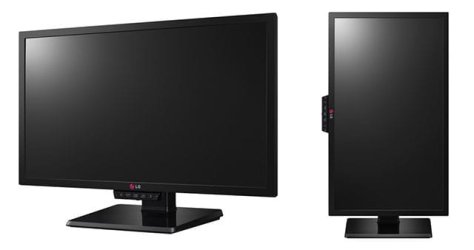
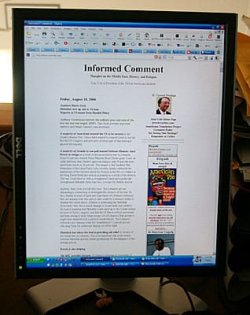
On another note after that I got a monitor that was able to turn 90 degrees on it's stand, You would not believe how much nicer web pages look when a monitor is turned 90 degrees

4 by 3 monitor1.jpg

4 by 3 monitor2.jpg
 

My Computer My Computer

At a glance

Microsoft Windows 7 Ultimate 32-bit 7601Intel(R) Pentium(R) Dual CPU E2160 @ 1.80GHz4.00 GB(1) VNC Mirror Driver (2) Intel(R) G33/G31 Ex...
Computer type
PC/Desktop
Computer Manufacturer/Model Number
Compac
OS
Microsoft Windows 7 Ultimate 32-bit 7601
CPU
Intel(R) Pentium(R) Dual CPU E2160 @ 1.80GHz
Motherboard
MSI Boston
Memory
4.00 GB
Graphics Card(s)
(1) VNC Mirror Driver (2) Intel(R) G33/G31 Express Chipset
Sound Card
Disabled
Monitor(s) Displays
Headless
Screen Resolution
1280 x 960 x 32 bits (4294967296 colors) @ 60 Hz
Hard Drives
ST3320820AS ATA Device
Keyboard
Headless
Mouse
Headless
Antivirus
Malwarebytes pro
Other Info
Also
Windows 8.1 Laptop and Desktop both Acer
OK thanks but this won't help since that was the last time i let my mother use my laptop

I would not blame your Mum to much the only reason I know the answer is because many years ago without knowing it I pressed those same keys.

On another note after that I got a monitor that was able to turn 90 degrees on it's stand, You would not believe how much nicer web pages look when a monitor is turned 90 degrees

View attachment 385153

View attachment 385154
+1 I use it a lot!
 

My Computer My Computer

At a glance

Microsoft Windows 7 Home Premium 64-bit 7601 ...Intel(R) Core(TM) i7-3770 CPU @ 3.40GHz8.00 GBIntel(R) HD Graphics 4000
Computer type
PC/Desktop
OS
Microsoft Windows 7 Home Premium 64-bit 7601 Multiprocessor Free Service Pack 1
CPU
Intel(R) Core(TM) i7-3770 CPU @ 3.40GHz
Motherboard
ASUSTeK COMPUTER INC. P8H77-M
Memory
8.00 GB
Graphics Card(s)
Intel(R) HD Graphics 4000
Sound Card
On Board
Monitor(s) Displays
Dell 24"
Screen Resolution
1920 x 1080
Hard Drives
(1) INTEL SSDSC2CT180A3 ATA Device (2) ST500DM002-1BD142 ATA Device (3) WDC WD3200AAKS-75L9A0 ATA Device (4) Generic- Compact Flash USB Device (5) Generic- MS/MS-Pro USB Device (6) Generic- SD/MMC USB Device (7) Generic- SM/xD-Picture USB
PSU
500w Corsair
Case
Cooler Master
Cooling
3 Fans
Keyboard
Logitech MK300
Mouse
Logitech WOM
Internet Speed
75Mb
Antivirus
Norton 360
Browser
Firefox, Opera, IE
But how did you manage to use your mouse? Mine was completely going crazy! Left made the cursor go down, down made it go right! waouh!
 

My Computer My Computer

At a glance

windows 7
Computer type
PC/Desktop
OS
windows 7
But how did you manage to use your mouse? Mine was completely going crazy! Left made the cursor go down, down made it go right! waouh!

You will have to rotate your monitor your brain is hardwired to move the mouse in the direction it wants the cursor to go. Windows thinks you have the monitor rotated so the top of the screen is now to your right and moving the mouse up will send the cursor to the right. It's very confusing if your monitor is not oriented the way Windows thinks it is.

Look at post 6 pictures again


385153d1460657390-screendisplay-appear-like-has-made-90-rotation-4-3-monitor1.jpg
 

My Computer My Computer

At a glance

Microsoft Windows 7 Ultimate 32-bit 7601Intel(R) Pentium(R) Dual CPU E2160 @ 1.80GHz4.00 GB(1) VNC Mirror Driver (2) Intel(R) G33/G31 Ex...
Computer type
PC/Desktop
Computer Manufacturer/Model Number
Compac
OS
Microsoft Windows 7 Ultimate 32-bit 7601
CPU
Intel(R) Pentium(R) Dual CPU E2160 @ 1.80GHz
Motherboard
MSI Boston
Memory
4.00 GB
Graphics Card(s)
(1) VNC Mirror Driver (2) Intel(R) G33/G31 Express Chipset
Sound Card
Disabled
Monitor(s) Displays
Headless
Screen Resolution
1280 x 960 x 32 bits (4294967296 colors) @ 60 Hz
Hard Drives
ST3320820AS ATA Device
Keyboard
Headless
Mouse
Headless
Antivirus
Malwarebytes pro
Other Info
Also
Windows 8.1 Laptop and Desktop both Acer
Well but even making a chesttorsion to look at the screen the right way and have the mouse just as usual, the mouse did not send the cursor the coherent way. But anyway this tragical problem is over and i won't sleep worse because i don't understand it
completely! It was fun solving it!
 

My Computer My Computer

At a glance

windows 7
Computer type
PC/Desktop
OS
windows 7
Well but even making a chesttorsion to look at the screen the right way and have the mouse just as usual, the mouse did not send the cursor the coherent way. But anyway this tragical problem is over and i won't sleep worse because i don't understand it
completely! It was fun solving it!
But your problem is you are, I think, using a laptop and the screen on that can only be landscape unless you physically hold the compleate laptop up and turn it 90 degrees clockwise! But that requires two hands so what are you going to move the mouse with (Answers please in a sealed brown envelope!!!)
 

My Computer My Computer

At a glance

Microsoft Windows 7 Home Premium 64-bit 7601 ...Intel(R) Core(TM) i7-3770 CPU @ 3.40GHz8.00 GBIntel(R) HD Graphics 4000
Computer type
PC/Desktop
OS
Microsoft Windows 7 Home Premium 64-bit 7601 Multiprocessor Free Service Pack 1
CPU
Intel(R) Core(TM) i7-3770 CPU @ 3.40GHz
Motherboard
ASUSTeK COMPUTER INC. P8H77-M
Memory
8.00 GB
Graphics Card(s)
Intel(R) HD Graphics 4000
Sound Card
On Board
Monitor(s) Displays
Dell 24"
Screen Resolution
1920 x 1080
Hard Drives
(1) INTEL SSDSC2CT180A3 ATA Device (2) ST500DM002-1BD142 ATA Device (3) WDC WD3200AAKS-75L9A0 ATA Device (4) Generic- Compact Flash USB Device (5) Generic- MS/MS-Pro USB Device (6) Generic- SD/MMC USB Device (7) Generic- SM/xD-Picture USB
PSU
500w Corsair
Case
Cooler Master
Cooling
3 Fans
Keyboard
Logitech MK300
Mouse
Logitech WOM
Internet Speed
75Mb
Antivirus
Norton 360
Browser
Firefox, Opera, IE
Well but even making a chesttorsion to look at the screen the right way and have the mouse just as usual, the mouse did not send the cursor the coherent way. But anyway this tragical problem is over and i won't sleep worse because i don't understand it
completely! It was fun solving it!
But your problem is you are, I think, using a laptop and the screen on that can only be landscape unless you physically hold the compleate laptop up and turn it 90 degrees clockwise! But that requires two hands so what are you going to move the mouse with (Answers please in a sealed brown envelope!!!)


I did that with my laptop once, I used a USB keyboard and mouse instead of the laptop keyboard mouse. The reason I did was because the laptop needed a good cleaning and I'm a procrastinator, I will usually waste time thinking of ways not to do something.
 

My Computer My Computer

At a glance

Microsoft Windows 7 Ultimate 32-bit 7601Intel(R) Pentium(R) Dual CPU E2160 @ 1.80GHz4.00 GB(1) VNC Mirror Driver (2) Intel(R) G33/G31 Ex...
Computer type
PC/Desktop
Computer Manufacturer/Model Number
Compac
OS
Microsoft Windows 7 Ultimate 32-bit 7601
CPU
Intel(R) Pentium(R) Dual CPU E2160 @ 1.80GHz
Motherboard
MSI Boston
Memory
4.00 GB
Graphics Card(s)
(1) VNC Mirror Driver (2) Intel(R) G33/G31 Express Chipset
Sound Card
Disabled
Monitor(s) Displays
Headless
Screen Resolution
1280 x 960 x 32 bits (4294967296 colors) @ 60 Hz
Hard Drives
ST3320820AS ATA Device
Keyboard
Headless
Mouse
Headless
Antivirus
Malwarebytes pro
Other Info
Also
Windows 8.1 Laptop and Desktop both Acer
I am a brilliant procrastinator too. I give up that it was the real initial cause of my problem and not my mum being clumsy, my lapotop keyboard was dirty as usual and she was willing to clean it! You unmasked me lol.
 

My Computer My Computer

At a glance

windows 7
Computer type
PC/Desktop
OS
windows 7
Back
Top