Solved Screensaver and power off monitor not working

It was my mouse

I have had this problem too and I couldn't get to the bottom of it. gbcutter's post directed me at the new mouse and once I unplugged its receiver the problem went away.

I just got this Microsoft Natural Ergonomic Mouse (Amazon.com: Microsoft Natural Wireless Laser Mouse 6000: Electronics), the receiver for which breaks power management's auto off.

PRETTY ANNOYED MICROSOFT!
 

My Computer My Computer

At a glance

Windows 7Intel Core 2 Duo E6750 2.66GHz LGA 775 65W4x 2GB 240-Pin DDR2 SDRAM DDR2 800nVidia GTX 280
Computer Manufacturer/Model Number
Home build
OS
Windows 7
CPU
Intel Core 2 Duo E6750 2.66GHz LGA 775 65W
Motherboard
EVGA 122-CK-NF67-T1 LGA 775 NVIDIA nForce 680i LT SLI
Memory
4x 2GB 240-Pin DDR2 SDRAM DDR2 800
Graphics Card(s)
nVidia GTX 280
Monitor(s) Displays
Cintiq 21UX
Screen Resolution
1600x1200
Hard Drives
Western Digital Caviar Green WD10EACS 1TB SATA 3.0Gb/s 3.5" Hard Drive
PSU
OCZ GameXStream OCZ700GXSSLI 700W ATX12V
Case
COOLER MASTER RC-690-KKN1-GP
It was my mouse

Newest intellipoint drivers from the post above resolved my issue as well. Thanks forum!
 

My Computer My Computer

At a glance

Windows 7Intel Core 2 Duo E6750 2.66GHz LGA 775 65W4x 2GB 240-Pin DDR2 SDRAM DDR2 800nVidia GTX 280
Computer Manufacturer/Model Number
Home build
OS
Windows 7
CPU
Intel Core 2 Duo E6750 2.66GHz LGA 775 65W
Motherboard
EVGA 122-CK-NF67-T1 LGA 775 NVIDIA nForce 680i LT SLI
Memory
4x 2GB 240-Pin DDR2 SDRAM DDR2 800
Graphics Card(s)
nVidia GTX 280
Monitor(s) Displays
Cintiq 21UX
Screen Resolution
1600x1200
Hard Drives
Western Digital Caviar Green WD10EACS 1TB SATA 3.0Gb/s 3.5" Hard Drive
PSU
OCZ GameXStream OCZ700GXSSLI 700W ATX12V
Case
COOLER MASTER RC-690-KKN1-GP
Could be media player?

I use WMC to run my music library and I used to have this problem when I ran Vista and now suddenly have it back in Windows 7. I found that disabling the web access in Task Manager (I forgot what it was called) helped. WMC can try to access the web and if that function is on, it won't let the monitor go off. I also found that switching power machine off to never worked. But then I had to turn on the screen saver to 9999 minutes or I'd get a flicker and a "blank" screen instead of a black one.

Now I've got WMP library problems. Corrupt. I try to rebuild the db and that works but now the SS or screen off won't work, even when minimized.
 

My Computer My Computer

At a glance

Microsoft Windows 7 Home Premium 64-bit 7601 ...Intel(R) Core(TM) i5-2300 CPU @ 2.80GHz6 GBRadeon 6750 1gb
Computer Manufacturer/Model Number
HP Pavilion p6745f
OS
Microsoft Windows 7 Home Premium 64-bit 7601 Multiprocessor Free Service Pack 1
CPU
Intel(R) Core(TM) i5-2300 CPU @ 2.80GHz
Motherboard
PEGATRON CORPORATION 2AB6
Memory
6 GB
Graphics Card(s)
Radeon 6750 1gb
Sound Card
(1) IDT High Definition Audio CODEC (2) Intel(R) Display A
Monitor(s) Displays
Acer x193w
Hard Drives
(1) WDC WD15EARS-60MVWB0 (2) Generic- Compact Flash USB Device (3) Generic- MS/MS-Pro USB Device (4) Generic- SD/MMC USB Device (5) Generic- SM/xD-Picture USB Device (6) WD My Book 1110 USB Device
PSU
Internal 500W (100V-240V)
Case
Mid-size ATX
Cooling
unknown
Keyboard
HP usb multimedia keyboard
Mouse
HP usb compliant mouse
Internet Speed
256 kbps
Other Info
Ver: CHI_713.bin vCHI7.13
Screensaver broken and Phantom Devices

win 7 64 bit sp1 USB Logitech mouse & keyboard (NOT cordless)

About 10± days ago I did a win update of about 5 or 6 changes, soon after I discovered my screensaver no longer works.
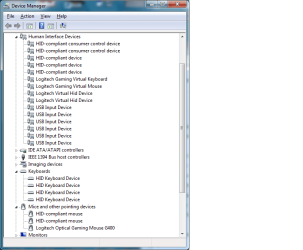
It is enabled in the registry, I read a solution where you delete all HID entries from device manager then rescan for hw changes, this worked 1 time however device manager now shows 1 logitech keyboard and 3 more HID compliant keyboards and same for mice, 1 logitech and 3 HID compliant.
I updated the logitech software from 8.3 to 8.4 and installed the latest video driver(s) from AMD because I started in safe mode\command prompt to run SFC but got a message saying screensaver could not start because of a direct3d driver problem.
DXdiag detects no problems.

1. How do I restore screensaver operatin to normal (system restore is absolute last resort) ?

2, How do I remove the ghost devices from device manager ?
If necessary I am capable of editing registry with reliable instructions.
TIA
 

My Computer My Computer

At a glance

win 7 home premium 64-bit SP1AMD black phenom II 9654 GigRadeon 4600
Computer Manufacturer/Model Number
Barebones
OS
win 7 home premium 64-bit SP1
CPU
AMD black phenom II 965
Motherboard
gigabyte 880GA-UD3H
Memory
4 Gig
Graphics Card(s)
Radeon 4600
Sound Card
onboard realtek
Monitor(s) Displays
AOC 24"
Hard Drives
2 x 1TB
Cooling
electric
Unfortunately, for me the answer was to reset to factory settings... nothing was working... the screensaver was the tip of the iceberg.

Now that I'm back up with most programs installed the screensaver and screen off works as programed.

For those speaking of mice, it might be interesting to note that I have a wired mouse and keyboard plugged into a Belkin unit that lets me use both of them and the screen for two computers. I bought a wireless mouse and installed that in an independent usb port in front. I have no conflict between these two.

My problem probably started with a conflict between WinTV and Media Center. Or more likely because I used an app that forced Media Center to recognize the digital tuners on the Hauppauge TV card. Canada does not allow it for some reason though it works fine with WinTV. Now the logitech wireless can open and close WinTV from a distance and I won't even set up Media Center for TV to prevent corruption of the app and elimination of conflicts over use.

I hope no one has to go to such extremes.
 

My Computer My Computer

At a glance

Microsoft Windows 7 Home Premium 64-bit 7601 ...Intel(R) Core(TM) i5-2300 CPU @ 2.80GHz6 GBRadeon 6750 1gb
Computer Manufacturer/Model Number
HP Pavilion p6745f
OS
Microsoft Windows 7 Home Premium 64-bit 7601 Multiprocessor Free Service Pack 1
CPU
Intel(R) Core(TM) i5-2300 CPU @ 2.80GHz
Motherboard
PEGATRON CORPORATION 2AB6
Memory
6 GB
Graphics Card(s)
Radeon 6750 1gb
Sound Card
(1) IDT High Definition Audio CODEC (2) Intel(R) Display A
Monitor(s) Displays
Acer x193w
Hard Drives
(1) WDC WD15EARS-60MVWB0 (2) Generic- Compact Flash USB Device (3) Generic- MS/MS-Pro USB Device (4) Generic- SD/MMC USB Device (5) Generic- SM/xD-Picture USB Device (6) WD My Book 1110 USB Device
PSU
Internal 500W (100V-240V)
Case
Mid-size ATX
Cooling
unknown
Keyboard
HP usb multimedia keyboard
Mouse
HP usb compliant mouse
Internet Speed
256 kbps
Other Info
Ver: CHI_713.bin vCHI7.13
FYI Re screensaver not working

This does not resolve my issue however I have discovered that, if VLC media player is in use, whether operating or idle on the taskbar, the screensaver will not init.
 

My Computer My Computer

At a glance

win 7 home premium 64-bit SP1AMD black phenom II 9654 GigRadeon 4600
Computer Manufacturer/Model Number
Barebones
OS
win 7 home premium 64-bit SP1
CPU
AMD black phenom II 965
Motherboard
gigabyte 880GA-UD3H
Memory
4 Gig
Graphics Card(s)
Radeon 4600
Sound Card
onboard realtek
Monitor(s) Displays
AOC 24"
Hard Drives
2 x 1TB
Cooling
electric
Ghost Devices

Here's a snapshot
 

Attachments

  • DM1.png
    DM1.png
    19.5 KB · Views: 136

My Computer My Computer

At a glance

win 7 home premium 64-bit SP1AMD black phenom II 9654 GigRadeon 4600
Computer Manufacturer/Model Number
Barebones
OS
win 7 home premium 64-bit SP1
CPU
AMD black phenom II 965
Motherboard
gigabyte 880GA-UD3H
Memory
4 Gig
Graphics Card(s)
Radeon 4600
Sound Card
onboard realtek
Monitor(s) Displays
AOC 24"
Hard Drives
2 x 1TB
Cooling
electric
Sorry!

Yes, of course it doesn't and I'm sorry.

Have you looked for programs that automatically report usage? Is your modem on when this happens or off or both? Some programs try to phone home all the time... they might keep your screensaver from running. I remember when I was running Vista I had allowed such an anonymous reporting service to operate. If I remembered to go into Task Manager and disable that function, the screen would go black (as I programmed it) after one minute (for listening to music at night). It might be something like that.
 

My Computer My Computer

At a glance

Microsoft Windows 7 Home Premium 64-bit 7601 ...Intel(R) Core(TM) i5-2300 CPU @ 2.80GHz6 GBRadeon 6750 1gb
Computer Manufacturer/Model Number
HP Pavilion p6745f
OS
Microsoft Windows 7 Home Premium 64-bit 7601 Multiprocessor Free Service Pack 1
CPU
Intel(R) Core(TM) i5-2300 CPU @ 2.80GHz
Motherboard
PEGATRON CORPORATION 2AB6
Memory
6 GB
Graphics Card(s)
Radeon 6750 1gb
Sound Card
(1) IDT High Definition Audio CODEC (2) Intel(R) Display A
Monitor(s) Displays
Acer x193w
Hard Drives
(1) WDC WD15EARS-60MVWB0 (2) Generic- Compact Flash USB Device (3) Generic- MS/MS-Pro USB Device (4) Generic- SD/MMC USB Device (5) Generic- SM/xD-Picture USB Device (6) WD My Book 1110 USB Device
PSU
Internal 500W (100V-240V)
Case
Mid-size ATX
Cooling
unknown
Keyboard
HP usb multimedia keyboard
Mouse
HP usb compliant mouse
Internet Speed
256 kbps
Other Info
Ver: CHI_713.bin vCHI7.13
I had this problem with the screensaver not working because of my wireless mouse. Found the fix on another forum, you need to load the latest driver throught the attached link Software Downloads | Microsoft Hardware
 

My Computer My Computer

At a glance

Window 7i74 gb
Computer Manufacturer/Model Number
HP
OS
Window 7
CPU
i7
Memory
4 gb
Monitor(s) Displays
24" LG Flatron
My fix was to disable the wake-up features of devices other than my keyboard in device manager (under power management untick "allow this device to wake the computer").

You can find out what woke your computer last by hitting the green button, typing cmd and hitting cmd.exe when it comes up on top of the start menu. After giving permission to run command, type "powercfg /lastwake" to find out what woke your computer last.

I found out which device was the culprit by typing into the command dialog
"powercfg /devicequery wake_armed"

That will tell you what woke your computer last.
 
Last edited:

My Computer My Computer

At a glance

Microsoft Windows 7 Home Premium 64-bit 7601 ...Intel(R) Core(TM) i5-2300 CPU @ 2.80GHz6 GBRadeon 6750 1gb
Computer Manufacturer/Model Number
HP Pavilion p6745f
OS
Microsoft Windows 7 Home Premium 64-bit 7601 Multiprocessor Free Service Pack 1
CPU
Intel(R) Core(TM) i5-2300 CPU @ 2.80GHz
Motherboard
PEGATRON CORPORATION 2AB6
Memory
6 GB
Graphics Card(s)
Radeon 6750 1gb
Sound Card
(1) IDT High Definition Audio CODEC (2) Intel(R) Display A
Monitor(s) Displays
Acer x193w
Hard Drives
(1) WDC WD15EARS-60MVWB0 (2) Generic- Compact Flash USB Device (3) Generic- MS/MS-Pro USB Device (4) Generic- SD/MMC USB Device (5) Generic- SM/xD-Picture USB Device (6) WD My Book 1110 USB Device
PSU
Internal 500W (100V-240V)
Case
Mid-size ATX
Cooling
unknown
Keyboard
HP usb multimedia keyboard
Mouse
HP usb compliant mouse
Internet Speed
256 kbps
Other Info
Ver: CHI_713.bin vCHI7.13
Sceennsaver

Thank you for the replies.
The mouse is usb corded and the modem is always on.
Someone drove into a power pole in March and xaused a power outage after which I could no longer connect to the internet.
I kept getting winsodk init failed failed and wrong version winsock messages so after all else failed I reinstalled windows which restored interbet access and fixed whatever ther screensaver activation problem was (for now).
 

My Computer My Computer

At a glance

win 7 home premium 64-bit SP1AMD black phenom II 9654 GigRadeon 4600
Computer Manufacturer/Model Number
Barebones
OS
win 7 home premium 64-bit SP1
CPU
AMD black phenom II 965
Motherboard
gigabyte 880GA-UD3H
Memory
4 Gig
Graphics Card(s)
Radeon 4600
Sound Card
onboard realtek
Monitor(s) Displays
AOC 24"
Hard Drives
2 x 1TB
Cooling
electric
my current 2 cents:
it seems that my screen saver / display power off stopped working when i updated the intel wifi driver. the old driver failed to stay connected to most n-routers, the new one is ok. i'm on win7-64, and yes, "allow this device to wake up the computer" is unchecked in the device manager.

so now i have a choice between n / display powering off. don't like it one bit.

anyone seen the same phenomenon?

EDIT:
--------------------
played with this some more. seems that the intel wifi nic is not the culprit after all - even disabling it the screen still stays on. plus - the machine does not run tasks scheduled to run on idle.
 
Last edited:

My Computer My Computer

At a glance

Windows 7 Ultimate x64
OS
Windows 7 Ultimate x64
I have read the posts here with interest. Whilst I may be missing something, I don't understand why everyone is using a screensaver, in this day and age of flat screens. Unless you are still using a CRT monitor, there is no necessity for a screensaver. At least, that is my understanding. If anyone wishes to correct me, feel free: at 67 I am still learning and will accept any constructive criticism as education.

I have used a Logitech MK 250 wireless KB & mouse for almost 2 years now and have had none of the Power management problems here described. I have not used a screensaver since my first 19" flat screen, 5 years ago. (I now have a 24" Liyama.) This is not meant as criticism, I am simply intrigued by the fact that others still use a screensaver and would like to know if there is an actual technical reason for it.
 

My Computer My Computer

At a glance

Windows 7/64 HPremium.AMD FX-6300.Corsair (2x4) GB DDR3 CMXGX3M2A1337CL9.NVidia/Gigabyte GT730 (2GB) GDDR5.
Computer type
PC/Desktop
Computer Manufacturer/Model Number
bertison
OS
Windows 7/64 HPremium.
CPU
AMD FX-6300.
Motherboard
Asus M5A78L-M LE/USB3.
Memory
Corsair (2x4) GB DDR3 CMXGX3M2A1337CL9.
Graphics Card(s)
NVidia/Gigabyte GT730 (2GB) GDDR5.
Sound Card
Onboard.
Monitor(s) Displays
Iiyama PLE2407HDS.
Screen Resolution
1920 x 1280
Hard Drives
Desktop: 1TB. WD10EZEX-00BN5A0.
Zyxel nsa310 NAS: 2TB Seagate Barracuda 7200.14.
Cache Drive: Sandisk SDSSDRC032G.
Laptop Lenovo B50/80 128 GB SSD.
PSU
Corsair 750M.
Case
Coolermaster N300.
Cooling
FRONT: (2X) 140mm. TOP: (1x) 120mm. REAR: (1x) 120mm.
Keyboard
Logitech K290
Mouse
Trust Optical Wired
Internet Speed
15 Mb Down, 0.55 Up.
Antivirus
Kaspersky Total Security 2017, Hitman Pro.
Browser
Firefox.
Other Info
NETWORK:
Sky "Q box" and router.
Desktop & NAS - 30 Metres Cat6 Ethernet wired, via TP-Link 4-port switch.
Lenovo B50/80 Laptop, 2x Wileyfox phones, Lenovo TAB3-8 tablet - all wireless.
Grandchildren, their parents and friends as bandwidth 'parasites' at various times!
dear bertison - we use screen savers for fun!

or - if in an office environment, it's nice to know that every passer-by doesn't eyeball your screen during your lunch break even if you didn't switch it off.

i could live without a screensaver, no problem, but i do want the display to power off when idle.
 

My Computer My Computer

At a glance

Windows 7 Ultimate x64
OS
Windows 7 Ultimate x64
Screensaver Fun!

Hi zdoe

Thanks for that: think I remember "fun". Some 40-odd years ago, before my first marriage.:(

Or maybe today, when my 6 year old granddaughter wants a (willing) playmate.:D

Think I will try a screensaver, and change it regularly. Is that allowed?;)
 

My Computer My Computer

At a glance

Windows 7/64 HPremium.AMD FX-6300.Corsair (2x4) GB DDR3 CMXGX3M2A1337CL9.NVidia/Gigabyte GT730 (2GB) GDDR5.
Computer type
PC/Desktop
Computer Manufacturer/Model Number
bertison
OS
Windows 7/64 HPremium.
CPU
AMD FX-6300.
Motherboard
Asus M5A78L-M LE/USB3.
Memory
Corsair (2x4) GB DDR3 CMXGX3M2A1337CL9.
Graphics Card(s)
NVidia/Gigabyte GT730 (2GB) GDDR5.
Sound Card
Onboard.
Monitor(s) Displays
Iiyama PLE2407HDS.
Screen Resolution
1920 x 1280
Hard Drives
Desktop: 1TB. WD10EZEX-00BN5A0.
Zyxel nsa310 NAS: 2TB Seagate Barracuda 7200.14.
Cache Drive: Sandisk SDSSDRC032G.
Laptop Lenovo B50/80 128 GB SSD.
PSU
Corsair 750M.
Case
Coolermaster N300.
Cooling
FRONT: (2X) 140mm. TOP: (1x) 120mm. REAR: (1x) 120mm.
Keyboard
Logitech K290
Mouse
Trust Optical Wired
Internet Speed
15 Mb Down, 0.55 Up.
Antivirus
Kaspersky Total Security 2017, Hitman Pro.
Browser
Firefox.
Other Info
NETWORK:
Sky "Q box" and router.
Desktop & NAS - 30 Metres Cat6 Ethernet wired, via TP-Link 4-port switch.
Lenovo B50/80 Laptop, 2x Wileyfox phones, Lenovo TAB3-8 tablet - all wireless.
Grandchildren, their parents and friends as bandwidth 'parasites' at various times!
update2 - i think i've pinned down the culprit - usbaudio.sys.

New USB Audio Driver from Windows 7 SP1

so actually the problem is that the system is never idle enough to sleep / shut off the display. high cpu usage caused by external USB speakers. though i never experienced this with another USB audio stick.

extensive googling shows that win7-64 usb audio driver is at fault. this may get fixed once i upgrade to sp1. or - if i can find them, the xp-64 usb audio drivers might work.

anyone got an xp-64 disc that you could pull them for me from?
 
Last edited:

My Computer My Computer

At a glance

Windows 7 Ultimate x64
OS
Windows 7 Ultimate x64
The Fix That Wroked...for me

:DHats off to the poster who said turn off the laptop, remove the battery and wait 60 seconds. I actually waited 5 minutes. My screensaver and power settings work like new!
 

My Computer My Computer

At a glance

Microsoft Windows 7 Home PremiumIntel Celeron3 GBInter GMA Notebook
Computer Manufacturer/Model Number
Acer Aspire 5315-2153
OS
Microsoft Windows 7 Home Premium
CPU
Intel Celeron
Motherboard
530 @ 1.73 GHz
Memory
3 GB
Graphics Card(s)
Inter GMA Notebook
Sound Card
High Definintion Audio
Monitor(s) Displays
Generic PnP
Hard Drives
WDC 320 ATA
Just to make sure someone knows about my battle with the screensaver not starting when I hooked up a Logitech M515 optical mouse on an Inspirion 8500 (2002 vintage) running Windows 2000Pro w/service pack 4. Tried numerous fixes found online. None worked until I found the Logitech forum. SetPoint 3.1.116, found on the logitech site, corrected the "Optical Mouse Not Allowing The Screensaver To Start" problem immediately.

The mouse tilt wheel function also works fine with this old driver.

This driver is generic enough to work with just about any mouse. The driver is listed for Windows 2000 and XP.

Hope this helps soemone who has spent as much time as I have trying to keep the mouse and have the screensaver work.


Now, a question for Logitech. Why does this driver work fine, but 6.X driver does nothing for the problem. Maybe someone should look at this driver and find out what was screwed up in the new drivers.


NAH, that would make too much sense.
 

My Computer My Computer

At a glance

Windows 2000Pro w/service pack 4Intel Core2 DUo2GigNVIDIA GeForce 9400GT
Computer Manufacturer/Model Number
Sel Built
OS
Windows 2000Pro w/service pack 4
CPU
Intel Core2 DUo
Motherboard
ECS
Memory
2Gig
Graphics Card(s)
NVIDIA GeForce 9400GT
Sound Card
Soundblaster Live
Monitor(s) Displays
Dell 2400W
Hard Drives
6 ea IDE (PATA)
1 ea SCSI
PSU
600Watt
Case
Old Full Tower
Cooling
4 fans + Power Supply fan
my resolution to what i was writing a few posts up:

sp1, and replacing the attached USB-audio device. problem solved.

likelier culprit than the usbaudio.sys that i was suspecting is the old altec lansing usb-speakers i was using and have now trashed.
 

My Computer My Computer

At a glance

Windows 7 Ultimate x64
OS
Windows 7 Ultimate x64
Back
Top