Screensaver not starting automatically.

townsbg

Well-known member
Guru
Gold Member
VIP
Local time
2:54 AM
Messages
2,091
Sometimes, and I'm not sure why, but my screensaver doesn't start automatically. This has happened with both the photos screensaver built into windows and one that I've installed. The only resolution is to log out of my profile. Today this happened just after booting up my computer. Any ideas? I have screensaver set to start after 5 minutes.
 

My Computers

System One System Two

Hi Townsbg-

Have you tried doing a clean boot to see if there's some program running in the background which prevents the screensaver from starting?
 

My Computer

Computer type
Laptop
Computer Manufacturer/Model Number
Dell M6500 Precision Work Station
OS
Windows 7 Pro SP1 64 bit
Memory
8 GB
Screen Resolution
1920x
Internet Speed
30 Mbps
Antivirus
Norton Security
Browser
IE 11
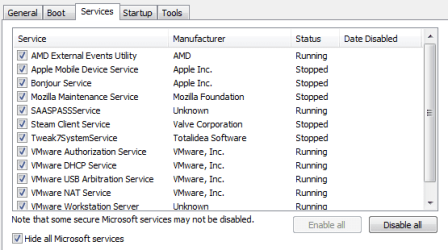
No but I have very little running. I keep services trimmed down. VMWare doesn't start automatically so I know that it isn't that.

services.PNG
 

My Computers

System One System Two

Is something starting up in the background while the computer is left idle? Or is there a process that is not closing down properly?

  1. From an admin command prompt, type powercfg/requests
  2. wait the time screensaver is supposed to kick-in (5 min)
  3. if screensaver does not start, then press <return>

should do the trick, and tell you what is preventing screensaver from starting.
 

My Computer

Computer type
PC/Desktop
OS
Windows 7 x64, Vista x64, 8.1 smartphone
CPU
Intel E8400 65W 64-bit
Motherboard
Gigabyte EP45-UD3LR
Memory
DDR2 2 x 2GB, 1GB x 2
Graphics Card(s)
XFX Radeon HD5750
Sound Card
AMD High Definition Audio; Realtek High Definition Audio
Monitor(s) Displays
iiyama prolite X2377HDS
Screen Resolution
1920 x 1080
Hard Drives
500GB 7200 rpm Seagate ST3500413AS 16MB, 500GB 5400 rpm Toshiba MQ02ABF050H 32MB, 200GB 7200 rpm Seagate ST3200820AS 8MB, 2TB 7200 rpm Western Digital WD20EZRX 64MB
PSU
Enermax Liberty Modular
Case
Antec P193 Midi Tower
Keyboard
Mionix ZIBAL 60
Mouse
Razer USB 2.0 Diamondback Mouse or Huion Graphics Tablet
Browser
Internet Explorer, Lunascape, Firefox, Opera, Avast Safezone
Townsbg- Did you try it?

I like the response from iko22.
 

My Computer

Computer type
Laptop
Computer Manufacturer/Model Number
Dell M6500 Precision Work Station
OS
Windows 7 Pro SP1 64 bit
Memory
8 GB
Screen Resolution
1920x
Internet Speed
30 Mbps
Antivirus
Norton Security
Browser
IE 11
I'll have to wait until it happens again.
 

My Computers

System One System Two

This afternoon I had the issue happen again. I ran your command and it didn't return anything. I changed the timeout to a minute to confirm that it wasn't working and then the screensaver started. It continued to work on 5 minutes throughout the rest of the day. So changing the timeout seemed to correct the issue.

FYI I've run the command every so often throughout the day and each time I had the following immediately after running a VMWare virtual machine. Do you know if there is a connection?

SYSTEM:
[DRIVER] \FileSystem\srvnet
An active remote client has recently sent requests to this machine.
 

My Computers

System One System Two

Had you run VMWare since changing the screensaver timeout to a minute? Did the screensaver work on that occasion? What did powercfg report on that occasion?
 

My Computer

Computer type
PC/Desktop
OS
Windows 7 x64, Vista x64, 8.1 smartphone
CPU
Intel E8400 65W 64-bit
Motherboard
Gigabyte EP45-UD3LR
Memory
DDR2 2 x 2GB, 1GB x 2
Graphics Card(s)
XFX Radeon HD5750
Sound Card
AMD High Definition Audio; Realtek High Definition Audio
Monitor(s) Displays
iiyama prolite X2377HDS
Screen Resolution
1920 x 1080
Hard Drives
500GB 7200 rpm Seagate ST3500413AS 16MB, 500GB 5400 rpm Toshiba MQ02ABF050H 32MB, 200GB 7200 rpm Seagate ST3200820AS 8MB, 2TB 7200 rpm Western Digital WD20EZRX 64MB
PSU
Enermax Liberty Modular
Case
Antec P193 Midi Tower
Keyboard
Mionix ZIBAL 60
Mouse
Razer USB 2.0 Diamondback Mouse or Huion Graphics Tablet
Browser
Internet Explorer, Lunascape, Firefox, Opera, Avast Safezone
I didn't run VMWare. I changed the timeout to a minute and let it wait immediately. When it worked I changed it back to 5 minutes. I didn't run the command after changing it but prior to changing it the command returned nothing.
 

My Computers

System One System Two

So changing the timeout has reset the timer. It would be interesting to see if this is a permanent fix, or not.

I had this exact same problem, on my Windows 7 but not on my Vista machine. On mine, VMWare is not installed but, like you, I had Steam Client, and I had the AMD External Events Utility (together with an older AMD graphics card).

On my machine, changing the timeout resets the timer - but it was not a permanent fix. Maybe you got lucky with a permanent fix, if not, then I have shared these things with you.​
 

My Computer

Computer type
PC/Desktop
OS
Windows 7 x64, Vista x64, 8.1 smartphone
CPU
Intel E8400 65W 64-bit
Motherboard
Gigabyte EP45-UD3LR
Memory
DDR2 2 x 2GB, 1GB x 2
Graphics Card(s)
XFX Radeon HD5750
Sound Card
AMD High Definition Audio; Realtek High Definition Audio
Monitor(s) Displays
iiyama prolite X2377HDS
Screen Resolution
1920 x 1080
Hard Drives
500GB 7200 rpm Seagate ST3500413AS 16MB, 500GB 5400 rpm Toshiba MQ02ABF050H 32MB, 200GB 7200 rpm Seagate ST3200820AS 8MB, 2TB 7200 rpm Western Digital WD20EZRX 64MB
PSU
Enermax Liberty Modular
Case
Antec P193 Midi Tower
Keyboard
Mionix ZIBAL 60
Mouse
Razer USB 2.0 Diamondback Mouse or Huion Graphics Tablet
Browser
Internet Explorer, Lunascape, Firefox, Opera, Avast Safezone
I have steam installed but I don't use it and the issue predates it. I couldn't even tell you for sure when this started but it's been going on for a while.
 

My Computers

System One System Two

I had this happen again this afternoon. I ran the command and nothing. I changed the timeout back to 1 minute and it worked. It was still working after 5 minutes but I'm getting tired of having to do that. Do you know what I can do to resolve this rather than change the timeout? That isn't a fix but a work around.
 

My Computers

System One System Two

You could run the clean boot, as I suggested earlier. I don't know what's in your Startup folder.
 

My Computer

Computer type
Laptop
Computer Manufacturer/Model Number
Dell M6500 Precision Work Station
OS
Windows 7 Pro SP1 64 bit
Memory
8 GB
Screen Resolution
1920x
Internet Speed
30 Mbps
Antivirus
Norton Security
Browser
IE 11
I think that it's releated to Firefox. The last time this happened I had been using Firefox. Have you even heard of that? Perhaps a ad-on gone haywire?
 

My Computers

System One System Two

I don't use a screen saver so I can't verify if FireFox is causing the problem. However, I did find a blog where it mentions that if you're watching a video or anything similar in FireFox and using full screen mode, it can disable a screen saver. However, that was supposedly fixed. Maybe I'll try a screen saver and see if I can reproduce the issue but don't expect quick turnaround.

However, you said the problem occurred right after starting up hence the suggested clean boot.
 

My Computer

Computer type
Laptop
Computer Manufacturer/Model Number
Dell M6500 Precision Work Station
OS
Windows 7 Pro SP1 64 bit
Memory
8 GB
Screen Resolution
1920x
Internet Speed
30 Mbps
Antivirus
Norton Security
Browser
IE 11
Well that time I had opened FF. But no vids full screen.
 

My Computers

System One System Two

I tried both the Photos and Aurora screen savers and messed around extensively in Firefox a couple of times but it had no effect.
 

My Computer

Computer type
Laptop
Computer Manufacturer/Model Number
Dell M6500 Precision Work Station
OS
Windows 7 Pro SP1 64 bit
Memory
8 GB
Screen Resolution
1920x
Internet Speed
30 Mbps
Antivirus
Norton Security
Browser
IE 11
SAASPASS is security/login related so I can't disable that. Also the issue predates installing that. That only leave the AMD as a non-M$ service that starts automatically. Vmware, iTunes, Tweak, and steam are all manual or disabled.
 

My Computers

System One System Two

You just don't want to run a clean boot, do you? :-)
 

My Computer

Computer type
Laptop
Computer Manufacturer/Model Number
Dell M6500 Precision Work Station
OS
Windows 7 Pro SP1 64 bit
Memory
8 GB
Screen Resolution
1920x
Internet Speed
30 Mbps
Antivirus
Norton Security
Browser
IE 11
Back
Top