Screenshots and Files - Upload and Post in Seven Forums

How to Upload and Post a Screenshot and File in Seven Forums


This tutorial will show you how to upload and attach a screenshot, image, or a file in your post here at Seven Forums.

You will need to turn off enhanced attachment uploading at the bottom of your account's Settings > General Settings page, and Save changes before having the options displayed in this tutorial.
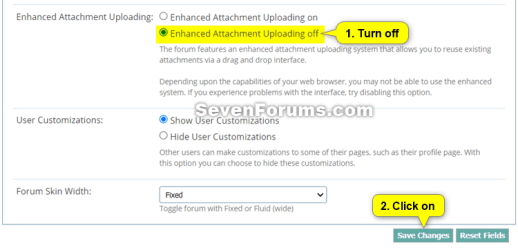
enhanced_attachment_uploading.png

If you are intending to upload large log or diagnostic files then please upload them to a reputable file sharing service such as OneDrive, Google Drive, Dropbox or Amazon Cloud Drive (US) (UK) and post a share link rather then uploading to the forum


You can only upload the file types below up to the size limit per single file.


File TypeMax File Size
7z4.00 MB
bat600.0 KB
docx2.00 MB
gif1.00 MB
ico1.00 MB
jpeg2.00 MB
jpg2.00 MB
log2.00 MB
pdf2.00 MB
png2.00 MB
psd2.00 MB
ps11.00 MB
rar4.00 MB
reg2.00 MB
txt2.00 MB
vbs2.00 MB
wav1.00 MB
xlsx1.00 MB
zip4.00 MB


Contents

  • Option One: To Insert a File or Image into a Post
  • Option Two: To Upload and Insert a File or Image into a "Go Advanced" Post


OPTION ONE

To Insert a File or Image into a Post


If you wanted to create a screenshot to upload, you can create one with Paint (mspaint.exe) or Snipping Tool to upload.


1 While editing your post, place the cursor where you would like to insert the file or image at, and click/tap on the image icon on the toolbar. (see screenshot below)
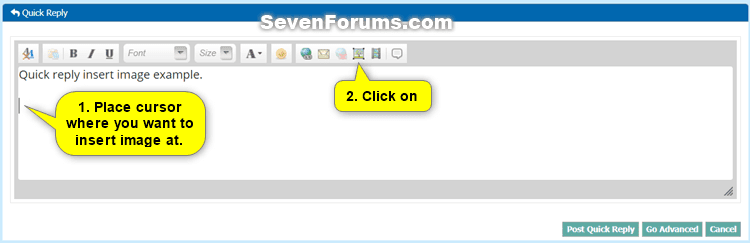
Quick_Reply-1.png

2 Do step 3 (computer) or step 4 (URL) below from where the image you want to upload is located.


3 To Insert File or Image from your Computer

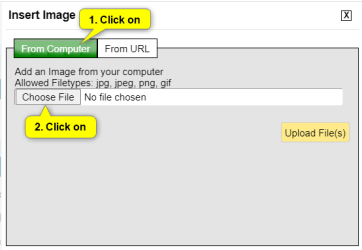
A) Click/tap on the From Computer tab, and click/tap on the Choose Files button. (see screenshot below)
Quick_Reply-2.png

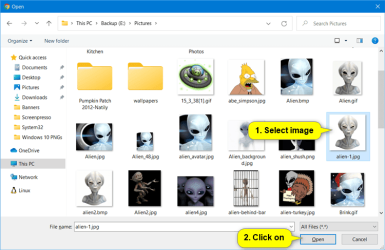
B) Navigate to and select one or more (limit 5 at once) file(s) and/or image(s) you want to insert into your post, and click/tap on the Open button. (see screenshot below)
Quick_Reply-3.png

C) Click/tap on the Upload File(s) button, and go to step 5 below. (see screenshot below)
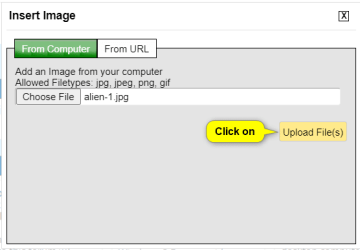
Quick_Reply-4.png


4 To Insert Image from URL

A) Click/tap on the From URL tab, and enter the URL address of the image. (see screenshot below)

B) Check the Retrieve remote file and reference locally box, click/tap on OK, and go to step 5 below. (see screenshot below)
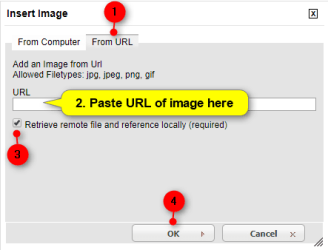
Quick_Reply-5.png


5 Your file(s) and/or image(s) will now be uploaded and inserted into your post. (see screenshot below)

If you like, you could double click/tap on an inserted image to adjust the Image Settings for it below. When finished, click/tap on OK to apply.
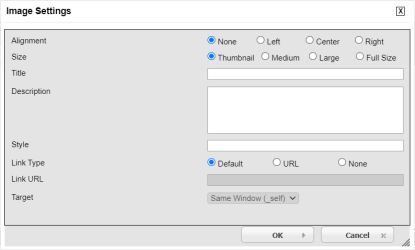
Quick_Reply-7.png

Quick_Reply-6.png

6 When finished with your post, click/tap on either the Post Quick Reply or Submit Reply button to post it. (see screenshot above)


OPTION TWO

To Upload and Insert a File or Image into a "Go Advanced" Post


If you wanted to create a screenshot to upload, you can create one with direct screenshot, Paint (mspaint.exe) or Snipping Tool ready to upload.


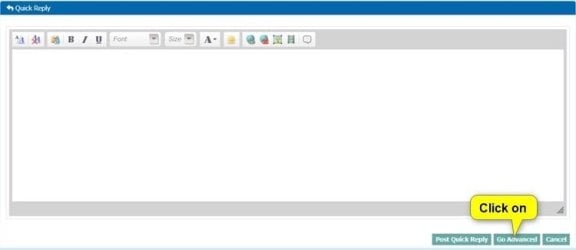
1 While editing your post, click/tap on the Go Advanced button. (see screenshot below)
Go_Advanced-1.jpg

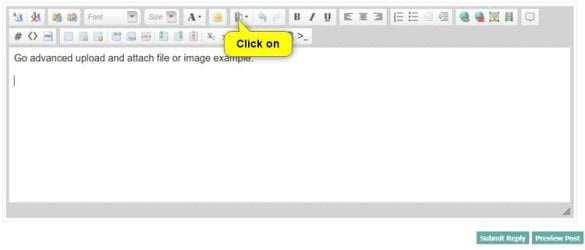
2 Click/tap on the paperclip icon on the toolbar. (see screenshot below)
Go_Advanced-3.jpg

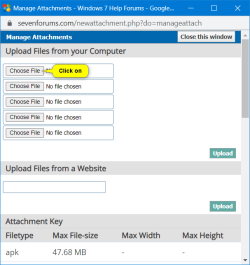
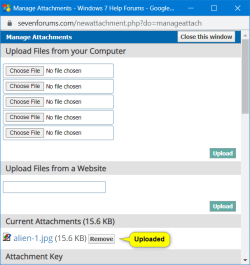
3 Click/tap on an empty Choose File button. (see screenshot below)
Go_Advanced-4.png

4 Navigate to and select the file or image you want to upload, and click/tap on the Open button. (see screenshot below)
Quick_Reply-3.png

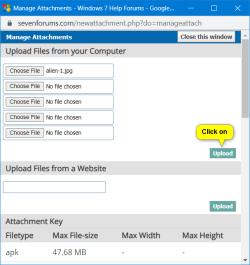
5 When finished choosing files to upload, click/tap on the Upload button. (see screenshot below)
Go_Advanced-5.png

6 After your chosen files have been uploaded, you can close the Manage Attachments window. (see screenshot below)

If you would like to remove one of the uploaded Current Attachments, click/tap on the Remove button to the right of the file you would like to remove.

Go_Advanced-6.png

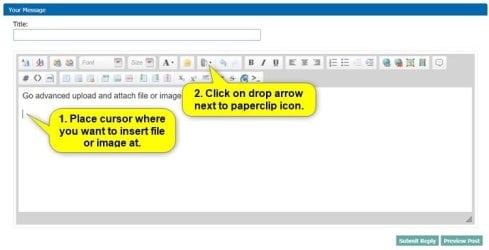
7 While back editing your post, place the cursor where you would like to insert the file or image at, and click/tap on the arrow to the right of the paperclip icon on the toolbar. (see screenshot below)
Go_Advanced-7.jpg

8 Click/tap on the uploaded file in the drop menu you want to insert at this location in your post. (see screenshot below)
Go_Advanced-8.jpg

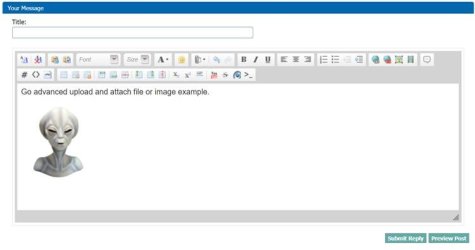
9 Your file(s) and/or image(s) will now be inserted into your post. (see screenshot below)

If you like, you could double click/tap on an inserted image to adjust the Image Settings for it below. When finished, click/tap on OK to apply.
Quick_Reply-7.png

Go_Advanced-9.jpg

10 When finished with your post, click/tap on either the Submit Reply button to post it. (see screenshot above)


That's it,
Shawn Brink


Last edited:
Hello Shawn mate I have a little problem in that I Browse pics in particular to upload them to posts and although I browse and add them in the order I want them to be - thye very often are out of sequence.

ie Attachment 1. B
" 2. C
" 3. A

> instead of A B C?? Is there a secret to getting them in order please??
 

My Computer My Computer

At a glance

Desk1 7 Home Prem / Desk2 10 Pro / Main lap A...Desk1 i5 3750K / Laptop i7 GTX 860M / Desk2 i...Desk1 8GB (1866) / Desk2 16GB (1333) / Laptop...Desk 1& 2NVidia GTX 650 & Laptops on board Intel
Computer type
PC/Desktop
Computer Manufacturer/Model Number
Own build (new) Desk1 / Asus ROG Win 7 / Desk2 1st build
OS
Desk1 7 Home Prem / Desk2 10 Pro / Main lap Asus ROG 10 Pro 2 laptop Toshiba 7 Pro Asus P2520 7 & 10
CPU
Desk1 i5 3750K / Laptop i7 GTX 860M / Desk2 i5 2500
Motherboard
Desk1 Asus P877-V / Desk2 Gigabyte H67 UD3H / Laptop ?
Memory
Desk1 8GB (1866) / Desk2 16GB (1333) / Laptop 8Gb DDR3
Graphics Card(s)
Desk 1& 2NVidia GTX 650 & Laptops on board Intel
Sound Card
Desk 1 & 2 -XONAR DG Realtek High Def audio Laptop
Monitor(s) Displays
Desk 1 Benq HD 2450 / Desk2 Philips 24" / Laptop 17.5"
Screen Resolution
1920x1080 D1 & D2 & Laptop 1
Hard Drives
Desk1 Samsung 120GB 830 SSD
Asus ROG 256GB 850 Pro SSD
Desk2 Samsung 840 256 SSD
Toshiba 120GB EVO
PSU
Desk 1 Corsair HX 1050/ Laptop ? / Desk 2 Corsair HX 650
Case
Desk 1 Cooler HAF XM ? Toshiba laptop / Desk2 Coolermaster
Cooling
Fans on all Desk1 -2 Desk2 - all Coolermasters 5 Laptop ?
Keyboard
Desk 1 MS Sidewinder X6 Desk 2 MS Sidewinder X 4
Mouse
Desk 1&2 - Gigabyte MS 900 gamer - laptop - Logitec wireless
Internet Speed
ADSL2+
Other Info
One other Desktop (tester) and spare Toshba laptop both with SSD's
Running Kaspersky 2016 ISS on all machines config'd identically
Logitec audio stereo systems on each machine (x3)
Canon MG5250MFC
Router/modem TP-Link running WPA2SK
Hey John,

I find that the best way is to use the method in step 10 to attach the uploaded images how you like in the post. :)
 

My Computer My Computer

At a glance

64-bit Windows 11 Pro for WorkstationsIntel i7-8700K OC'd to 5 GHz64 GB (4x16GB) G.SKILL TridentZ RGB DDR4 3600...ASUS ROG-STRIX-GTX1080TI-O11G-GAMING
Computer type
PC/Desktop
Computer Manufacturer/Model Number
Self built custom
OS
64-bit Windows 11 Pro for Workstations
CPU
Intel i7-8700K OC'd to 5 GHz
Motherboard
ASUS ROG Maximus XI Formula Z390
Memory
64 GB (4x16GB) G.SKILL TridentZ RGB DDR4 3600 MHz
Graphics Card(s)
ASUS ROG-STRIX-GTX1080TI-O11G-GAMING
Sound Card
Integrated
Monitor(s) Displays
2 x Samsung Odyssey G7 27"
Screen Resolution
2560x1440
Hard Drives
1TB Samsung 990 PRO M.2,
4TB Samsung 990 PRO PRO M.2,
TerraMaster F8 SSD Plus NAS
PSU
Seasonic Prime Titanium 850W
Case
Thermaltake Core P3
Cooling
Corsair Hydro H115i
Keyboard
Logitech wireless K800
Mouse
Logitech MX Master 4
Internet Speed
2 Gb/s Download and 100 Mb/s Upload
Antivirus
Malwarebyte Anti-Malware Premium
Browser
Google Chrome
Other Info
Logitech Z625 speaker system,
Logitech BRIO 4K Pro webcam,
HP Color LaserJet Pro MFP M477fdn,
APC SMART-UPS RT 1000 XL - SURT1000XLI,
Galaxy S23 Plus phone
Ok mate I will re read that again:)
 

My Computer My Computer

At a glance

Desk1 7 Home Prem / Desk2 10 Pro / Main lap A...Desk1 i5 3750K / Laptop i7 GTX 860M / Desk2 i...Desk1 8GB (1866) / Desk2 16GB (1333) / Laptop...Desk 1& 2NVidia GTX 650 & Laptops on board Intel
Computer type
PC/Desktop
Computer Manufacturer/Model Number
Own build (new) Desk1 / Asus ROG Win 7 / Desk2 1st build
OS
Desk1 7 Home Prem / Desk2 10 Pro / Main lap Asus ROG 10 Pro 2 laptop Toshiba 7 Pro Asus P2520 7 & 10
CPU
Desk1 i5 3750K / Laptop i7 GTX 860M / Desk2 i5 2500
Motherboard
Desk1 Asus P877-V / Desk2 Gigabyte H67 UD3H / Laptop ?
Memory
Desk1 8GB (1866) / Desk2 16GB (1333) / Laptop 8Gb DDR3
Graphics Card(s)
Desk 1& 2NVidia GTX 650 & Laptops on board Intel
Sound Card
Desk 1 & 2 -XONAR DG Realtek High Def audio Laptop
Monitor(s) Displays
Desk 1 Benq HD 2450 / Desk2 Philips 24" / Laptop 17.5"
Screen Resolution
1920x1080 D1 & D2 & Laptop 1
Hard Drives
Desk1 Samsung 120GB 830 SSD
Asus ROG 256GB 850 Pro SSD
Desk2 Samsung 840 256 SSD
Toshiba 120GB EVO
PSU
Desk 1 Corsair HX 1050/ Laptop ? / Desk 2 Corsair HX 650
Case
Desk 1 Cooler HAF XM ? Toshiba laptop / Desk2 Coolermaster
Cooling
Fans on all Desk1 -2 Desk2 - all Coolermasters 5 Laptop ?
Keyboard
Desk 1 MS Sidewinder X6 Desk 2 MS Sidewinder X 4
Mouse
Desk 1&2 - Gigabyte MS 900 gamer - laptop - Logitec wireless
Internet Speed
ADSL2+
Other Info
One other Desktop (tester) and spare Toshba laptop both with SSD's
Running Kaspersky 2016 ISS on all machines config'd identically
Logitec audio stereo systems on each machine (x3)
Canon MG5250MFC
Router/modem TP-Link running WPA2SK
still trying to sort out screenshot - have managed to use sniptool and saved it but cannot attach it - will keep trying
 

My Computer My Computer

At a glance

windows 7 home premium
Computer type
PC/Desktop
Computer Manufacturer/Model Number
dell inspironN7110?
OS
windows 7 home premium
Antivirus
Norton
Browser
Internet Explorer
Hello Cathode,

Most people miss step 10 after uploading if it helps. :)
 

My Computer My Computer

At a glance

64-bit Windows 11 Pro for WorkstationsIntel i7-8700K OC'd to 5 GHz64 GB (4x16GB) G.SKILL TridentZ RGB DDR4 3600...ASUS ROG-STRIX-GTX1080TI-O11G-GAMING
Computer type
PC/Desktop
Computer Manufacturer/Model Number
Self built custom
OS
64-bit Windows 11 Pro for Workstations
CPU
Intel i7-8700K OC'd to 5 GHz
Motherboard
ASUS ROG Maximus XI Formula Z390
Memory
64 GB (4x16GB) G.SKILL TridentZ RGB DDR4 3600 MHz
Graphics Card(s)
ASUS ROG-STRIX-GTX1080TI-O11G-GAMING
Sound Card
Integrated
Monitor(s) Displays
2 x Samsung Odyssey G7 27"
Screen Resolution
2560x1440
Hard Drives
1TB Samsung 990 PRO M.2,
4TB Samsung 990 PRO PRO M.2,
TerraMaster F8 SSD Plus NAS
PSU
Seasonic Prime Titanium 850W
Case
Thermaltake Core P3
Cooling
Corsair Hydro H115i
Keyboard
Logitech wireless K800
Mouse
Logitech MX Master 4
Internet Speed
2 Gb/s Download and 100 Mb/s Upload
Antivirus
Malwarebyte Anti-Malware Premium
Browser
Google Chrome
Other Info
Logitech Z625 speaker system,
Logitech BRIO 4K Pro webcam,
HP Color LaserJet Pro MFP M477fdn,
APC SMART-UPS RT 1000 XL - SURT1000XLI,
Galaxy S23 Plus phone
Is there a method to attach image files with a template without them having resized when posting and without everytime uploading them separately?
 

My Computer My Computer

At a glance

Windows 10 Proi5-650016GB DDR4 2133 Crucial Ballistix Sport LTMSI GeForce GTX 1060 GAMING X 6G
Computer type
PC/Desktop
Computer Manufacturer/Model Number
Custom build
OS
Windows 10 Pro
CPU
i5-6500
Motherboard
Gigabyte B150-HD3P-CF
Memory
16GB DDR4 2133 Crucial Ballistix Sport LT
Graphics Card(s)
MSI GeForce GTX 1060 GAMING X 6G
Sound Card
Intel Display Audio
Monitor(s) Displays
Liyama ProLite XB2483HSU-B2
Screen Resolution
1920 x 1080
Hard Drives
Crucial MX200 500GB & Toshiba DT01ACA300 3TB
PSU
Corsair RM550x
Case
Fractal Design Define S
Cooling
Cooler Master TX3 i
Keyboard
Func KB-460 (MX Red)
Mouse
Corsair Gaming M65 RGB
Antivirus
Bitdefender Total Security 2016 + MBAM Pro + MBAE Pro
Browser
Google Chrome
Other Info
Creative Sound Blaster Tactic3D Rage V2 headset
Have you tried adding the images to your forum album and using them from there?
 

My Computer My Computer

At a glance

Windows 11
Computer type
PC/Desktop
OS
Windows 11
Yes I have, unfortunately the same thing happens and I just tried it again.
 

My Computer My Computer

At a glance

Windows 10 Proi5-650016GB DDR4 2133 Crucial Ballistix Sport LTMSI GeForce GTX 1060 GAMING X 6G
Computer type
PC/Desktop
Computer Manufacturer/Model Number
Custom build
OS
Windows 10 Pro
CPU
i5-6500
Motherboard
Gigabyte B150-HD3P-CF
Memory
16GB DDR4 2133 Crucial Ballistix Sport LT
Graphics Card(s)
MSI GeForce GTX 1060 GAMING X 6G
Sound Card
Intel Display Audio
Monitor(s) Displays
Liyama ProLite XB2483HSU-B2
Screen Resolution
1920 x 1080
Hard Drives
Crucial MX200 500GB & Toshiba DT01ACA300 3TB
PSU
Corsair RM550x
Case
Fractal Design Define S
Cooling
Cooler Master TX3 i
Keyboard
Func KB-460 (MX Red)
Mouse
Corsair Gaming M65 RGB
Antivirus
Bitdefender Total Security 2016 + MBAM Pro + MBAE Pro
Browser
Google Chrome
Other Info
Creative Sound Blaster Tactic3D Rage V2 headset
Both of the images in your album would need to resize as they are bigger than the post area.
 

My Computer My Computer

At a glance

Windows 11
Computer type
PC/Desktop
OS
Windows 11
Finally, no resizing anymore :)
Thanks for the help :)
 

My Computer My Computer

At a glance

Windows 10 Proi5-650016GB DDR4 2133 Crucial Ballistix Sport LTMSI GeForce GTX 1060 GAMING X 6G
Computer type
PC/Desktop
Computer Manufacturer/Model Number
Custom build
OS
Windows 10 Pro
CPU
i5-6500
Motherboard
Gigabyte B150-HD3P-CF
Memory
16GB DDR4 2133 Crucial Ballistix Sport LT
Graphics Card(s)
MSI GeForce GTX 1060 GAMING X 6G
Sound Card
Intel Display Audio
Monitor(s) Displays
Liyama ProLite XB2483HSU-B2
Screen Resolution
1920 x 1080
Hard Drives
Crucial MX200 500GB & Toshiba DT01ACA300 3TB
PSU
Corsair RM550x
Case
Fractal Design Define S
Cooling
Cooler Master TX3 i
Keyboard
Func KB-460 (MX Red)
Mouse
Corsair Gaming M65 RGB
Antivirus
Bitdefender Total Security 2016 + MBAM Pro + MBAE Pro
Browser
Google Chrome
Other Info
Creative Sound Blaster Tactic3D Rage V2 headset
You can also add the images in a post template now that they are in your albums ;)
Just use insert image and paste the url of the album image link.

There is a limit on how many images can be in the album can't remember what that limit is 50 I believe ?
 

My Computer My Computer

At a glance

Win-7-Pro64bit 7-H-Prem-64biti7-5930K 2nd i9-9940x both water blocked VRM'...Trident-z 3200C14 2nd Trident-z 3600C16EVGA 1080ti ftw3 2nd Titan Xp both water blocked
Computer type
PC/Desktop
Computer Manufacturer/Model Number
Custom assembled by me :}
OS
Win-7-Pro64bit 7-H-Prem-64bit
CPU
i7-5930K 2nd i9-9940x both water blocked VRM's too
Motherboard
ASUS SABERTOOTH X99 2nd ASUS x299 Apex
Memory
Trident-z 3200C14 2nd Trident-z 3600C16
Graphics Card(s)
EVGA 1080ti ftw3 2nd Titan Xp both water blocked
Sound Card
Built-in Realtek
Monitor(s) Displays
1-AOC G2460PG 24"G-Sync 144Hz/ 2nd 1-ASUS VG248QE 24" 144Hz
Screen Resolution
1920 x 1080 144Hz
Hard Drives
2-Samsung M.2 Evo & Evo Plus
2-Samsung 850 EVO 500GB SSD's/ 3-2.5 W.D. Black 1tb-&3-1tb/3-3.5 WD Black 1tb hdd's
PSU
EVGA SuperNOVA 1000-P2 2nd 1200-P2
Case
2-Corsair Obsidian Series 450D Black ATX Mid Tower
Cooling
Custom water loops
Keyboard
Logitech G710+/ 2nd Logitech G910
Mouse
2-RedDragon M901 Perdition 16400 dpi Gaming mouse = wired
Internet Speed
Comcast Ping 19ms 89.31mbps download speed 6.12mbps upload
Antivirus
Malwarebytes Pro/ Superantispyware Pro
Browser
FireFox & Pale moon
Other Info
2nd ASUS X299 Apex/Intel i9-9940x with Custom water loop/7H-Prem-x64/Corsair 450D case/Ram Trident-z 3600C16 4x8gb / Samsung970Evo plus 500gb SSD/Dual ssd EZ swap evo/PSU EVGA SuperNova 1200w-P2 80+Platinum/GPU Titan Xp /8-ML-140 on push-pull on 2-280GTX rads
Thanks, Ive not used the Album function before, from now on, I'll give it a try.
 

Attachments

  • cheers klx.png
    cheers klx.png
    1.8 KB · Views: 4,786

My Computer My Computer

At a glance

w7 pro 32 bit w/XP virt enabled.AMD A6-36504 GB DDR3 RAMNVIDIA GeForce 210
Computer type
PC/Desktop
Computer Manufacturer/Model Number
locally made
OS
w7 pro 32 bit w/XP virt enabled.
CPU
AMD A6-3650
Motherboard
ASUS F1A55-M CSM
Memory
4 GB DDR3 RAM
Graphics Card(s)
NVIDIA GeForce 210
Sound Card
NVIDIA High Definition Audio
Monitor(s) Displays
28" HD monitor
Screen Resolution
1680 x 1050 x 32 bits (4294967296 colors) @ 59 Hz
Hard Drives
2 x 500 GB Western Digital Blue Hard Drive
PSU
?
Case
?
Cooling
3-4 fans
Keyboard
big yellow keys
Mouse
logitec
Internet Speed
60 mb
Antivirus
panda
Browser
ff
Other Info
scanner, webcam, bw printer, fax modem, cd/dvd burner, PC usb ports: 2 usb3, 6 usb2 plus 7 port usb hub, 2 tb usb3, 1 Tb usb3, 500Mb usb2, 120Mb USB2 portable drives, asst of flash drives 250 Mb to 32 Gb. backup PC, office
Selvan,

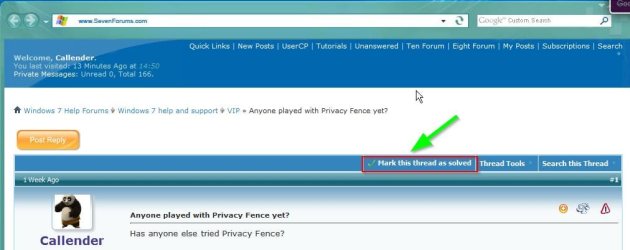
Thanks, problem is solved, please where is Check Mark?
See image below:
 

Attachments

  • cheers klx chainwheel.png
    cheers klx chainwheel.png
    4.7 KB · Views: 3,916
  • 7 forum, top of listing.jpg
    7 forum, top of listing.jpg
    50.6 KB · Views: 569

My Computer My Computer

At a glance

w7 pro 32 bit w/XP virt enabled.AMD A6-36504 GB DDR3 RAMNVIDIA GeForce 210
Computer type
PC/Desktop
Computer Manufacturer/Model Number
locally made
OS
w7 pro 32 bit w/XP virt enabled.
CPU
AMD A6-3650
Motherboard
ASUS F1A55-M CSM
Memory
4 GB DDR3 RAM
Graphics Card(s)
NVIDIA GeForce 210
Sound Card
NVIDIA High Definition Audio
Monitor(s) Displays
28" HD monitor
Screen Resolution
1680 x 1050 x 32 bits (4294967296 colors) @ 59 Hz
Hard Drives
2 x 500 GB Western Digital Blue Hard Drive
PSU
?
Case
?
Cooling
3-4 fans
Keyboard
big yellow keys
Mouse
logitec
Internet Speed
60 mb
Antivirus
panda
Browser
ff
Other Info
scanner, webcam, bw printer, fax modem, cd/dvd burner, PC usb ports: 2 usb3, 6 usb2 plus 7 port usb hub, 2 tb usb3, 1 Tb usb3, 500Mb usb2, 120Mb USB2 portable drives, asst of flash drives 250 Mb to 32 Gb. backup PC, office
Hello klxdrt, :)

The "Mark as solved" button is only available in threads you created in the forum areas, and not in tutorials.
 

My Computer My Computer

At a glance

64-bit Windows 11 Pro for WorkstationsIntel i7-8700K OC'd to 5 GHz64 GB (4x16GB) G.SKILL TridentZ RGB DDR4 3600...ASUS ROG-STRIX-GTX1080TI-O11G-GAMING
Computer type
PC/Desktop
Computer Manufacturer/Model Number
Self built custom
OS
64-bit Windows 11 Pro for Workstations
CPU
Intel i7-8700K OC'd to 5 GHz
Motherboard
ASUS ROG Maximus XI Formula Z390
Memory
64 GB (4x16GB) G.SKILL TridentZ RGB DDR4 3600 MHz
Graphics Card(s)
ASUS ROG-STRIX-GTX1080TI-O11G-GAMING
Sound Card
Integrated
Monitor(s) Displays
2 x Samsung Odyssey G7 27"
Screen Resolution
2560x1440
Hard Drives
1TB Samsung 990 PRO M.2,
4TB Samsung 990 PRO PRO M.2,
TerraMaster F8 SSD Plus NAS
PSU
Seasonic Prime Titanium 850W
Case
Thermaltake Core P3
Cooling
Corsair Hydro H115i
Keyboard
Logitech wireless K800
Mouse
Logitech MX Master 4
Internet Speed
2 Gb/s Download and 100 Mb/s Upload
Antivirus
Malwarebyte Anti-Malware Premium
Browser
Google Chrome
Other Info
Logitech Z625 speaker system,
Logitech BRIO 4K Pro webcam,
HP Color LaserJet Pro MFP M477fdn,
APC SMART-UPS RT 1000 XL - SURT1000XLI,
Galaxy S23 Plus phone
You can only "Solve" threads that you started:

Solved.jpg
 

My Computer My Computer

At a glance

Microsoft Windows 7 Home Premium 64-bit 7601 ...AMD C-60 APU with Radeon(tm) HD Graphics4.00 GBAMD Radeon HD 6290 Graphics
Computer type
Laptop
Computer Manufacturer/Model Number
ASUS
OS
Microsoft Windows 7 Home Premium 64-bit 7601 Multiprocessor Free Service Pack 1
CPU
AMD C-60 APU with Radeon(tm) HD Graphics
Motherboard
ASUSTeK COMPUTER INC. X501U
Memory
4.00 GB
Graphics Card(s)
AMD Radeon HD 6290 Graphics
Sound Card
(1) AMD High Definition Audio Device (2) Realtek High Defi
Screen Resolution
1366 x 768 x 32 bits (4294967296 colors) @ 60 Hz
Hard Drives
Hitachi HTS545050A7E380 SATA Disk Device
Antivirus
Comodo CIS & FW, SecureAplus App Whitelisting, Threatfire
Browser
Cyberfox 64bit, Opera 64bit, Airfox
Other Info
Spy-The-Spy, HitmanPro.Alert, Norton Connect Safe, MJRegWatcher, BitDefender TrafficLight, Voodoo Shield, Zemana AntiMalware
Brink,

Didn't know that.
 

Attachments

  • cheers klx chainwheel.png
    cheers klx chainwheel.png
    4.7 KB · Views: 3,880
  • sorry 2.jpg
    sorry 2.jpg
    7.1 KB · Views: 3,976

My Computer My Computer

At a glance

w7 pro 32 bit w/XP virt enabled.AMD A6-36504 GB DDR3 RAMNVIDIA GeForce 210
Computer type
PC/Desktop
Computer Manufacturer/Model Number
locally made
OS
w7 pro 32 bit w/XP virt enabled.
CPU
AMD A6-3650
Motherboard
ASUS F1A55-M CSM
Memory
4 GB DDR3 RAM
Graphics Card(s)
NVIDIA GeForce 210
Sound Card
NVIDIA High Definition Audio
Monitor(s) Displays
28" HD monitor
Screen Resolution
1680 x 1050 x 32 bits (4294967296 colors) @ 59 Hz
Hard Drives
2 x 500 GB Western Digital Blue Hard Drive
PSU
?
Case
?
Cooling
3-4 fans
Keyboard
big yellow keys
Mouse
logitec
Internet Speed
60 mb
Antivirus
panda
Browser
ff
Other Info
scanner, webcam, bw printer, fax modem, cd/dvd burner, PC usb ports: 2 usb3, 6 usb2 plus 7 port usb hub, 2 tb usb3, 1 Tb usb3, 500Mb usb2, 120Mb USB2 portable drives, asst of flash drives 250 Mb to 32 Gb. backup PC, office
Attached file size limits

Hi,

I see that the file limit size for jpg's is 2.0MB .

Is that per file?

Or ...

Must the sum total of all jpg's attached total
no more than 2.0MB ?

Thanks!
 

My Computer My Computer

At a glance

Windows 7 Pro 64 bit
Computer type
PC/Desktop
Computer Manufacturer/Model Number
Acer
OS
Windows 7 Pro 64 bit
Hi,
As far as I'm aware it is a per file limit not a total of all.
 

My Computer My Computer

At a glance

Win-7-Pro64bit 7-H-Prem-64biti7-5930K 2nd i9-9940x both water blocked VRM'...Trident-z 3200C14 2nd Trident-z 3600C16EVGA 1080ti ftw3 2nd Titan Xp both water blocked
Computer type
PC/Desktop
Computer Manufacturer/Model Number
Custom assembled by me :}
OS
Win-7-Pro64bit 7-H-Prem-64bit
CPU
i7-5930K 2nd i9-9940x both water blocked VRM's too
Motherboard
ASUS SABERTOOTH X99 2nd ASUS x299 Apex
Memory
Trident-z 3200C14 2nd Trident-z 3600C16
Graphics Card(s)
EVGA 1080ti ftw3 2nd Titan Xp both water blocked
Sound Card
Built-in Realtek
Monitor(s) Displays
1-AOC G2460PG 24"G-Sync 144Hz/ 2nd 1-ASUS VG248QE 24" 144Hz
Screen Resolution
1920 x 1080 144Hz
Hard Drives
2-Samsung M.2 Evo & Evo Plus
2-Samsung 850 EVO 500GB SSD's/ 3-2.5 W.D. Black 1tb-&3-1tb/3-3.5 WD Black 1tb hdd's
PSU
EVGA SuperNOVA 1000-P2 2nd 1200-P2
Case
2-Corsair Obsidian Series 450D Black ATX Mid Tower
Cooling
Custom water loops
Keyboard
Logitech G710+/ 2nd Logitech G910
Mouse
2-RedDragon M901 Perdition 16400 dpi Gaming mouse = wired
Internet Speed
Comcast Ping 19ms 89.31mbps download speed 6.12mbps upload
Antivirus
Malwarebytes Pro/ Superantispyware Pro
Browser
FireFox & Pale moon
Other Info
2nd ASUS X299 Apex/Intel i9-9940x with Custom water loop/7H-Prem-x64/Corsair 450D case/Ram Trident-z 3600C16 4x8gb / Samsung970Evo plus 500gb SSD/Dual ssd EZ swap evo/PSU EVGA SuperNova 1200w-P2 80+Platinum/GPU Titan Xp /8-ML-140 on push-pull on 2-280GTX rads
Ok, thanks!
 

My Computer My Computer

At a glance

Windows 7 Pro 64 bit
Computer type
PC/Desktop
Computer Manufacturer/Model Number
Acer
OS
Windows 7 Pro 64 bit
Back
Top