script error for "googletagmanager.com" while installing video driver

Keyes

New member
Member
VIP
Local time
3:56 PM
Messages
122
script error for "googletagmanager.com" while installing video driver

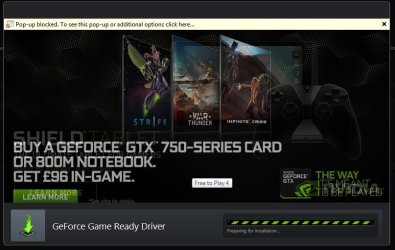
I downloaded the new nvidia drivers via geforce experience. While it was installing, it had a slide show advertising things like shadowplay or nvidia shield, etc. I clicked on one, and it brought me to internet explorer, which was fine.
However, when I clicked on the left side of the slideshow, I an error came up. This thread (not mine) shows a similar one, except replace nvidia.com and some other details with:

Googletagmanager.com

I clicked the red X, and the internet explorer yellow pop up blocked bar came across the installer.
Is this a legitimate error? Googletagmanager appears to be a legitamate domain, and apparently provides live feeds and such or whatever. Does anyone else have this installing the new nvidia drivers?
 

My Computer

Computer type
PC/Desktop
OS
Windows 7 Home Premium 64 bit
sounds like a dodgy bit of coding on Nvidia's part there, it's absolutely nothing to worry about, I think they just use Google tag manager to track how many clicks it has on the ads. You can post a support ticket at Nvidia.com if you want to inform Nvidia about the error, but i'll have a try at clicking the ads in the installer anyway and screenshot the results.

Edit: easily replicated >
script error nvodoa.jpg
nvidia popup.jpg

it continues fine after clicking yes though.
 

My Computer

Computer type
PC/Desktop
Computer Manufacturer/Model Number
Custom Build
OS
Windows 7 Ultimate x64 SP1
CPU
Intel Q6600 @ 2.6Ghz
Motherboard
Evga NF78-CK-132-A 3-Way SLI
Memory
4Gb DDR2 Corsair Dominator @ 800Mhz 5-5-5-15
Graphics Card(s)
EVGA 560 GTX SC FTW 1GB
Sound Card
Realtek HD 7.1 Audio, Plantronics GameCom780 7.1 Headset
Monitor(s) Displays
Dell S2409W
Screen Resolution
1920 x 1080
Hard Drives
SanDisk SDSSDHII-120G-G25 120GB SSD
Samsung 7200RPM 750Gb SATA
Samsung 850 EVO 120GB SSD
Western Digital Green 1TB 7200RPM
PSU
Xigmatek 750W Quad sli quad core 80% eff
Case
Antec 900 Gaming Case
Cooling
Zalman CNPS9700-NT NVIDIA Tritium
Keyboard
Logitech generic keyboard, MS wireless keyboard
Mouse
Razor Lachesis Banshee V2 Blue, 4000DPI, MS wireless mouse
Internet Speed
152Mb Virgin Media Fibre Optic
Antivirus
Microsoft Security Essentials
Browser
Google Chrome
Other Info
Wireless Gaming Receiver for Windows, Wireless Xbox 360 Pad
sounds like a dodgy bit of coding on Nvidia's part there, it's absolutely nothing to worry about, I think they just use Google tag manager to track how many clicks it has on the ads. You can post a support ticket at Nvidia.com if you want to inform Nvidia about the error, but i'll have a try at clicking the ads in the installer anyway and screenshot the results.

I had a chat with their live support and its being passed to their technicans. Thanks for trying it out! However, I cant reproduce this with the standalone installer. You may have to try it via geforce experience.
 

My Computer

Computer type
PC/Desktop
OS
Windows 7 Home Premium 64 bit
sounds like a dodgy bit of coding on Nvidia's part there, it's absolutely nothing to worry about, I think they just use Google tag manager to track how many clicks it has on the ads. You can post a support ticket at Nvidia.com if you want to inform Nvidia about the error, but i'll have a try at clicking the ads in the installer anyway and screenshot the results.

I had a chat with their live support and its being passed to their technicans. Thanks for trying it out! However, I cant reproduce this with the standalone installer. You may have to try it via geforce experience.

see edited post above keyes, feel free to use above images as reference if you need to chat with live support again
 

My Computer

Computer type
PC/Desktop
Computer Manufacturer/Model Number
Custom Build
OS
Windows 7 Ultimate x64 SP1
CPU
Intel Q6600 @ 2.6Ghz
Motherboard
Evga NF78-CK-132-A 3-Way SLI
Memory
4Gb DDR2 Corsair Dominator @ 800Mhz 5-5-5-15
Graphics Card(s)
EVGA 560 GTX SC FTW 1GB
Sound Card
Realtek HD 7.1 Audio, Plantronics GameCom780 7.1 Headset
Monitor(s) Displays
Dell S2409W
Screen Resolution
1920 x 1080
Hard Drives
SanDisk SDSSDHII-120G-G25 120GB SSD
Samsung 7200RPM 750Gb SATA
Samsung 850 EVO 120GB SSD
Western Digital Green 1TB 7200RPM
PSU
Xigmatek 750W Quad sli quad core 80% eff
Case
Antec 900 Gaming Case
Cooling
Zalman CNPS9700-NT NVIDIA Tritium
Keyboard
Logitech generic keyboard, MS wireless keyboard
Mouse
Razor Lachesis Banshee V2 Blue, 4000DPI, MS wireless mouse
Internet Speed
152Mb Virgin Media Fibre Optic
Antivirus
Microsoft Security Essentials
Browser
Google Chrome
Other Info
Wireless Gaming Receiver for Windows, Wireless Xbox 360 Pad
sounds like a dodgy bit of coding on Nvidia's part there, it's absolutely nothing to worry about, I think they just use Google tag manager to track how many clicks it has on the ads. You can post a support ticket at Nvidia.com if you want to inform Nvidia about the error, but i'll have a try at clicking the ads in the installer anyway and screenshot the results.

I had a chat with their live support and its being passed to their technicans. Thanks for trying it out! However, I cant reproduce this with the standalone installer. You may have to try it via geforce experience.

see edited post above keyes, feel free to use above images as reference if you need to chat with live support again

Thanks, that was quick! I will be sure to show them if they need it.
 

My Computer

Computer type
PC/Desktop
OS
Windows 7 Home Premium 64 bit
Back
Top