
Dell N4010 Win 7 x64, freezes on restart after installing video driver

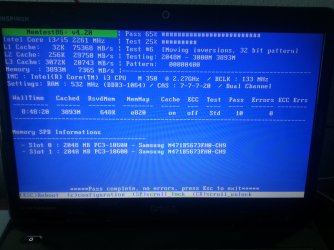
I did look at your cleaning posts and will give it a try once I buy compressed air from the store. As for the Memtest86+, I ran it for 6.5 hours today, it passed 7 tests without errors and said "Pass complete, no errors, press Esc to exit"

HOWEVER, when I restarted the laptop and tried to boot into Windows, it froze again at the Starting Windows screen. This is weird because I didn't even install the video drivers this time, so it was a first. Attached is the most recent SF diagnostic tool zip folder. Thanks again in advance,
 

Attachments

My Computer My Computer

At a glance

Microsoft Windows 7 Home Premium 64-bit 7601 ...Intel(R) Core(TM) i3 CPU M 350 @ 2.27GHz4.00 GBStandard VGA Graphics Adapter
Computer type
Laptop
Computer Manufacturer/Model Number
Dell
OS
Microsoft Windows 7 Home Premium 64-bit 7601 Multiprocessor Free Service Pack 1
CPU
Intel(R) Core(TM) i3 CPU M 350 @ 2.27GHz
Motherboard
Dell Inc. 021CN3
Memory
4.00 GB
Graphics Card(s)
Standard VGA Graphics Adapter
Sound Card
(1) Realtek High Definition Audio (2) High Definition Audi
Screen Resolution
0 x 0 x 0 bits (0 colors) @ 0 Hz
Hard Drives
(1) Hitachi HTS545032B9A300 ATA Device (2) Kingston DataTraveler 2.0 USB Device
Hello Flipzag,

Your dump files still point to failing RAM.. Have you ran Memtest for at least 10 passes and have you also tested each RAM stick in each DIMM slot?


Good luck and keep us posted,
Nommy
 

My Computer My Computer

At a glance

Microsoft Windows 8.1 64-bit ProfessionalIntel(R) Core(TM) i7-4510U CPU @ 2.00GHz8.00 GB (2 x 4.00 GB)AMD Radeon R7 M265
Computer type
Laptop
Computer Manufacturer/Model Number
Dell Inspiron 5547
OS
Microsoft Windows 8.1 64-bit Professional
CPU
Intel(R) Core(TM) i7-4510U CPU @ 2.00GHz
Motherboard
Dell Inc. 08KNCD
Memory
8.00 GB (2 x 4.00 GB)
Graphics Card(s)
AMD Radeon R7 M265
Screen Resolution
1366 x 768 x 4294967296 colors
Hard Drives
(1) 1TB ST1000LM024 HN-M101MBB (2) 2TB Western Digital external hard drive (3) 500GB Packard Bell external hard drive
Mouse
Corsair Vengeance M60
Antivirus
Windows Defender & Malwarebytes
Browser
Firefox, Chromium
Other Info
+ Acer TravelMate 7730G with 32bit Ubuntu 14.04 LTS Trusty Tahr.

My Computer My Computer

At a glance

Desk1 7 Home Prem / Desk2 10 Pro / Main lap A...Desk1 i5 3750K / Laptop i7 GTX 860M / Desk2 i...Desk1 8GB (1866) / Desk2 16GB (1333) / Laptop...Desk 1& 2NVidia GTX 650 & Laptops on board Intel
Computer type
PC/Desktop
Computer Manufacturer/Model Number
Own build (new) Desk1 / Asus ROG Win 7 / Desk2 1st build
OS
Desk1 7 Home Prem / Desk2 10 Pro / Main lap Asus ROG 10 Pro 2 laptop Toshiba 7 Pro Asus P2520 7 & 10
CPU
Desk1 i5 3750K / Laptop i7 GTX 860M / Desk2 i5 2500
Motherboard
Desk1 Asus P877-V / Desk2 Gigabyte H67 UD3H / Laptop ?
Memory
Desk1 8GB (1866) / Desk2 16GB (1333) / Laptop 8Gb DDR3
Graphics Card(s)
Desk 1& 2NVidia GTX 650 & Laptops on board Intel
Sound Card
Desk 1 & 2 -XONAR DG Realtek High Def audio Laptop
Monitor(s) Displays
Desk 1 Benq HD 2450 / Desk2 Philips 24" / Laptop 17.5"
Screen Resolution
1920x1080 D1 & D2 & Laptop 1
Hard Drives
Desk1 Samsung 120GB 830 SSD
Asus ROG 256GB 850 Pro SSD
Desk2 Samsung 840 256 SSD
Toshiba 120GB EVO
PSU
Desk 1 Corsair HX 1050/ Laptop ? / Desk 2 Corsair HX 650
Case
Desk 1 Cooler HAF XM ? Toshiba laptop / Desk2 Coolermaster
Cooling
Fans on all Desk1 -2 Desk2 - all Coolermasters 5 Laptop ?
Keyboard
Desk 1 MS Sidewinder X6 Desk 2 MS Sidewinder X 4
Mouse
Desk 1&2 - Gigabyte MS 900 gamer - laptop - Logitec wireless
Internet Speed
ADSL2+
Other Info
One other Desktop (tester) and spare Toshba laptop both with SSD's
Running Kaspersky 2016 ISS on all machines config'd identically
Logitec audio stereo systems on each machine (x3)
Canon MG5250MFC
Router/modem TP-Link running WPA2SK

Attachments

  • 20130918_090508.jpg
    20130918_090508.jpg
    579.6 KB · Views: 5

My Computer My Computer

At a glance

Microsoft Windows 7 Home Premium 64-bit 7601 ...Intel(R) Core(TM) i3 CPU M 350 @ 2.27GHz4.00 GBStandard VGA Graphics Adapter
Computer type
Laptop
Computer Manufacturer/Model Number
Dell
OS
Microsoft Windows 7 Home Premium 64-bit 7601 Multiprocessor Free Service Pack 1
CPU
Intel(R) Core(TM) i3 CPU M 350 @ 2.27GHz
Motherboard
Dell Inc. 021CN3
Memory
4.00 GB
Graphics Card(s)
Standard VGA Graphics Adapter
Sound Card
(1) Realtek High Definition Audio (2) High Definition Audi
Screen Resolution
0 x 0 x 0 bits (0 colors) @ 0 Hz
Hard Drives
(1) Hitachi HTS545032B9A300 ATA Device (2) Kingston DataTraveler 2.0 USB Device
Much and as Nommy suggested before maybe some new RAM might be indicated here.

I checked out the site you got the drivers from and it is quite convoluted and I found this maybe it has few more choices than the other list you used. http://search.dell.com/results.aspx...&~srd=False&ipsys=False&advsrch=False&~ck=tab

It has many references and it might take a bit of hunting through as you can see. Just out of interest have you checked out the power adaptor volts?? Plus how are the temps now please??
 

My Computer My Computer

At a glance

Desk1 7 Home Prem / Desk2 10 Pro / Main lap A...Desk1 i5 3750K / Laptop i7 GTX 860M / Desk2 i...Desk1 8GB (1866) / Desk2 16GB (1333) / Laptop...Desk 1& 2NVidia GTX 650 & Laptops on board Intel
Computer type
PC/Desktop
Computer Manufacturer/Model Number
Own build (new) Desk1 / Asus ROG Win 7 / Desk2 1st build
OS
Desk1 7 Home Prem / Desk2 10 Pro / Main lap Asus ROG 10 Pro 2 laptop Toshiba 7 Pro Asus P2520 7 & 10
CPU
Desk1 i5 3750K / Laptop i7 GTX 860M / Desk2 i5 2500
Motherboard
Desk1 Asus P877-V / Desk2 Gigabyte H67 UD3H / Laptop ?
Memory
Desk1 8GB (1866) / Desk2 16GB (1333) / Laptop 8Gb DDR3
Graphics Card(s)
Desk 1& 2NVidia GTX 650 & Laptops on board Intel
Sound Card
Desk 1 & 2 -XONAR DG Realtek High Def audio Laptop
Monitor(s) Displays
Desk 1 Benq HD 2450 / Desk2 Philips 24" / Laptop 17.5"
Screen Resolution
1920x1080 D1 & D2 & Laptop 1
Hard Drives
Desk1 Samsung 120GB 830 SSD
Asus ROG 256GB 850 Pro SSD
Desk2 Samsung 840 256 SSD
Toshiba 120GB EVO
PSU
Desk 1 Corsair HX 1050/ Laptop ? / Desk 2 Corsair HX 650
Case
Desk 1 Cooler HAF XM ? Toshiba laptop / Desk2 Coolermaster
Cooling
Fans on all Desk1 -2 Desk2 - all Coolermasters 5 Laptop ?
Keyboard
Desk 1 MS Sidewinder X6 Desk 2 MS Sidewinder X 4
Mouse
Desk 1&2 - Gigabyte MS 900 gamer - laptop - Logitec wireless
Internet Speed
ADSL2+
Other Info
One other Desktop (tester) and spare Toshba laptop both with SSD's
Running Kaspersky 2016 ISS on all machines config'd identically
Logitec audio stereo systems on each machine (x3)
Canon MG5250MFC
Router/modem TP-Link running WPA2SK
Much and as Nommy suggested before maybe some new RAM might be indicated here.

I checked out the site you got the drivers from and it is quite convoluted and I found this maybe it has few more choices than the other list you used. Dell N4010 - Dell - Search - All Dell.com

It has many references and it might take a bit of hunting through as you can see. Just out of interest have you checked out the power adaptor volts?? Plus how are the temps now please??

I did not post any links to the sites I got my drivers from, I only posted a link to a site explaining in what order to install the drivers. I got my drivers from here:

Drivers & Downloads | Dell US and

https://downloadcenter.intel.com/Se...oductProduct=Intel®+Core™+i3+Mobile+Processor

None of the drivers on either site work; they all lead to the problem I've had of freezing upon trying to load windows after rebooting from installing the drivers.

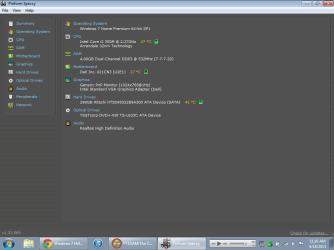
Current temps are as follows.
 

Attachments

  • speccy.png
    speccy.png
    29 KB · Views: 3

My Computer My Computer

At a glance

Microsoft Windows 7 Home Premium 64-bit 7601 ...Intel(R) Core(TM) i3 CPU M 350 @ 2.27GHz4.00 GBStandard VGA Graphics Adapter
Computer type
Laptop
Computer Manufacturer/Model Number
Dell
OS
Microsoft Windows 7 Home Premium 64-bit 7601 Multiprocessor Free Service Pack 1
CPU
Intel(R) Core(TM) i3 CPU M 350 @ 2.27GHz
Motherboard
Dell Inc. 021CN3
Memory
4.00 GB
Graphics Card(s)
Standard VGA Graphics Adapter
Sound Card
(1) Realtek High Definition Audio (2) High Definition Audi
Screen Resolution
0 x 0 x 0 bits (0 colors) @ 0 Hz
Hard Drives
(1) Hitachi HTS545032B9A300 ATA Device (2) Kingston DataTraveler 2.0 USB Device
My Computer My Computer

At a glance

Desk1 7 Home Prem / Desk2 10 Pro / Main lap A...Desk1 i5 3750K / Laptop i7 GTX 860M / Desk2 i...Desk1 8GB (1866) / Desk2 16GB (1333) / Laptop...Desk 1& 2NVidia GTX 650 & Laptops on board Intel
Computer type
PC/Desktop
Computer Manufacturer/Model Number
Own build (new) Desk1 / Asus ROG Win 7 / Desk2 1st build
OS
Desk1 7 Home Prem / Desk2 10 Pro / Main lap Asus ROG 10 Pro 2 laptop Toshiba 7 Pro Asus P2520 7 & 10
CPU
Desk1 i5 3750K / Laptop i7 GTX 860M / Desk2 i5 2500
Motherboard
Desk1 Asus P877-V / Desk2 Gigabyte H67 UD3H / Laptop ?
Memory
Desk1 8GB (1866) / Desk2 16GB (1333) / Laptop 8Gb DDR3
Graphics Card(s)
Desk 1& 2NVidia GTX 650 & Laptops on board Intel
Sound Card
Desk 1 & 2 -XONAR DG Realtek High Def audio Laptop
Monitor(s) Displays
Desk 1 Benq HD 2450 / Desk2 Philips 24" / Laptop 17.5"
Screen Resolution
1920x1080 D1 & D2 & Laptop 1
Hard Drives
Desk1 Samsung 120GB 830 SSD
Asus ROG 256GB 850 Pro SSD
Desk2 Samsung 840 256 SSD
Toshiba 120GB EVO
PSU
Desk 1 Corsair HX 1050/ Laptop ? / Desk 2 Corsair HX 650
Case
Desk 1 Cooler HAF XM ? Toshiba laptop / Desk2 Coolermaster
Cooling
Fans on all Desk1 -2 Desk2 - all Coolermasters 5 Laptop ?
Keyboard
Desk 1 MS Sidewinder X6 Desk 2 MS Sidewinder X 4
Mouse
Desk 1&2 - Gigabyte MS 900 gamer - laptop - Logitec wireless
Internet Speed
ADSL2+
Other Info
One other Desktop (tester) and spare Toshba laptop both with SSD's
Running Kaspersky 2016 ISS on all machines config'd identically
Logitec audio stereo systems on each machine (x3)
Canon MG5250MFC
Router/modem TP-Link running WPA2SK
OK mate I misread that - sorry. The temps look to be ok now at least.

Now if the drivers are the problem and it is really hard to understand that one I am at a loss as to where to turn next.

I would suggest a factory default if you have if the data backed up

Dell Laptops - Restore factory settings

or a clean install using this

http://www.sevenforums.com/tutorials/219487-clean-reinstall-factory-oem-windows-7-a.html#post1839164

no worries, I appreciate the help. I did do a clean install just a few days ago thinking it would solve the problem but it didn't...
 

My Computer My Computer

At a glance

Microsoft Windows 7 Home Premium 64-bit 7601 ...Intel(R) Core(TM) i3 CPU M 350 @ 2.27GHz4.00 GBStandard VGA Graphics Adapter
Computer type
Laptop
Computer Manufacturer/Model Number
Dell
OS
Microsoft Windows 7 Home Premium 64-bit 7601 Multiprocessor Free Service Pack 1
CPU
Intel(R) Core(TM) i3 CPU M 350 @ 2.27GHz
Motherboard
Dell Inc. 021CN3
Memory
4.00 GB
Graphics Card(s)
Standard VGA Graphics Adapter
Sound Card
(1) Realtek High Definition Audio (2) High Definition Audi
Screen Resolution
0 x 0 x 0 bits (0 colors) @ 0 Hz
Hard Drives
(1) Hitachi HTS545032B9A300 ATA Device (2) Kingston DataTraveler 2.0 USB Device
Well I suppose we have been through reseating the sticks and the hard drive. I am left wondering if cleaning the RAM slots might be a thing to try if you want to?

If so cut a piece of old credit card - about 1/2 inch wide and snip off the corners or better still round them off and hold a piece of lint free cloth over the need of it dab some alcohol on it (iso propyl alcohol is good stuff - we swab people with before an injection) and very gently wipe it down the slot but be very gentle. You could even try cleaning the contacts on the sticks too using a dab of alcohol on a piece of lint free cloth.
 

Attachments

  • CARD.PNG
    CARD.PNG
    1.7 KB · Views: 29

My Computer My Computer

At a glance

Desk1 7 Home Prem / Desk2 10 Pro / Main lap A...Desk1 i5 3750K / Laptop i7 GTX 860M / Desk2 i...Desk1 8GB (1866) / Desk2 16GB (1333) / Laptop...Desk 1& 2NVidia GTX 650 & Laptops on board Intel
Computer type
PC/Desktop
Computer Manufacturer/Model Number
Own build (new) Desk1 / Asus ROG Win 7 / Desk2 1st build
OS
Desk1 7 Home Prem / Desk2 10 Pro / Main lap Asus ROG 10 Pro 2 laptop Toshiba 7 Pro Asus P2520 7 & 10
CPU
Desk1 i5 3750K / Laptop i7 GTX 860M / Desk2 i5 2500
Motherboard
Desk1 Asus P877-V / Desk2 Gigabyte H67 UD3H / Laptop ?
Memory
Desk1 8GB (1866) / Desk2 16GB (1333) / Laptop 8Gb DDR3
Graphics Card(s)
Desk 1& 2NVidia GTX 650 & Laptops on board Intel
Sound Card
Desk 1 & 2 -XONAR DG Realtek High Def audio Laptop
Monitor(s) Displays
Desk 1 Benq HD 2450 / Desk2 Philips 24" / Laptop 17.5"
Screen Resolution
1920x1080 D1 & D2 & Laptop 1
Hard Drives
Desk1 Samsung 120GB 830 SSD
Asus ROG 256GB 850 Pro SSD
Desk2 Samsung 840 256 SSD
Toshiba 120GB EVO
PSU
Desk 1 Corsair HX 1050/ Laptop ? / Desk 2 Corsair HX 650
Case
Desk 1 Cooler HAF XM ? Toshiba laptop / Desk2 Coolermaster
Cooling
Fans on all Desk1 -2 Desk2 - all Coolermasters 5 Laptop ?
Keyboard
Desk 1 MS Sidewinder X6 Desk 2 MS Sidewinder X 4
Mouse
Desk 1&2 - Gigabyte MS 900 gamer - laptop - Logitec wireless
Internet Speed
ADSL2+
Other Info
One other Desktop (tester) and spare Toshba laptop both with SSD's
Running Kaspersky 2016 ISS on all machines config'd identically
Logitec audio stereo systems on each machine (x3)
Canon MG5250MFC
Router/modem TP-Link running WPA2SK
Hello Flipzag,

Sorry for my late reply, I'm having a bad case of migraine:(

I agree with ICit2lol, it appears that failing RAM is a part of the issue, and it would be best to replace it.

----------

When replaced, please run the following hardware tests;
Please run Memtest86+ to test your RAM for issues.

   Tip
Let Memtest run for at least 10 passes and preferably overnight as it may take very long to complete.
:ar: Especially read part three of the tutorial, which explains you to test each RAM stick in all DIMM slots to filter out failing slots.
Suppose you have got the result like that:
test|Slot1|Slot2
RAM1| Error | Error
RAM2|Good|Good
It is a RAM, a bad RAM.

But if you have got a result like that:
test|Slot1|Slot2
RAM1| Error |Good
RAM2| Error |Good
It is a motherboard issue. The particular slot is bad.

----------

After Memtest has concluded that the new RAM is good, please reinstall the most recent update of your GPU and perform the following hardware test;

Stress test the graphics card using Furmark GPU Stress Test.
   Information
During the test please check the screen for artifacts.
The purpose of this test is to make your machine crash and create dump files so that we can pinpoint the cause of your problem.

   Tip
Please run Furmark once when your machine has just started, and once again when your machine has been active for several hours.


Good luck and keep us posted,
Nommy
 

My Computer My Computer

At a glance

Microsoft Windows 8.1 64-bit ProfessionalIntel(R) Core(TM) i7-4510U CPU @ 2.00GHz8.00 GB (2 x 4.00 GB)AMD Radeon R7 M265
Computer type
Laptop
Computer Manufacturer/Model Number
Dell Inspiron 5547
OS
Microsoft Windows 8.1 64-bit Professional
CPU
Intel(R) Core(TM) i7-4510U CPU @ 2.00GHz
Motherboard
Dell Inc. 08KNCD
Memory
8.00 GB (2 x 4.00 GB)
Graphics Card(s)
AMD Radeon R7 M265
Screen Resolution
1366 x 768 x 4294967296 colors
Hard Drives
(1) 1TB ST1000LM024 HN-M101MBB (2) 2TB Western Digital external hard drive (3) 500GB Packard Bell external hard drive
Mouse
Corsair Vengeance M60
Antivirus
Windows Defender & Malwarebytes
Browser
Firefox, Chromium
Other Info
+ Acer TravelMate 7730G with 32bit Ubuntu 14.04 LTS Trusty Tahr.
How can I be sure that failing RAM is the issue, when it just passed Memtest 10 times without error? I don't want to pay $100 for new RAM only to find that the issue still persists.
 

My Computer My Computer

At a glance

Microsoft Windows 7 Home Premium 64-bit 7601 ...Intel(R) Core(TM) i3 CPU M 350 @ 2.27GHz4.00 GBStandard VGA Graphics Adapter
Computer type
Laptop
Computer Manufacturer/Model Number
Dell
OS
Microsoft Windows 7 Home Premium 64-bit 7601 Multiprocessor Free Service Pack 1
CPU
Intel(R) Core(TM) i3 CPU M 350 @ 2.27GHz
Motherboard
Dell Inc. 021CN3
Memory
4.00 GB
Graphics Card(s)
Standard VGA Graphics Adapter
Sound Card
(1) Realtek High Definition Audio (2) High Definition Audi
Screen Resolution
0 x 0 x 0 bits (0 colors) @ 0 Hz
Hard Drives
(1) Hitachi HTS545032B9A300 ATA Device (2) Kingston DataTraveler 2.0 USB Device

Same issue

Dell inspiron 14R N4010

I have the exact same issue. Hard drive crashed, I went to upgrade to an SSD. Everytime I install the video driver, it either crashes during the install or as soon as I reboot (crashes during startup). I did try replacing the ram because I had some spare and that had no effect.

I have tried doing a clean install of windows 7 and windows 10 and both have the same issue.

I have the Pentium 6100M CPU in this one. I am not sure if this will resolve it, but I have already ordered a replacement CPU (2330M) because it was cheap. Note: the graphics chip is on the CPU in this one so replacing the CPU means replacing the graphics chip.

I am a computer repair technician, I run a computer repair business and have been for a while now. I have already done all the usual things like replacing the thermal paste/cleaning out dust. This is not a thermal issue, it seems to be either a faulty CPU/GPU or perhaps motherboard, or its a very annoying software issue that no one has found a fix for yet.

The dell driver for this is strange, its a wifi/video driver combo. However, the driver seems to make no difference. I have tried installing it from dell, from intel and from windows update and they all yield the same result.

I know this is an old thread but did you ever find a solution to your issue?
 
Last edited:

My Computer My Computer

At a glance

Any/All
Computer type
PC/Desktop
OS
Any/All
Power Options setting

Go to Control Panel > (Hardware and Sounds) Power Options
Change plan settings > Change advanced power settings > Intel(R) Graphics Settings
Opt for Maximum Performances
 

My Computer My Computer

At a glance

Windows 7 Ultimate x64
Computer type
PC/Desktop
OS
Windows 7 Ultimate x64
Back
Top