Dell N4010 Win 7 x64, freezes on restart after installing video driver

flipzag

New member
Local time
2:18 PM
Messages
16
Hi all, as the thread title says, I am having trouble with my laptop. I just reformatted and did a fresh install of Windows 7 Ultimate x64. I have installed all Windows Updates and installed all drivers in the order Dell specifies here: How to reinstall drivers in the correct order | Dell US EXCEPT for the video drivers. I should mention the video drivers I am trying to install are the Intel HD graphics drivers for my onboard graphics. This is because as soon as I do so and restart, Windows hangs on a black screen right after the "Starting Windows" screen and my laptop fan goes on full blast. The computer at this point is unresponsive, forcing me to do a hard power down. The only remedy after this is to either do a system restore to before the video drivers were installed, or boot into safe mode to uninstall the video drivers manually and run CCleaner. The laptop runs fine running on the default "standard VGA drivers" with the exception of poor resolution and unable to run anything graphics intensive. I've tried using drivers from both Dell and Intel's websites, via .exe installers and manually via .zip folders. I've attached my SF diagnostic .zip folder. Also forgot to mention I am running the most updated BIOS with default settings loaded. Please help and thank you in advance!
 

Attachments

My Computer My Computer

At a glance

Microsoft Windows 7 Home Premium 64-bit 7601 ...Intel(R) Core(TM) i3 CPU M 350 @ 2.27GHz4.00 GBStandard VGA Graphics Adapter
Computer type
Laptop
Computer Manufacturer/Model Number
Dell
OS
Microsoft Windows 7 Home Premium 64-bit 7601 Multiprocessor Free Service Pack 1
CPU
Intel(R) Core(TM) i3 CPU M 350 @ 2.27GHz
Motherboard
Dell Inc. 021CN3
Memory
4.00 GB
Graphics Card(s)
Standard VGA Graphics Adapter
Sound Card
(1) Realtek High Definition Audio (2) High Definition Audi
Screen Resolution
0 x 0 x 0 bits (0 colors) @ 0 Hz
Hard Drives
(1) Hitachi HTS545032B9A300 ATA Device (2) Kingston DataTraveler 2.0 USB Device
Hello Flipzag and welcome to the Forums,

Please download and install the KB971033 Windows Update.

When done, please follow the Genuine and Activation Posting Instructions and provide us with the log created to see if the update is successfully installed.


Good luck and keep us posted,
Nommy
 

My Computer My Computer

At a glance

Microsoft Windows 8.1 64-bit ProfessionalIntel(R) Core(TM) i7-4510U CPU @ 2.00GHz8.00 GB (2 x 4.00 GB)AMD Radeon R7 M265
Computer type
Laptop
Computer Manufacturer/Model Number
Dell Inspiron 5547
OS
Microsoft Windows 8.1 64-bit Professional
CPU
Intel(R) Core(TM) i7-4510U CPU @ 2.00GHz
Motherboard
Dell Inc. 08KNCD
Memory
8.00 GB (2 x 4.00 GB)
Graphics Card(s)
AMD Radeon R7 M265
Screen Resolution
1366 x 768 x 4294967296 colors
Hard Drives
(1) 1TB ST1000LM024 HN-M101MBB (2) 2TB Western Digital external hard drive (3) 500GB Packard Bell external hard drive
Mouse
Corsair Vengeance M60
Antivirus
Windows Defender & Malwarebytes
Browser
Firefox, Chromium
Other Info
+ Acer TravelMate 7730G with 32bit Ubuntu 14.04 LTS Trusty Tahr.
Code:
Diagnostic Report (1.9.0027.0):
-----------------------------------------
Windows Validation Data-->

Validation Code: 0
Cached Online Validation Code: N/A, hr = 0xc004f012
Windows Product Key: *****-*****-DDH3D-TMCHV-8GXKP
Windows Product Key Hash: gc55MXpKIH58f1CzhmdwAKRbdTM=
Windows Product ID: 00359-OEM-9809522-29179
Windows Product ID Type: 8
Windows License Type: COA SLP
Windows OS version: 6.1.7601.2.00010300.1.0.003
ID: {68B49233-6D0E-4011-8CD4-6CFC79408DFB}(1)
Is Admin: Yes
TestCab: 0x0
LegitcheckControl ActiveX: N/A, hr = 0x80070002
Signed By: N/A, hr = 0x80070002
Product Name: Windows 7 Home Premium
Architecture: 0x00000009
Build lab: 7601.win7sp1_ldr.130801-1934
TTS Error: 
Validation Diagnostic: 
Resolution Status: N/A

Vista WgaER Data-->
ThreatID(s): N/A, hr = 0x80070002
Version: N/A, hr = 0x80070002

Windows XP Notifications Data-->
Cached Result: N/A, hr = 0x80070002
File Exists: No
Version: N/A, hr = 0x80070002
WgaTray.exe Signed By: N/A, hr = 0x80070002
WgaLogon.dll Signed By: N/A, hr = 0x80070002

OGA Notifications Data-->
Cached Result: N/A, hr = 0x80070002
Version: N/A, hr = 0x80070002
OGAExec.exe Signed By: N/A, hr = 0x80070002
OGAAddin.dll Signed By: N/A, hr = 0x80070002

OGA Data-->
Office Status: 109 N/A
OGA Version: N/A, 0x80070002
Signed By: N/A, hr = 0x80070002
Office Diagnostics: 025D1FF3-364-80041010_025D1FF3-229-80041010_025D1FF3-230-1_025D1FF3-517-80040154_025D1FF3-237-80040154_025D1FF3-238-2_025D1FF3-244-80070002_025D1FF3-258-3

Browser Data-->
Proxy settings: N/A
User Agent: Mozilla/4.0 (compatible; MSIE 8.0; Win32)
Default Browser: C:\Program Files (x86)\Google\Chrome\Application\chrome.exe
Download signed ActiveX controls: Prompt
Download unsigned ActiveX controls: Disabled
Run ActiveX controls and plug-ins: Allowed
Initialize and script ActiveX controls not marked as safe: Disabled
Allow scripting of Internet Explorer Webbrowser control: Disabled
Active scripting: Allowed
Script ActiveX controls marked as safe for scripting: Allowed

File Scan Data-->

Other data-->
Office Details: <GenuineResults><MachineData><UGUID>{68B49233-6D0E-4011-8CD4-6CFC79408DFB}</UGUID><Version>1.9.0027.0</Version><OS>6.1.7601.2.00010300.1.0.003</OS><Architecture>x64</Architecture><PKey>*****-*****-*****-*****-8GXKP</PKey><PID>00359-OEM-9809522-29179</PID><PIDType>8</PIDType><SID>S-1-5-21-2725885322-46547858-3776219343</SID><SYSTEM><Manufacturer>Dell Inc.</Manufacturer><Model>Inspiron N4010</Model></SYSTEM><BIOS><Manufacturer>Dell Inc.</Manufacturer><Version>A13</Version><SMBIOSVersion major="2" minor="6"/><Date>20110331000000.000000+000</Date></BIOS><HWID>7EBC3507018400FC</HWID><UserLCID>0409</UserLCID><SystemLCID>0409</SystemLCID><TimeZone>Pacific Standard Time(GMT-08:00)</TimeZone><iJoin>0</iJoin><SBID><stat>3</stat><msppid></msppid><name></name><model></model></SBID><OEM><OEMID>DELL  </OEMID><OEMTableID>QA09   </OEMTableID></OEM><GANotification/></MachineData><Software><Office><Result>109</Result><Products/><Applications/></Office></Software></GenuineResults>  

Spsys.log Content: 0x80070002

Licensing Data-->
Software licensing service version: 6.1.7601.17514

Name: Windows(R) 7, HomePremium edition
Description: Windows Operating System - Windows(R) 7, OEM_COA_SLP channel
Activation ID: 5e017a8a-f3f9-4167-b1bd-ba3e236a4d8f
Application ID: 55c92734-d682-4d71-983e-d6ec3f16059f
Extended PID: 00359-00196-095-229179-02-1033-7601.0000-2582013
Installation ID: 014010266871201966416330244824203315629673776936064702
Processor Certificate URL: http://go.microsoft.com/fwlink/?LinkID=88338
Machine Certificate URL: http://go.microsoft.com/fwlink/?LinkID=88339
Use License URL: http://go.microsoft.com/fwlink/?LinkID=88341
Product Key Certificate URL: http://go.microsoft.com/fwlink/?LinkID=88340
Partial Product Key: 8GXKP
License Status: Licensed
Remaining Windows rearm count: 3
Trusted time: 9/15/2013 5:23:05 PM

Windows Activation Technologies-->
HrOffline: 0x00000000
HrOnline: N/A
HealthStatus: 0x0000000000000000
Event Time Stamp: N/A
ActiveX: Registered, Version: 7.1.7600.16395
Admin Service: Registered, Version: 7.1.7600.16395
HealthStatus Bitmask Output:


HWID Data-->
HWID Hash Current: MgAAAAIAAgABAAEAAAACAAAAAgABAAEA6GGQ0nhGdxaIguyeIKZ4PkSKBNb4YtT9XF0=

OEM Activation 1.0 Data-->
N/A

OEM Activation 2.0 Data-->
BIOS valid for OA 2.0: yes
Windows marker version: 0x20001
OEMID and OEMTableID Consistent: yes
BIOS Information: 
  ACPI Table Name	OEMID Value	OEMTableID Value
  APIC			PTLTD 			 APIC  
  FACP			INTEL 		CRESTLNE
  HPET			INTEL 		CRESTLNE
  BOOT			PTLTD 		$SBFTBL$
  MCFG			INTEL 		CRESTLNE
  SPCR			PTLTD 		$UCRTBL$
  SLIC			DELL  		QA09   
  OSFR			DELL  		DELL    
  ASF!			  CETP		    CETP
  SSDT			PmRef		CpuPm
 

My Computer My Computer

At a glance

Microsoft Windows 7 Home Premium 64-bit 7601 ...Intel(R) Core(TM) i3 CPU M 350 @ 2.27GHz4.00 GBStandard VGA Graphics Adapter
Computer type
Laptop
Computer Manufacturer/Model Number
Dell
OS
Microsoft Windows 7 Home Premium 64-bit 7601 Multiprocessor Free Service Pack 1
CPU
Intel(R) Core(TM) i3 CPU M 350 @ 2.27GHz
Motherboard
Dell Inc. 021CN3
Memory
4.00 GB
Graphics Card(s)
Standard VGA Graphics Adapter
Sound Card
(1) Realtek High Definition Audio (2) High Definition Audi
Screen Resolution
0 x 0 x 0 bits (0 colors) @ 0 Hz
Hard Drives
(1) Hitachi HTS545032B9A300 ATA Device (2) Kingston DataTraveler 2.0 USB Device
Hello Flipzag,

The log checks out clean, good:)

----------

Please check your hard drive for minidumps;

  1. Navigate to C:\WINDOWS\Minidump (Replace C: with the letter of the drive where you installed Windows on).
  2. Select all the files there by clicking on the first file, holding down the SHIFT key, and clicking on the last file.
  3. Copy all files by hitting Ctrl+C.
  4. Create a folder on your desktop called "Dumpfiles" and paste all .dmp files in that folder.
  5. Right click on the folder and click on Send to. Then click on Compressed (zipped) folder.
    This will create a .zip called Dumpfiles.zip on your desktop.
  6. Please upload the .zip file by following this tutorial.
    • If your Windows is not set to create dump files upon a BSOD, please follow this tutorial to configure it.
    • If no dump files are found in that folder, please report back.
If there are no minidumps, which I think, please upload the zipped MEMORY.dmp which is located in C:\WINDOWS.
If this file isn't there, please report back.


Good luck and keep us posted,
Nommy
 
Last edited:

My Computer My Computer

At a glance

Microsoft Windows 8.1 64-bit ProfessionalIntel(R) Core(TM) i7-4510U CPU @ 2.00GHz8.00 GB (2 x 4.00 GB)AMD Radeon R7 M265
Computer type
Laptop
Computer Manufacturer/Model Number
Dell Inspiron 5547
OS
Microsoft Windows 8.1 64-bit Professional
CPU
Intel(R) Core(TM) i7-4510U CPU @ 2.00GHz
Motherboard
Dell Inc. 08KNCD
Memory
8.00 GB (2 x 4.00 GB)
Graphics Card(s)
AMD Radeon R7 M265
Screen Resolution
1366 x 768 x 4294967296 colors
Hard Drives
(1) 1TB ST1000LM024 HN-M101MBB (2) 2TB Western Digital external hard drive (3) 500GB Packard Bell external hard drive
Mouse
Corsair Vengeance M60
Antivirus
Windows Defender & Malwarebytes
Browser
Firefox, Chromium
Other Info
+ Acer TravelMate 7730G with 32bit Ubuntu 14.04 LTS Trusty Tahr.
I followed the tutorial to create dump files, but I'm not getting any BSOD's so there are no dumpfiles in my Windows folder. I update video drivers, it tells me to restart my computer, and upon doing so, I get to the "Starting Windows" screen where it locks up.

System restore says this: A recent driver installation or upgrade may be preventing the system from starting.

But the thing is, I have tried using different video drivers from Dell and Intel, most recent to older versions, via .exe installers and manually with .zip folders via Device Manager, and I get the same result. It's not like I have a dedicated video card that I can replace... Thanks for the help so far, hope we can figure this out.
 

My Computer My Computer

At a glance

Microsoft Windows 7 Home Premium 64-bit 7601 ...Intel(R) Core(TM) i3 CPU M 350 @ 2.27GHz4.00 GBStandard VGA Graphics Adapter
Computer type
Laptop
Computer Manufacturer/Model Number
Dell
OS
Microsoft Windows 7 Home Premium 64-bit 7601 Multiprocessor Free Service Pack 1
CPU
Intel(R) Core(TM) i3 CPU M 350 @ 2.27GHz
Motherboard
Dell Inc. 021CN3
Memory
4.00 GB
Graphics Card(s)
Standard VGA Graphics Adapter
Sound Card
(1) Realtek High Definition Audio (2) High Definition Audi
Screen Resolution
0 x 0 x 0 bits (0 colors) @ 0 Hz
Hard Drives
(1) Hitachi HTS545032B9A300 ATA Device (2) Kingston DataTraveler 2.0 USB Device
For what it's worth, this is what Event Viewer shows.

Source: Kernel-Power
Event ID: 41
Task Category: 63
Level: Critical

The system has rebooted without cleanly shutting down first. This error could be caused if the system stopped responding, crashed, or lost power unexpectedly.
 

My Computer My Computer

At a glance

Microsoft Windows 7 Home Premium 64-bit 7601 ...Intel(R) Core(TM) i3 CPU M 350 @ 2.27GHz4.00 GBStandard VGA Graphics Adapter
Computer type
Laptop
Computer Manufacturer/Model Number
Dell
OS
Microsoft Windows 7 Home Premium 64-bit 7601 Multiprocessor Free Service Pack 1
CPU
Intel(R) Core(TM) i3 CPU M 350 @ 2.27GHz
Motherboard
Dell Inc. 021CN3
Memory
4.00 GB
Graphics Card(s)
Standard VGA Graphics Adapter
Sound Card
(1) Realtek High Definition Audio (2) High Definition Audi
Screen Resolution
0 x 0 x 0 bits (0 colors) @ 0 Hz
Hard Drives
(1) Hitachi HTS545032B9A300 ATA Device (2) Kingston DataTraveler 2.0 USB Device
Hello Flipzag,

A event ID 41 error simply means that Windows shut down unexpectedly, there is no additional information there besides that what we already knew.

----------

Are you able to boot into Windows?

If yes, please follow this;
Please use the SFC /SCANNOW command as displayed in option two of this tutorial.


  1. Click on the :orb:.
  2. Open an elevated command prompt.
  3. Type "SFC /SCANNOW" without the quotations.
  4. Let SFC do it's thing, and then prompted to, restart.

    If SFC found and repaired anything, please do the following:
  5. When restarted, open an elevated command prompt.
  6. Type (or copy) the following, this will create a .txt file on your desktop;
    findstr /c:"[SR]" %windir%\Logs\CBS\CBS.log >"%userprofile%\Desktop\sfcdetails.txt"
  7. In your next reply, please attach this file using the method displayed in this tutorial.

----------

If you are unable to boot into Windows, please follow this;
Please use the SFC /SCANNOW command at boot as shown in option one of this tutorial.
   Note

You will need either your original Windows Installation disc or a Repair Disc for this to work.


  1. First change the Boot order so that DVD's boot before Windows does.
  2. Insert either your installation or repair disc in your machine.
  3. Navigate to the System Recovery Options, and once there, click on Command Prompt.
  4. In command prompt, please type the following;
    sfc /scannow /offbootdir=f:\ /offwindir=f:\windows
    :warn::ar:Replace F: with the letter where Windows is installed on!
  5. SFC will now attempt to search for integrity violations and fix those found.
  6. Once done, please type "Exit" and hit ENTER to exit command prompt.
  7. To restart, remove the DVD and select Restart from the menu.

    If SFC found and repaired any violations, please do the following;
  8. When restarted, open an elevated command prompt.
  9. Type (or copy) the following, this will create a .txt file on your desktop;
    findstr /c:"[SR]" %windir%\Logs\CBS\CBS.log >"%userprofile%\Desktop\sfcdetails.txt"
  10. In your next reply, please attach this file using the method displayed in this tutorial.
----------

Please follow this;
Run Driver Verifier for 24 hours or the occurrence of the next crash, whichever is earlier.

   Information
Why Driver Verifier:
It puts a stress on the drivers, ans so it makes the unstable drivers crash. Hopefully the driver that crashes is recorded in the memory dump.

How Can we know that DV is enabled:
It will make the system bit of slow, laggy.

   Warning
Before enabling DV, make it sure that you have earlier System restore points made in your computer. You can check it easily by using CCleaner looking at Tools > System Restore.

If there is no points, make a System Restore Point manually before enabling DV.

   Tip


Good luck and keep us posted,
Nommy
 

My Computer My Computer

At a glance

Microsoft Windows 8.1 64-bit ProfessionalIntel(R) Core(TM) i7-4510U CPU @ 2.00GHz8.00 GB (2 x 4.00 GB)AMD Radeon R7 M265
Computer type
Laptop
Computer Manufacturer/Model Number
Dell Inspiron 5547
OS
Microsoft Windows 8.1 64-bit Professional
CPU
Intel(R) Core(TM) i7-4510U CPU @ 2.00GHz
Motherboard
Dell Inc. 08KNCD
Memory
8.00 GB (2 x 4.00 GB)
Graphics Card(s)
AMD Radeon R7 M265
Screen Resolution
1366 x 768 x 4294967296 colors
Hard Drives
(1) 1TB ST1000LM024 HN-M101MBB (2) 2TB Western Digital external hard drive (3) 500GB Packard Bell external hard drive
Mouse
Corsair Vengeance M60
Antivirus
Windows Defender & Malwarebytes
Browser
Firefox, Chromium
Other Info
+ Acer TravelMate 7730G with 32bit Ubuntu 14.04 LTS Trusty Tahr.
SFC /scannow yields: Windows Resource Protection did not find any integrity violations.
 

My Computer My Computer

At a glance

Microsoft Windows 7 Home Premium 64-bit 7601 ...Intel(R) Core(TM) i3 CPU M 350 @ 2.27GHz4.00 GBStandard VGA Graphics Adapter
Computer type
Laptop
Computer Manufacturer/Model Number
Dell
OS
Microsoft Windows 7 Home Premium 64-bit 7601 Multiprocessor Free Service Pack 1
CPU
Intel(R) Core(TM) i3 CPU M 350 @ 2.27GHz
Motherboard
Dell Inc. 021CN3
Memory
4.00 GB
Graphics Card(s)
Standard VGA Graphics Adapter
Sound Card
(1) Realtek High Definition Audio (2) High Definition Audi
Screen Resolution
0 x 0 x 0 bits (0 colors) @ 0 Hz
Hard Drives
(1) Hitachi HTS545032B9A300 ATA Device (2) Kingston DataTraveler 2.0 USB Device
Before I run Driver Verifier, should I attempt to install the video drivers again? Currently I am able to boot windows and post this because I did a system restore to before I installed them, and am running on the standard VGA drivers with low resolution.
 

My Computer My Computer

At a glance

Microsoft Windows 7 Home Premium 64-bit 7601 ...Intel(R) Core(TM) i3 CPU M 350 @ 2.27GHz4.00 GBStandard VGA Graphics Adapter
Computer type
Laptop
Computer Manufacturer/Model Number
Dell
OS
Microsoft Windows 7 Home Premium 64-bit 7601 Multiprocessor Free Service Pack 1
CPU
Intel(R) Core(TM) i3 CPU M 350 @ 2.27GHz
Motherboard
Dell Inc. 021CN3
Memory
4.00 GB
Graphics Card(s)
Standard VGA Graphics Adapter
Sound Card
(1) Realtek High Definition Audio (2) High Definition Audi
Screen Resolution
0 x 0 x 0 bits (0 colors) @ 0 Hz
Hard Drives
(1) Hitachi HTS545032B9A300 ATA Device (2) Kingston DataTraveler 2.0 USB Device
Good, thank for the update:)

----------

Hmm, please fill in your system specs by following this tutorial first. After that, make a restore point and try to install the latest driver available at the manufacturers site to see if it works. If it doesn't, you can restore your machine to the point that you have just created.

----------

After that, please enable Driver Verifier and post back any crashes.
If your machine has crashed - follow the BSOD Posting Instructions and upload the .zip file created so that we can analyze the problem.


Good luck and keep us posted,
Nommy
 

My Computer My Computer

At a glance

Microsoft Windows 8.1 64-bit ProfessionalIntel(R) Core(TM) i7-4510U CPU @ 2.00GHz8.00 GB (2 x 4.00 GB)AMD Radeon R7 M265
Computer type
Laptop
Computer Manufacturer/Model Number
Dell Inspiron 5547
OS
Microsoft Windows 8.1 64-bit Professional
CPU
Intel(R) Core(TM) i7-4510U CPU @ 2.00GHz
Motherboard
Dell Inc. 08KNCD
Memory
8.00 GB (2 x 4.00 GB)
Graphics Card(s)
AMD Radeon R7 M265
Screen Resolution
1366 x 768 x 4294967296 colors
Hard Drives
(1) 1TB ST1000LM024 HN-M101MBB (2) 2TB Western Digital external hard drive (3) 500GB Packard Bell external hard drive
Mouse
Corsair Vengeance M60
Antivirus
Windows Defender & Malwarebytes
Browser
Firefox, Chromium
Other Info
+ Acer TravelMate 7730G with 32bit Ubuntu 14.04 LTS Trusty Tahr.
Done and done. Back to standard VGA drivers as I post this. Driver Verifier says "No unsigned drivers have been found" which is expected since I am unable to reboot into windows once I install the drivers.
 

Attachments

My Computer My Computer

At a glance

Microsoft Windows 7 Home Premium 64-bit 7601 ...Intel(R) Core(TM) i3 CPU M 350 @ 2.27GHz4.00 GBStandard VGA Graphics Adapter
Computer type
Laptop
Computer Manufacturer/Model Number
Dell
OS
Microsoft Windows 7 Home Premium 64-bit 7601 Multiprocessor Free Service Pack 1
CPU
Intel(R) Core(TM) i3 CPU M 350 @ 2.27GHz
Motherboard
Dell Inc. 021CN3
Memory
4.00 GB
Graphics Card(s)
Standard VGA Graphics Adapter
Sound Card
(1) Realtek High Definition Audio (2) High Definition Audi
Screen Resolution
0 x 0 x 0 bits (0 colors) @ 0 Hz
Hard Drives
(1) Hitachi HTS545032B9A300 ATA Device (2) Kingston DataTraveler 2.0 USB Device
Hello Flipzag

The following software is contributing to your problems, please uninstall it;

Code:
[COLOR=Red][B]DAEMON Tools Lite[/B][/COLOR]    "c:\program files (x86)\daemon tools lite\dtlite.exe" -autorun    Rob-PC\Rob    HKU\S-1-5-21-2725885322-46547858-3776219343-1000\SOFTWARE\Microsoft\Windows\CurrentVersion\Run
Start Menu\Programs\[COLOR=Red][B]PeerBlock[/B][/COLOR]    Public:Start Menu\Programs\PeerBlock    Public
Start Menu\Programs\[COLOR=Red][B]PeerBlock\Help and Support[/B] [/COLOR]   Public:Start Menu\Programs\PeerBlock\Help and Support    Public
  • Download and install Revo Uninstaller.
  • Right click the program that needs to be removed, and click on Uninstall.
  • Select "Advanced" as uninstall mode.
  • Let Revo remove the program, and afterwards please follow the displayed steps to remove all entries of the program as well.
  • When all programs have been uninstalled, please restart your machine.

----------

:warn: P2P Warning! :warn:

:info: Important: I notice that there are one or more P2P (Person to person) file sharing related programs on your computer;

1. PeerBlock

:note: Please note that using any form of peer to peer networking is highly dangerous, as there is no way to identify the source of the files you download, and you can expect an infestation of malware to occur.

Years ago P2P file sharing was safe and easy to do. And while the latter may still be so today, it is most certainly not safe anymore. A peer to peer program is a direct conduit into your computer. Most of these programs lack proper security measures and malware writers can easily breach them, and they continue to exploit the users of these programs to spread their malware.
As addition to that; while using a P2P program, your computer may be sharing way more than you want it to. There have been reports of people's passwords, personal, private and financial data being exposed via P2P networks, only because they had a peer to peer program installed, and lacked the skills to configure it properly.

Please read the following reports on the dangers of using peer to peer programs and file sharing.
Risks of P2P systems.
File sharing infects 500.000 computers.
File sharing dangers involve more than legal troubles.
Seattle man arrested for P2P identity theft.

I highly recommend that you uninstall the above mentioned P2P programs, as I can not guarantee your safety from malware if you leave them installed and the likelihood of reinfection is very high to certain.
You can uninstall them by doing the following steps;

  1. Click on the :orb:.
  2. Click on Control Panel and under Programs click on Uninstall a program.
  3. Wait for the list to update, and when done, please right-click on the icon of the program(s) mentioned above and select Uninstall.
  4. Follow the on screen instructions, and when prompted, please restart your computer.

    :info: When you have multiple P2P programs installed Click No - I will manually restart later when prompted to restart, and repeat steps three and four until all programs are uninstalled, and click Yes - Restart now when you have finished uninstalling the last P2P program.
    :ar:If you choose not to uninstall them, please refrain from using any P2P program during this fix! Using them may interfere with any measures we may take.
----------

Code:
Event[2706]:
  Log Name: System
  Source: Disk
  Date: 2013-09-16T09:06:38.831
  Event ID: 11
  Task: N/A
  Level: Error
  Opcode: N/A
  Keyword: Classic
  User: N/A
  User Name: N/A
  Computer: Rob-PC
  Description: 
[COLOR=Red][B]The driver detected a controller error on \Device\Harddisk1\DR1.[/B][/COLOR]
Please preform the following hardware test as well;

Stress test the graphics card using Furmark GPU Stress Test.
   Information
During the test please check the screen for artifacts.
The purpose of this test is to make your machine crash and create dump files so that we can pinpoint the cause of your problem.

   Tip
Please run Furmark once when your machine has just started, and once again when your machine has been active for several hours.

----------

Stress test the CPU with IntelBurnTest.
   Note
When IntelBurnTest has crashed your system, please continue by following the BSOD posting instructions.

----------

Stress test the CPU with Prime95.
   Tip
Be sure to keep an eye on your temperatures when running these tests, especially the Large FFTs. We recommend the free utility Speedfan.
   Note
As with all hardware tests, Prime95 is not fail-safe. If the test passes for 2 hours with no errors, it is most likely to be stable. Unfortunately, it sometimes makes mistakes and gives a clean bill of health to faulty hardware.
   Note
When Prime95 has crashed your system, please continue by following the BSOD posting instructions.

----------

   Warning
:warn:You only have 7GB of free space on your C: drive
Please clear up some free space, you need at least 15GB!
:ar:Hard Disk Space: Free Up and Recover


Good luck and keep us posted,
Nommy

 
Last edited:

My Computer My Computer

At a glance

Microsoft Windows 8.1 64-bit ProfessionalIntel(R) Core(TM) i7-4510U CPU @ 2.00GHz8.00 GB (2 x 4.00 GB)AMD Radeon R7 M265
Computer type
Laptop
Computer Manufacturer/Model Number
Dell Inspiron 5547
OS
Microsoft Windows 8.1 64-bit Professional
CPU
Intel(R) Core(TM) i7-4510U CPU @ 2.00GHz
Motherboard
Dell Inc. 08KNCD
Memory
8.00 GB (2 x 4.00 GB)
Graphics Card(s)
AMD Radeon R7 M265
Screen Resolution
1366 x 768 x 4294967296 colors
Hard Drives
(1) 1TB ST1000LM024 HN-M101MBB (2) 2TB Western Digital external hard drive (3) 500GB Packard Bell external hard drive
Mouse
Corsair Vengeance M60
Antivirus
Windows Defender & Malwarebytes
Browser
Firefox, Chromium
Other Info
+ Acer TravelMate 7730G with 32bit Ubuntu 14.04 LTS Trusty Tahr.
Thanks for the help so far. I've uninstalled Daemon Tools and PeerBlock, and moved 95GB worth of music and pictures back onto my external hard drive since they are not immediately needed.

Furmark burn test yields this:

Furmark requires an OpenGL 2.0 compliant graphics controller. Startup failed.

This was not unexpected, as I am running standard VGA graphics on integrated Intel video.

Running the CPU stress tests now...
 

My Computer My Computer

At a glance

Microsoft Windows 7 Home Premium 64-bit 7601 ...Intel(R) Core(TM) i3 CPU M 350 @ 2.27GHz4.00 GBStandard VGA Graphics Adapter
Computer type
Laptop
Computer Manufacturer/Model Number
Dell
OS
Microsoft Windows 7 Home Premium 64-bit 7601 Multiprocessor Free Service Pack 1
CPU
Intel(R) Core(TM) i3 CPU M 350 @ 2.27GHz
Motherboard
Dell Inc. 021CN3
Memory
4.00 GB
Graphics Card(s)
Standard VGA Graphics Adapter
Sound Card
(1) Realtek High Definition Audio (2) High Definition Audi
Screen Resolution
0 x 0 x 0 bits (0 colors) @ 0 Hz
Hard Drives
(1) Hitachi HTS545032B9A300 ATA Device (2) Kingston DataTraveler 2.0 USB Device
HWInfo led to a BSOD, actually the first I've ever encountered on this laptop. I think I was in the middle of setting up IntelBurnTest but not actually running the stress test yet.
 

Attachments

My Computer My Computer

At a glance

Microsoft Windows 7 Home Premium 64-bit 7601 ...Intel(R) Core(TM) i3 CPU M 350 @ 2.27GHz4.00 GBStandard VGA Graphics Adapter
Computer type
Laptop
Computer Manufacturer/Model Number
Dell
OS
Microsoft Windows 7 Home Premium 64-bit 7601 Multiprocessor Free Service Pack 1
CPU
Intel(R) Core(TM) i3 CPU M 350 @ 2.27GHz
Motherboard
Dell Inc. 021CN3
Memory
4.00 GB
Graphics Card(s)
Standard VGA Graphics Adapter
Sound Card
(1) Realtek High Definition Audio (2) High Definition Audi
Screen Resolution
0 x 0 x 0 bits (0 colors) @ 0 Hz
Hard Drives
(1) Hitachi HTS545032B9A300 ATA Device (2) Kingston DataTraveler 2.0 USB Device
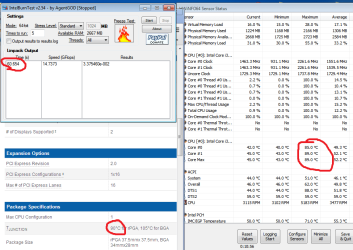
According to Intel my max temp is 90deg C. I made it about a minute before I manually stopped the test because I reached 89.
 

Attachments

  • IntelBurnTest.png
    IntelBurnTest.png
    36 KB · Views: 5

My Computer My Computer

At a glance

Microsoft Windows 7 Home Premium 64-bit 7601 ...Intel(R) Core(TM) i3 CPU M 350 @ 2.27GHz4.00 GBStandard VGA Graphics Adapter
Computer type
Laptop
Computer Manufacturer/Model Number
Dell
OS
Microsoft Windows 7 Home Premium 64-bit 7601 Multiprocessor Free Service Pack 1
CPU
Intel(R) Core(TM) i3 CPU M 350 @ 2.27GHz
Motherboard
Dell Inc. 021CN3
Memory
4.00 GB
Graphics Card(s)
Standard VGA Graphics Adapter
Sound Card
(1) Realtek High Definition Audio (2) High Definition Audi
Screen Resolution
0 x 0 x 0 bits (0 colors) @ 0 Hz
Hard Drives
(1) Hitachi HTS545032B9A300 ATA Device (2) Kingston DataTraveler 2.0 USB Device
Hello Flipzag,

Code:
*******************************************************************************
*                                                                             *
*                        Bugcheck Analysis                                    *
*                                                                             *
*******************************************************************************

Use !analyze -v to get detailed debugging information.

[COLOR=Red][B]BugCheck 50[/B][/COLOR], {fffff80100000003, 0, fffff80002cac2d2, 5}


[COLOR=Red][B]Could not read faulting driver name[/B][/COLOR]
[COLOR=Red][B]Probably caused by : ntkrnlmp.exe[/B][/COLOR] ( nt!RtlpLookupFunctionEntryForStackWalks+a3 )

Followup: MachineOwner
---------
Driver reference Table; ntkrnlmp.exe

A bugcheck STOP X50 means PAGE_FAULT_IN_NONPAGED_AREA. This is usually caused by faulty RAM; have you removed the failing RAM sticks?
Read this for more info: Bugcheck 0X50.

----------

Please run Memtest86+ to test your RAM for issues.

   Tip
Let Memtest run for at least 10 passes and preferably overnight as it may take very long to complete.
:ar: Especially read part three of the tutorial, which explains you to test each RAM stick in all DIMM slots to filter out failing slots.
Suppose you have got the result like that:
test|Slot1|Slot2
RAM1| Error | Error
RAM2|Good|Good
It is a RAM, a bad RAM.

But if you have got a result like that:
test|Slot1|Slot2
RAM1| Error |Good
RAM2| Error |Good
It is a motherboard issue. The particular slot is bad.

Good luck and keep us posted,
Nommy
 
Last edited:

My Computer My Computer

At a glance

Microsoft Windows 8.1 64-bit ProfessionalIntel(R) Core(TM) i7-4510U CPU @ 2.00GHz8.00 GB (2 x 4.00 GB)AMD Radeon R7 M265
Computer type
Laptop
Computer Manufacturer/Model Number
Dell Inspiron 5547
OS
Microsoft Windows 8.1 64-bit Professional
CPU
Intel(R) Core(TM) i7-4510U CPU @ 2.00GHz
Motherboard
Dell Inc. 08KNCD
Memory
8.00 GB (2 x 4.00 GB)
Graphics Card(s)
AMD Radeon R7 M265
Screen Resolution
1366 x 768 x 4294967296 colors
Hard Drives
(1) 1TB ST1000LM024 HN-M101MBB (2) 2TB Western Digital external hard drive (3) 500GB Packard Bell external hard drive
Mouse
Corsair Vengeance M60
Antivirus
Windows Defender & Malwarebytes
Browser
Firefox, Chromium
Other Info
+ Acer TravelMate 7730G with 32bit Ubuntu 14.04 LTS Trusty Tahr.
Hello Flipzag,

I missed your last reply, sorry.

Have you ever reapplied the thermal paste on your CPU? Please by following this tutorial and to clean your desktop on the inside as displayed in this tutorial.

----------

I have asked someone to take a look here to give you more specific advice on how to clean your machine, please be patient until they arrive.

----------

Please post screenshots of your machine when it has just started up and when it has been used for a few hours;
Please download Speccy.

  1. Download and install Speccy.
  2. Open Speccy. Click on the Summary tab.
  3. Click on File and then on Save Snapshot.
  4. Set the save location as your desktop and upload the file by following this tutorial.

----------

Good luck and keep us posted,
Nommy
 
Last edited:

My Computer My Computer

At a glance

Microsoft Windows 8.1 64-bit ProfessionalIntel(R) Core(TM) i7-4510U CPU @ 2.00GHz8.00 GB (2 x 4.00 GB)AMD Radeon R7 M265
Computer type
Laptop
Computer Manufacturer/Model Number
Dell Inspiron 5547
OS
Microsoft Windows 8.1 64-bit Professional
CPU
Intel(R) Core(TM) i7-4510U CPU @ 2.00GHz
Motherboard
Dell Inc. 08KNCD
Memory
8.00 GB (2 x 4.00 GB)
Graphics Card(s)
AMD Radeon R7 M265
Screen Resolution
1366 x 768 x 4294967296 colors
Hard Drives
(1) 1TB ST1000LM024 HN-M101MBB (2) 2TB Western Digital external hard drive (3) 500GB Packard Bell external hard drive
Mouse
Corsair Vengeance M60
Antivirus
Windows Defender & Malwarebytes
Browser
Firefox, Chromium
Other Info
+ Acer TravelMate 7730G with 32bit Ubuntu 14.04 LTS Trusty Tahr.
I have a laptop, not a desktop. Opening it up to reapply thermal paste seems to me to be more risk than any potential gain, and there's no way there's enough dust inside to cause any issues.

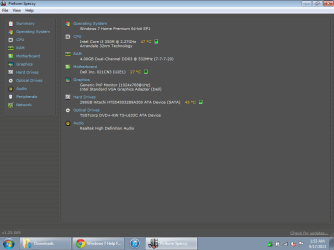
My laptop has been up for a few hours already so here's this screenshot for now. Will post again on cold boot in the morning, as well as run Memtest. Thanks again for the help so far.
 

Attachments

  • ROB-PC.png
    ROB-PC.png
    27.5 KB · Views: 4

My Computer My Computer

At a glance

Microsoft Windows 7 Home Premium 64-bit 7601 ...Intel(R) Core(TM) i3 CPU M 350 @ 2.27GHz4.00 GBStandard VGA Graphics Adapter
Computer type
Laptop
Computer Manufacturer/Model Number
Dell
OS
Microsoft Windows 7 Home Premium 64-bit 7601 Multiprocessor Free Service Pack 1
CPU
Intel(R) Core(TM) i3 CPU M 350 @ 2.27GHz
Motherboard
Dell Inc. 021CN3
Memory
4.00 GB
Graphics Card(s)
Standard VGA Graphics Adapter
Sound Card
(1) Realtek High Definition Audio (2) High Definition Audi
Screen Resolution
0 x 0 x 0 bits (0 colors) @ 0 Hz
Hard Drives
(1) Hitachi HTS545032B9A300 ATA Device (2) Kingston DataTraveler 2.0 USB Device
Hello Flipzag,

The Speccy shot looks fine, good.

----------

If you don't want to clean the thermal paste, then don't.
But please do follow the following;
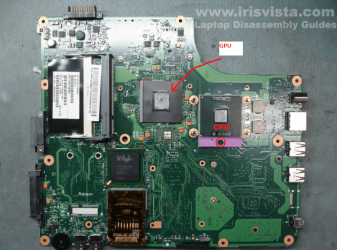
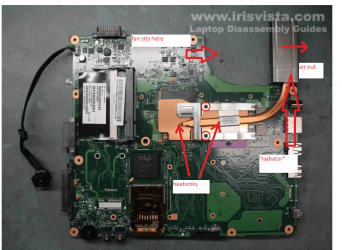
Just a very simple things you can do is turn the machine over and shine a very bright light into the air intake hole - then look into the air outlet and see if the small "radiator" in there is clear or not. If it looks to be a bit clogged then get a can of compressed air poke a large cable tie into the fan blades in the air intake to stop the fan from spinning and blast the crud out of that radiator. The cable tie is to stop the fan from spinning faster than it is designed to do and if let spin at very fast speeds may wreck the bearing or the blades themselves.
Now in the past if this does not work I have used pipe cleaners (see pic) and very gently cleaned from the outside by very carefully pushing through the pipe cleaner to loosen the crud. But you have to be careful.
Failing this it means disassembling the machine to get to those parts, plus keep in mind you may have a problem with the compound on the dies. Thy are not like the usual CPU /GPU we have in desktops and are the bare silicon chips the the heatsink clamps to.
In the pics is a Toshiba but principle is the same
CPU0.PNG
CPU1.PNG

Good luck and keep us posted,
Nommy
 

My Computer My Computer

At a glance

Microsoft Windows 8.1 64-bit ProfessionalIntel(R) Core(TM) i7-4510U CPU @ 2.00GHz8.00 GB (2 x 4.00 GB)AMD Radeon R7 M265
Computer type
Laptop
Computer Manufacturer/Model Number
Dell Inspiron 5547
OS
Microsoft Windows 8.1 64-bit Professional
CPU
Intel(R) Core(TM) i7-4510U CPU @ 2.00GHz
Motherboard
Dell Inc. 08KNCD
Memory
8.00 GB (2 x 4.00 GB)
Graphics Card(s)
AMD Radeon R7 M265
Screen Resolution
1366 x 768 x 4294967296 colors
Hard Drives
(1) 1TB ST1000LM024 HN-M101MBB (2) 2TB Western Digital external hard drive (3) 500GB Packard Bell external hard drive
Mouse
Corsair Vengeance M60
Antivirus
Windows Defender & Malwarebytes
Browser
Firefox, Chromium
Other Info
+ Acer TravelMate 7730G with 32bit Ubuntu 14.04 LTS Trusty Tahr.
I have a laptop, not a desktop. Opening it up to reapply thermal paste seems to me to be more risk than any potential gain, and there's no way there's enough dust inside to cause any issues.

My laptop has been up for a few hours already so here's this screenshot for now. Will post again on cold boot in the morning, as well as run Memtest. Thanks again for the help so far.
Hello flipzag the temp on the CPU if this is at idle is on the borderline for me and the hard drive definitely too hot - so am guessing that there is a fair bit of crud inside the machine. A slightly better temp gauge is the Core Temp program and shows the core temps in more detail but the choice is yours of course. Core Temp

Did you have look at my clean up info as per the post Nommy included? Check all of the vents in the bottom of the machine with a very bright light and just look into other vents to see if it is coming through. This is especially important with the intake for the small fan and outlet through from the "radiator".
Personally I always keep a piece of filtering material taped over the intake - usually some sheer stuff like curtain material but you can use what you like.
You can use a can of compressed air but whatever you do if you blow through the fan aperture make sure you insert say a cable tie into the blades before you do because as I said in that clean up spinning the fan may take it beyond its manufacture limits and wreck the bearing.
 

My Computer My Computer

At a glance

Desk1 7 Home Prem / Desk2 10 Pro / Main lap A...Desk1 i5 3750K / Laptop i7 GTX 860M / Desk2 i...Desk1 8GB (1866) / Desk2 16GB (1333) / Laptop...Desk 1& 2NVidia GTX 650 & Laptops on board Intel
Computer type
PC/Desktop
Computer Manufacturer/Model Number
Own build (new) Desk1 / Asus ROG Win 7 / Desk2 1st build
OS
Desk1 7 Home Prem / Desk2 10 Pro / Main lap Asus ROG 10 Pro 2 laptop Toshiba 7 Pro Asus P2520 7 & 10
CPU
Desk1 i5 3750K / Laptop i7 GTX 860M / Desk2 i5 2500
Motherboard
Desk1 Asus P877-V / Desk2 Gigabyte H67 UD3H / Laptop ?
Memory
Desk1 8GB (1866) / Desk2 16GB (1333) / Laptop 8Gb DDR3
Graphics Card(s)
Desk 1& 2NVidia GTX 650 & Laptops on board Intel
Sound Card
Desk 1 & 2 -XONAR DG Realtek High Def audio Laptop
Monitor(s) Displays
Desk 1 Benq HD 2450 / Desk2 Philips 24" / Laptop 17.5"
Screen Resolution
1920x1080 D1 & D2 & Laptop 1
Hard Drives
Desk1 Samsung 120GB 830 SSD
Asus ROG 256GB 850 Pro SSD
Desk2 Samsung 840 256 SSD
Toshiba 120GB EVO
PSU
Desk 1 Corsair HX 1050/ Laptop ? / Desk 2 Corsair HX 650
Case
Desk 1 Cooler HAF XM ? Toshiba laptop / Desk2 Coolermaster
Cooling
Fans on all Desk1 -2 Desk2 - all Coolermasters 5 Laptop ?
Keyboard
Desk 1 MS Sidewinder X6 Desk 2 MS Sidewinder X 4
Mouse
Desk 1&2 - Gigabyte MS 900 gamer - laptop - Logitec wireless
Internet Speed
ADSL2+
Other Info
One other Desktop (tester) and spare Toshba laptop both with SSD's
Running Kaspersky 2016 ISS on all machines config'd identically
Logitec audio stereo systems on each machine (x3)
Canon MG5250MFC
Router/modem TP-Link running WPA2SK
Back
Top