Solved SD card reader does not work

Frikster

New member
Member
VIP
Local time
7:16 PM
Messages
135
Location
Macedonia
Hi
i got a dell latitude e6430 , 64 bit win 7 laptop and it's card reader does not work.
i hear the sound of a connected device when i put the card in but it does not read it. I assume i need new drivers
the driver that is is using ( according to device manager ) is Broadcom Usbccid Smartcard Reader (WUDF)
i looked around google but i could not find for my laptop version. Only for e6400 and i assumed i rather ask than download invalid files and hope i dont break anything

If more info is required, ask away
Thank you

EDIT : if possible , suggest to me which drivers i should also download in order to improve my experience because i don't think windows update downloads every driver that i need since my pc freezes after exiting sleep mode.
*specs are not the ones on my profile, those are from my pc*
 

My Computer

Computer type
PC/Desktop
OS
Windows 7 64bit
CPU
i5 6600 3.3 GHz
Motherboard
ASUS B150M-A
Memory
16gb HyperX Fury 2x8gb
Graphics Card(s)
Gigabyte G1 Gaming 1060
Monitor(s) Displays
Samsung SyncMaster B2330HD
Screen Resolution
1920 x 1080
Hard Drives
1tb Toshiba
PSU
Corsair builder VS550
Case
SAMA Assasin
Cooling
Stock
Keyboard
A4Tech KB-28G
Mouse
X7 X-710BK
Internet Speed
99 Mbps
Antivirus
Malwarebytes
Browser
Chrome
Other Info
Nothing at the moment

My Computer

Computer Manufacturer/Model Number
W530-3630QM1
OS
windows 7 home 64bit
CPU
INTEL-CORE I7
Memory
16GB
Hard Drives
750GB
Browser
Chrome
i know the website but i do not know which one exactly is needed to fix my main issue
 

My Computer

Computer type
PC/Desktop
OS
Windows 7 64bit
CPU
i5 6600 3.3 GHz
Motherboard
ASUS B150M-A
Memory
16gb HyperX Fury 2x8gb
Graphics Card(s)
Gigabyte G1 Gaming 1060
Monitor(s) Displays
Samsung SyncMaster B2330HD
Screen Resolution
1920 x 1080
Hard Drives
1tb Toshiba
PSU
Corsair builder VS550
Case
SAMA Assasin
Cooling
Stock
Keyboard
A4Tech KB-28G
Mouse
X7 X-710BK
Internet Speed
99 Mbps
Antivirus
Malwarebytes
Browser
Chrome
Other Info
Nothing at the moment

My Computer

Computer type
PC/Desktop
Computer Manufacturer/Model Number
Mellon Labs (custom build)
OS
Win 7 Pro x64/Win 10 Pro x64 dual boot
CPU
AMD FX 8350 Vishera @ 4200
Motherboard
ASUS M5A97 R2.0
Memory
16 GB Mushkin Blackline DDR3-2400 @ 1866 (9-10-10-10-31)
Graphics Card(s)
XFX Radeon R9 280 Double D Black Edition
Sound Card
Realtek HD Audio on MB. Sounds great.
Monitor(s) Displays
Acer 24", Acer 22"
Screen Resolution
3840 x 1080
Hard Drives
1 x Mushkin Chronos 120 GB SSD (Win 10)
1 x Samsung 850 EVO 250 GB SSD (Win 7)
1 x WD 1TB SATA Blue
1 x WD 1TB SATA Green
PSU
Corsair TX-750
Case
CoolerMaster HAF 912+
Cooling
Coolermaster Seidon 240M Liquid AIO. 6 case fans
Keyboard
Logitech G710+
Mouse
Logitech G500s
Internet Speed
Much better since I got fiber, but still way overpriced.
Antivirus
MSE, Malware Bytes for scanning
Browser
Firefox
Other Info
Corsair VOID USB headphones.

A Mellon Labs X-1 - LCD Smartie driven system status display.

Brought to you by the letter E

My Computer

Computer Manufacturer/Model Number
HP, Dell, Gateway, Toshiba - 4 laptops and 2 desktops
OS
Vista, Windows7, Mint Mate, Zorin, Windows 8
CPU
from 1.6GHz Duo to i7
Monitor(s) Displays
2x HP w2207
Hard Drives
5x HDD, 7x SSD, 12x Externals
Keyboard
with trackball - no mices
Mouse
Trackball mice
Internet Speed
DSL 6000
the driver works fine, it fixed the issue
but i have another problem now. My Sony MemoryStickPRODuo 8 gb mark2 magic gate sd card cant be read when i put it in the slot and it looks like i cannot put a Memory Stick Duo Adaptor in the SD slot in the laptop. I can only put bigger sized cards and microsd adapters which work and open just fine.
Any info if i am doing something wrong, can i use the Duo Adaptor or that slot is not meant for an adaptor
 

My Computer

Computer type
PC/Desktop
OS
Windows 7 64bit
CPU
i5 6600 3.3 GHz
Motherboard
ASUS B150M-A
Memory
16gb HyperX Fury 2x8gb
Graphics Card(s)
Gigabyte G1 Gaming 1060
Monitor(s) Displays
Samsung SyncMaster B2330HD
Screen Resolution
1920 x 1080
Hard Drives
1tb Toshiba
PSU
Corsair builder VS550
Case
SAMA Assasin
Cooling
Stock
Keyboard
A4Tech KB-28G
Mouse
X7 X-710BK
Internet Speed
99 Mbps
Antivirus
Malwarebytes
Browser
Chrome
Other Info
Nothing at the moment
Try another adapter, make sure it's not a physical issue with the device.
 

My Computer

Computer type
PC/Desktop
Computer Manufacturer/Model Number
Gateway DX4822-01
OS
Windows 7 Home Premium x64
CPU
Intel Pentium Dual Core 2.6 GHz
Motherboard
stock factory for this model
Memory
6 GB
Graphics Card(s)
stock factory for this model
Sound Card
stock factory for this model
Monitor(s) Displays
Dell P2010Ht
Screen Resolution
1600 x 900
Hard Drives
1 TB Western Digital
PSU
300 watt
Cooling
80mm case fan, CPU fan, 60mm front intake
Keyboard
Logitech
Mouse
HP 3-button optical wheel mouse
Internet Speed
fiber optic
Antivirus
MSE, SuperAntiSpyware, Malwarebytes Free
no adapter goes inside that thing. Except micro sd card adapters which go in just fine and get read in 0.01 second.
The sony card is smaller in size than ,for example the micro sd adapter, and when i insert it, nothing happens but on other devices it can be read using the duo stick adaptor ( which can't be inseted in the sd card slot on this laptop without using force, which i will avoid in order to NOT CAUSE harm )
so.... im pretty stuck or there is hope ? :D
 

My Computer

Computer type
PC/Desktop
OS
Windows 7 64bit
CPU
i5 6600 3.3 GHz
Motherboard
ASUS B150M-A
Memory
16gb HyperX Fury 2x8gb
Graphics Card(s)
Gigabyte G1 Gaming 1060
Monitor(s) Displays
Samsung SyncMaster B2330HD
Screen Resolution
1920 x 1080
Hard Drives
1tb Toshiba
PSU
Corsair builder VS550
Case
SAMA Assasin
Cooling
Stock
Keyboard
A4Tech KB-28G
Mouse
X7 X-710BK
Internet Speed
99 Mbps
Antivirus
Malwarebytes
Browser
Chrome
Other Info
Nothing at the moment
Your Card Reader is working that is the main thing ...
 

My Computer

Computer Manufacturer/Model Number
W530-3630QM1
OS
windows 7 home 64bit
CPU
INTEL-CORE I7
Memory
16GB
Hard Drives
750GB
Browser
Chrome
Old thread but relevent question.

I have installed a 3.5” internal card reader and while all appears to be working, or should be, the cards are not able to be browsed or used. (I have actually tried 2, a generic and one from an HP Presario, both of which worked in the previous PCs.)

The USB port on the front of the reader works fine and in fact I can use a really cheap and nasty little plastic external card reader through this port and it works. So too does a USB memory stick. The card slots will not show up in Windows Explorer.

The card reader was initially showing up as a “Mass USBStorage Device” in the USB controllers section of Device Manager. (The cheap external one shows up the same way and it works.) In Portable Devices section of Device Manager the drive letter assignations of G,H,I ,J & K were made. If a USB stick was used in the reader’s USB port it was given drive letter L. These devices were all shown to be working properly and using Microsoft 2006 drivers. The “Details” tab of “Properties” for each drive letter even showed which type of card was recognized. CF, XD, SD & MS etc.

Disk Management showed these drive letters with “No Media”. The LED next to the card lights up when a card is inserted but nothing is accessible. Disable, Enable, Uninstall, reinstall, remove, replace, reboot, etc, all does nothing.

So, I used Driver Booster 4 to scan for driver updates. As it was scanning I noticed “Generic USB 2.0 card reader” flash through a couple of times. I had already done all other drivers before installing the card reader so it should only be looking at the reader. I allowed it to download and install whatever it wanted to and now the “USB Mass Storage Device” has been replaced with “RealtekUSB 2.0 Card Reader”. The “PortableDevices” section is gone completely and Disk Management no longer shows the drive letters as assigned or there at all.

I have blown the slots out with compressed air and sprayed electrical contact cleaner onto the contacts.

Any ideas would be appreciated?
 
Last edited:

My Computer

Computer type
PC/Desktop
Computer Manufacturer/Model Number
Custom
OS
W7 Pro 32 bit
CPU
Intel Core 2 6600 @ 2.40 GHz
Motherboard
Gigabyte GA EP41T-USB3
Memory
3 GB
Graphics Card(s)
Gigabyte ATi Radeon HD5450
Hard Drives
Seagate 320 SATA
Maxtor 250 SATA (X2)
Antivirus
AVG Free
Browser
IE + Chrome
Windows 7 issue or not?

Well, after lots of research and sorting out ridiculous suggestions from actual informed possible solutions, I have found that this issue is quite widespread and by some accounts only presented after certain W7 updates. In other words, working readers stopped working after the updates.

The machines that originally had my readers working were running XP Pro and Vista Home. I'm going to disconnect my 2 HDDs with content and install XP on the blank disk. If the reader works, it is a W7 issue.

One other interesting thing is that some people report this problem to be only affecting the SD Card slot of their multi-card reader. I will have to go and dig out a Sony Memory Stick to see if mine does the same.

I have turned the "Hide empty drives" off in Folder Options / View tab. All this does is show that the disk slots are there but don't detect inserted media. Contrary to some suggestions, this does not fix anything.

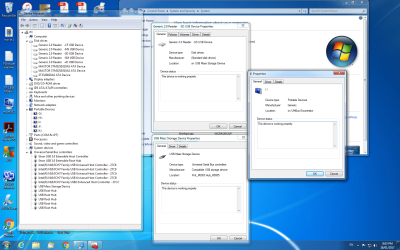
Just for interest here is a screen shot from Windows 7 Device Manager showing that the reader is recognised and apparently "working properly". This is what it looks like with the Generic 2006 Windows drivers. It changes when Driver Booster 4 detects the reader as a Realtek 2.0 Reader.
 

Attachments

  • Device Manager Generic.png
    Device Manager Generic.png
    220.4 KB · Views: 4

My Computer

Computer type
PC/Desktop
Computer Manufacturer/Model Number
Custom
OS
W7 Pro 32 bit
CPU
Intel Core 2 6600 @ 2.40 GHz
Motherboard
Gigabyte GA EP41T-USB3
Memory
3 GB
Graphics Card(s)
Gigabyte ATi Radeon HD5450
Hard Drives
Seagate 320 SATA
Maxtor 250 SATA (X2)
Antivirus
AVG Free
Browser
IE + Chrome
No different in Windows 10

Well I couldn't get XP to install on this computer so I did a Windows 10 Home Single Language install instead.

Windows 10 is performing exactly the same as 7. Generic drivers from Microsoft 2006 show as Mass USB storage device, lists drive letters in Portable devices and shows each slot by type as a drive in Disk Drives. Drive icons can be seen in File Explorer, or not, by changing Hide empty drives setting and Disk Management shows slots as drives with No Media.

Driver analysis software detects the Card Reader as Realtek and once these drivers are updated it behaves as described in thread above. ie Portable Drives gone from Device Manager and missing from Disk Drives. They can be shown by in-hiding them.

Next step is to try a Memory Stick in the appropriate slot to see if the reader is only dropping the SD slot.

Then put the whole Card Reader back in it's old machine and see what it does there.

No comments or suggestions from any Computer / Windows 7 boffins yet?
 

My Computer

Computer type
PC/Desktop
Computer Manufacturer/Model Number
Custom
OS
W7 Pro 32 bit
CPU
Intel Core 2 6600 @ 2.40 GHz
Motherboard
Gigabyte GA EP41T-USB3
Memory
3 GB
Graphics Card(s)
Gigabyte ATi Radeon HD5450
Hard Drives
Seagate 320 SATA
Maxtor 250 SATA (X2)
Antivirus
AVG Free
Browser
IE + Chrome
Sd Card Only

It is, or appears to be, the SD Card slot only that doesn't work. I put my Memory Sticks in and they read just fine.

Or perhaps it is just that the SD Card reader on this device is not up to handling even 8GB. The Memory sticks are quite oldish and relatively low capacity. I also just noticed in looking at my Micro SD Cards, that they are SDHC, so perhaps the reader simply can't handle that format. I hadn't even considered that the reader might just be too old to handle more recent card chips.

I'm surprised by this as it is a USB 2.0 device and so is the el'cheapo external one that does read the Micro SDHC. I've wasted enough time on it now so it's best to give up.

Next step is to junk it and go get a new one that will read current card chip standards.
 

My Computer

Computer type
PC/Desktop
Computer Manufacturer/Model Number
Custom
OS
W7 Pro 32 bit
CPU
Intel Core 2 6600 @ 2.40 GHz
Motherboard
Gigabyte GA EP41T-USB3
Memory
3 GB
Graphics Card(s)
Gigabyte ATi Radeon HD5450
Hard Drives
Seagate 320 SATA
Maxtor 250 SATA (X2)
Antivirus
AVG Free
Browser
IE + Chrome
Back
Top