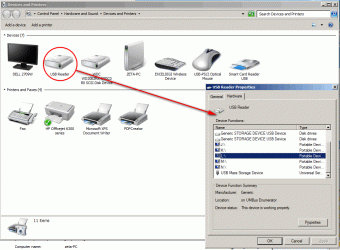
Windows 7 SP2 Intel desktop PC.
I have a weird 3½ slot internal USB card reader problem.
All SD and mSD cards (last with adapter) are recognized normally as storage devices except one Sandisk Extreme Pro 8GB micro SD, which worked normally until 2 weeks ago but still works normally with other external USB card reader.
With internal USB reader all SD cards used to be drive L: and still are L:, except this Sandisk Pro.
When this Sandisk mSd card is inserted nothing happens and looks like Windows considers it as nothing or something else but not a storage device.
Nor computer storage manager doesn't see it in internal card reader.
But when I use external card reader, this Sandisk SD card works normally and is given a letter S:.
It looks like some kind registry numerator of USB devices has listed this SD card ID as not storage device.
Any ideas how to troubleshoot?
I have a weird 3½ slot internal USB card reader problem.
All SD and mSD cards (last with adapter) are recognized normally as storage devices except one Sandisk Extreme Pro 8GB micro SD, which worked normally until 2 weeks ago but still works normally with other external USB card reader.
With internal USB reader all SD cards used to be drive L: and still are L:, except this Sandisk Pro.
When this Sandisk mSd card is inserted nothing happens and looks like Windows considers it as nothing or something else but not a storage device.
Nor computer storage manager doesn't see it in internal card reader.
But when I use external card reader, this Sandisk SD card works normally and is given a letter S:.
It looks like some kind registry numerator of USB devices has listed this SD card ID as not storage device.
Any ideas how to troubleshoot?
Last edited:
My Computer
At a glance
Windows 7 Enterprise 64 bitIntel I5-7608 GBCLUB 3D HD5450 1GB GDDR3 CGAX-54524LI
- OS
- Windows 7 Enterprise 64 bit
- CPU
- Intel I5-760
- Motherboard
- INTEL P55 S1156 DDR3 GLAN RAID BLKDP55WB
- Memory
- 8 GB
- Graphics Card(s)
- CLUB 3D HD5450 1GB GDDR3 CGAX-54524LI
- Hard Drives
- WD150HFLS 150GB/10000rpm
WD10EALS Blue 1TB