
Seagate 2TB problem:inaccessible,ask for initialize,incorrect capacity

twinklestar

New member
Local time
9:11 AM
Messages
4
Hello everyone,

My external HDD (Seagate Expansion Drive 2TB) became inaccessible today. Bought it around 3 years ago and works fine until today.

The things I did before disassemble:

  • Change USB cable
  • try other USB slot
  • try connect to other computer (my macbook)
none of them works.

I decided to disassemble the drive (since the warranty is expired), take it off from the enclosure, and connect it directly to my mobo via SATA.

It can be seen in Device Manager, but in Disk Management it asks for initialize and show wrong capacity (show only 128GB).
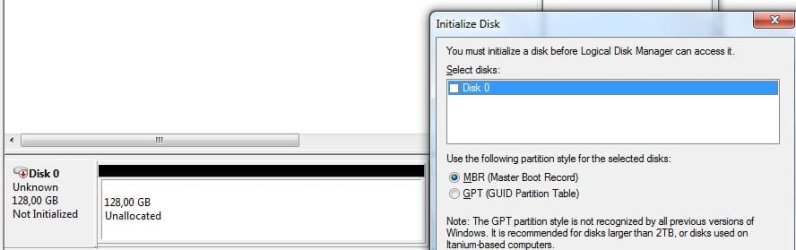
Disk Management.JPG
Disk Management 2.JPG


with Seatools, Short DST pass but failed on Short Generic test. Drive Information on Seatools shows only 4 GB.
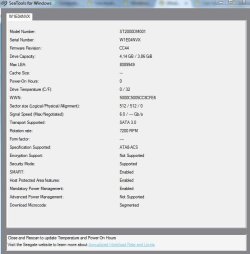
Seatools Drive Information.JPG


Tried TestDisk, but since it showed incorrect size, I didn't proceed further.
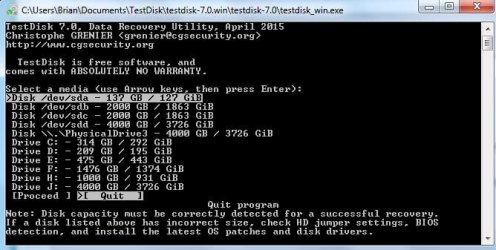
Testdisk.JPG


Mini Tool Partition Wizard shows bad disk. Didn't proceed with the scan though.

Mini Tool.JPG


Is there any chance to get my data back? Or any suggestion what should I do next? Any help will be appreciate.

So sorry for my poor English, and since this is my 1st thread, I might accidentally break some rules here. Please apologize.

Thank you in advance.
 

My Computer

Computer type
PC/Desktop
Computer Manufacturer/Model Number
Custom build
OS
Windows 7 Professional x64
CPU
Intel i7 2600
Motherboard
Intel
Memory
16 GB Visipro
Graphics Card(s)
Intel HD (Internal)
Sound Card
Realtek
Monitor(s) Displays
Samsung
Screen Resolution
1366 x 768
Hard Drives
WD Green 2TB
Seagate 2TB
Seagate Expansion 4TB
PSU
Dazumba 750W
Case
Thermaltake Element
Cooling
Thermaltake Jing
Keyboard
Logitech
Mouse
Logitech
Hi Twinklestar,

Welcome to Seven Forums.

Not a good news. Your drive is a goner. I have seen many users reporting this problem but not solved.( shows as 128GB drive, trying to initialise throws up an error message "The request could not be performed because of an I/O device error", Seatool for Windows reporting it as a 4TB drive - your third screenshot -)

The cause for this is more or less established by reasoning - failure of the HDD Controller PCB on the HDD.

Possible solution - swap the PCB from an identical HDD - same model number. A difficult task which may or may not succeed. Though this has been suggested, I haven't seen any user doing that and reporting success.

No DIY data recovery is possible. However a truly Professional Data Recovery Service can recover the data. They may have the necessary electronics to do that.
 
Last edited:

My Computer

OS
Windows 7 Home Premium 32 bit
Hi Jumanji, thank you very much for the reply.

Yeah, this morning when I turn on my PC, the drive cannot be detected by BIOS. It keeps clicking and when I proceed to windows it stuck on "Starting Windows". I'll take it to the recovery service and see if they could save my data.

Umm, about the truly professional thing, is there any clue to know if the recovery service is a truly professional or not? Last time I went to a recovery service (my Seagate Backup Plus 3TB failed around 8 months ago - PCB burned), they don't have the PCB and asked me to find an identical HDD for PCB swap (just like your suggestion). However, I couldn't find it and at the end I gave up on that drive.

Also, I planned to buy a new internal SATA drive around 3 - 4TB. Is there any suggestion for the brand/type? Since I had 2 failed Seagate drives right now, I think I'll go with WDC. Please advise.

Thank you very much.
 

My Computer

Computer type
PC/Desktop
Computer Manufacturer/Model Number
Custom build
OS
Windows 7 Professional x64
CPU
Intel i7 2600
Motherboard
Intel
Memory
16 GB Visipro
Graphics Card(s)
Intel HD (Internal)
Sound Card
Realtek
Monitor(s) Displays
Samsung
Screen Resolution
1366 x 768
Hard Drives
WD Green 2TB
Seagate 2TB
Seagate Expansion 4TB
PSU
Dazumba 750W
Case
Thermaltake Element
Cooling
Thermaltake Jing
Keyboard
Logitech
Mouse
Logitech
Hi @twinklestar and welcome to sevenforums!

I'm terribly sorry to hear about the troubles you have with the drive, I know this could be a very unpleasant experience...

I won't recommend to try and change the PCB of your drive because replacing the circuit board on a hard disk could possibly damage your information even further. Furthermore, there are many firmware changes that make it very difficult to find a circuit with the same firmware as the failed drive and if you try to install a circuit with a different firmware, you may damage the hard drive.

With that in mind, I would suggest is to look for a professional data recovery company, like @jumanji suggested, and look in the official website of the manufacturer if any data recovery partners are listed.

Hope this helps and best of luck!
 

My Computer

Computer type
PC/Desktop
OS
Windows 7
Hi MightyMiroWD,

Thanks for the suggestion. Yeah, I'll try to find a professional data recovery here. Hopefully the data could be saved.

Thanks !
 

My Computer

Computer type
PC/Desktop
Computer Manufacturer/Model Number
Custom build
OS
Windows 7 Professional x64
CPU
Intel i7 2600
Motherboard
Intel
Memory
16 GB Visipro
Graphics Card(s)
Intel HD (Internal)
Sound Card
Realtek
Monitor(s) Displays
Samsung
Screen Resolution
1366 x 768
Hard Drives
WD Green 2TB
Seagate 2TB
Seagate Expansion 4TB
PSU
Dazumba 750W
Case
Thermaltake Element
Cooling
Thermaltake Jing
Keyboard
Logitech
Mouse
Logitech
Hi twinklestar!

I hope you get all the data back from the drive!

However, I noticed your question about WD internal drives and since I'm a WD representative I decided to give you some information about the different models.

WD Blue is a regular everyday drive that is most commonly used for regular computing, light gaming and workloads and it's often combined with SSD. It is fully capable to run most games as well as many programs for editing or programming.

Support Answers

WD Black is a performance oriented drive and it has good features, such as a built-in dual-core CPU, that makes the drive suitable for multitasking. It is designed for heavy gaming, big workloads and intensive file usage and comes with a 5-year limited warranty.

Support Answers

WD Red is the NAS/RAID drive designed for RAID environments and NAS in particular. It is tuned and optimized for 24/7 performance, so it's often used for backups and stable secondary storage as well.

Support Answers

Cheers and feel free to ask any questions you may have!
 

My Computer

Computer type
PC/Desktop
OS
Windows 7
Hi twinklestar!

I hope you get all the data back from the drive!

However, I noticed your question about WD internal drives and since I'm a WD representative I decided to give you some information about the different models.

WD Blue is a regular everyday drive that is most commonly used for regular computing, light gaming and workloads and it's often combined with SSD. It is fully capable to run most games as well as many programs for editing or programming.

Support Answers

WD Black is a performance oriented drive and it has good features, such as a built-in dual-core CPU, that makes the drive suitable for multitasking. It is designed for heavy gaming, big workloads and intensive file usage and comes with a 5-year limited warranty.

Support Answers

WD Red is the NAS/RAID drive designed for RAID environments and NAS in particular. It is tuned and optimized for 24/7 performance, so it's often used for backups and stable secondary storage as well.

Support Answers

Cheers and feel free to ask any questions you may have!


How about the green? I have used 2 WD green 2TB since around 6-7 years ago and working fine until now. Only 1 partition got corrupted around 2 years ago (you can see it in my disk management screenshot on post 1) but I recovered all the data successfully.

I use my PC for audio work which need a lot of space for the VST and audio data. I know that based on the performance, Black series is the best option. But consider the price and the noise (I love the green's silent performance), I think I'll go with WD green again, but still waiting and searching for another option. Will decide tomorrow.

Maybe its kinda OOT, so sorry for the mods.
 

My Computer

Computer type
PC/Desktop
Computer Manufacturer/Model Number
Custom build
OS
Windows 7 Professional x64
CPU
Intel i7 2600
Motherboard
Intel
Memory
16 GB Visipro
Graphics Card(s)
Intel HD (Internal)
Sound Card
Realtek
Monitor(s) Displays
Samsung
Screen Resolution
1366 x 768
Hard Drives
WD Green 2TB
Seagate 2TB
Seagate Expansion 4TB
PSU
Dazumba 750W
Case
Thermaltake Element
Cooling
Thermaltake Jing
Keyboard
Logitech
Mouse
Logitech
WD Green line has merged with WD Blue a while ago you can check for a WD Blue with a 5400RPM. It will suit your needs since you are going to use it for mass storage drive.

As for the noise levels, they're low and shouldn't be an issue - it's between 21dBA and 25dBA depending on the capacity according to the
specsheet of the EZRZ line of the model:

Support Answers
 

My Computer

Computer type
PC/Desktop
OS
Windows 7
Hi Jumanji, thank you very much for the reply.

Yeah, this morning when I turn on my PC, the drive cannot be detected by BIOS. It keeps clicking and when I proceed to windows it stuck on "Starting Windows". I'll take it to the recovery service and see if they could save my data.

Umm, about the truly professional thing, is there any clue to know if the recovery service is a truly professional or not? Last time I went to a recovery service (my Seagate Backup Plus 3TB failed around 8 months ago - PCB burned), they don't have the PCB and asked me to find an identical HDD for PCB swap (just like your suggestion). However, I couldn't find it and at the end I gave up on that drive.

Also, I planned to buy a new internal SATA drive around 3 - 4TB. Is there any suggestion for the brand/type? Since I had 2 failed Seagate drives right now, I think I'll go with WDC. Please advise.

Thank you very much.

No professional recovery company would ask a client to find a compatible drive. This is more difficult than might be apparent. Even 2 drives with identical model numbers may have been manufactured in different countries and have significant internal differences. Specific numbers need to match and this information is difficult to obtain. Replacing the PC board typically requires the transfer of drive specific information from the original. While not particularly difficult for a professional data recovery company (certainly easier than some other recovery methods) it would be a challenge for even a well informed amateur.

The best way to maintain data integrity is to have backups of your data. All files of any importance should have at least one backup copy, 2 or more backup copies if the files are of particular importance. Even professional data recovery cannot be relied on.
 

My Computer

Computer type
PC/Desktop
Computer Manufacturer/Model Number
HP
OS
Windows 7 Pro 64 bit
CPU
Xeon W3520
Memory
8 GB
Graphics Card(s)
Nvidia Geforce 210
As Miller stated it is a formidable task to locate an identical in all respects PCB for the HDD with the same Part number,Revision number etc.. That is why I added the word "truly" to prefix the Professional Data Service. (If you had purchased two identical drives at the same time from the same vendor, there are greater chances that both PCBs are from the same batch and identical in all respects.)

Seagate themselves have data recovery partners who may be well versed and well equipped to deal with Seagate HDDs. In-lab recovery: Reliable and affordable data recovery services when you need it | Seagate

As far as buying external HDD is concerned, if you are inclined towards Western Digital external drives, make sure that you buy only their "Elements" models ( both in Desktop and portable HDDs). Any other model like My Book, Passport, Passport Ultra etc., incorporate Hardware Encryption that has the potential of locking you out of any DIY data recovery that may otherwise be possible with other non-hardware encrypted drives.
 

My Computer

OS
Windows 7 Home Premium 32 bit
Try to go for WD Black as 1st choice, WD Blue as 2nd choice.
Samsung are also better now in HDD.
Seagate is dropping in quality.

Don't go for Toshiba, as it may not be done by Toshiba manufacturer.
That is i had some failed Toshiba HDD(s).
As my brother Toshiba laptop failed, i went to Toshiba Service center.
Upon asking about Toshiba external /internal HDD(s) the Service staff said they don't just sell HDD.
Most of their Toshiba HDD are for OEM, such as Toshiba laptop.

As for HDD size, if it is for backup, do consider 5" desktop type, as more reliable than 3.5"
__________________________________

As quote from jumanji

As Miller stated it is a formidable task to locate an identical in all respects PCB for the HDD with the same Part number,Revision number etc.. That is why I added the word "truly" to prefix the Professional Data Service. (If you had purchased two identical drives at the same time from the same vendor, there are greater chances that both PCBs are from the same batch and identical in all respects.)
_______________
This is true, as being in-charge of Warranty.
 

My Computer

Computer type
Laptop
Computer Manufacturer/Model Number
Toshiba L630 and L735
OS
Windows 7 x64
Hard Drives
240 GB SSD
Back
Top