Solved SEAGATE External HDD problem

fansgirl

New member
Member
Local time
3:19 AM
Messages
42
I have Seagate External HDD Back Up Plus Portable with size 5 terra, yesterday it working just fine, but today when I turn my PC on it not detected my HDD,

I have tried to change my usb port and cable it's still not appearing
when I look on disk management that HDD not appearing
on device & printer my HDD name appear
when I turn OFF my pc with that HDD still plugging it's always stuck on shutting down loading, and when I turn ON it stuck at beginning too, but before this error that stuck part only happen when I turn my PC ON and when I turn OFF it turn OFF normally
in device manager if I uninstall that HDD usb driver I can turn OFF and turn ON normally without getting stuck, and when I open disk management some disk is detected but not initialized


I can't Initialized because when I choose it error message appear " The request could not be performed beacuse of an I/O device Error"
I tried use Easeus partition/data recovery,Minitoolpartition but my HDD not detected in there
no drive letter too
I don't know if this connected with my error but before this happen " safely remove hardware & eject media" icon never appear on tray

I don't have Restore Point because I never remember to make it

so is my HDD can be fixed? I really need files in that HDD so if it can be fixed can someone tell me how to fix it without data loss? I don't have any backup because that HDD is my backup.

Sorry if my explanation is bad, I'm not really know about this thing so I really need your guidance an sorry for my bad English
 

Attachments
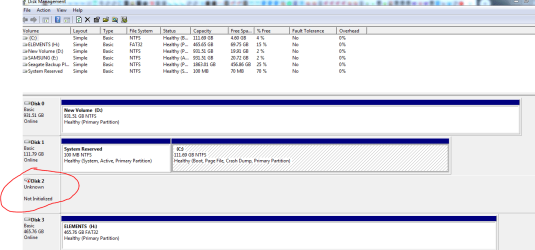
  • DHcmVD.png
    DHcmVD.png
    90.4 KB · Views: 2

My Computer

Computer type
Laptop
Computer Manufacturer/Model Number
Sony Vaio/ VPCEA36FG
OS
Windows 7 home premium 64bit
CPU
Intel(R) Core (TM) i5CPU M 560 @2.67GHz
Motherboard
Sony Corporation VAIO
Memory
4gb
Graphics Card(s)
ATI Mobility Radeon HD 5650
Sound Card
(1) ATI HDMI Audio(2) Bluetooth Hands-free Audio(3) Realtek
Hard Drives
Hitachi HTS545050B9SA00 (500GB)
Browser
Mozila Firefox, IE
#5
I tried using GSmartControl this is the result :

smartctl 6.5 2016-05-07 r4318 [i686-w64-mingw32-win7(64)-sp1] (sf-6.5-1)
Copyright (C) 2002-16, Bruce Allen, Christian Franke, smartmontools

=== START OF INFORMATION SECTION ===
Vendor: Seagate
Product: BUP Portable
Revision: 1707
Compliance: SPC-4
LU is fully provisioned
Logical Unit id: 0x3e41423946505730
Serial number: 00000000NAB9FPW0
Device type: disk
Local Time is: Sun Nov 29 08:40:46 2020 SEAST
device Test Unit Ready [medium or hardware error (serious)]
A mandatory SMART command failed: exiting. To continue, add one or more '-T permissive' options.
 

My Computer

Computer type
Laptop
Computer Manufacturer/Model Number
Sony Vaio/ VPCEA36FG
OS
Windows 7 home premium 64bit
CPU
Intel(R) Core (TM) i5CPU M 560 @2.67GHz
Motherboard
Sony Corporation VAIO
Memory
4gb
Graphics Card(s)
ATI Mobility Radeon HD 5650
Sound Card
(1) ATI HDMI Audio(2) Bluetooth Hands-free Audio(3) Realtek
Hard Drives
Hitachi HTS545050B9SA00 (500GB)
Browser
Mozila Firefox, IE
You might want to stop using that hard-drive and get with a data recovery person in your area. I might be wrong, however, a SMART error sometimes is not good. Is the media inside the computer AOK? If yes, perhaps purchase or borrow another external usb HDD and make a fresh set of full images of your C and D partitions -- buying you peace of mind and time until the present ext usb HDD situation is resolved one way or another.
 

My Computer

Computer type
PC/Desktop
Computer Manufacturer/Model Number
Antec desktop; Acer Aspire laptops
OS
Windows 7 Professional 64-bit
CPU
Desktop i5; Acers i5 & i7
Memory
desktop 16GB; 1 Acer 8GB & 1 Acer 16GB
Hard Drives
1TB split into 2 equal partitions [OS and data] usable by RJS
Internet Speed
AT&T DSL
Browser
FF, GChrome, msIE
Other Info
Windows 7 Firewall, Emsisoft AM/AV, MSE [scan-only], SpywareBlaster, Ruiware/BillP combine
From the description of the problem in the first post, it is possible the controller unit within the Seagate disc has failed. Seagate discs do seem to have this issue on occasion.


Plug it in to a USB port. Does it display a power led on/off ?


If on, and irrespective of whether it's initialised by Disk Management or not, then:


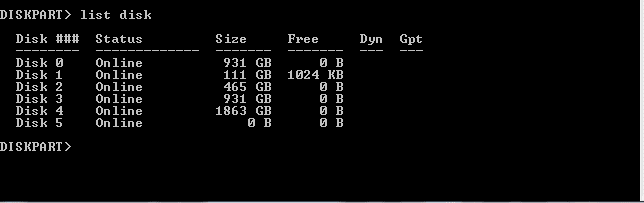
1) open a cmd as Admin (Start -->cmd (in search box) --> click cmd.exe)
2) at prompt: diskpart (Enter)
3) at diskpart prompt, list disk (Enter)


If the Seagate external disk is listed - and you need to be sure which disk is which in the displayed list -

then exit diskpart so no damage is done to to the disk.


Summary: if diskpart found it and listed it but Disk Management cannot initialise it (the I/O error message) then it is very likely its' internal controller has failed. If you need the data on it (as it's your backup, most likely) then find a repair shop and have them retrieve the data files for you.
 

My Computer

Computer type
Laptop
Computer Manufacturer/Model Number
HP 250 G7
OS
Windows 7 Pro x64
CPU
Intel i5-8265U
Motherboard
Intel Coffee Lake
Memory
8gb
Graphics Card(s)
Intel Iris Plus 655
Sound Card
Realtek HDA
Monitor(s) Displays
Generic
Screen Resolution
1366 x 768
Hard Drives
Crucial P5 NVMe 1Tb internal
WD's 4Tb, 3Tb, 2 x 2Tb external
Mouse
Logi wireless
Internet Speed
45 Mbps
Antivirus
AVG
Browser
Firefox 88, Pale Moon 29, Brave 129
Other Info
Combination of i5-8265U with Crucial P5 achieves Crystal Bench scores > 5000

Iris Plus GPU (Whiskey Lake) driver from BioStar

HP 250 G7 is a budget machine
this is the result
 

Attachments

  • Capture2.PNG
    Capture2.PNG
    7.6 KB · Views: 15
  • Capture.3PNG.PNG
    Capture.3PNG.PNG
    4.9 KB · Views: 1

My Computer

Computer type
Laptop
Computer Manufacturer/Model Number
Sony Vaio/ VPCEA36FG
OS
Windows 7 home premium 64bit
CPU
Intel(R) Core (TM) i5CPU M 560 @2.67GHz
Motherboard
Sony Corporation VAIO
Memory
4gb
Graphics Card(s)
ATI Mobility Radeon HD 5650
Sound Card
(1) ATI HDMI Audio(2) Bluetooth Hands-free Audio(3) Realtek
Hard Drives
Hitachi HTS545050B9SA00 (500GB)
Browser
Mozila Firefox, IE
On a USB external HDD you normally have a 2.5" SATA HDD inside a case that converts SATA to USB.

If the SATA to USB conversion electronics is damaged, you can still open the case and remove the HDD and insert on another case or directly to a SATA cable.

First thing to do is to run Seagate test on the drive.
SeaTools for Windows
 

My Computers

System One System Two

  • Computer type
    PC/Desktop
    Computer Manufacturer/Model Number
    custom build
    OS
    Windows 7 HP 64
    CPU
    i5 6600K - 800MHz to 4200MHz
    Motherboard
    GA-Z170-HD3P
    Memory
    4+4G GSkill DDR4 3000
    Graphics Card(s)
    IG - Intel 530
    Monitor(s) Displays
    Samsung 226BW
    Screen Resolution
    1680x1050
    Hard Drives
    (1) -1 SM951 – 128GB M.2 AHCI PCIe SSD drive for Windows 7 and Lubuntu
    (2) -1 WD SATA 3 - 1T for Data
    (3) -1 WD SATA 3 - 1T for backup
    PSU
    Thermaltake 450W TR2 gold
    Keyboard
    Old and good Chicony mechanical keyboard
    Mouse
    Logitech mX performance - 9 buttons (had to disable some)
    Internet Speed
    500Mb/s
    Browser
    Firefox 64
    Other Info
    TinyWall firewall
  • Computer type
    Laptop
    System Manufacturer/Model Number
    Asus Q550LF
    OS
    Windows 7 Pro
    CPU
    i7-4500U 800MHz to 3.0GHz
    Motherboard
    Asus Q550LF
    Memory
    (4+4)G DDR3 1600
    Graphics Card(s)
    IG intel 4400 + NVIDIA GeForce GT 745M
    Sound Card
    Realtek
    Monitor(s) Displays
    LG Display LP156WF4-SPH1
    Screen Resolution
    1920 x 1080
    Hard Drives
    BX500 120G SSD for Windows and programs +
    1T HDD for data
    Internet Speed
    500 Mb/s
    Browser
    Firefox
    Other Info
    TinyWall firewall
fansgirl:


Do you know which disk listed by diskpart is the Seagate ?


My guess is Disk 5 - it recorded no size. But you need to make sure. One way is to disconnect all disks except the Seagate (and obviously the C drive) and re-run diskpart. Then there should be only Disk 1 and 2 in the list.


So, it appears diskpart lists it but Disk Management cannot initialise it. That indicates the internal controller has failed.


Although Megahertz suggest the Seagate Tools, unfortunately that programme will not see an uninitialised disk. I have a Seagate BUP external 2TB drive - it an enclosed case that cannot be opened. I've also had several external disk failures over the last 12 months that have been finally attributed to internal controller failure. Disks do go down ...
 

My Computer

Computer type
Laptop
Computer Manufacturer/Model Number
HP 250 G7
OS
Windows 7 Pro x64
CPU
Intel i5-8265U
Motherboard
Intel Coffee Lake
Memory
8gb
Graphics Card(s)
Intel Iris Plus 655
Sound Card
Realtek HDA
Monitor(s) Displays
Generic
Screen Resolution
1366 x 768
Hard Drives
Crucial P5 NVMe 1Tb internal
WD's 4Tb, 3Tb, 2 x 2Tb external
Mouse
Logi wireless
Internet Speed
45 Mbps
Antivirus
AVG
Browser
Firefox 88, Pale Moon 29, Brave 129
Other Info
Combination of i5-8265U with Crucial P5 achieves Crystal Bench scores > 5000

Iris Plus GPU (Whiskey Lake) driver from BioStar

HP 250 G7 is a budget machine
ian50 :

Yeah, it's Disk 5.

Seagate Tools can't read that disk, and yes it enclosed case.

So it can't be fixed then?....

with that trouble can I claim warranty?
 

My Computer

Computer type
Laptop
Computer Manufacturer/Model Number
Sony Vaio/ VPCEA36FG
OS
Windows 7 home premium 64bit
CPU
Intel(R) Core (TM) i5CPU M 560 @2.67GHz
Motherboard
Sony Corporation VAIO
Memory
4gb
Graphics Card(s)
ATI Mobility Radeon HD 5650
Sound Card
(1) ATI HDMI Audio(2) Bluetooth Hands-free Audio(3) Realtek
Hard Drives
Hitachi HTS545050B9SA00 (500GB)
Browser
Mozila Firefox, IE
ian50 :

Yeah, it's Disk 5.

Seagate Tools can't read that disk, and yes it enclosed case.

So it can't be fixed then?....

with that trouble can I claim warranty?

If it is still under warranty you SHOULD claim for a new one.
 

My Computers

System One System Two

  • Computer type
    PC/Desktop
    Computer Manufacturer/Model Number
    custom build
    OS
    Windows 7 HP 64
    CPU
    i5 6600K - 800MHz to 4200MHz
    Motherboard
    GA-Z170-HD3P
    Memory
    4+4G GSkill DDR4 3000
    Graphics Card(s)
    IG - Intel 530
    Monitor(s) Displays
    Samsung 226BW
    Screen Resolution
    1680x1050
    Hard Drives
    (1) -1 SM951 – 128GB M.2 AHCI PCIe SSD drive for Windows 7 and Lubuntu
    (2) -1 WD SATA 3 - 1T for Data
    (3) -1 WD SATA 3 - 1T for backup
    PSU
    Thermaltake 450W TR2 gold
    Keyboard
    Old and good Chicony mechanical keyboard
    Mouse
    Logitech mX performance - 9 buttons (had to disable some)
    Internet Speed
    500Mb/s
    Browser
    Firefox 64
    Other Info
    TinyWall firewall
  • Computer type
    Laptop
    System Manufacturer/Model Number
    Asus Q550LF
    OS
    Windows 7 Pro
    CPU
    i7-4500U 800MHz to 3.0GHz
    Motherboard
    Asus Q550LF
    Memory
    (4+4)G DDR3 1600
    Graphics Card(s)
    IG intel 4400 + NVIDIA GeForce GT 745M
    Sound Card
    Realtek
    Monitor(s) Displays
    LG Display LP156WF4-SPH1
    Screen Resolution
    1920 x 1080
    Hard Drives
    BX500 120G SSD for Windows and programs +
    1T HDD for data
    Internet Speed
    500 Mb/s
    Browser
    Firefox
    Other Info
    TinyWall firewall
fansgirl


Claim warranty if it's still in the warranty period, sure. If you track the Seagate websites on warranty claim, you'll see they have a well established procedure for it.
 

My Computer

Computer type
Laptop
Computer Manufacturer/Model Number
HP 250 G7
OS
Windows 7 Pro x64
CPU
Intel i5-8265U
Motherboard
Intel Coffee Lake
Memory
8gb
Graphics Card(s)
Intel Iris Plus 655
Sound Card
Realtek HDA
Monitor(s) Displays
Generic
Screen Resolution
1366 x 768
Hard Drives
Crucial P5 NVMe 1Tb internal
WD's 4Tb, 3Tb, 2 x 2Tb external
Mouse
Logi wireless
Internet Speed
45 Mbps
Antivirus
AVG
Browser
Firefox 88, Pale Moon 29, Brave 129
Other Info
Combination of i5-8265U with Crucial P5 achieves Crystal Bench scores > 5000

Iris Plus GPU (Whiskey Lake) driver from BioStar

HP 250 G7 is a budget machine
Okay, I will claim the warranty then, it's better than I can't use that hdd again.

Thank you for answering my questions, now i will not wondering if my hdd can be fixed or not.
 

My Computer

Computer type
Laptop
Computer Manufacturer/Model Number
Sony Vaio/ VPCEA36FG
OS
Windows 7 home premium 64bit
CPU
Intel(R) Core (TM) i5CPU M 560 @2.67GHz
Motherboard
Sony Corporation VAIO
Memory
4gb
Graphics Card(s)
ATI Mobility Radeon HD 5650
Sound Card
(1) ATI HDMI Audio(2) Bluetooth Hands-free Audio(3) Realtek
Hard Drives
Hitachi HTS545050B9SA00 (500GB)
Browser
Mozila Firefox, IE
Back
Top