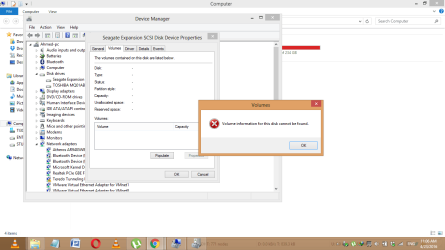
Seagate HDD not showing up in computer(have tried all given steps)

ahmaze531

New member
Local time
3:46 AM
Messages
3
Dear All,

I have been using my Seagate 1TB Hard Disk since 4 months, recently i tried copying a file to it, and it showed:

""This file is not located in this Drive""

it was something like this...


And after that my HDD went undetected, now whenever i plug it in, it makes the sound of turning on.and also the blue light comes on the HDD.

But it's not shown in My computer.

I changed my cables, went to disk management ; where i could not see my drive listed there(i can send u a screenshot of it; as some other unnamed disks were there),

i tried refreshing it and still no success.

I also have tried updating, deleting the drivers from Device Manager, but no Success.


Please Help me in resolving this issue..

Thanks
 

My Computer My Computer

At a glance

Windows 8 x64 bit2.736GB2GB
Computer type
Laptop
Computer Manufacturer/Model Number
TOSHIBA
OS
Windows 8 x64 bit
CPU
2.73
Memory
6GB
Graphics Card(s)
2GB
Hard Drives
750GB
Screenshot is attached
 

Attachments

  • seagate.png
    seagate.png
    41.5 KB · Views: 1

My Computer My Computer

At a glance

Windows 8 x64 bit2.736GB2GB
Computer type
Laptop
Computer Manufacturer/Model Number
TOSHIBA
OS
Windows 8 x64 bit
CPU
2.73
Memory
6GB
Graphics Card(s)
2GB
Hard Drives
750GB
Hi ahmaze531,

Welcome to Seven Forums. ( But may be I am driving you out of SevenForums :D.)

I find that you have a Toshiba laptop running Windows 8, 64 bit. May be your problem has something to do with Storage Pool feature on Windows 8. For this reason you may be better off to present your problem on the Windows 8 Forum.
 

My Computer My Computer

At a glance

Windows 7 Home Premium 32 bit
OS
Windows 7 Home Premium 32 bit
Dear,

The problem is on all Laptops, i mean i even checked on XP, WINdows 7, WIndows 8.1.

I am just clueless now.

I would appreciate your help as i have important Data in my hard disk.

Thanks
 

My Computer My Computer

At a glance

Windows 8 x64 bit2.736GB2GB
Computer type
Laptop
Computer Manufacturer/Model Number
TOSHIBA
OS
Windows 8 x64 bit
CPU
2.73
Memory
6GB
Graphics Card(s)
2GB
Hard Drives
750GB
I am also clueless right now not having come across or dealt with " Volume Information for this Disk cannot be found". Need to investigate what exactly is happening. Please provide the following information.

You said some other unnamed disks were there in Windows Disk Management.

1. Please mention the exact Model Number of your Seagate Expansion Drive.

2. Is it a portable drive - meaning it does not have a power brick and is USB powered?

3. Please remove all external drives/pendrives/USB docks/external card readers/USB connected printers etc. Nothing on the USB ports except your USB keyboard and mouse. Not even your faulty Seagate external drive. Post a screenshot of My Computer, Device Manager and Windows Disk Managemnt.

4. Now plugin your Seagate Expansion and again the screenshots of My computer, Device Manager, and Windows Disk Management.

My computer - full screenshot

Device Manager - take a screenshot of only the Device Manager Window. What is in the background not required. Expand Disk drives and Universal Serial Bus controllers

Windows Disk Management - http://www.sevenforums.com/tutorials/274797-disk-management-post-screen-capture-image.html

Screenshots: How to Use the Snipping Tool in Vista

Even if I am unable to get any clue, may be that info can get others to help you.
 
Last edited:

My Computer My Computer

At a glance

Windows 7 Home Premium 32 bit
OS
Windows 7 Home Premium 32 bit
Back
Top